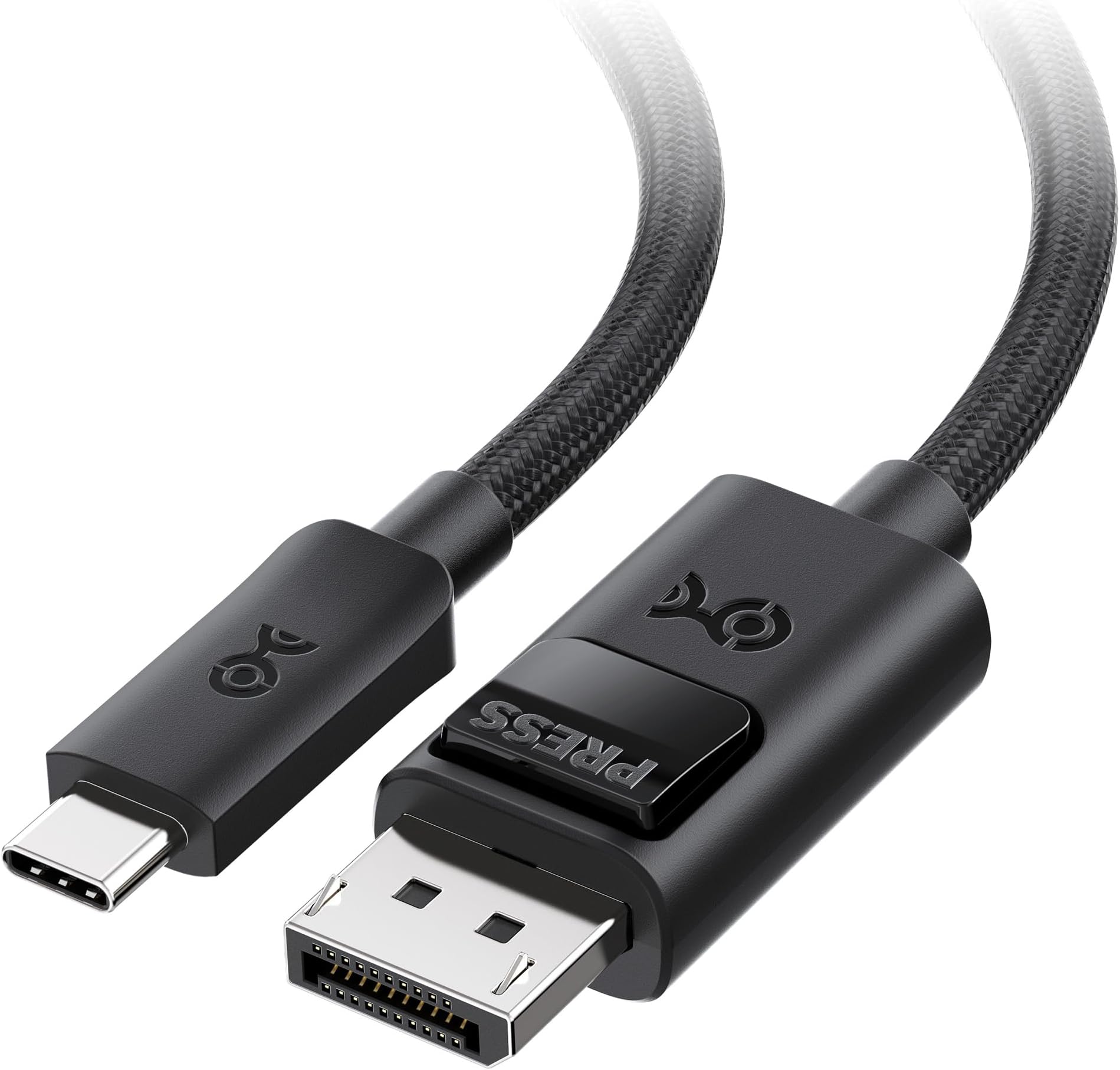


Cable Matters 54Gbps Unidirectional USB C to DisplayPort 2.1 Cable - 6ft / 1.8m, Supports DP54, 8K@165Hz / 4K@480Hz (Thunderbolt 5 to DisplayPort Cable) - Not for Portable USB-C Monitor
Product ID: 807290418
Buy anything from 5,000+ international stores. One checkout price. No surprise fees. Join 2M+ shoppers on Desertcart.
Desertcart purchases this item on your behalf and handles shipping, customs, and support to Vanuatu.
Product description Will this work with any USB-C port? Only with USB-C/USB4/Thunderbolt 5/4 ports that support DisplayPort Alt Mode (video output). Charging-only or data-only USB-C ports will not output video. Will this work with any USB-C port? Only with USB-C/USB4/Thunderbolt 5/4 ports that support DisplayPort Alt Mode (video output). Charging-only or data-only USB-C ports will not output video. Will it work in reverse (DisplayPort source to USB-C monitor), or with a portable USB-C monitor? No. This cable is unidirectional (USB-C source → DisplayPort display only) and is not for USB-C monitor input or portable USB-C monitors. Will it work in reverse (DisplayPort source to USB-C monitor), or with a portable USB-C monitor? No. This cable is unidirectional (USB-C source → DisplayPort display only) and is not for USB-C monitor input or portable USB-C monitors. Why can’t I get 8K@165Hz or 4K@480Hz? These modes require both a host that outputs DP 2.1 over USB-C (DP54/UHBR13.5) and a DisplayPort monitor that supports the same mode. Otherwise it will fall back to a lower mode (often via DSC). Why can’t I get 8K@165Hz or 4K@480Hz? These modes require both a host that outputs DP 2.1 over USB-C (DP54/UHBR13.5) and a DisplayPort monitor that supports the same mode. Otherwise it will fall back to a lower mode (often via DSC). I’m getting “No Signal” or flickering—what should I check first? Set the monitor to the correct DisplayPort input, update GPU drivers/firmware, reseat both ends, and avoid adapters/docks that may not support the required DP bandwidth. I’m getting “No Signal” or flickering—what should I check first? Set the monitor to the correct DisplayPort input, update GPU drivers/firmware, reseat both ends, and avoid adapters/docks that may not support the required DP bandwidth. My DisplayPort connector won’t unplug easily—is something wrong? This cable has a locking DisplayPort latch. Press the release button before unplugging to protect the port. My DisplayPort connector won’t unplug easily—is something wrong? This cable has a locking DisplayPort latch. Press the release button before unplugging to protect the port. Comparison Products 54G USB C to DP Cable 40G USB C to DP Cable USB C to HDMI 2.1 Cable USB C to DP 2.1 USB C to HDMI 2.1 Adapter DisplayPort 2.1 Cable Long 8K HDMI Cable Review: Great cord…bought 2 of them! - Great cable, definitely worth the money. Backwards compatibility is nice. Love the braided cord, makes it feel more durable. Speed and picture quality is great also. My only complaint is the button on the DP end can be hard to keep pushed in when plugging into your monitors. Especially if your monitors port is on the bottom and you have to keep the cord flat against the monitor to plug it in. Review: Does the job - Works as advertised. Helped me connect my M5 mac to an older Dell 38" ultrawide where USB video/power negotioation is spotty at best. Just using office apps at native resolution so I can't speak to high bandwidth applications or refresh rates.



| ASIN | B0G7X31GWJ |
| Best Sellers Rank | #1,323 in USB Cables |
| Brand | Cable Matters |
| Brand Name | Cable Matters |
| Cable Type | USB-C to DisplayPort |
| Color | Black |
| Compatible Devices | Laptop |
| Connector Type | USB Type C |
| Customer Reviews | 4.4 out of 5 stars 79 Reviews |
| Data Transfer Rate | 54 Gigabits Per Second |
| Frequency | 54000000000 Hz |
| Indoor Outdoor Usage | Indoor |
| Manufacturer | Cable Matters Premium USB-C to DisplayPort 2.1 Cable - 6ft / 1.8m |
| Model | 201456-BLK-6 |
| Number of Pins | 44 |
| Other Special Features of the Product | DP2.1 |
| Part Number | 201456-BLK-6 |
| Recommended Uses For Product | Gaming, Content Creation, Pro Workflows |
| Special Feature | DP2.1 |
| UPC | 682017357003 |
| Unit Count | 6.0 Feet |
D**L
Great cord…bought 2 of them!
Great cable, definitely worth the money. Backwards compatibility is nice. Love the braided cord, makes it feel more durable. Speed and picture quality is great also. My only complaint is the button on the DP end can be hard to keep pushed in when plugging into your monitors. Especially if your monitors port is on the bottom and you have to keep the cord flat against the monitor to plug it in.
B**L
Does the job
Works as advertised. Helped me connect my M5 mac to an older Dell 38" ultrawide where USB video/power negotioation is spotty at best. Just using office apps at native resolution so I can't speak to high bandwidth applications or refresh rates.
A**R
Works
Works as expected with a MacBook Pro via thunderbolt 5
O**L
Desconexión y pantalla borrosa
No entra bien en el puerto
D**N
Quality cable
Quality made cable. Much better then some other cables costing more.
J**.
Solid Build Quality and Future-Proof Specs for High Refresh Rates
If you are upgrading your setup and need a reliable way to push high refresh rates from your laptop to a display, this Cable Matters USB-C to DisplayPort 2.1 cable is a highly dependable choice. Out of the box, the build quality feels premium with sturdy connector shrouds and a thick, durable jacket that feels built to last without being overly stiff. A lot of users on enthusiast forums often point out how confusing cable specs can be and how many cables cause screen flickering, but this one actually delivers on its high-bandwidth promises, easily handling 4K at extremely high refresh rates and even 8K. You just have to read the fine print: this cable is strictly unidirectional, meaning it only works from a USB-C source computer to a DisplayPort monitor, and it absolutely will not work if you are trying to plug it into a portable USB-C monitor. It is always a bit nerve-wracking to buy display cables since so many generic brands drop the signal. Cable Matters is generally a trusted name in the PC community for staying true to VESA standards, and this DP 2.1 cable lives up to that reputation. While DisplayPort 2.1 might be overkill for basic setups right now, having support for 54Gbps and Thunderbolt 5 makes it an incredibly future-proof cable for next-generation gaming monitors and high-end workstations. Conclusion A high-quality, durable cable that delivers stable, high-bandwidth performance for modern gaming monitors, as long as you keep the strict unidirectional limitation in mind.
I**D
Extreme high spec USB-C to Display Port cable - may exceed capabilities of most hardware
This is a review of a CABLE MATTERS 54Gbps Unidirectional USB C to DisplayPort 2.1 Cable. It is high specification, but it is important to note that it is Uni-directional. Specifically, a USB-C / Thunderbolt 5 to DP Connection. The manufacturer specifically warns not to expect it to drive portable USB-C Monitors. For its intended purpose, if your laptop/Mac/PC supports it, it can output at a phenomenal 54Gbps video bandwidth at 8K and high refresh 4K resolution displays. 8K requires that the source be DisplayPort 2.1 compliant. If so, this cable can transmit signals at the following lofty levels on supported devices. This last requirement is key – those are very high spec requirements. Up to 8K@165Hz 4K@480Hz, and 4K@240Hz It can be an initial cable connector for Multi-Stream Transport (MST) daisy chaining monitors. The 1st monitor would need DisplayPort output to the DisplayPort input jack of the 2nd monitor. In summary, this is a state-of-the-art cable that likely exceeds the equipment of most video enthusiasts for USB to DisplayPort 2.1 use. Less robust hardware will not tap the capabilities of this cable well. But the cable signal will fall back to transmit at the lower specification.
E**C
Perfect sized USB C to DP 2.1 Thunderbolt 5 speeds
A great quality USB C to DP 2.1 Thunderbolt 5 cable Pros: +Quality made cable +Supports unidirection +Worked for my macbook air m4 and even used it in a dock setup +worked flawlessly for me while running 2k@240Hz though it can run higher Cons: -Limitations like it can't be used on a portable monitor. I tried and confirm it doesn't work. This is already made obvious in the listing
G**R
Ótimo cabo
bom
A**N
Buona qualità
Ottimo, buona qualità costruttiva. Lo spinotto dal lato DP si toglie con una pressione, perfetto per evitare che esca per sbaglio o rimanga leggermente labile
M**S
Good
Does the job
T**E
Super Kabel! Funktioniert einwandfrei!
Hallo zusammen, freundlicherweise wurde mir dieses USB-C auf Displayport Kabel im Rahmen des Amazon Vine-Programms kostenfrei zur Verfügung gestellt, wofür ich mich zunächst mal bei Amazon und natürlich auch beim Hersteller recht herzlich bedanken möchte. Das ich dieses Produkt kostenfrei erhalten habe, nimmt jedoch keinerlei Einfluss auf meine Bewertung! Ich habe mir vor kurzem eine neue, moderne Dockingstation besorgt, welche nur noch über USB-C Bildsignale ausgibt. Demnach habe ich mich sehr gefreut dieses USC-C auf Displayport 2.1 Kabel testen zu dürfen. Knapp 27,00€ ist natürlich ein stolzer Preis für ein 1,8m langes Kabel, aber da ich in der Veranstaltungsbranche tätig bin, weiß ich, dass das ein normaler Preis für hochwertige Kabel ist. Immerhin bekommt man hier Thunderbolt 5 und Displayport 2.1, was derzeit wohl der höchstmögliche Standard ist. Darüber hinaus ist das Kabel stabil geflochten, verwicklungsfrei und macht insgesamt einen sehr hochwertigen Eindruck. Es unterstützt maximal 8K bei 165Hz oder 4K bei bis zu 480Hz. Das sind Werte, die man sich vor 10-15 Jahren nicht mal hätte vorstellen können. Ist schon Wahnsinn, wohin die Entwicklung hier gegangen ist und noch geht. Toll! Was soll ich sonst noch sagen? Kabel funktioniert einwandfrei bei mir! Sogar so gut, dass ich mir dasselbe Kabel für meinen zweiten Monitor nochmal (auf eigene Kosten) bestellt habe. Welch größeres Lob kann man für ein Produkt aussprechen, als das man ein zweites davon kauft? Demnach sollte es wohl kaum überraschen, dass es von mir auch eine klare Kaufempfehlung und die vollen 5 Sterne gibt! Ich bedanke mich fürs Lesen 😊 TK 😊
M**O
MacBook to 49in Ultrawide Monitor.
Perfect and flicker free for an M4 Macbook Pro to a Samsung G95SC - 5120x1440p @ 120Hz.
Trustpilot
2 weeks ago
1 month ago