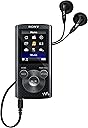
๐ง Elevate Your Audio Experience!
The Sony NWZE383 is a versatile digital music, video, and photo player that offers 4 GB of storage, a rechargeable battery with up to 30 hours of audio playback, and built-in FM radio, making it the perfect companion for music lovers on the go.
| ASIN | B00ECRRB8G |
| Additional Features | FM Radio |
| Battery Average Life | 30 Hours |
| Best Sellers Rank | #340,251 in Electronics ( See Top 100 in Electronics ) #1,791 in MP3 & MP4 Players |
| Brand | Sony |
| Built-In Media | MP3 Player, USB Cable |
| Color | Black |
| Compatible Devices | Laptop |
| Component Type | Battery |
| Connectivity Technology | USB |
| Customer Reviews | 4.2 out of 5 stars 2,502 Reviews |
| Display Technology | LCD |
| Global Trade Identification Number | 00027242867673 |
| Item Weight | 4.8 ounces |
| Manufacturer | Sony |
| Memory Storage Capacity | 4 GB |
| Mfr Part Number | NWZE383BLK |
| Model Name | nwze383 |
| Model Number | NWZE383BLK |
| Screen Size | 1.77 |
| Special Feature | FM Radio |
| Supported Media Type | Internal Flash |
| Supported Standards | MP3 |
| UPC | 027242867673 |
| Unit Count | 1.0 Count |
M**H
This model has what I need (sleep timer) and has the most reasonable price on top of a good brand so I got it PRO
I bought this for almost a year. Now I can leave a full review. This model has what I need (sleep timer) and has the most reasonable price on top of a good brand so I got it PRO: - sounds is very good and clear (no complain) the earphones provided are also very good. - sturdy, nice design - sleep timer is a big PLUS - let you have different folders ( but you have to create it from Windows) - the battery last quite long. i drove a 5 hrs trip in Florida with full battery and still have some left. I use this daily whenever I drive which is quite often, when I study and walk around, it last for a good couple of days up to a week,depends on usage - it displays photos if your song comes with one so it's kinda cool to see other than the boring black bg CON: -after a few months, it freezes quite often. you either wait till it clears up or press the Reset button in the back which is a tiny hole. I dont know why they do this because I dont have a needle/sharp pen with me all the time to press the Reset button. My old MP3 was like this too, if someone can enlighten me,pls do - do not let you delete songs from the player, you have to do it from Windows. sometimes it does not recognize file but will not let me delete on the MP3 itself. it's a hassle - it doesnt tell you which file it doesnt recognize till you actually listen then and Error message come out - i only use this for the music since my phone's battery goes down quickly. i think the Video and Photos functions are useless since phones can do that and the screen is too small. i rather exchange that with more memory space or a Recording option would be nice for my university lecture. - the HOLD option can be annoying sometimes (you have to pause 1st before you press it to end,if not it'll just hold) Overall I really like this, though I have lots of Cons but it's still a good quality MP3 player that has what I need. I just wish it stop freezing so often and have Recording/Delete option ,that'll be perfect.
T**R
Definitely worth every penny...
I completely LOVE this media player. I looked all around for something reliable that didn't say iPod on it and I believe this to be the best choice for myself. I just wish that Sony would make one with a higher capacity than 16gb. That, however, is not any kind of an issue since 16gb is more than enough space for all of my music and my photos of my favorite dog. This player will also hold and play videos, movies, tv shows, and pod casts. However, any of those files take up way too much space to bother putting them on there. Battery life is astoundingly long, but I still charge it every day just to make sure. It sounds great regardless of what it's plugged into. It also came with a pair of ear bud headphones that sound and work great (also made by Sony and not cheap knock-offs). So I really have no complaints about this item and am very happy that I bought it. It's very easy to operate, no matter where you decide to use it and I would highly recommend it to anyone who needs a good, reliable media player.
U**Y
Still the best option today. 5th gen ipod is better, but that's history (sigh)
I lost my 5th generation ipod nano and replaced it with the 16gb Walkman. I really really like it. I'm glad I got it. Here are some comparisons between the 5th gen ipod nano, the 7th gen ipod nano (never used but I did my homework) and using my phone for music. Price: I paid $78 for the 16gb Walkman. As I write this, the 7th gen ipod nano is about $130. This is one of the main reasons I didn't replace get another nano. The 8gb walkman was $73 making the 16gb an easy choice at $5 more. The 4gb option was also appealing at $53.00. But I decided to go for the 16gb option. Controls (Why using your phone is no good): The most important feature for me as actual physical buttons instead of a touch screen. That's one reason the 6th & 7th gen ipod nano didn't appeal to me. I tried using my phone but I never realized how frequently I push pause/play and <<rev and forward>> while driving. On a device with physical buttons I can do this safely without looking. Operating a touch-screen player (or phone) while driving requires looking at the screen. Not an option. A few reviews mention getting used to the controls. I don't think there are any problems with the controls. They're just not the same as an ipod. I miss the controls of my 5th gen ipod but I like this too. Software (getting music onto the Walkman) I actually like this part of the Walkman quite a bit. Of course I used itunes with my ipod. But I almost NEVER bought anything from the itunes store. I bought most of my music from the amazon mp3 store. The software for the walkman isn't an online store interface. It's for moving files to the player and it does a very good job. I was surprised at how easily and accurately it imported all my music files and found the appropriate album artwork. I have been able to easily create playlists. I find this software BETTER than itunes when I went to move some songs, but not all. When I looked at the music options on the device it had the usual options - song, artist, album, genre. But I was pleasantly surprised to see "Folder" as an option. If you have home-recordings, or class lecture notes or some other style of recording that doesn't follow the genre/artist/album/song organization, you can organize them in custom folders. Sound quality: I don't notice anything too special about the sound quality. I think 95% of the sound quality of mp3 devices depends on the headphones or speakers you use. And I NEVER use the cheap headphones that come with ipods, or other mp3 players. I do like the equalizer options. I like being able to same 2 custom equalizer options. What I miss about the ipod nano was the MONO audio option. I like to listen to music with 1 ear-bud in at work so I can hear if someone tries to talk to me. The MONO option is perfect for this. I may be the only person in the world who liked and used this option. Something I loved about the ipod was the seamless transition between tracks. This is important if you're listening to Dark Side of the Moon or The Who Live at Leeds where one song blends in with another. With my 2007 Sansa player I'd here a fraction of a second drop in between tracks. This drove me crazy. I never noticed this with the ipod. I think I noticed it very slightly with the Walkman. But almost imperceptible and very comparable in quality to the ipod. Screen: I do not see what everyone loves about the screen. I don't really care about the screen though. I just use it for music. Construction/size/weight etc. It's about 2x as thick as the 5th gen ipod nano, which means it's still pretty small. But it's not any heavier. Considering I LOST my ipod, I like that the walkman is just a little chunkier. Maybe I won't lose this one. I don't like that it turns itself off at the slightest sign of inactivity. But I can get used to it. I would give it 5 stars if is was more like the ipod. But I still like it a lot and for the price and the fact that it has BUTTONS (and not an app with virtual buttons) is enough to make this the right choice for me.
M**.
Works just fine on Windows 10 makes setting up and sync fast and easy.
Great Walkman product for what I use it for. Had to create a simple setup guide for Windows 10. So far I'm liking the unit, will be using it on AUX input devices between my car and workstation computer. If you're having issues installing the drivers I have posted a link to the full instructions with images. Below is a quick guide for those familiar with Windows 10. How to Setup your Sony Walkman as a Hard drive on your Windows 10 computer. 1. Open <b>Computer Management</b>. From your Search box, type Computer Management. 2. Connect your Sony Walkman using the USB cable provided or your longer cable that you purchased. 3. Your Sony will show up in Unknown Devices and will not pop up the Explorer if the drive is incorrect. 4. From Unknown Devices Right click the device and click on Update Driver Software. Next (don't worry about what the picture shows, it should be unknown devices) 5. From the Update Driver Software select Browse My Computer for Driver Software. Next 6. Select the Let me pick from a list of device drivers on my computer. Next Note: The Sony tip: INF folder didn't work. 7. From the Select your device's type from the list below scroll down to Universal Serial Bus Devices. Next Note: Some say to look for USB Mass Storage but that doesn't show up until the driver is installed or the next screen. 8. From the Select the device driver you want to install for this hardware, let's select the USB Mass Storage Device. Next 9. You should see, Windows has successfully updated your driver software. USB Mass Storage Device. Note: You should now see your battery charging animation working. Before your device driver was installed properly your charge screen didn't have any moving images I bet. 10. Check your Device Manager from Computer Management and you should see, Portable Devices list WALKMAN and Universal Serial Bus Controllers showing USB Mass Storage Device. Here is the link to the Product: Sony NWZE383 4 GB Walkman MP3 Video Player (Red) The link to the How To setup on Windows 10 guide. (if you need additional help) http://www.mysmallcloud.com/repairs-and-service/windows-10-devices/sony-walkman-nwz-e383
D**2
Easy to use and great sound
I bought this for my mom in lieu of the more expensive, smaller capacity iPod Shuffle. I love Apple products, but I thought the lack of a screen to navigate the Shuffle would be too complicated for my mom. This is such a great alternative. It doesn't require you to download a program (like iTunes), plays .wma and .mp3 files and even has an FM radio. It operates just like a jump drive so you just drag and drop your music from your computer to your device. It also has an equalizer and a decent set of headphones. It is bigger than the too small Shuffle, making it easier to hold. The controls are simple and the player is very easy to navigate. I gave this to my mom pre-loaded with some of her favorite music and she absolutely loves it. I also looked at the SanDisk Sansa products, but thought they were too small. If you're looking for a cheaper alternative to an iPod, this is the way to go. UPDATE: I've seen reviews where people have a hard time turnng off the device. While the device is playing, press pause and THEN hold down the "hold" button until the item powers down. It turns off everytime.
L**S
Not as good as older Walkman
I bought this player about a year ago. I intended to use it to replace an older 8-gig Sony Walkman. The sound quality seems about the same as the older Walkman, but in almost all ways the older Walkman is better than this one. So I've kept my older one for use in situations where the new one is frustrating (when driving, walking or exercising at the gym). My biggest frustration is just turning the thing on. To turn it on, you press any of the buttons. Then you wait a few seconds until it says it's on hold. Then you hold down the OPTION button for a couple of seconds until that goes away. Then it goes into a "creating library" phase that usually lasts from 2 to 20 seconds. Then you press the play/pause button and it finally starts to play. Figure around 8-20 seconds to turn it on, while having to watch the screen. So I especially do not recommend this player if you, like me, want to use the player in the accessory input of your car radio. It's just too much of a driving distraction to turn it on. For the older Walkman, a touch of a button turns it on. If it's been used within the last 24 hours, it comes on immediately. Otherwise a several second delay but no other actions needed. The older Walkman isn't much larger than this one, but it has a much larger screen. It displays more info about the song being displayed - title, performer, album, year released and music category. This one only alternates between showing the performer and song title. The layout of the older Walkman made it very easy to use the controls by feel. When in my car, going for a walk, exercising in the gym or listening to music in bed, I like to be able to control it by feel. With the layout this one has, I have a much more difficult time using them by feel, and often hit the wrong button. Of course, it is a lot better than a touch screen if you want to go by feel, but Sony has really gone backwards from the older model. The one feature that this one has that my older one did not have is a sleep timer. I really like that feature, except that it's implemented poorly in this device. When the sleep timer is active, you cannot use either the BACK button or the OPTION button without first cancelling the sleep timer. This means you can't, among other things: Switch to a different playlist. Search for an album or artist. Display details about the song being played. You can't even display the current time. Playlists are similar on both devices, with one big difference. The older Walkman remembers the songs you've played in a playlist, while the newer one doesn't. The newer one doesn't do this. So, for example, if I have a 200-title playlist and listen to it over ten sessions of 20 songs per session, turning the device off in the meantime, the older Walkman will have played each song exactly once. The newer one will have played a lot of duplicates, and a lot of songs wouldn't have been heard. In practice, I usually listen to about 10 songs each evening, and I usually hear at least two or three songs that I listened to the night before. So - sound quality is fine, it's only the controls that are frustrating. I use Windows Media Player to construct playlists, and use the automatic sync to keep the two players in sync - works great with both players, so no gripes there.
P**R
Love, Love Love!!! Great for workouts at Physical Therapy
I love, love, love this MP3 Video Walkman!!! I had another one, but left it on an airplane in Rio De Janeiro so I purchased this one. I have loaded all of my CD's onto it and use it mostly for my Physical Therapy workouts and while flying. The only problem I have had is that I wish it had a designated on/off button as I often have trouble getting it to turn off completely. That runs down the battery then. Other than that, I have really enjoyed the smallness of it and it is so much easier than carrying my phone around when I just want music and don't want to wear down my cell phone battery. The sound is WONDERFUL!!! I don't know what I will do if I lose this one or if it quits charging for me! I don't think these are made any more. Just wish it were a different color as my last one was pink and my rival college football teams color is red! I try not to have many red things! :-)
M**H
CONSUMER WARNING: Replacement batteries are unavailable for post-2013 Walkmans - turns into a piece of junk
Short Cliff's notes version: When the battery in an out-of-warranty Walkman dies, no store on earth will sell you a replacement battery. That means your Walkman will never play another song ever again. You will have to toss your Walkman into a garbage can. If you're skeptical (and you should be) read the long version of this review and be sure to dial the two phone numbers I provided in order to verify my consumer warning. You will then become a believer. The phone numbers are to Sony's Walkman Department and Encompass. When the battery in your out-of-warranty Walkman dies, you will become very familiar with Encompass. Long version: When it ran it was a good unit, worth 4 or 5 stars. And then the battery died only a year and a half after the date of purchase. So you buy a new battery, right? A new battery just like you would buy for a digital voice recorder or an automobile. Wrong. Sony and Encompass both refuse to sell batteries for units that are out-of-warranty. The warranty is good for only one year. Maybe I shoulda extended the manufacturer's warranty, right? Wrong, no can do. Sony will not allow you to extend the warranty on a Walkman (and besides, you should never have to pay extra $$$ to extend the warranty for something as simple as changing the battery, that would be ridiculous). Fact: Sony builds the 383, 385, A15, A17 Walkman in a way that requires a technician with special tools and special training to get to the Walkman's battery compartment. The average consumer can not change the 383, 385, A15 or A17 Walkman battery. Even if you could change the battery, neither Sony nor Encompass will sell you a battery for this model. Buy a battery at Radio Shack, Fry's, Office Depot or Staples? Nope, not gonna happen. They don't sell batteries for an out-of-warranty 383, 385, A15, A17 Walkman. So what then? Since Sony or Encompass won't sell you a battery for it, you have only one choice: You throw it in the trash and you buy a new one - which is fine if you're Donald Trump or Carlos Slim. The fact is the 383, 385, A15, A17 Walkman's are disposable, throw-away units when the battery dies. How long did the battery in my 16 GB / 385 Walkman last? About 1.5 years, a short eighteen months. My 385 received 'limited use.' I didn't use the 385 every day. I used it only on an occasional weekend. When it comes to battery life, your mileage may vary. You're wondering: What kind of battery does the 385 and A17 use? My answer would be: It sure as heck does not use triple-A or double-A batteries. I never bothered to check and see what kind of battery they use, because I knew from the get-go that only a technician could change the battery. I figured when the battery on the 385 and A17 wore out, I would need to send the out-of-warranty unit to Sony to have the battery replaced. I expected Sony to charge me a fee for replacing the battery. I of course found out that I was wrong, Sony and Encompass should offer that service, but they don't. This discovery, or revelation, may seem unbelievable. I would agree, it is unbelievable, totally unbelievable. And unethical. I'm sure someone out there is thinking "Time for a class action lawsuit." Trust... and then verify: You can verify my unbelievable claim by simply calling Sony and Encompass. In fact, my one hope is that all Walkman owners band together by calling Encompass and besieging them with calls. When you call Sony and Encompass, ask them how much they will charge you to replace the battery for an out-of-warranty 383, 385 or A17 Walkman. Encompass, the company Sony contracted to sell parts for the Walkman, will tell you that they don't sell batteries for an out-of-warranty 383, 385, A15, A17 Walkman. And then lay it on Encompass. Voice a 'controlled, polite' outrage that expresses extreme disappointment in not being able to buy a battery for an out-of-warranty NWZ-E383 NWZ-E385 NWZ-A15 NWZ-A17 Sony (Walkman department): 239.768.7602 Encompass (Walkman parts division): 866.779.5153 For those not up on Walkman's: The 383 and 385 units were not mass produced in 1969. The 383 and 385 Walkman that I purchased came off Sony's assembly line in approximately 2013 / 2014. Meaning, Sony should sell you a battery (and charge you $$ to have a Sony or Encompass technician replace it) for an out-of-warranty unit that is only one or two years old. But they don't. And that is freaking unbelievable. Utterly Ridiculous Department: There is one team of technicians who might be able to access the Walkman's battery compartment with special tools and change the battery for you, and that would be some of the employees who work in the forensics department at the NSA. Or you can try contacting Eric Snowden, god bless his soul :) Plan B: If those suggestions fail, you might try contacting some of the rocket scientists who work at Area 51. Their team should be able to replicate (manufacture) a replacement battery out of thin air and then replace it using special tools. Tom Cruise would be plan C. Unequivocal, incontrovertible proof: I have copies of emails from Encompass and Sony. The words in those emails amount to nonsense. In two emails that Encompass sent me, they stated that batteries for the aforementioned units are not available to consumers who have an out-of-warranty Walkman. Challenge / accountability: I contacted both companies via email and phone numerous times. I challenge a corporate mouthpiece from Sony or Encompass to step up and post a response to this review. I am ready to read their lies. I want to thank Amazon for letting me post this consumer warning. Thank you Amazon. Now if you would just allow me to change the picture in my profile, things would be really swell. Caveat emptor and Happy Holiday, 2015 :)
S**Y
Five Stars
Its a great product for music lovers. Works perfectly. Really good.
F**S
Excelente
Excelente calidad de producto
L**R
No bad feedback so I assume that it does what it's ...
Bought as a gift. No bad feedback so I assume that it does what it's supposed to!
S**Y
gifted to my son and he is happy with the clarity on
A Quality product by Sony, gifted to my son and he is happy with the clarity on sound
A**R
Five Stars
Awesome product.
Trustpilot
3 weeks ago
1 month ago