Buy anything from 5,000+ international stores. One checkout price. No surprise fees. Join 2M+ shoppers on Desertcart.
Desertcart purchases this item on your behalf and handles shipping, customs, and support to Vanuatu.
🚀 Power up your home network — never miss a beat or a stream!
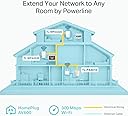
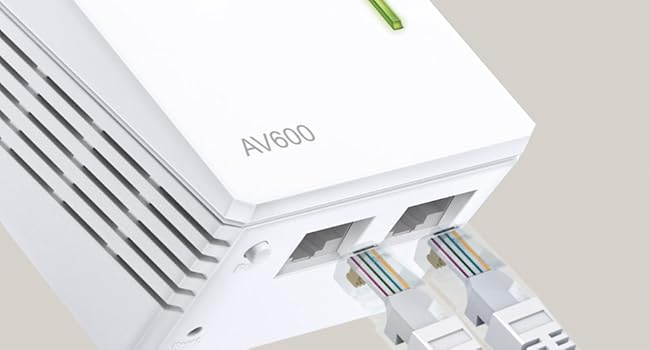
The TP-Link TL-WPA4220 TKIT is a powerful powerline adapter starter kit delivering up to 600Mbps over your home’s electrical wiring, complemented by a 300Mbps WiFi extender and dual Ethernet ports. Designed for easy one-touch setup and app management, it extends reliable wired and wireless connectivity to hard-to-reach areas, ideal for UHD streaming, gaming, and smart home devices.


| ASIN | B07N1HDMFR |
| Best Sellers Rank | 890 in Computers & Accessories ( See Top 100 in Computers & Accessories ) 5 in Powerline Network Adapters |
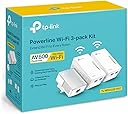
| Box Contents | 3× 6.5 ft. (2 m) Ethernet cable (RJ45), Powerline Ethernet Adapter 2× TL-WPA4220 & 1× TL-PA4010, Quick installation guide |
| Brand | TP-Link |
| Brand Name | TP-Link |
| Color | White |
| Colour | White |
| Compatible Devices | Desktop |
| Compatible Operating System Family | Linux, Windows |
| Compatible devices | Desktop |
| Country of Origin | China |
| Customer Reviews | 4.2 out of 5 stars 5,030 Reviews |
| Data Link Protocol | Ethernet |
| Data Transfer Rate | 300 Megabits Per Second |
| Data link protocol | Ethernet |
| Hardware Interface | Ethernet |
| Hardware interface | Ethernet |
| Item Dimensions L x W x H | 5.4L x 4W x 9.4H centimetres |
| Item Type Name | 2-Port Powerline Adapter WiFi 3-pack Kit, , Range Extender, Broadband/WiFi Extender, WiFi Booster/Hotspot |
| Manufacturer | TP-Link |
| Manufacturer Part Number | TL-WPA4220 TKIT |
| Model Number | TL-WPA4220T KIT |
| Product Warranty | Manufacturer's 3 Years Warranty |
| Product dimensions | 5.4L x 4W x 9.4H centimetres |
M**Y
Almost boxed it up for a return. Glad I didn't!
UPDATE: After using this wonderful piece of kit now for several days, I can truly say - it is more than magnificent at what it does. Despite owning the title of 'grumpy, moany old man, I simply cannot find fault in this incredible bit of kit. I am so happy that I can watch smart TV, listen to my iPod Touch through my B&W speaker, use my iPad, my MacBook, heck, even my android phone hits in to it. I even tried it at the end of the very long garden just because I could and heck, I have a full on signal. I am simply over joyed 'Sometimes on a review you kind of feel excited and don't actually know where to start. On the one hand I find 'War & Peace' reviews about as helpful as the proverbial chocolate teapot; although, I have see some nice ones. I digress, so here it goes FWIW. This was a case of third time lucky. I'd purchased and returned two of the so-called things that plug in to a socket , press the WPS button while pressing the button on the router and job done. Sadly my new build cottage is protected by kingpin insulation lined on both sides with foil. No wifi is getting through it. I was on the cusp of giving up when I stumbled on this offering from TP-Link. Once I got my thick head around the fact it does not bounce a signal through wifi I was home and dry. Setting up is a breeze. I plugged in the ethernet cable to the smallest unit and it had a 'chat' with my router and set itself up. Then I plugged in the bigger unit, switched it on (don't press pair). And sorted; I thought all was good. All I wanted to do was use my iPod Touch to play music through a Bowers and Wilkins A7 in my den which is about thirty metres from my cottage. Nothing! Totally useless. Speaker I had plugged into the ethernet and into the unit; no worries light stopped flashing on my B&W unit. Turned on the iPod and nothing, it so would not pick up. In the box it all went while I went off to do other things, in a huff. Then I wondered. No good following the instructions, useless. Fine if you just want to power ups a TV or similar. Once you want to stream music or use an iPod there is something you NEED to do. Go into your iPod wifi settings and wait until you see the TP link highlighted. Click on it and enter the password which is handily printed on top of the TP Link unit. All went well. Choose music, hit the A7 speaker and voila, perfect signal. Been listening to my music all afternoon without dropping once. I now fully understand how these things work. I used the smaller unit as mentioned plugged into my router and only one of the two larger units. I suppose should I wish to use a TV in my shed or garage, I will use the second unit. I cannot tell you how pleased I am. JUST be sure if you have issues to look on your TV, speaker or whatever if it asks to join your TP Link unit. Enter th password and you really are JOB DONE! I got there for under £100.
T**D
Great
Great easy to set up, and use powerline wifi externer. Used to extend wifi capability in barn conversion where foil backed wall insulation was stopping signal. Works a treat. Not super fast but getting between 56 and 66 maps more than enough for our use. Un-intrusive design and at a great price point when I bought.
M**E
Does the job - but could cause interference with exisiting WiFi signal
I bought this to add the capability of a wired network connection in my wife's outside office (using the power sockets that are spurred off the main house) and to also extend the WiFi into my daughter's bedroom, which is in the opposite corner to the current TP-Link Wifi Router as the current signal is weak. To set up, took around 30-45 minutes all in. The single sheet guide in the box is all you need. It does recommend downloading their app to install - which I did. Once installed, the app has basically served its purpose as all the data on it is available through the web interface of the extenders (192.168.0.XXX). The hardwired CAT-5 link works flawlessly in my wife's office. A speed test gives around very similar speeds to being directly connected to the main house router. The Wifi extension upstairs also has a CAT-5 output, which I've tested successfully. But I use for the Wi-Fi only at present. It is okay and gives a strong signal out - enough for my daughter. I've "cloned" the main WiFi SSID (details on how to do this are in the box) which gives a basic mesh network in the house. However, I'm sure there is a clash with the main wifi, as some points in the house now give a lower signal. A simple switch on and off on my phone/tablet/laptop usually gets it to pick up the stronger of the signals - buts it's not seemless. There IS an update coming to this set (AV600) that will give native mesh networking when used with a TP-Link router - but this hasn't been rolled out yet (July 2020). Overall, I'm impressed. It's served it dual purpose brilliantly - and not bad for £65 at time of purchase,
M**S
So amazing! Great signal quality and easy to set up. Wifi and ethernet connections
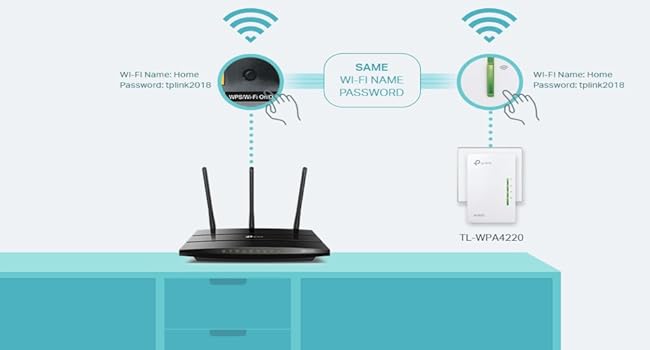
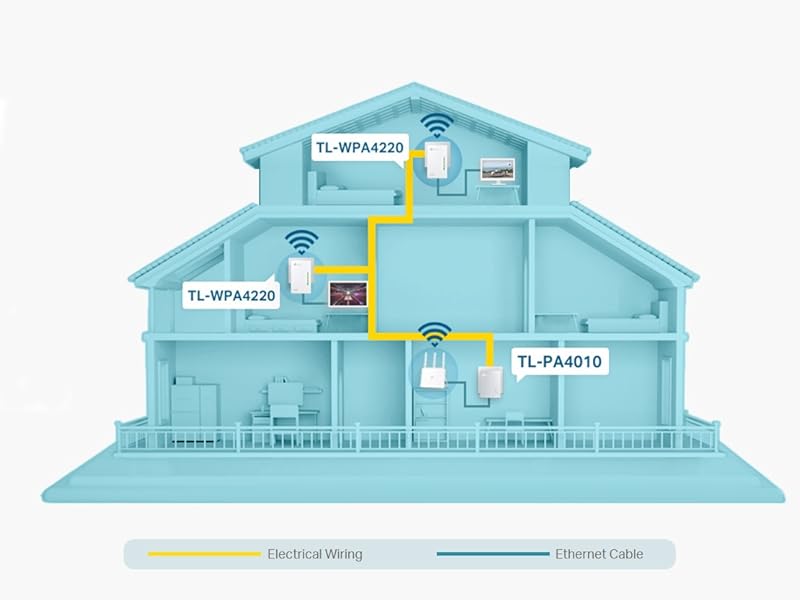
So I've had wifi woes since a floor fitter chopped in half an ethernet cable that ran the length of the house. I was considering various options like running cables up the outside of the building, etc. but eventually after reading tons of reviews I opted for this solution. It's AWESOME. CAUTION: We are lucky enough to be in a detached house so we know that the power rings are all ours - I have heard of problems before in semi-detached houses or flats with shared power rings but I can't really comment. My experience relates purely to a detached house. Installation was so easy: Plug the power-link hub device into a wall socket near my router Plug the ethernet cable from router to power-link hub Take one of the extender units and plug it into a wall socket elsewhere in the house (home office, in my case) Press the sync button on the hub and then on the extender and watch them link up (took mine about 5 seconds) At this point you now have an ethernet port in your new location. Repeat for the second extender (we put ours at the top of the house, 3 floors) Now you can connect to the web interface of the extender and change the wifi settings - making the network name and password the same as your standard internet connection means devices will seamlessly move between areas keeping strong wifi. The Wifi connection is 400mbs which is pretty fast, unfortunately the wired connection is only 100mbs (but there is a gigabit version, different product) but it is rock-solid. I have had to restart the extenders a couple of times to re-sync them which is a bit of a pain but compared to running network cables everywhere it's better. NOTE: I did first try another manufacturer's wifi-booster device which simply takes your existing wifi network and repeats it and it was massively lacking - if you have a large house and need a wifi hotspot creating, THIS is the product for you - it has transformed my working-from-home life :-) Highly recommended!
M**R
Straightforward and easy to setup
Product arrived well packaged with clear instructions for installation. Setup was relatively simple. Pairing process is extremely easy and changing SSID and password is straightforward (and explained in instructions). So long as you are familiar with accessing your router settings you should be more than capable of setting it up. Ethernet connection seems to work as well as if my pc were plugged directly into router. However, the broadband at my house is terrible (max 3Mbps), so I can't really comment on the 300Mbps claim. It also makes it harder to judge whether the powerline is at fault when my internet drops out. The only issue I have had is the WiFi connection kept cutting out randomly for short periods of time. This was largely fixed with a firmware update for my router but still happens every so often and can be frustrating. Finally, the only other minor thing I noticed was the included ethernet cables are cat5, which as far as I'm aware has a max speed of 100Mbps. So if you want the 300Mbps wired connection you will need to use your own cat 5e. Overall decent and easy to setup product with comprehensive instructions. Would recommend for ethernet but you may not get the best WiFi connection.
J**.
Worked brilliantly and simply for me. Problems with connection by WiFi by solved in minutes.
I have a theoretical wifi connection of 78Mbps by my router. It has always given an acceptable but low sometimes connection. Issues arrived with daughter working from home so she had to use with a long ethernet cable trailing through the house waiting for someone to trip over. Friend always been telling me to give powerline. So I thought it may be worth giving it a try. My expectations were. Cheap price. Also I didn't know if the wiring of my house was ok. So I gave this a go. Simple instructions but I was still doubtful if adapter would connect to router. But the required lights came on very quickly. Put the first of the two adaptors in daughters room. Followed simple instructions to connect. Worked like a treat. Her connection from router was steady 68-70Mbps from a potential 78Mbps from router. She could now, and has, workerd from home with no issues whatsoever. I tried the second adaptor on my desktop pc in my converted garage. Had exactly the same connection of 68-70Mbps. My daughter has always complained about connection to fireststick. She says that has very much improved. This could be because of wifi booster. No other explainable reason. The router i have is an ac but I am not sure if it boosts with this equipment in 2.4 and 5ghz or just 2.4ghz. All I can say is wifi has been improved upstairs. I rate at 5/5 for how it worked for me. It is a cheap set of kit but gives brilliant performance for me. I will always stick with powerline connections now in areas I can. The suppied ethernet net cables are only one metre long. If this is too short for you you can buy longer at least as good quality one for £5-6. Do I recommend it? I never do on products. All I can say it has worked brilliantly for me.
K**.
I'm highly satisfied with the TP-Link TL-WPA4220 TKIT
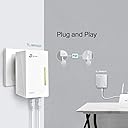
I've been using the TP-Link TL-WPA4220 TKIT for a few weeks now and I'm impressed with its performance. This kit has been a game-changer for extending my WiFi signal to areas of my home that were previously dead zones. Setup was incredibly easy. Simply plug the adapters into power outlets and press the pairing button - it couldn't be simpler. The included Ethernet cables were also handy for connecting wired devices. Signal strength is excellent. I've noticed a significant improvement in WiFi speed and reliability in areas where I previously struggled. Streaming HD content and online gaming are now smooth and uninterrupted. The two Ethernet ports on each adapter are a great addition, allowing me to connect wired devices like a smart TV or gaming console directly to the powerline network. Overall, I'm highly satisfied with the TP-Link TL-WPA4220 TKIT. It's a reliable, affordable, and user-friendly solution for boosting your home's WiFi coverage.
P**L
Wpa 4220 kit
Replacement for my prev WPA kit that was old and “end of life” ! Easy to set up via WPS and pairing. I get a WiFi speed of about 35 mbps down and 15 mbps up which is about half of what my router produces but it is enough for me for all my streaming and wifi devices. Ethernet to TV works well no streaming issues. Good to have 2 extenders. I managed to do a firmware update via the tp-link app which I have never done before in case it went wrong. But it was easy. The firmware on the adapter and just one extender was applied , then I had to apply the upgrade again to the 2nd extender. Not sure why this is but everything was ok. So overall happy with this. Smaller and more compact than the old kit - which is good. Installation was easy and it worked. Reasonable price. Not as fast as advertised (in my set up)
P**A
La calidad del producto
El equipo es excelente, tiene bastante alcance , lo único es que las clavijas del toma son inglesas y se le tiene que colocar un adaptador de corriente español
P**A
Soluzione ottimale per zone WiFi scoperte
Sono anni che utilizzo questi prodotti e hanno sempre dato ottimi risultati. Dove non esiste cablaggio a livello LAN e la WiFi è scarsa la soluzione di utilizzare l'impianto elettrico è perfetta. Le performance sono discrete ma ricordiamoci che non si può pretendere una velocità di connessione WiFi pari a quella del router.
Z**1
délai de livraison respecté
produit conforme à la description, livré bien emballé et protégé
A**V
Be aware
The item itself is ok, however the title of it states for UK plug, but it’s not. Be aware, the UK plug is available only if you order from Amazon UK. Unfortunately seller told me that only upon item delivered to me, however I asked him to confirm the plug type before placing the order and he confirmed that “yes, it’s UK plug type”.
M**S
Rapport qualité/prix
Super rapport qualité prix, signal très puissant. Seul petit défaut, quand on installe, soit on laisse apparaitre chaque récepteur dans la détection wifi (box, link 1, link 2)et dans ce cas pas de soucis tout se fait tout seul, mais si on veut faire en sorte qu'un seul signal(celui de la box) apparaisse dans toute la maison, c'est un peu plus capricieux. Mis à part ça, super content de mon achat.
Trustpilot
2 weeks ago
5 days ago