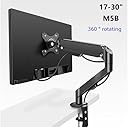
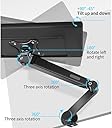
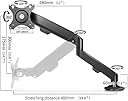
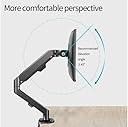
Elevate Your Workspace! 🚀
The Single Monitor Desk Mount is an adjustable gas spring monitor arm designed for screens ranging from 13 to 35 inches, supporting up to 30.9lbs. It features a wide range of motion, durable construction, and easy installation options, making it the perfect addition to any professional workspace.
| Manufacturer | MagicHold |
| Brand | MagicHold |
| Item Weight | 4.74 pounds |
| Product Dimensions | 24 x 10 x 5 inches |
| Color | Black |
| Material Type | Aluminum |
| Manufacturer Part Number | OA-9Xa |
L**R
Fantastic Compact and Flexible Design
I absolutely LOVE my Monitor and Laptop stand. It takes up far less space than more standard designs, and it gives me a tremendous amount of flexibility in the spacing of the Laptop and Monitor. I've got both a large laptop (17" Dell XPS) and a VERY Large Monitor (32" LG), and with a bit of trial and error, I was able to get both in exactly the horizontal and vertical position I wanted.The instructions were clear and straightforward, and easy to follow. Assembly wasn't difficult (but see below), and was easily accomplished by one person working alone.It's completely sturdy and stable (something the unusual design made me worry about before I bought it). But my concerns didn't pan out. I have it mounted on a mobile computer cart, and the cart and its contents get moved in and out of different rooms daily.The only rather minor downside I have to report is that getting things exactly the way you want them in terms of position and height requires more time and a bit more work to adjust height and position.But that's a minor quibble. This is a great product at a great price (certainly compared to the alternatives).
M**G
Very good, very happy with this purchase (with pics)
I bought the MagicHold 2 after looking at many other options throughout the internet. What I found is that out of the dozen or so laptop/monitor stands offered on Amazon, there's only 3-4 actual different designs. Most are the same ODM stands rebranded for different importers. This stand seems to be the exact same stand as the "Viozon Monitor and Laptop Mount" right down to having identical pictures. The instruction manual for the MagicHold 2 has "OLL-3L" on the instruction manual, while the Viozon's product number is "OL-3L". I chose the MagicHold 2 because it comes in black.NOTE: The stand I received is different/updated from the stands in the reviewer pictures from 2015.My Setup > Laptop: 15.6" screen Lenovo P1 > Monitor: 27"PROS:- nice looking (compared to most of the other cheaper ones)- easy to install - under 5 minutes, 10 minutes with cable routing- good quality for the price (with the exception below)- cable hiding is pretty good, they can be routed internally, unlike most of the cheaper ones- stability is very good, so far I haven't had any problems with drooping- adjustability is excellent (with the exception below)CONS:- I immediately broke a thumbscrew (see picture) with very little force - the part is definitely defective, so I ran down to the hardware store and bought an M6 screw to fit.- The VESA mount included was an extremely tight fit on my monitor - I don't know if the VESA mount is slightly too big or my monitor's mounting space is too small- Unless the laptop is facing straight forward or completely flat, the laptop screen will not be vertical and parallel to the monitor - the gap between the 2 will be a very annoying "V". This is a common problem with lots of stands I looked into. There are several solutions to making the screens butt cleanly together (like in my pictures), and I chose to use a Dremel tool to modify the base of the laptop mount by removing a protrusion from the cast aluminum part (see pictures). Now the laptop rotates in the 3rd dimension, and I have full adjustability. (I scratched the base in the pic while using a hacksaw to speed up the cutting, but NBD no one's going to see it.)Overall, I would recommend this stand to anyone trying to clean up their desktop. The arms and base are a much nicer design than most of the others.
B**.
Good mount, works well
I am pleased with this mount, it holds the laptop securely and the arms are sturdy and solid. Mount was easy to attach to the desk and adjust as needed. Can be readjusted later as well. Has two lock rings for under each arm attachment and the arm sits on this and pivots freely on top of it. Makes it easy to move up or down and not cause it to wear as fast if you need to readjust the position like it would if the arm itself had a lock screw on it. There is a slow the lock ring slides down in so it doesn't have to use the screw itself to hold the mount, it uses a bushing that fits the slot and pulls in on it. There is even a single attachment on the end of the arm for cables though it would have been nice to have another on the inner arm as well for aesthetics sake. My image shows my "laptop mega work station" I have setup with my work laptop on the arm and my personal laptop and tablet on the desk. The upper right is a second monitor I use for the two laptops and my server which sits below everything on the bottom right. I have all three hooked to a HDMI switch and use a wireless keyboard and mouse for the work laptop. Still gotta get a multi-device mouse and keyboard for all at a later time but for now this works!
C**E
Much more room on your desk
I worked from home for several years and despite having a large desk, I also used it for other purposes outside of work. With this set, I could eliminate the monitor stand and the laptop from the desktop. This was a game changer for me. The material is very resistant, and I've had this set assembled for a few years now. The only issue is that it is not super easy to adjust the tilt of the monitor. You need a small tool to loosen the screw the holds the monitor in its position, then reposition it and screw it again. Besides that, it is a great durable product, and I highly recommend it.
A**W
Pick a different brand / seller
I have only had this for a couple of years but I already need to replace it.I moved recently and had to take my desk and the stand apart so I could move them (I moved the stand in the original box) and then rebuild it in my new place. This is the only time I have ever disassembled this product, so I assumed it would be OK to do it one time.Now that I have reassembled in my new place there is no way to use the laptop arm because it's so crooked - I have to set it ON the right clamp instead of between the two clamps because it is so crooked otherwise. I'm legitimately worried my laptop is going to fall - I've almost knocked it off a few times because it is so unstable.Just get a better one from a more reputable brand that will replace parts so you don't have to worry about damaging your computer equipment.
Trustpilot
1 month ago
2 weeks ago