Buy anything from 5,000+ international stores. One checkout price. No surprise fees. Join 2M+ shoppers on Desertcart.
Desertcart purchases this item on your behalf and handles shipping, customs, and support to Vanuatu.
🎮 Dominate the game with precision, power, and style—your ultimate one-handed weapon awaits!
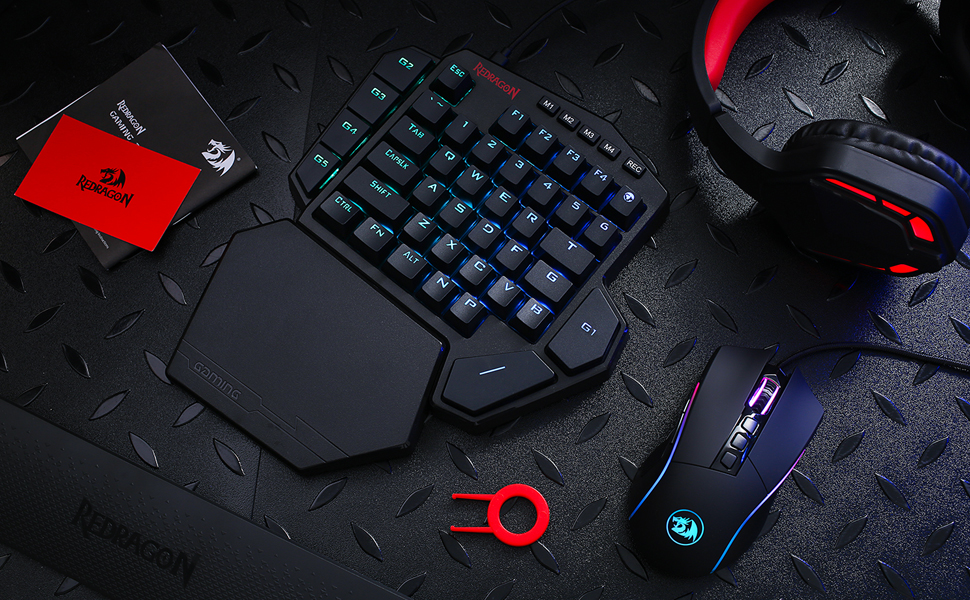
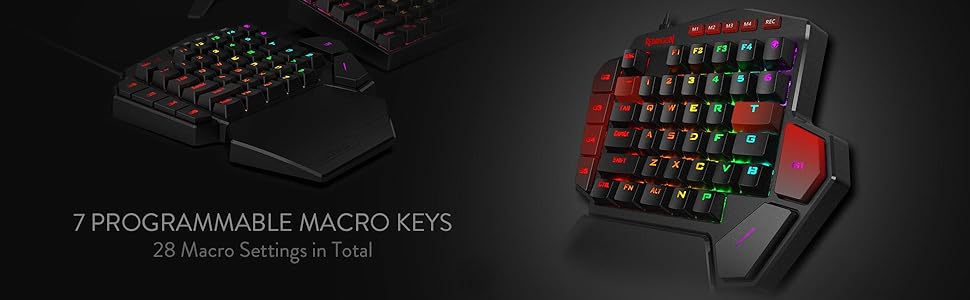
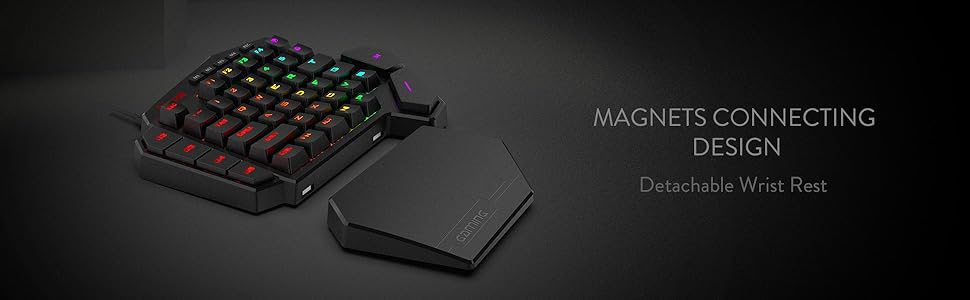
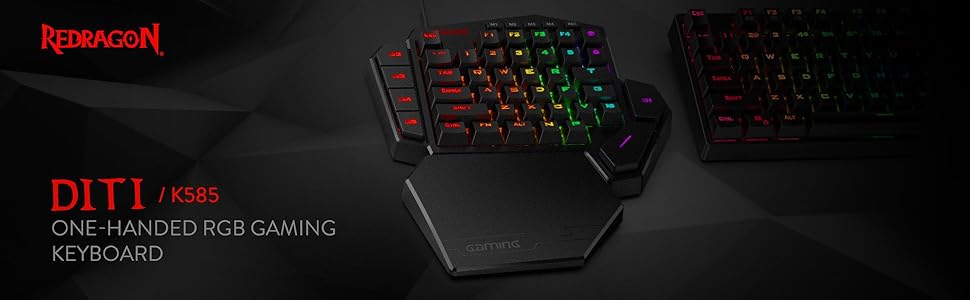
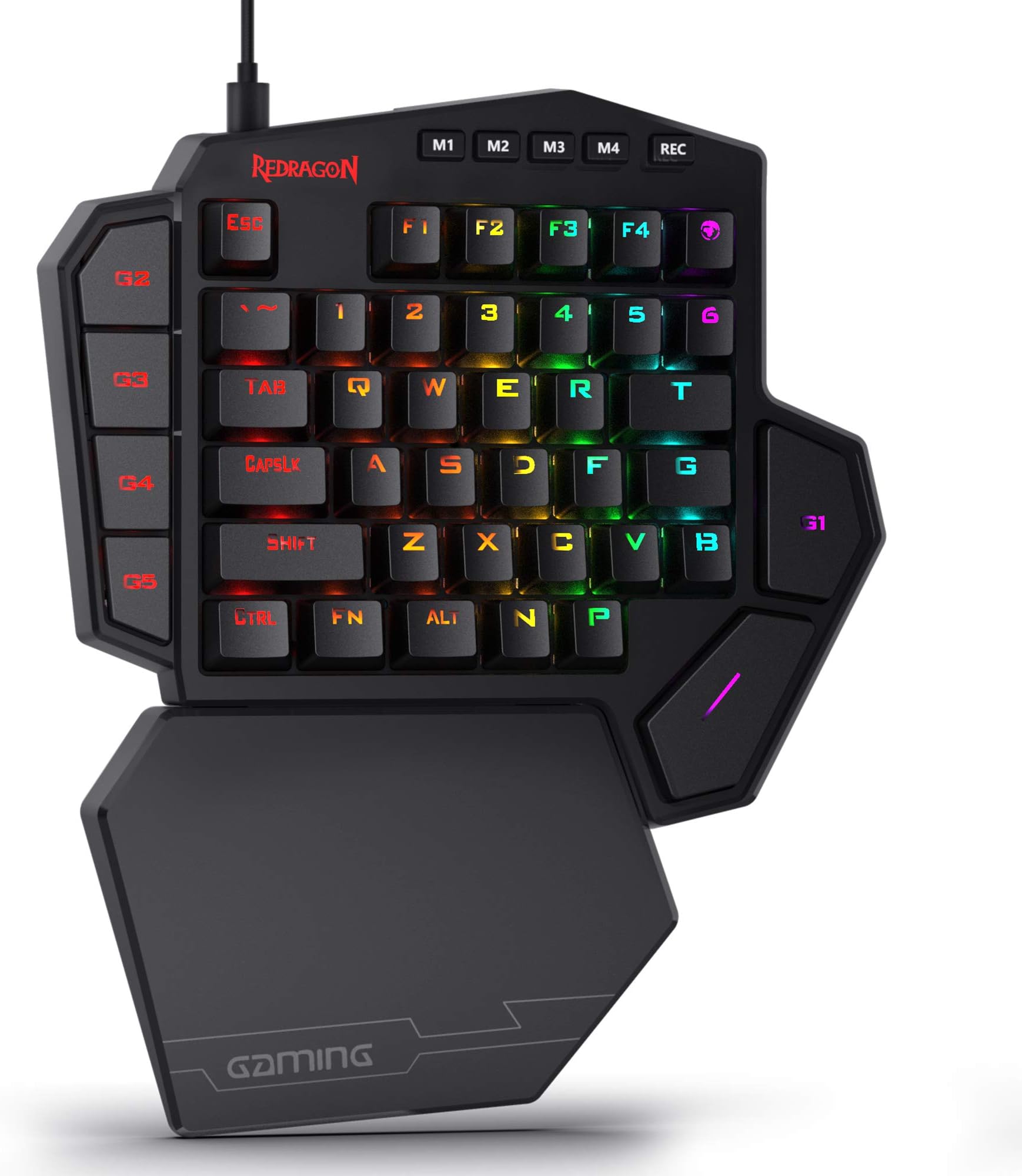
The Redragon K585 DITI is a professional-grade, wired one-handed mechanical gaming keyboard featuring 42 keys with a compact QWERTY layout, upgraded hot-swappable Blue switches for customizable tactile feedback, and 7 programmable macro keys. It boasts vibrant RGB lighting with 16.8 million colors across 5 modes, a USB-C connection with a USB pass-through port, and an ergonomic detachable magnetic wrist rest for enhanced comfort. Designed for serious gamers seeking portability, customization, and efficiency, it delivers high performance at an unbeatable price point.


| ASIN | B07NBJVH4G |
| Additional Features | 42 Keys One-Handed, Compact For Gaming, Extra Onboard G Keys, Wrist Rest |
| Antenna Location | Gaming |
| Best Sellers Rank | #706 in Video Games ( See Top 100 in Video Games ) #65 in PC Gaming Keyboards |
| Brand | Redragon |
| Built-In Media | Keycap/Switch Puller, Spare Switches, USB Cable |
| Button Quantity | 5 |
| Color | Black K585 |
| Compatible Devices | Laptop |
| Compatible Operating System Family | Android, Linux, Windows |
| Compatible Tablet Computer Models | AAUB P30 |
| Connectivity Technology | USB-C |
| Customer Reviews | 4.4 out of 5 stars 7,410 Reviews |
| Enclosure Material | Acrylonitrile Butadiene Styrene |
| Hand Orientation | Ambidextrous |
| Is Electric | Yes |
| Item Dimensions L x W x H | 10.3"L x 8.5"W x 2"H |
| Item Type Name | gaming keyboard |
| Item Weight | 1.3 Pounds |
| Keyboard Backlighting Color Support | RGB |
| Keyboard Description | Mechanical, Gaming, Macro |
| Keyboard Layout | QWERTY |
| Manufacturer | Redragon |
| Mechanical Keyboard Switch Model | Blue |
| Mfr Part Number | 711210126 |
| Minimum Required Operating System Version | Android 13.0 |
| Model Name | DITI |
| Model Number | K585 WIRED |
| Number of Keys | 42 |
| Number of Sections | 5 |
| Power Source | Rechargeable Battery |
| Recommended Uses For Product | Gaming |
| Series Number | 585 |
| Special Feature | 42 Keys One-Handed, Compact For Gaming, Extra Onboard G Keys, Wrist Rest |
| Style Name | Contemporary |
| Switch Type | Clicky |
| Theme | Gaming |
| Unit Count | 1.0 Count |
| Warranty Description | / |
D**D
Amazing and game changing product
This gamepad is so comfortable! It may not look that way with the wrist block but I promise you it helps so much and feels better than it looks. Programming it is very simple and being able to program multiple key inputs up to the millisecond in punch time to just one key helps a lot with combos or drop shotting in fighters or first person shooting games! This think is incredible for the price and I bought a second one because my wife liked using it so much.
A**.
Highly Programmable, Sturdy, Very Useful
So I have to say, this thing is pretty cool. The build quality is surprisingly very sturdy with relatively heavy plastic. The Blue Switch keys sound great and press well. The magnetic palm rest is really nice. The extra USB port is handy. Couple things to note about the product. The cord is USB C into the keyboard and USB A into your PC. You can program the 7 macro keys (G1-G5, ~ and T) by using the keyboard itself (though only with keys that already appear on this left-handed keyboard), OR you can download software from manufacturer's website that allows you to program ALMOST every key (FN key, Rec key, and maybe one or two others excluded). This latter software method is good if you want to reprogram any of the normal letter keys or if you want to program a key to use a key NOT on this keyboard already (example: Windows key or Enter or any right-side characters or arrow keys). There are 4 layers or modes you can have (accessed via the M1-4 keys), so you can theoretically have a 4 sets of keys programmed. You can set the RGB LED color setting for each layer/mode as a visual clue for what layer/mode you're active on, which is really handy. It does not have a Windows key, which I wish it did, but using the software method you can program another key to be the Windows key (though unfortunately you can't reprogram the FN key for this purpose). The size of the keyboard is larger than I expected, but it's good. The optional key re-programming software is decent. The bottom space key is easily accessible for my thumb. The right top G1 key, though, is not so comfortable for thumb press and I'll need to use my index finger for that one. The top right key (right of F4) is the m character (though a few programs read it like an F5) and I guess has special meaning in some games or something. Overall, this is really quite nice. It can easily be used as a macropad or shortcuts-specific extra keyboard too, which is cool. Have to say, the ~$30 spent on it seems well worth it.
R**1
Solid keyboard at a solid price. Just make sure you know what you need.
I'll be honest and say that I actually returned this item just because it didn't work for how I like to game. That being said, I was amazed at the quality of this product, despite the low price. The keys click very well and the backlighting is really good. I also love the detachable wrist pad. There's so many features on this thing that make it well worth the cost. The only reason why I returned it is because I was getting tired of having to reprogram the keys for almost every game I play. I bought this primarily so I could play ARC Raiders on my Steam Deck with the KB+M setup but not having "M" key to access my map grew tiresome and there's an odd space between the spacebar and other keys that I kept hitting whenever I'd try to jump. All that being said, my issues were purely my own and a lack of my research prior to purchase. It's a solid keyboard and I'll definitely be buying from Redragon in the future for their quality and price.
G**L
One of the best keyboard gamepads for the $$$
I'm a long time Belkin Nostromo N52 user and it finally started showing it's age last week with some keypress failures. After 15 years with it, it's as natural for me to use as a mouse. No thought required, just press the keys by memory. I've always used the same buttons for everything in the same position regardless of the FPS I was playing. Lethal's at TAB, Tactical at R, F use, etc. So my learning curve on this gaming keyboard was helped by that by just mapping everything in the same way. After playing on the N52 with the claw hand position due to the curved/raised wrist rest, I was a bit of an adjustment in hand placement. Didn't feel natural for about 4-5 days (maybe 10 hours in). Since then, It's becoming to require less thought and everything is becoming a reaction now without thought. The only part that's still odd is reaching for all the extra buttons that you can program having 41 vs. 20. I still have about 9 that I haven't programed. 1st world problems. The rest is comfortable and even though significantly different than what I've been used to for a long time, has become a positive. I've not had any issues with the space bar. Mt thumb lines up with it wonderfully and I'm 5'10" with average size hands. Software is easy to program and setup micros and adjust lighting. Wish it had a few more options for the lighting but its not bad. For the money, it's a solid piece of equipment that has worked as expected and I'm happy with. Doubtful it's going to give me 15 years of service like the Belkin N52 did but that's the new world we live in. Everything built to be disposable and replaced in a few years instead of making it the best they can and making it last a long time..
P**G
Best Gaming Keyboard I have used & at a Great Price!
This product by Red Dragon is amazing!! I had an expensive Corsair "gaming keyboard" for the past 2+ years, but what is gaming about a standard keyboard? just the lights? This is why I wanted to try out this Red Dragon one handed gaming keyboard and I am glad I did. This thing fits your hand perfectly, your wrist is supported by the extension on the bottom area, the keys are spaced out so your hand is comfortable, spacebar is perfectly placed to rest your thumb on and it also has macros, a few other specializes(gaming shaped) keys like G, T as well. And if you like RGB, it has that too with many modes that you can control on the hardware or through software that is optional. So far, this feels so much better than any of the other keyboards I had over the past few years, it really feels like a gaming controller, not just a keyboard to type with. I combined this with a smaller tenkeyless keyboard now(that one is for typing) and I love this setup. The keyboard uses a blue switch setup, so the keys sound and feel very clicky, its nice for gaming. You can always change out the switches and keycaps too at any time and replace them with other ones, very customizable keyboard. I replaced the F keys as you can see in the attached image with white pudding keycaps for style. The price is great on this device, you can find it for $2X here on Amazon which is much cheaper than the "gaming keyboards" by bigger brands, yet this one is superior in all ways for gaming. I give it a HUGE thumbs up!!
M**F
Finally, a game pad that’s worth buying!
I have spent YEARS looking for a good game pad. Thank you to Redragon for this beautiful, and cost effective piece of equipment. Cosmetics: Watch the video to see the different lighting options. If you like your setup with RGB lights and cool effects, this game pad will fit in nicely. The aesthetic on the burst option (the M3 button) is my favorite and looks epic when you’re doing a lot of key tapping. It does not appear that you can turn the lighting off in any way, so the phase option (M4) is the least pronounced if you don’t want a lot of light. Performance: I play on a laptop as I don’t have a tower PC (yet), and this seemed like a great solution to having to put your hand on a warm/hot keyboard based on how taxing the games you’re playing are on your system. I primarily play Guild Wars 2 and first person shooters like CoD and Apex Legends and it is fantastic for these play styles. The game pad is mechanical, so you get your quick reactions, and the magnetic wrist platform is a comfortable addition for long sessions. It is way more comfortable playing with the game pad and mouse rather than having to extend your hand out further to the keyboard. The world map button in the top right is also a pleasant touch 👌🏻 There is a usb pass through next to the USB C plug in that works great, I even tested a multi USB adapter on it and there hasn’t been any lag in performance from any of my components. Overall, this is a great game pad and it’s one of the least expensive ones you can find.
S**.
Exceptional
For the price that I paid, $39.60 USD, it's an exceptional half-keyboard. The switches are smooth and have a nice clicky break to them, that is already driving my wife crazy when I play FPS games. I don't mind the noise, because I wear a headset, but I can understand how that might be a deal-breaker for someone. RedDragon also sells this model with "Cherry" switches in them, that, I assume, are different in some way, but I have not felt them. Mine has "Blue" switches. They are not MX switches, they are a Chinese off-brand, but they feel good regardless. It also includes a switch removal tool, as well as 4 extra replacement switches. The wrist-support clips on magnetically, and feels pretty good, but it is made out of a hard plastic that might get uncomfortable after a while. This does not matter to me, because I don't use it; this is a personal preference, that has nothing to do with this keyboard - I've just never been comfortable using a wrist support. As with other RedDragon products, the included instruction manual is basically hot garbage, but there are some tutorials on YouTube that can quickly teach you how to use the RedDragon software, which is pretty decent. It will not link with Razer Chroma, but the RGB is still addressable through the proprietary software. With regard to all of these thoughts, I believe that this is the best half-keyboard I have ever used, especially for the price. EDIT: After about a year of use, the USB-C port on the back of the keyboard that connects the keyboard to the computer started to crap out on me. I was able to keep it going for another year after that. In March of 2023, it stopped working entirely. I took it apart to see if I could fix it, but I would require some micro-solder work to replace the USB-C port, and I do not have the tools for that. It was fun while it lasted, which was about 2 years. Take from that what you will
M**Y
Will get the job done in a pinch, but definitely spend the money and get a Azeron!
It gets the job done, but it’s cheap crap. Even the razor one is not all that great. After owning two Azeron “keyboards” all of these other cheaper options just don’t stack up. Then again the Azeron models start around $250 so there’s something to be said about that. Also. The Azeron models are 3d printed and hand assembled so there are as close to perfect as you can get. These cheap knock offs not so much. They’re exactly what I just said. Cheap knock off.
F**P
Nicht nur gut für Gaming sondern auch fürs Arbeiten Top!
Diese Einhandtastatur ist nicht "nur" für Gaming zu gebrauchen. Ich habe mich für diese Tastatur entschieden da ich beim Arbeiten gerne Macros verwenden wollte um dedizierte Tasten für verschiedene Befehle zu haben. So kann man z.B. beim Videoschnitt funktionen wie Abspielrichtung, Compressor oder im Prinzip alles was man per Tastenanschläge realisieren kann. Die Möglichkeiten sind daher nahezu endlos. Auch könnte ich mir vorstellen das man als Streamer diese Tastatur gut und gerne verwenden könnte um seinen stream zu steuern. So könnte man in OBS seine Sczenen per Tastendruck wechseln. Und wenn man Fertig mit arbeiten ist - einfach das Profil wechseln und rumballern. Aber mehr zum einzelnen Hardware positiv: -Blaue Taster und sogar ein paar Ersatztaster falls es Probleme geben sollte. Diese sind besonders beliebt bei PC Spielern und geben einem einfach mit das beste Feedback wenn man die Taste gedrückt hat. -Gute Keycaps, keine Folierten dinger wo das nach kurzer benutzen abgeht. -Sauberer gut lesbarer Font mit guter RGB beleuchtung -Starke Magneten um die Handauflage zu befestigen. -gutes gesleevtes Kabel -eingebauter USB 2.0 Hub (1 Anschluss für z.B. Maus) -Macros werden im Gerät selbst im Speicher gehalten nicht auf dem PC -Hochwertiges stabiles Plastik insgesamt guter Eindruck -Profil-Tasten um schnell umzuschalten (z.B. Photoshop macros auf M2 -> umgeschaltet auf M1 zu Fortnite oder sowas) -Alle Tasten können mit Macros belegt werden (außer Profil/Rec tasten) negativ: -etwas groß -Fragwürdige Tastenverschiebung - die P Taste ist unten rechts wo M sein müsste und das M ist die Taste ganz oben rechts. kein wirkliches problem - kann man in der software sehr leicht ändern da alle Tasten Makro-fähig sind Außerdem wurde das M mit einem Globus-symbol versehen (Map)... kann man mögen aber ich weiß nicht wieso -wenn man wirklich meckern will könnte man sich noch wünschen das weniger Plastic sondern vielleicht Alu verwendet wird, aber wirklich auch nur wenn man meckern will -keine haptische(gefühlte) Unterscheidung der Tasten. Es ist üblich das die F Taste einen kleinen Hubbel hat um auch ohne hinzusehen seine Position auf der Tastatur wieder zu finden. der Fehlt hier leider. Man hätte ihn hier auch auf die WASD Tasten legen können da hier der Fokus nicht auf schreiben sondern auf Gaming liegt. Man kann sich also auf der Tastatur im schlimmsten Falle mal kurz "verlaufen". Ich denke das ist Eingewöhnungszeit. Software positiv: -klein und leicht bedienbar -keine werbung oder ähnliches -nicht schwer zu verstehen und schnelle übersicht. -einstellbare USB Report Rate -auch ohne software nutzbar negativ: -Standard ist 50ms verzögerung bei jedem Tastendruck, und das verdoppelt sich auf 100ms je Taste jede Taste runter wie rauf registriert wird. Daher ergibt sich dann natürlich 100ms. das ist selbst dann ein wenig langsam wenn man "Hello World" eintippt. Meine Empfehlung ist bei Taste runter 10ms und die Taste hoch auf 0ms(leider geht nicht 5ms die Verzögerungszeiten sind in 10ms schritten aufgebaut). Der Befehl wird dann Problemlos sequenziell abgearbeitet. Es lohnt sich also ein Wenig finetuning zu betreiben. -leider kann man nicht mehrere Einträge gleichzeitig im macro bearbeiten, so dass es bei langen Befehlsketten schon eine weile dauern kann bis man das Perfekt eingestellt hat -kein macro an/aus toggle (wäre schön wenn man ein sich wiederholendes Macro schreiben könnte das so lange läuft bis man die Taste erneut drückt) hier sind Zyklen eingebaut. d.h. man kann z.B. ein Macro 10mal wiederholen lassen bevor man es erneut startet. Das kann man mit diverser Software ergänzen - z.B. X-Mouse Button Control oder beliebige andere Auto-klicker Als letzter positiven Punkt möchte ich den Support nennen. Dieser ist sehr nett und hilfbereit. Wie ich bei anderen Produkten dieser Firma festgestellt habe - sehr verlässlich - sehr gut. Insgesamt eine sehr gute Anschaffung. Ich habe es als geschenk bekommen und bin begeistert. Wer also nicht eine zweite Tastatur an seinem Arbeitsplatz haben möchte und dann mit Autohotkey und anderen Wundermittel versucht sich mehr Möglichkeiten zu geben (siehe Linus Tech tips) - der kann sich diese Tastatur holen und hat sich viel Bastelarbeit gespart. Und natürlich ist gaming hier im Fokus - das schafft sie auch problemlos. Der Preis und die Ausführung sind sehr gut. Die Hardware ist ebenfalls sehr gut. Es bleibt wenig zu Meckern, die Bedienung zu erleichtern (Multi-select) wäre z.B. ein Punkt und auch ein An/Aus toggle für Macros. Es bleibt ein sehr gutes Produkt und ich denke es hat 5 Sterne für diesen Preis verdient.
H**D
رائعة
ممتازة واستجابتها سريعة وصوتها كويس وكمان الممتاز جدا فيها امكانية تعديل الزرائر الإضافية دا غير إن ليها سوفتوير بينزل من الموقع الرسمي بيعدل فيها كل حاجة وممكن يتم تسجيل أكتر من ماكرو
A**A
Too big, but it's amazing
Things that I like 1. Crisp keypress. 2. Anti-ghosting is quite good, haven't had any issues with multiple keypresses so far. 3. It is comfortable to use, specially because of the key layout. The things that I dislike 1. My hands are huge and I still can't reach some keys at times, so the keypad is perhaps a bit too big, it should come in various sizes so people with smaller hands can use it as well. 2. There is no software to program the macros, macros are programmed physically on the hardware, that is severely disappointing, usually softwares allow you to set macros based on microsecond delays and are highly editable. 3. There is no "Enter" key on the keypad. The key over the space at could easily have been used for it. 4. The "M" or the map key is way off its place, it's at the top instead of it's usual location, so I just reassign the keybind for map to "B" instead. I would say, in this price range, it is one of the best you can get :D
M**U
Une très belle surprise !
J'ai acheté ce produit en complément d'un ordinateur portable gamer dont le constructeur a eu l'excellente idée de ne pas mettre d'anti-ghosting dessus. Ayant besoin uniquement d'un clavier pour jouer, avec anti-ghosting, j'ai acheté ce clavier une main. Et quelle bonne surprise cet achat fut ! J'avais peur de ne pas m'adapter au clavier, mais il est très, très agréable ! Il est légèrement bruyant, mais c'est ce qui fait aussi son charme (et c'est largement supportable). C'est un réel plaisir de jouer dessus ! On sent qu'il a été fait pour des gamer ! Le clavier a immédiatement été reconnu par l'ordinateur, qui l'a configuré en quelques secondes, donc je pouvais l'utiliser quasiment à l'utilisation. Deux remarques cependant: Tout d'abord, le clavier est, effectivement, en QWERTY, cependant, pour mon utilisation, ce n'était pas gênant, étant donné que je n'utilise ce clavier que pour jouer. Un logiciel est disponible en ligne afin de modifier les touches, ainsi que les lumières si on le désire. Pour ce qui est de la modification des touches, on peut, à une touche donnée, lui associer une autre touche du clavier ou de la souris, ou même une combinaison de touche, ce qui est vraiment très appréciable ! Donc le clavier peut s'adapter aux touches non disponibles pour certains de nos jeux (et il y a différents profils de disponibles, si jamais). Mais la très bonne surprise est le fait que le clavier est reconnu ... en AZERTY ! Donc vous n'avez même pas besoin de modifier sur le logiciel les touches, le Q est automatiquement considéré comme un A par l'ordinateur. C'est très appréciable ! Si malgré tout la disposition vous dérange, il est possible d'échanger les touches à l'aide des pinces fournies avec (cela se retire très facilement, cependant, les touches sont légèrement différentes des unes des autres, donc si vous êtes maniaque comme moi, je ne vous le conseille pas). Un défaut, cependant, que ce clavier possède: il s'agit de la touche espace. Je présume que ce clavier a été conçu par un géant, car je trouve, en ce qui me concerne, la touche espace très loin par rapport à mon clavier initial ! Cependant, on peut corriger le problème en affectant à la touche P (je ne sais pas pourquoi elle est là, mais bon ...) la touche espace, la touche P se trouvant pile où je mettais mon pouce sur mon pc pour appuyer sur l'espace. En jeu, cela s'adapte parfaitement bien et sans aucun problème. Donc vraiment, si vous êtes dans la même situation que moi (un constructeur catastrophique qui a osé mettre un clavier sans anti-ghosting sur son pc gamer, coucou Dell), ce clavier va vous RAVIR ! Le prix est, certes, un peu élevé (rajoutez 5€ en moyenne pour avoir un bon clavier gamer, complet), mais ce prix est très cohérent avec la qualité du produit. Il a au moins l'avantage de prendre beaucoup moins de place qu'un clavier complet, et j'ose même dire que ses touches programmables peuvent vous permettre de l'utiliser en complément de votre clavier de base, même en étant hors jeu.
P**Y
Funkar perfekt
Funkar mycket bra.jag har testat 1 år. perfekt
Trustpilot
1 week ago
2 months ago