โก Print smart, print fast, print green โ your officeโs new MVP!
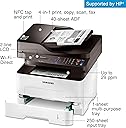
The HP Samsung Xpress M2885FW is a wireless monochrome laser multifunction printer that delivers professional-quality prints at speeds up to 29 ppm. Featuring NFC tap-to-print, automatic duplex printing, and an Eco button to reduce toner and paper usage, it supports seamless mobile and cloud printing. Ideal for busy home offices and businesses, it combines print, scan, copy, and fax functions with advanced ReCP technology for sharp, clear documents.


| ASIN | B00IQBT3VW |
| Additional Printer Functions | All In One |
| B&W Pages per Minute | 28 ppm |
| Best Sellers Rank | #898,800 in Office Products ( See Top 100 in Office Products ) #1,364 in Laser Computer Printers |
| Brand | Samsung |
| Built-In Media | 1 |
| Color | Black |
| Color Pages per Minute | 1 |
| Compatible Devices | PC, Smartphones, Tablets |
| Control Method | App |
| Controller Type | Vera |
| Customer Reviews | 4.0 4.0 out of 5 stars (349) |
| Display Type | LED |
| Dual-sided printing | Yes |
| Duplex | Automatic |
| Global Trade Identification Number | 00887276683508, 08806086051224 |
| Hardware Interface | USB |
| Ink Color | Black |
| Is Electric | Yes |
| Item Type Name | Laser Printer |
| Item Weight | 24.9 Pounds |
| Manufacturer | HP |
| Maximum Copy Resolution Black and White | 600 dpi |
| Maximum Copy Speed Black and White | 9 ppm |
| Maximum Media Size | 8.5 x 14 inch |
| Maximum Print Resolution Black and White | 600 dpi |
| Maximum Sheet Capacity | 250 hojas |
| Model Name | SS359D |
| Model Number | SS359D#BGJ |
| Model Series | Xpress |
| Number of Ethernet Ports | 1 |
| Number of Trays | 1 |
| Other Special Features of the Product | Auto Document Feeder |
| Output sheet capacity | 120 hojas |
| Paper Size | 8.5 inch x 14 Inches |
| Print media | Envelopes, Paper (plain) |
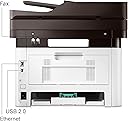
| Printer Connectivity Type | Ethernet, USB, Wi-Fi |
| Printer Output Type | Monochrome |
| Printer Type | Laser |
| Processor Count | 1 |
| Resolution | 4800 x 600 |
| Scanner Type | Sheetfed |
| Specific Uses For Product | Office, business, home office |
| Total USB 2.0 Ports | 1 |
| Total Usb Ports | 1 |
| UPC | 191628404216 |
| Warranty Description | limited warranty |
| Warranty Type | Limited Warranty |
| Wattage | 400 watts |
D**.
Excellent product, hard wireless setup unless you know the tricks.
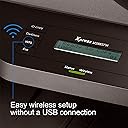
I went by the previous review and decided to do wireless setup by CD. That did not work, general error. After that, the wireless setup was gruelling... 8 hours with Samsung remote assistance "team". The printer arrived without instructions for setup and I tried to google video on youtube,,,no such luck. Did not think about googling out manual, called Samsung assistance. It was gruelling, time-consuming and my impression was that the call center was in India...I did not mind, but 3 people went by the same script with me to do a setup... the first person managed to do setup for one computer... and disconnected leaving a message that the setup was successful, and feedback page. I had to call back again because I had more than one computer and unlike what the first agent told me, the computers did not pick up the printer automatically after the first one was set up. The second agent spent 1 hour and destroyed the first connection as well as printer stopped picking up wi-fi (the green light went red),after which he disconnected saying it was the network provider's fault and we need to switch to lower bandswidth. The third agent tried insuccessfully to undo the doings of the second agent ,also said it was the network provider's fault and we need to switch to lower bandswidth , reset the router and pay for the network provider's engineer to come and set up the computer. She said the printer was not configured to work with high speed internet (incorrect information) and that if we want to keep the printer, we have to slash down our internet speed twice, and that the printer does not work with double widths routers- all turned out to be incorrect again, and that nothing could be done unless the router was reset from the network provider. Also incorrect. I ended up calling our Fios Verizon internet provider... and got some luck there. I do not know if that was a job of a person there to assist with setup, but he did guide me on the phone... and the setup turned out to be as easy as pushing WPS button on our router and WPS button on the printer, and after that it was like a miracle.... I could print from my both computers on any level, and print /scan to and from my iphone!!!! Samsung people, would you please slip a small note about internet setup pushing WPS buttons????? with the package???? will save you tons of time paying for call center services with inexperienced agents!!!! The product itself is excellent , I am really impressed. A welcome change from inkjet and stuck wet jammed paper, cleaning nozzles.... the process is smooth, the product arrived packaged with care, timely delivery, looks well designed and well made, not flimsy. I am not put off by top/down parts as some people do, I think it is quite functional... and our printing experience became a breeze. Very excited... But- the Fios Verizon technician saved me from returning the printer, which was on my mind after 8 hours with Samsung remote control team, after all, why would I keep the printer that would not print and the problem could not be resolved by Samsung technicians? I did not even know if it was some problem with something with the printer itself! But, with the Wi-Fi setup behind me... .I am so happy. And, it could have taken me less than 10 minutes had I known about WPS button. I think it's excellent product.And, I am excited about it printing wirelessly from any part of the house, and I was told that W models can only connect wirelessly to one device while FW models connect to multiple... I do not need fax, but multiple connectivity is worth keeping it.
D**T
Great Quality Printer
Frist I owned an Epson XP-310 that died within 2 years of light use. When I say light use, it was just used for school related projects. Second, I tried a Canon Pixma printer that took very poorly scanned images via the scanner. (Read below a possible fix for all scanners). Third, I owned an Epson XP-640 that came out with a firmware update rendering all aftermarket ink useless. Epson forces you to buy their extremely overpriced ink to line their pockets with gold. So now I own this Samsung printer who works alongside with HP. Basically, owning a monochrome printer will save me a lot of money on ink even if I had to buy Samsung's genuine ink. Hopefully Epson and Canon both get sued for forcing you to buy over-priced highway robbery ink while I own a monochrome printer. Printer-Wise This thing has very clean and crisp prints that even surprised me. Of course it's black and white, but it suits my needs just perfectly while not getting ripped off on ink. Scanner-Wise Ok here is the problem with this printer, and it's why I docked minus one star from my rating. Basically, HP is a useless company, and Samsung really should design their own software. Here is an in-depth explanation of my findings. I tried scanning on all DPI settings between 75 through 600. I tried all the advance settings that clean the images up one by one. I tried the upper tray instead of the glass. Every single scan was absolute trash. Blurry, dots, watercolor, and many other issues. So, with my diagnostic mind, I decided to make a copy which bypasses all the computer's software; therefore, it just uses the printer's built in software. The copy was absolutely perfect in every way. So there is a fix for this, and this fix could help people with other scanners of different brands as well. I purchased VueScan. ($40.00) program online. By using this software, which automatically detected the printer, I achieve perfect color scans of great high quality. Obviously, nobody really wants to buy extra software because this printer should come with the correct software; however, this problem was giving me a nightmare of re-boxing, shipping it back, and possibly having Amazing partially charging me for shipping. Not to mention other brands of scanners have crappy software as well. Overall, I'm happy with this printer, and im disgusted with Epson and Canon.
M**E
Finally a printer that just works. I can print from iPad/iPhone/Galaxy S4 without even installing any drivers (it just finds it on the local wifi and prints flawlessly everytime). You can even add it to 'Google Cloud Printers', meaning I can print my Gmail emails from anywhere I have internet connection. At the office and want to print your wife's boarding passes on the home printer? Click, click, done. Going throught your emails on your phone and want to print those tickets to that event ? Click, click, done. Want to save the planet and print Duplex ? Can easily be done from any of those devices. The printers wakes up from sleep automatically when it gets a job in the queue over WiFi. The setup was long as there is no keyboard to enter your WiFi key, so you have to do it touch-tones style (1,A,B,C,a,b,c,!) which can be infuriating (Thanks to my need for a 18 characters wifi key). It did once disconnect from my WiFi. I cycled the power and never had issues again. Great buy !
M**A
Only have had it a few days, and I love being able to print or copy two-sided at home, and also to use the toner saver feature when I don't need a super high-quality print. I don't have a land phone line, so the fax is of no use to me. I haven't yet tried the scanner, so I'm not sure if it makes PDFs for storage on a computer, but the associated phone app shows that option, so I'm optimistic. Oh, and with my android phone, I have the choice of printing via the "tap" function or just via wifi. My only reservation so far is that the instructions aren't always clear, so it takes a while to figure out how to do thing the first time. But that's a minor quibble about an excellent printer.
R**R
It was a great deal to have such printer in 150$ price range and have found the installation easy and ready to print. I particularly like two side printing to have paper.
S**T
Sold as described. Works fine. Prints well. Easy installation too !
I**.
| am technically challenged and this printer is super easy to use. When you scan it just saves it on your computer in document folder under scan. Printing can be done from my iPhone as well which makes it very convenient.
Trustpilot
2 weeks ago
3 weeks ago