Buy anything from 5,000+ international stores. One checkout price. No surprise fees. Join 2M+ shoppers on Desertcart.
Desertcart purchases this item on your behalf and handles shipping, customs, and support to Vanuatu.
๐ Elevate your network game with pro-grade power and flexibility!
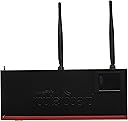
The Mikrotik Routerboard RB2011UiAS-2HnD-IN is a feature-packed router designed for tech-savvy professionals. Powered by a 600MHz Atheros CPU and 128MB RAM, it offers 10 Ethernet ports (5 Gigabit + 5 Fast Ethernet), an SFP cage, and dual-chain 2.4GHz 802.11bgn WiFi with external antennas. Its metal desktop enclosure includes a touchscreen LCD panel and supports passive PoE output, enabling you to power other devices via Ethernet. Equipped with RouterOS L5 license, it provides advanced firewall, scripting, and scheduling capabilities, making it ideal for users who demand robust, customizable network control.
| ASIN | B00BGIXOHQ |
| Antenna Location | Home |
| Antenna Type | Fixed |
| Best Sellers Rank | #83,947 in Computers & Accessories ( See Top 100 in Computers & Accessories ) #1,920 in Computer Routers |
| Brand | MikroTik |
| Built-In Media | desktop enclosure, two indoor antennas for wireless, power supply, touchscreen LCD panel |
| Color | Red |
| Compatible Devices | Personal Computer |
| Connectivity Protocol | Ethernet |
| Connectivity Technology | Ethernet, USB |
| Control Method | App |
| Controller Type | Application |
| Coverage | Within 2.4 GHz frequency band |
| Customer Reviews | 4.4 out of 5 stars 435 Reviews |
| Data Transfer Rate | 1000 Megabits Per Second |
| Frequency | 2.4 GHz |
| Frequency Band Class | Dual-Band |
| Has Internet Connectivity | Yes |
| Has Security Updates | Yes |
| Is Modem Compatible | Yes |
| Item Weight | 600 Grams |
| LAN Port Bandwidth | 1000 Mbps |
| Manufacturer | Mikrotik |
| Maximum Upstream Data Transfer Rate | 300 Megabits Per Second |
| Mfr Part Number | RB2011UiAS-2HND-IN |
| Model Name | RB2011UiAS-2HnD-IN |
| Model Number | RB2011UiAS-2HND-IN |
| Number of Antennas | 2 |
| Number of Ports | 10 |
| Operating System | RouterOS |
| Other Special Features of the Product | WPS |
| RAM Memory Installed | 128 MB |
| Router Firewall Security Level | drop |
| Router Network Type | wireless |
| Security Protocol | WPS |
| Special Feature | WPS |
| UPC | 739197078027 700175496140 643193935461 |
| Wi-Fi Generation | Wi-Fi 4 |
| Wireless Communication Standard | 802.11bgn |
| Wireless Compability | 802.11bgn |
T**T
Not your average router. AMAZING price for all the things this can do.
I am so amazed with this product. It's powerful, flexible, inside a robust metal case, sports external antennas, USB data access, ability to use web-based configuration, command line configuration, or Windows configuration program, and this even a touchscreen LCD panel built right in! The catch? You will have to learn how to use it. I am a standard user with a desire to tinker, so have been running DD-WRT (custom firmware) for my old WRT-54GL. I found that setup easy to use, even though there are many advanced features available, for the most part I could ignore them. Now, this Mikrotik product made me wonder if purchasing it was a mistake once I booted it up and logged into the interface the first time. There is a "quick set" feature that will preload many standard settings that will turn the Mikrotik router into your basic home router, where you plug in your modem on Ethernet port #1, and the rest of the 9 ports act as your local bridged network. With quick set, you can be up and running in no time, but the setup will be basic... and if you're looking at this router, I know you want to do some fun stuff with it. Want to do DDNS? You'll need a script+schedule to get that working. Want to do some port forwarding? You'll need to 1) allow access through the firewall for whatever port you want to use, and 2) create a NAT rule that handles this incoming connection on that port. Automatic backup to file on local storage + email you a copy? Make a schedule for it. And so on and so forth. This thing seems to be very versatile. So far, everything I want to do can be done, but you can't always assume it will be a simple task... or even straightforward. I know I'm barely tapping the potential of this thing, but as a hobbyist/tinkerer, it's been a good investment. Also, the RouterOS license that you need for this is built in. There are no licensing feeds - just buy the hardware and it works - unlike enterprise-class Cisco products, etc... I read that power users (e.g. those used to the aforementioned Cisco products) will have no problem adjusting to RouterOS. It's different, but if you are already messing with the high-class gear, you probably have a good idea of what you're doing. For basic users like me, it was more of a fun project, but can clearly see the potential of this device. Also, if you need help, the Mikrotik community is great. I've received so many scripting tips and troubleshooting techniques just by browsing the forums. Just take it slow and get to know the router. Treat it with respect and invest some time into it - it's different than what you're used to, but that's okay. You might even form a long lasting bond with this amazing piece of tech, ha! :)
A**T
Excellent router
With new fiber to the house, it was time to replace my old WRT54GL (running DD-WRT) with a more capable router, and this fit my needs. (I retired the old router to our AirBnB guest house and connected it to this one via a buried cable on its own subnet.) I run Linux Mint, and the WinBox software runs fine through Wine. There's also a web GUI, but WinBox is nicer as it has features such as drag-and-drop to reorder the firewall rules. Some features seem only accessible via the CLI. Speaking of the firewall, this one has a lot more features than the consumer routers. Using the firewall, I set up port-knocking so I can access my system from anywhere, while keeping all the ports stealthed. The firewall also secures my IP camera so it can't talk to China or anywhere else (except through my port-knocked connection), but it does track all of the addresses the camera tries to connect to. (So far, I've seen two addresses, both of which are listed online as abusive). The firewall is stateful, which allows me to add rules so I can connect from my main network to the guest network, but the guest cannot connect to my main network. I still have some more things to do. I'm working on getting OpenVPN working (also with port-knocking), and also planning to change my setup to use vlans to give me a little more control. There's plenty of nifty built-in utilities such as a traffic generator and packet sniffer. Built-in scripting is also a powerful feature. You can also run scripts on schedules. Firmware upgrades are super simple, and you can even write a script to update the firmware automatically as needed. There's also a lot of features I'll never use at home, such as MPLS and BGP. The router is small, runs cool, and the all-metal construction seems sturdy. Having 10 ports is handy. The router doesn't support the fastest WiFi speeds, but that's fine for my needs. Documentation is not as mature as for other brands, but the Mikrotik website has a wiki and a forum to help answer whatever questions I may have. Now I kinda wish all my routers were Mikrotik. Maybe one day... UPDATE (Jan 19, 2022): This router is still holding up and I've had absolutely no problems with it. I bought a cheap ($24.53) Mikrotik hAP lite for the guest house which I bricked somehow. Bought an hAP AC lite ($49) to replace it, which I also bricked. I think I'll replace the guest house unit with one of these. UPDATE (Jun 26, 2022): Still no problems with this router. And the two cheap Mikrotik's I mentioned earlier I got working again as well.
S**R
Complex piece of hardware, but very full-featured and appears to be of great quality
I took the chance and ordered up one of these so I didn't have to use my FIOS router anymore. About the only feature really "missing" would be 5Ghz wifi, as this is 2.4Ghz only. If you don't know what that means then you're probably not considering this router, though. One can always use a separate access point, as I do already, so if you need "AC" wifi, you can still have that. Is the setup complex? Yes, but no. There is an easy way to configure this through the browser, much like any other in a "quick" setup section where you can define your SSID, wifi password and encryption, and your router password. The first port would be the one you hook to your cable modem or other ISP box, though this can be configured to make it any of the ports deeper in the settings. As shown, there are 5 gigabit ports, and 5 10/100 ports. That's way more than most routers provide, and chances are you have plenty of 10/100 devices that won't use the gigabit speeds anyway. You can always configure your DHCP client port (the one that goes to the ISP) to be one of these, too. This also has a SFP cage, which you can use to hook up to a fiber connection if you have "fiber to the home" and it can be your DHCP client port even in the "easy" settings. This supports 1Gbps (10Gbps is another league price-wise), and you can even get a gigabit copper SFP adapter so you can have another gigabit Ethernet port for $20 or so. The USB port up front works with a provided "USB on the go" cable so that you can hook up either an external drive or a 3G/4G adapter to use for internet service, too. The router isn't even that big, really...its smaller than the FIOS one I had. It seems to perform well in my home, where I have this, a 5Ghz AP, and 3 switches, all filled up with about 20 Ethernet devices. The configuration options are very deep, and I look forward to learning about what they all do, but you don't necessarily NEED to fiddle with them. UPDATE: 2.5 years later, and this thing is just solid. I've never had to reset it unless updating firmware, and it will handle anything I throw at it.
I**E
Makes for a really good home router; possible wireless limitation.
Very strong router, endless capabilities. I'm used to dealing with DD-WRT, ClearOS, and pfSense. I turned this on and it operates a lot like any other commercial router. This isn't something to get for the typical person wanting a user friendly GUI. It takes some experience to set it up, or at least patience to find out how. I was a bit lost at but I did eventually figure it out. Basically if your used to a Linksys, Belkin, NETGEAR, or 2wire style interface, this isn't a router for you. It is powerful but you need to know how to set it to get the most out of it, isn't exactly plug-n-play. One thing to note, out of the box I'm only able to achieve 4-5MB/s [32-40Mbps] max transfer over WLAN. Took quite a bit of tweaking but I finally was able to achieve a 12.2MB/s solid from my server connected via gigabit. However, that is only 100Mbps on a single client over a 150Mbps Wireless N capable connection. If I download the file over ethernet, I get it at 123MB/s so I know it isn't my server or ports. I just can't seem to get any higher than this on wireless. Not sure if the wireless chip is binded to a 100Mbps interface internally and this is the limitation of it? Other than this small issue, I have replaced the antennas on it with coax terminations and have installed 2x9dBi antennas on the unit to increase the range a bit. However, same results persist with bandwidth limitation. Otherwise I'm not too bothered by it, definitely worth the money. I only use it as an access point instead of a router at the moment. Just was tired of my current router's 71mW and intennas.
X**S
Feature-packed, stable, and speedy! Perfect for the trained network adminstrator for their home or their workplace.
This router does so many things so well (e.g. VPN server/client, multiple DHCP servers, WiFi hotspot with real login capability, RADIUS authentication, etc.) with RouterOS that I just couldn't pass it up. This is the kind of router you would see at a small business or tiny commercial location, and it has the kind of reliability that you just don't see in more consumer-focused routers! I've been using this router for more than three years now and it hasn't failed me yet. WiFi is long-range, but cannot handle more than 30Mbps speed even at the highest level of signal strength. This is due to the particularities of 2.4Ghz WiFi, though this router will have no problem serving multiple clients at once. If you want more powerful wireless capabilities I suggest the Routerboard 922UAGS-5HPacD which I have also reviewed here on Amazon. The other mentioned Mikrotik router comes with a high-powered long-range two-stream 866Mbps 5Ghz wireless interface and I completely recommend both for SOHO-based networking requirements. The router usually ships with Router OS version 6.5 or later, but it was easy enough through Winbox (a GUI Mikrotik router management tool) to update to version 6.39.1 - the very latest as of this review. Same for the boot firmware, which often brings network speed improvements. For more information, check the change-logs available on the Mikrotik website. You'll find these routers to be supported for years to come by new and better features! The upgrade brought even more new features than before, such as more stable low-range wireless communication and faster bridged network transfers. For devices that have low-power radios or low signal, like my cell phones, the improvements have considerably improved coverage and speed even at negative-80-and-less wireless signal (which is visible from the management tool as well). For internal network devices like video servers or file-sharing, you'll find the new 'fast-path' and 'fasttrack' network transfer options to easily push 1Gbps without any drops or CPU usage by the router itself. The router comes with two switch-chips, connected to each set of five ports, which can drastically stabilize communication speed without any router overhead! This is a great thing for Internet communication because the router can max out 100Mbps+ with zero median speed difference. I have 100Mbps cable Internet and this router can push 100Mbps continuously to any Ethernet client without any problems or strange latency-related issues. The only issue I have with this is a lack of Mikrotik non-Wiki documentation, help system, or roll-over explanation but for someone like me who loves tinkering with all kinds of network equipment for home or business it wasn't really a problem. Less technical people may find the router configuration daunting, though you can purchase books on how to configure the router or hire someone if you really need help since Mikrotik has its own certified people to support their products. The only settings I had problems with were getting the WiFi to work (you have to set it to AP Bridge mode, not Station) and getting my cable ISP's modem to see the MAC address they needed to see so I could get a public IP (can only do that through the terminal console and not Winbox). The router provides 27-30dBm of WiFi power, or for those not versed in WiFi that's about 1 watt of power, which is more than many consumer-focused routers (often limited up-to 21dBm power). Clients may not be able to communicate at that high 30dBm power-level, but it can definitely help with range if you have clients that do support it like laptops and external WiFi cards (e.g. wireless-to-Ethernet bridges). One router is able to cover my whole house through several floors and walls, and if you have several of the same model configured on the same network and with different channels the routers can load-balance WiFi clients between themselves with no configuration changes or downtime. The router has 10 Ethernet ports: Ether1 (the first port) is taken for WAN connectivity in the default configuration for this router, 5 Gigabit Ethernet and 5 Fast Ethernet (1000Mbps and 100Mbps respectively) ports are available, though I would have preferred a bit of consistency here. There is an updated hardware revision called the Routerboard 3011UiAS that has ten Gigabit ports and more modern hardware, so don't forget to check the Mikrotik product pages for any new hardware releases! The Routerboard 2011UiAS-2HnD-IN internally has a 600Mhz processor which is absolutely great - with 20-50Mbps Internet traffic the CPU load barely reaches above 5% and even then that's only for a second. With 100Mbps Internet traffic, the CPU only reaches about 25% load which means the router can support even more bandwidth! Official figures quote the router at 200Mbps max, but with 'fast-path' and 'fasttrack' enabled supposedly the maximum is at least doubled (500Mbps). However, with my 100Mbps max Internet, this router is quite capable at handling that as well as any background traffic like port scanning or network attacks. You can configure port monitoring and automatically define blocked/allowed IP lists with firewall rules, and thereby protect the router against Internet scanning with almost no CPU or bandwidth impact! To explain further, with normal firewall rules (at the stage where data has already traversed the router destined for another device or network port), there is some slowdown with more than 25 rules. However, if you instead use the raw filter options (that operate as traffic is first seen by the router Ethernet port), you can minimize or reduce that slowdown to almost nothing, It also includes 128MB of storage space and 128MB of RAM - plenty for caching any kind of data such as DNS entries or computer files, or for upgrading the router on-the-fly. The router supports multiple partitions running different versions of RouterOS, so that way you can have a complete backup of another firmware version to downgrade/roll-back to if you encounter any problems, though it isn't done automatically. To restore an older version, you can simply boot up the other partition and continue working without any downtime! There is plenty of room for device updates, of which this router can support up to RouterOS v8 (as of now, the software is not yet out of v6, so there are several more years of updates available) with it's Level 5 license (normally about $100 or so, but included with the device). The software is device agnostic (but not CPU architecture agnostic), so you can update the router to any supported version as mentioned very easily using your preferred management interface. It even comes with an included fiber-optic Internet port (module for connectivity not included), though I don't have fiber Internet out here in rural West Virginia; the port supports up to 1Gbps or so I heard online. (I can't test it due to no fiber Internet service here.) The router does not reboot needlessly, nor does rebooting take more than 10 seconds. Other devices may need to reboot to apply configuration changes, but this router can reconfigure itself without the need to reboot (no matter how small the config change is or what part of the router it concerns, like wireless configuration or IP address changing). The only time you must reboot is if you want to upgrade the router, but you can choose to postpone rebooting indefinitely as the process is manually initiated. The router does not reboot under strain either, the worst that can happen is it starts dropping wireless clients if they have too-low signal or there is too much contention going on, but you can minimize this with multiple Mikrotik wireless routers like I am doing. I have three of these routers now and they operate a mesh wireless network for my entire house - no problems whatsoever to report! There is a web interface for this router, but I never used it because I prefer the client software Winbox for management (it exposes all the features of this router without any need for continuous page refreshes). The alternative SSH command-line interface (and the web interface) are easy enough to navigate since they match up with the Winbox management layout completely. This is the router brand that you should make your next purchase, I promise you will not be disappointed!
C**E
Pretty and Worthless?...No! Just Worthless and a PITA
I wrote a bad review when I first started using this wireless router because it kept needing to be power cycled to keep working properly. After reading all of the rave reviews from professional network engineers I thought I would retract my negative review and wait a few months and review it again. Well I have given this router all of the chances in the world and the bottom line is I find it to be unreliable. It constantly needs rebooting and I believe the rest of you are obsessed with your acceptance of the RB2011UiAS to the point that you would rather die than say anything bad about it. What good is a Swiss Army knife that is unreliable when you need it most. I don't believe I have a defective unit, it is configured properly and I am tired of all the rave reviews saying the negative reviews are unjustified. Do not buy this for wireless use. Maybe it's great for hard wired but wireless will have you calling it a PITA in no time at all.
D**R
Fast router, lots of options most won't need. Model I got has endless reboot problem.
I got this because my existing home router was very laggy when attempting to use the in-home streaming feature of the Steam gaming platform client. On the cisco branded linksys router, I would get messages about slow network and lots of lag when attempting to play a game on my surface pro that is streamed from my desktop gaming pc. When I switched to this router, I was getting FANTASTIC performance, and found it was as good as playing at the PC it was really running on. Pros: For feature set, quality, and speed, best bang for buck. Has a downloadable client that can be used to manage device. Very Robust CLI, although quite a bit of learning curve Gigabit ports, POE, SFP, and advanced layer 2/3 features? more than a home user would need, but this could make it great for a small business. Cons: BIGGEST con: Despite having the most up to date firmware and OS, it would randomly reboot. I downgraded and still had problem. I don't know if this is a problem with specific runs, or certain unstable images that they give out. It seems this issue happens on a lot of different models/OS versions. This makes it a non starter for any business, and extremely annoying for home user. I am returning mine and will get another one, but perhaps a different model, and we will see. This is the reason why I am docking 2 stars from it. Only one status LED per port, and instead of indcating port status, they indicate activity, which means when in use they blink constantly, which is highly annoying. This cannot be changed. There is a section in the RouterOS web menu and client for changing this, but it is unclear, and according to online documentation not supported. I see no excuse for this. For home user, probably a little bit more aggravation setting up. For someone a bit more technically inclined, this will give a major performance reliability boost over mainstream consumer routers (provided you don't get the reboot issue like I did) For professional user, would still require a little learning curve Documentation isn't always completely clear, I feel they would benefit from having an english fluent technical writer.
S**A
Great router, lots of configurability - if you can figure it out (it will take work).
Oh boy, what to say. This is a full featured router, but you really have to be willing to learn some tech to figure it out. It runs RouterOS, which is basically a command driven OS, and you can configure the router in all sorts of incredible ways *IF* you can figure out what you are doing. It comes with a few basic cases you can start with, and modify from there. I started with "Home Router" with a guestnet, and then proceeded to make all my devices have a static IP onces they logged on. Most things (I guess) can be done via GUI, but the GUI is literally just that: It's a window with a table of lines of things that you have to sort out what to put there. There's lots of info on line, some good, some bad, most not very explanatory unless you are a network savvy user. By that, I mean you know how, for instance, traffic is controlled, how queues work (or what they are), and have time to experiment. I was hoping there would be more "example configurations" on line, and there probably are somewhere, but the forums at Mikrotik are most of whats out there, and it's fair enough that "you are going to have to learn how to configure this thing". To be clear: This is a very powerful router. Even in it's basic configuration state with a few of my tweaks I find it worth it. But I still haven't configured a few things I'd really like to because of confusing examples - or perhaps more explicitly my thick skull goes a bit numb looking at some of the larger examples (I'm thinking specifically quality of service here - if QoS is important to you you *probably* want to get a router than has a nice gui with this setup for a simple user - unless you really really want to learn how network traffic works). In summary: Pro: Good router for the price. I get good wifi service - and it's really handy to see where network traffic is going in the router Lots of configurability - if you take the time to learn, you will be a router expert. Scary to look at logs and see how many login attempts and attacks get turned away The preconfigured cases are probably good enough for most people Con: Some features I want are clearly there, but oh boy I can't quite figure out how to set them up. Lots of examples from different revisions make it confusing. You won't be able to configure this exactly like you want without some elbow grease. Unless you want to get into the guts of routing - you are probably better off with a router targeted towards home users. EDIT 1: The antenna on this unit are *NOT* user replaceable (not easily anyway). You have to disassemble the unit, unsolder the old antenna connection, and solder new ones on to you knew antenna. There's is some discussion on the mikrotik forums about this: answer from mikrotik is uniformly "if you want to use your own antenna, by own of our open board units" (where you make your own case, etc). The range is pretty good already, and if you seriously need heavy long range wifi, you probably want to consider a mesh or stand alone wifi unit.
F**L
Genial
Un buen equipo burn rendimiento
J**S
No tira para 300 megas o mas
El procesador del router tira poco y te obliga a apagar el lcd para ganar recursos en caso de 300 megas, que fluctuan como si de una adsl se tratara... no recomendado para enrutar mas de 150 megas..
P**H
My quest for a powerful router has finally ended!
What an awesome router! With the burgeoning number of phones, tablets and laptops at home and with a fairly large family at home, it's been really difficult for me to keep track of the bandwidth hogs on my network. Earlier I used Tomato on an Asus RTN12 for this purpose, but it just wasn't stable enough and there was no persistent storage (no USB port and too little free space om Flash/NAND). With the RB2011UiAS plus a few simple queues and static DHCP leases, DL/UL consumption is recorded for each individual device and I can see the trends on an hourly/daily/weekly/monthly/yearly basis. Based on this, each device is being throttled independently :-) I've also enabled transparent proxy (with generous caching configured on a USB memory stick) on the Mikrotik router to reduce internet bandwidth usage and without having to configure each and every device with the proxy details. Wi-Fi signal strength is awesome and covers the entire house (G+2). The LCD has been configured to show PPPoE bandwidth graph always. I'm currently trying to get the router to beep differently whenever certain devices arrive on and leave the Wi-Fi network ;-) The 224 unique IP address that I have recorded attempting to hack my router via Telnet, SSH, Web and HTTP (28,000 attempts over the past two and a half days, yeah that right no typos here!) have been merrily sent to the tarpit via a few simple firewall rules. Maybe I'll flood ping them back with a script if I'm bored ;-) ... and I've just scratched the surface. If there is a con (not really so if you're a networking expert), it's that simple things can require quite a iut of head-scratching and googling to get to work. But once you hit the forums and read the Wiki, you'll get it working soon enough.
B**R
plus de puissance
Difficile a parametrer mais bon produit. Nous avons du nous faire aide par un informaticien qui a aussi eu du mal a le parametrer
C**.
Insane functionality at an insanely low price.
Great router for the price. Has Gigabit, SFP, and PoE in a $150 router! The functionality is huge as well. I went through 2 Asus AC3200's that were more than twice as expensive in one year. This was my replacement and I'll never go back.
Trustpilot
3 days ago
5 days ago