Desertcart purchases this item on your behalf and handles shipping, customs, and support to Vanuatu.
✂️ Label like a pro, wherever you go!
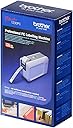
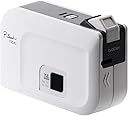
The Brother P-Touch PT-1230PC is a compact, PC-connectable label maker that requires no software installation. It prints durable laminated labels up to ½ inch wide in multiple lines with graphics and TrueType fonts. Featuring USB connectivity and a built-in manual cutter, it offers quick, professional labeling for home or office. Powered by 6 AAA batteries or an optional adapter, it’s designed for portability and ease of use.
| ASIN | B001IKKIVM |
| Additional Printer Functions | Print Only |
| B&W Pages per Minute | 2.76 pages_per_minute |
| Best Sellers Rank | #502,027 in Office Products ( See Top 100 in Office Products ) #905 in Label Makers |
| Brand | Brother |
| Built-In Media | User's Guide, USB cable, TZ tape (1/2" Black on White Laminated Starter Tape) |
| Color | White/Gray |
| Color Depth | 1 bpp |
| Compatible Devices | PC |
| Connectivity Technology | USB |
| Control Method | App |
| Customer Reviews | 4.4 out of 5 stars 216 Reviews |
| Display Type | LCD |
| Duplex | Manual |
| Global Trade Identification Number | 00012502621041, 04977766659994 |
| Hardware Interface | USB |
| Ink Color | Black |
| Item Weight | 180 hundredths pound |
| Manufacturer | Brother Printer |
| Maximum Copies Per Run | 200 |
| Maximum Copy Resolution Black and White | 180 dpi |
| Maximum Copy Speed Black and White | 2.76 pages_per_minute |
| Maximum Media Size | 1/2 inch |
| Maximum Print Resolution Black and White | 180 dpi |
| Maximum Sheet Capacity | 200 |
| Model Name | P-touch® PC-Connectable |
| Model Number | PT-1230pc |
| Model Series | P-touch |
| Number of Drivers | 1 |
| Number of Trays | 1 |
| Other Special Features of the Product | Compact |
| Output sheet capacity | 200 |
| Paper Size | 12 millimeters |
| Print media | Labels |
| Printer Connectivity Type | USB |
| Printer Output Type | Monochrome |
| Printer Type | Thermal |
| Printing Technology | Thermal |
| Resolution | 600 x 600 |
| Series Number | 1230 |
| Special Feature | Compact |
| Specific Uses For Product | personal |
| Total USB 2.0 Ports | 1 |
| Total Usb Ports | 1 |
| UPC | 069060123371 012502621041 777780497329 |
| Unit Count | 1 Count |
| Warranty Description | Manufacturer's limited one-year warranty. |
| Warranty Type | limited warranty |
R**H
Very nice label printer
I have bought 2 of these units and love them. I've seen a few people complain that they could not register to download the software from Brother's site. That's because they didn't open the unit and find the serial number under where the label cart. goes. I was able to download the extra software and it runs fine with the unit. Even the included software is pretty nice. One thing I love is that there is no install needed for the basic software. The printer acts as a flash drive with the application embedded. SO it's easy to take it w/ you and connect to any windows (XP or newer) machine and start printing. I got my units for ~20 each and I couldn't be happier. You will need 6 AAA batteries, but that not a big deal.
D**N
Very fun...
I purchased this just to label a few things around the house. I must say, once I got this working I have been having a blast with it. To start with I will describe the problems I ran in to. After installing 6 AAA batteries (or a 7-9v DC power supply) and then plugging it into my Windows 10 64bit PC with the supplied USB cable, a Window explorer popup showed an executable to run (simple edit/printing software for the device). I then double clicked the executable which launched their software, however when I typed information in to the label box and clicked print it ejected about two inches of label with nothing on it. I double checked everything and tried again with the same results. At this point I Googled “PT-1230PC downloads” and found a link to support.brother.com which had drivers and the full Editor software. I installed the drivers which I believe corrected the problem however after the driver install, the Window explorer popup showing an executable no longer worked. Because I could no longer run their simple program from the popup I installed the “FREE” full version from there web download which worked and printed perfectly. So, now that their drivers and full software application is loaded and working perfectly I have been able to play with it a bit. By default, the full program opens in a tab called “Express”. This tab gives all the basic features you need to print a label however if you’re a power user, switching to the “Professional” tab gives a lot more options. Some of these options include Word Art, Bar codes, easier access to layouts, and much more. Long story short, in my case I had to load their drivers and full software program located on their web site. I have had a lot of fun printing labels and for the price I am really enjoying this handy label maker. I have used hand held label makers in the past which are very time consuming – I would buy this over one of them any day.
R**T
Great printer, but power supply is weird.
The printer is nice, compact, works fine, but has a major problem with power. You either have to use batteries, or external AC adapter. Device does not powers from USB. And the problem with external AC adapter is that it uses reversed pins and 7.5V voltage, which may be not easily obtainable at cheap side. I found that power adapter for certain Panasonic DECT phones works fine with this printer, and can be obtained for much cheaper, than the original Brother AC adapter.
R**.
GREAT PRODUCT GREAT PRICE
This is a great product for those of us who like to believe that this will help us organize our life. I paid $12 at Amazon but have seen it retail for as much as $50 at the Staples of the world. Wait for the price drop on Amazon it fluctuates wildly. Simple and easy to use, wont pay extra for the automatic cutter. it also does graphics and has the software built in, great for net books where there is usually no optical drive. Look out for the price of the cartridges, that is where they will try to get you. Buy them on line and you will save a bundle at least 50 percent
T**Y
BEST BUY FOR PTech Printer.
I've been using the Brother Ptech line of printers for years -- the hand held variety. (1) The unit is small so you have to be careful to place it where it won't be knocked over. (2) It takes 6 AA batteries, so be sure to buy a (third party) 9 v AC adapter. (3) It has a short USB cord. This is the standard mini USB to standard USB cord, so buy a longer cord with a length suitable for where you will place the printer. (4) Download the extended editor software from the Brother site. It is VERY POWERFUL in what you can do and comes with lots of templates. You can insert pcitures in your labels. This is the reason I switched to the 1230 from the handheld unit. With this you can also print multiple labels w/o a long wasted label space between labels. It will print cut lines for you. (5) As usual, the PTech labels have an easily removable (blue) paper mount on the back to protect the sticky stuff. They come in a wide variety of print colors, tape colors (including transparent) and widths. (6) If you don't use the AC adapter, use rechargables. Never the less the printer will shut off after idle time to save power. This vendor sold the unit at a very competitive price, packed it well, and it arrived ahead of promised date.
S**R
FANTASTIC! ...still wastes tape like all of them
This is the best value, smallest profile, and FANTASTIC label printer! I'm an onsite Network Administrator and we live by our labels. No more hunting for symbols or searching through menu after menu to change settings. I use a lot more formatting options and save a lot of time with this. I worry about it turning on by accident as they should have put a delay on the power button. However, I do like that it automatically shuts off to save batteries. Can't wait to get a tablet or phone to work with it. I was hoping I could force the margins down as it STILL wastes a TON of material. Plan your labels and print them all at once, cut them manually, and you'll get a lot more out of them.
A**R
Good Enough
This label maker works alright, but it is no rival for the Brother PT-18R that I use at home. I purchased this because I wanted something inexpensive (state universities are not exactly rolling in cash these days) that could sit on my desk without taking up much space. I also liked the idea that I could type the labels on my computer keyboard. However, this model is quite limited in what it can do, and I'm not sure that I would buy it again. I would be much happier (probably up to 4 stars, considering the low price) if Brother provided a Linux version of the software. Someone out there has written a rudimentary linux program to drive this label maker, but I tried it and the quality of the print is poor (low res). I couldn't figure out how to fix this problem without hacking the code myself, and I really cannot justify putting time into that, particularly without any guarantee of success. As a result I have to run the Brother software in Windows, with Windows running as a guest operating system in a virtual machine on my linux desktop. Since I rarely use Windows for anything else, this is a lot of overhead just to make a label. Even running the Windows software, this labeller is limited and I sometimes wish that I had purchased the next higher up model (PT-2430 PC), which I gather has more capabilities. But then I would be getting into the price range of the PT-18R, which is much more versatile and doesn't take any more desk space.
W**R
A good, inexpensive label maker...
I have been using this for over three years without any problems. Rather than repeat the information here, you should read the reviews which tell you how to avoid wasting tape...they'll save you a lot of money. If you're going to print a lot of labels, you also should purchase the external power block. This printer burns through batteries at an amazing rate, and with six batteries per refill, gets expensive fast. Don't even think about using a power block off some other piece of equipment...I must have fifty of them around here that aren't being used and NONE ARE COMPATIBLE! (Brother wired the + connection to the shell and the - to the center pin. Everybody else is the opposite.) As a label printer, though, this is great. The labels are pretty much indestructible. Among other things, I use them to label my tomato cages, where they're exposed to the (California) weather all year round. They're still legible and stuck to the wire the next summer. I've stuck them to wood blocks, coated them with different types of finishes and they held fast. Putting them on a file tab is nothing in comparison. You should download the latest P-Touch software from the Epson website. It's much more versatile than the software that's built into the printer. It'll also drive other Brother label printers, like the QL-570, which I use for envelope labels. Highly recommended.
M**R
Praktischer Helfer
Ich nutze dieses Gerät hauptsächlich um Gegenstände eindeutig auch mit einem Logo und weiteren grafischen Symbolen beschriften zu können. Schön ist daran, dass zum einen keine eigene Software installiert werden muss und dass zum andren jede auf dem System installierte Schriftart und Grafik (monochrom) verwendet werden kann. Natürlich ist der Verschnitt am Anfang und am Ende des Ausdruckes nicht optimal, aber wenn man seine Ausdrucke in bisschen im Vorhinein plant, kann man diesen durchaus minimieren. Alles in allem ein sehr praktischer Helfer, welchen ich nicht mehr missen möchte.
S**E
Worth the price !
Work amazingly. Can design my own icons and print them!
P**H
Replacement for my old printer.
Works as it should..
L**T
The narrow tape is perfect for labelling small component bins/drawers (2-inch length
This has been a fairly solid unit at our electronics lab for a while—where we label a _lot_ of equipment, components and projects. We've mostly used the built-in software, and it's adequate for what we do (two-liner text labels of part name and some basic specifications, mostly). The narrow tape is perfect for labelling small component bins/drawers (2-inch length, the drawer tab is exactly the height of the tape for ours). It's a lot nicer being able to use a full keyboard, see what the label is going to look like, be able to nudge text left and right, rather than trying to make labels on a cramped little mushy keyboard for non-USB label makers. It was 100% plug-and-play on our computers (Win7). It comes with some internal read-only memory that has the label-making programme installed, so you just have to click the EXE and go! (Be nice to your IT people: scan for viruses first.) You can also download the full label-making programme off their website, which I understand has more features, but we didn't see a need for this. The unit wastes about 1 inch on each end when printing/cutting. To counteract this, we've been printing as many labels as we can fit on the 300mm maximum print length, with less space between each label, and cutting them by hand. The tape is split on the back, so it's fairly easy to remove; the tape tends to curl up, which makes it slightly harder to place. It does not come with an AC adapter, and we found batteries to die far too quickly, especially since the unit might be powered on for an hour or two while we sort parts into bins, collect info about them to put onto the label, and then print out and cut a bunch of labels. We're going through way too many batteries. The official AC adapter is expensive. The input plug is a standard 2.1mm ID 5.5mm OD DC jack, but it's center-negative, which we didn't have in the lab (electric musicians out there: most effects pedals are center-negative 9V supplies), so we cut off the plug and put a new one in with reverse polarity. Minor nuisance, I guess it's so that customers are more likely buy the official one when an aftermarket centre-positive supply doesn't work.
L**M
Five Stars
So easy to use, great investment for my office.
Trustpilot
2 months ago
4 days ago