Buy anything from 5,000+ international stores. One checkout price. No surprise fees. Join 2M+ shoppers on Desertcart.
Desertcart purchases this item on your behalf and handles shipping, customs, and support to Vanuatu.
🖨️ Classic tech, modern hustle — print smarter, not harder!
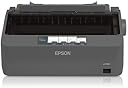
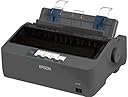
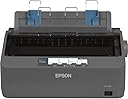
The Epson LX-350 is a robust 9-pin dot matrix printer delivering up to 347 characters per second with a durable design boasting a 10,000-hour mean time between failures. Featuring versatile connectivity through parallel, serial, and USB interfaces, it’s optimized for continuous and multi-part stationery printing in busy office environments. Its compact footprint and energy-efficient operation make it the go-to choice for professionals who demand reliable, cost-effective printing without compromise.
| ASIN | B00EUEDLWG |
| Additional Printer Functions | Print Only |
| B&W Pages per Minute | 6000 |
| Best Sellers Rank | #165,068 in Office Products ( See Top 100 in Office Products ) #7 in Dot Matrix Computer Printers |
| Brand | Epson |
| Built-In Media | Toner Cartridges |
| Color | SP LX-350 DOT MATRIX PRINTER |
| Color Depth | 24 bpp |
| Compatible Cartridge | 4000000 characters Black Draft |
| Compatible Devices | PC |
| Control Method | Remote |
| Controller Type | Push Button |
| Customer Reviews | 4.2 4.2 out of 5 stars (91) |
| Dual-sided printing | No |
| Duplex | Simplex |
| Global Trade Identification Number | 08715946522043 |
| Hardware Interface | Serial Interface |
| Ink Color | black |
| Is Electric | No |
| Item Dimensions D x W x H | 10.83"D x 13.7"W x 9.04"H |
| Item Type Name | SP LX-350 DOT MATRIX PRINTER |
| Item Weight | 4100 Grams |
| Manufacturer | Epson |
| Maximum Copies Per Run | 4 |
| Maximum Copy Resolution Black and White | 240 x 240 dpi |
| Maximum Media Size | SP LX-350 DOT MATRIX PRINTER |
| Maximum Print Resolution Black and White | 240 x 240 dpi |
| Maximum Sheet Capacity | 100 |
| Model Name | SP LX-350 DOT MATRIX PRINTER |
| Model Number | C11CC24001 |
| Model Series | LX |
| Number of Drivers | 1 |
| Number of Trays | 1 |
| Other Special Features of the Product | Compact |
| Output sheet capacity | 100 |
| Paper Size | SP LX-350 DOT MATRIX PRINTER |
| Power Consumption | 27 Watts |
| Print media | Paper (plain) |
| Printer Connectivity Type | Wired |
| Printer Output Type | Monochrome |
| Printer Type | Dot Matrix |
| Processor Count | 1 |
| Resolution | 240 x 240 dpi |
| Specific Uses For Product | Office |
| Total Usb Ports | 1 |
| Unit Count | 1.0 Count |
| Warranty Description | manufacturer |
| Warranty Type | Limited Warranty |
| Wattage | 27 watts |
A**S
Works great, and works on Mac, but CUPS driver sucks
The printer works on Mac and Windows, but it's a little quirky to get working through no fault of the printer. On the mac you have to manually set it up as Epson 9 pin, which uses the cups drivers (from linux). For windows, it includes a driver disk. You then need to set the highest resolution in the printer settings advanced options. I had no problem getting it printing on the mac, but found if I printed directly from chrome, the quality was terrible..not readable. If I printed directly from a web browser on windows, the print was garbed and page size completely wrong, even WORSE than on the mac. This has nothing to do with the printer and everything to do with the applications. Saving an image to the desktop and printing with the system dialog showed much better quality for both mac and windows. Printing plain text directly to the printer (bypassing the device) using lp -o raw filename.txt shows that the print quality is actually very good. Printing from applications such as notepad or textedit worked fine and the text was crisp and clear. So there are some issues with some applications which prevent it from printing as well as it could. To be fair it's not claimed to be supported on the mac, so I am happy just to be able to print to it. I print a lot of code, manuals, etc and don't want to waste toner on my laser printer for temporary printouts. For printing large amounts of data cheaply which doesn't need to look pretty you can't beat a dot matrix. Attached is a photo of raw text printing using lp -o raw filename.txt and also a photo of the same text formatted by the print driver using lp filename.txt. You can see the raw print is much smaller and sharper. One other issue is that you cannot print PDF labels correctly because the bar codes are unreadable. This is the fault of the CUPS driver, which seems to be trying to print greyscale by dithering even when the image is monochrome. I've tried converting the image to black and white (1 bit) TIFF, and still when I print, the bars are dithered and not solid. This is pretty frustrating because it's the only thing holding this printer back from being my daily driver printer. If I could just print labels correctly I'd safe myself a ton on Laserjet cartridges. The printer has the resolution but the cups drivers (in this case Apple's version) prevents it from working correctly. Tested in MacOS High Sierra, Catalina, Big Sur, and Windows 7.
R**N
Great printer
Have a vintage computer system and needed an old school printer to go with it. Most new printers only have USB and I needed old school parallel port connection. This one works great. Ribbon was dried out but sewing machine oil can be used to revive it back to work again. I love this printer! Has tractor feed for continuous paper.
P**Y
Good printer.
Good printer for specific uees. Price is reasonable.
L**E
Works Great! Using it with Python and Linux.
Printer works great! I am controlling it using Python on Linux to print out line-by-line within a program using the Epson ESC/POS commands (with the python-escpos library). Commands are easily sent over the USB interface and the printer works excellently for text. Not as sharp resolution as the old 24 pin dot matrix systems, (so graphical items aren't great) but the built in text/font options are very legible. The biggest trick to getting good text out of it is using the built-in fonts (Linux GUI on its own was not doing this out of box, so blurry text results).
A**.
Works great
It actually works very well .. and we use it a lot .. gonna get another one .. cause my other one is 40 years old .
S**N
Dot matrix printer yay! Free at last!
For the money, for a 9-pin, the print quality is fine. I've been using inkjet printers for years and years and always hated them. The expensive ink cartridges that never last and dry up drove me crazy. So nice to have a ribbon printer again. I feel liberated by this little dot matrix printer. See the video I uploaded. The tractor feed mechanism is fine. Seems to be a good little printer.
O**S
Bueno
Ok
R**.
Poor Customer Service
I purchased this item on September 1 2021. On November 1st the product quit working. I called about warranty and was told it had a two year warranty. Had to call and they tell me I have to send to a repair service center and the closest one to me is 100 miles away. Called them and was told I would need to mail the printer to them me paying for the shipping and also paying a $50.00 charge for them to look at printer and determine if it is under warranty. If it is determined to be under warranty they will reimburse me my shipping and $50.00. So not only am I out the money I paid for the printer I have to pay shipping and $50.00 until they decide to reimburse me and also the time that it takes to get repaired. I believe that I am loosing all the way around. Who is going to pay me for the downtime and my expense for gas and travel so send this to a service center?
Trustpilot
2 weeks ago
2 months ago