Buy anything from 5,000+ international stores. One checkout price. No surprise fees. Join 2M+ shoppers on Desertcart.
Desertcart purchases this item on your behalf and handles shipping, customs, and support to Vanuatu.
๐ Elevate your workspace with WiFi that works as hard as you do!
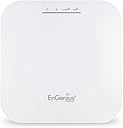
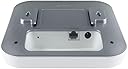
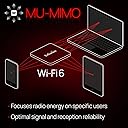
The EnGenius EWS357AP is a professional-grade WiFi 6 AX1800 access point delivering up to 1.73 Gbps wireless speeds with advanced OFDMA and MU-MIMO technologies. Featuring a PoE+ port for streamlined power and data delivery, 1GB RAM for robust multi-user performance, and license-free management tools, itโs designed for modern businesses seeking reliable, high-speed connectivity in a sleek ceiling-mount form factor.


| ASIN | B07Q59N1VY |
| Antenna Location | Business |
| Antenna Type | Fixed |
| Best Sellers Rank | #832 in Computer Networking Wireless Access Points |
| Brand | EnGenius |
| Built-In Media | 1 x Ceiling Mount Base (15/16" Trail), 1 x Ceiling Mount Base (9/16" Trail), 1 x Ceiling and Wall Mount Screw Kits, 1 x Quick Installation Guide, 802. |
| Color | White |
| Compatible Devices | UNIVERSAL |
| Connectivity Protocol | Wi-Fi |
| Connectivity Range | 328 Square Feet |
| Connectivity Technology | Wireless |
| Control Method | Remote |
| Controller Type | Switch |
| Coverage | 328 feet |
| Customer Reviews | 4.3 out of 5 stars 318 Reviews |
| Data Transfer Rate | 1 Gigabits Per Second |
| Frequency | 5 GHz |
| Frequency Band Class | Single-Band |
| Global Trade Identification Number | 00655216009479 |
| Has Internet Connectivity | Yes |
| Has Security Updates | Yes |
| Is Modem Compatible | No |
| Item Type Name | Wireless Access Point |
| Item Weight | 1.3 Pounds |
| LAN Port Bandwidth | 1000 Mbps |
| Manufacturer | EnGenius Technologies} |
| Maximum Upstream Data Transfer Rate | 1200 Megabits Per Second |
| Mfr Part Number | EWS357AP |
| Model Name | 802.11ax WiFi 6 2x2 Managed Indoor Wireless Access Point |
| Model Number | EWS357AP |
| Number of Antennas | 2 |
| Number of Ports | 1 |
| Operating System | ZyNOS |
| Other Special Features of the Product | Internet Security |
| RAM Memory Installed | 1 GB |
| Router Firewall Security Level | True |
| Router Network Type | Wireless |
| Security Protocol | WPA3 |
| Smart Home Compatibility | Smart Home Compatible |
| Special Feature | Internet Security |
| UPC | 655216009479 |
| Warranty Description | 1 year Manufacturer |
| Wi-Fi Generation | Wi-Fi 6 |
| Wireless Communication Standard | 802.11ax |
| Wireless Compability | 802.11ax |
J**N
Easy to set up, just works
I can strongly recommend this for a technical audience. If you know what a spanning tree is, the difference between a router and a switch, and how to configure a static Windows/MacOS/Linux network interface, why an AP might wish to convert multicast to unicast, then this is a product for you. If not, expect a learning curve. I got the EnG 30W PoE injector with this. Simply plug in the laptop (or computer) into the PoE LAN port, the AP into the PoE port, configure the ethernet interface to 192.168.1.10/24 and connect a browser to 192.168.1.1. No internet access needed; fully configurable in isolation. Go through the settings; Basic for LAN setup (you want the AP to use DHCP to get an address for its management interface; it's still a switch however). Switch to Wifi and set up the dual radios, 2GHz and 5GHz. Enable AX. Enable beam steering (yes!) if you want. Enable spanning trees. And of course change the admin password. Hit all the saves and apply buttons. Watch it generate Linux files (it will show you Linux config diffs!) and restart services. Unplug the ethernet from your laptop, plug into LAN and done. Just works. Then go find its DHCP lease on your DHCP server (for the management interface) if you want to access it again. I will probably give it a static address on my 10 net outside the DHCP range. It's an EXCELLENT product for a technical user. Straight to it, no marketing mumbo-jumbo. And for a $130 with the PoE injector added. That's a good price IMO. Assuming it's reliable it'll be one of those infrastructure piece that just works until it's retired because it's technically obsolete rather than fraught with an endless parade of problems (Netgear, looking at you here). They do seem to also offer integration with more IT-friendly management platforms/tools, since obviously if you have 20 APs in a building you can't realistically manage them using a laptop and ethernet cable. But for us techies, ethernet and a browser is just right. It can sit on a surface like a shelf when used with a tablet stand. I attached an image where it's on an Amazon Basics tablet holder (the Amazon part is B006ZT4VA0; go to any product listing and paste it into the URL in lieu of the one you're looking at).
T**Y
You get what you pay for.
I have installed 10 of these wifi6 AP EWS377's since they have been released in business environments. Anyone who does wireless installs for a living understands the fact you need to do a Wi-Fi site survey first to see what the current Wi-Fi environment is like before you install any Wi-Fi enabled device in a business or even your home. Most access points use manufacturer defaults and have very little adjustment of the AP radio settings. This unit is fully adjustable on both Radios and needs to be adjusted for for best performance and radio channel utilization that are not congested in your environment when doing the install. Its 2.5ghz gigabit Ethernet port is huge advantage when using it with IEEE 802.3BZ smart rate ethernet switches for maximized backplane bandwidth. WPA3 is fully supported for the new Wifi6 AX standard. Before doing any config changes you need to update the firmware FIRST!!! Then configure your AP. If you have worked with these AP's for the last 10 years then you would understand why this is important. All the bad ratings on this device can be explained and or usually resolved with the latest firmware update then a complete reset afterwards, then start the devices configuration. All the numerous channel options are great to get this to run in a bad Wi-Fi environment.. I have seen some pretty crappy environments with over 75 AP's being detected and flooding the same channels and people wonder why their Wi-Fi sucks. YOU NEED TO SCAN YOUR WIFI ENVIRONMENT FIRST!! I install Aruba, UBNT, Cisco and other access points and for the money, with this devices mesh capabilities it is a great Access point and I have not had a single issue with any of the 10 units I have installed . These devices can support 50 devices easily when the correct configuration is used and the resulting Wi-Fi network experience is 100% reliable and fast. I am blown away why people are so hung up on VHD160 on access points in a home. 5G works best with 40 and 80 wide channel width. Also the wider you set the channel bonding width the range of the access point is substantially decreased through walls and floors. This is a proven fact. You don't need 1200mbps or 1600MBps on a device to stream video or for video conferencing, Roku, firestick or any other streaming device. Zoom only uses 1.5mbps at 1080p. Even streaming 4k 60 frames is done with 35mbps. Not to mention any Gigabit switch port only supports 1000Mbps unless it uses IEEE 802.3 BZ multi-rate technology. I highly recommend these and once again for the money they are a great WIFI 6 option, and also they are extremely well made and when installed properly are almost bulletproof.
P**7
Finally. Reliable and affordable AP. Perfect for Home use.
First impression (8/6/20). Positive: Very, very, very strong 2.4 GHz signal (impressed! resolve all IoT and old "n" wifi TVs connections issues all over the house) and strong 5G GHz. Easy setup. Not dependent on "cloud" or controllers. Updated to current 3.7.4 firmware version - fast and easy. WiFi security options: WPA2, WPA3, WPA2/WPA3 - each Personal or Enterprise. Easy select 2.4 or 5 or both for each of 8 possible SSID. Very stable connection. Switch to this from UniFi FlexHD which gave me only problems and so far pleased. NO fancy interface here - but no issues nether. 5G speed (tested on iphone XSMax, AC not AX yet) 10% better and 2.4G at least 2-3 times stronger. Neutral: Received Hardware Version 1, not 2 which is out already. Also no 160 MHz wide channel for 5 GHz radio due to chipset limitations and LEDs can't be dimmed only turned on or off (See menu LED in Tools btw - not easy to find. Not a problem for me personally but would definitely be better to have this option). Also does not come with PoE+ injector and since I do not have PoE switch yet, I had to buy injector separately for 30$. Negative: none so far. Will update if anything.
B**S
Good, but not great, access point
I've had this access point up and running for a couple months now and I finally think I'm comfortable writing a review for it. The headline sums it up pretty well... it's a good access point, but it's not great. It will pass many of the standard metrics people are concerned about when it comes to Wi-Fi, like speed and range, well enough. This is actually my second Wifi 6 (802.11ax) device. This one doesn't perform quite as well, or have quite the same range, but it's within 90% of the other most of the time. Sustained speeds (on 5Ghz) in excess of 600Mbps, between two 11ax devices, is "typical" for the Engenius... With occasional spikes higher and lower depending on other factors. However, it's some of the things you may not frequently think of, where this AP loses a star. These include: Latency is higher with this device than with other access points. A ping to my router is double/triple (from sub 1ms with another AP to 2 to 3ms with this one) my other access point, with no other changes to network configuration. My instinct says this is probably caused by underpowered hardware, but the problem doesn't seem to get worse as the load increases, so that may not be the case. While an additional 2ms of ping isn't going to cause much harm for most applications, it bothers me knowing it's not as good as it could be. Compatibility with older devices is poor. We all have one or two devices that don't have a good upgrade path. In my case, it was a MyQ garage door opener. While the device isn't that old, it is a very basic 801.11n implementation. While it has connected to other 11ax access points, it will NOT connect to this one. I attempted everything from disabling WPA3 and AX support on the 2.4 band, to setting a completely unsecured secondary network with all but the most basic features disabled. No joy. An older laptop and a Surface 3 both refused to connect with the device in WPA2/WPA3 hybrid mode, where other WPA2-only devices connected without issue. The other 11ax AP I've used was also in WPA2/WPA3 hybrid mode... and these devices all worked fine. The user interface, while revealing a decent amount of control/options, is incredibly slow. This was originally what led to my assumption above that the device was using underpowered hardware, but the performance of the web UI is so inconsistent that I believe it has more to do with poor design (or extremely low prioritization) than with the actual performance of the hardware. Overall, this is a pretty decent buy for the $100 price point. If all of your clients are relatively new (802.11ac or newer) you'll like be very satisfied. But if you have older devices, (or recent devices, made poorly, by a garage door opener manufacturer) you may have some frustration.
A**P
Works great, be sure to use a simple temporary login password before upgrading firmware.
I would recommend temporarily setting the admin password to something simple using letters and numbers before upgrading the firmware. I used special characters in mine, but after a firmware update I installed the password was no longer working and I had to reprogram the unit after a factory reset after contacting support. I then set another password that used different special characters and this AP still provides great coverage even after 2 years! VLAN separation functionality is definitely there and supports a lot of enterprise settings you wouldn't typically find in a consumer AP.
A**H
Fast! Very Fast!
I bought three of these along with a matching switch with built in controller I will likely have to replace in the future because these access points are capable of more than the 1G ports on the only reasonably priced switch that powers these. They are fast, as in hitting speeds between wired Realtek and wired Intel NICs! Over 900Mbit's in perf. The coverage is remarkable, even on the back side of the unit you get decent speeds. Now the bad, not sure if i's these units specifically OR endemic to 802.11ax but these access points don't like Apple Macs with the 802.11ac wave 1 adapters. they are constantly dropping and reauthorizing. This isn't happening with Apple iOS devices or seem to happen with cheap IoT devices. I've found no solution to this, though disabling fast roaming seems to have helped some.
N**.
After only a year it's already discontinued and been usurped by a better options.
It started out rocky, but over time it's only gotten worse. Yes the product works, but it is missing major features and many of the ones it does have are poorly executed and barely documented. Finding anything from this company online is difficult due to their inconsistent pages and a mix of up to date and out of date information and files. This very relevant to the product, because when you need to troubleshoot something it's a slog to find anything on it. The best you will get is a 40min webinar and maybe some old documentation for a different product line. Because they basically just rebranded their skykey platform as Fit. This is verified in the FCC filings for their products. Very disappointed in this platform since I had always wanted the pro features but couldn't use their cloud storage plstform. After I have invested over $2k into Fit right when they announced it a year and a bit ago. They then give us proper Pro features on prem. using the cloud devices. They never gave any indication they were working on this, if they did it I couldn't find it even with deep investigation. Only that you could use them offline with limited functionality. Features also continue to be removed from AP's, I don't think I have ever seen one be added; only taken away. There are so many problems with the way this company communicates and its products in general. I don't recommend this company's products to anyone looking. At least not the way it currently is. If I could use my Fit devices that I already purchased with the advance features of private cloud it wouldn't be so bad. The lower end ones could have most of the same features since the hardware is powerful enough to run it. But I know they won't do that since it would cannibalize your more expensive AP sales. The hardware is good, great even. But it doesn't matter if the software is barely maintained and never fixed or improved. Never investing in EnGenius products again.
J**K
Excellent For the Price
I work in IT and have a good working knowledge of networking. Gigabit internet is scheduled for installation at the house in under a month so I've been working on upgrading the home network in preparation. Ethernet has been run so now the last thing was to install an access point fast enough to avoid bottlenecking the new connection and allow for fast local file transfers. I setup a PfSense box with multi gig NICs (including one with POE+ output) and was off to the races. Configuration was a breeze and once I got the thing setup with a static IP and pointed it to the gateway, everything was smooth sailing. After upgrading my desktop and laptop with Wifi 6, I was able to hit the advertised link speeds no problem. Even the Intel AX200 (2x2) WLAN card in the laptop was pulling a 1.25Gbit link.... faster than the internet connection which is really all I needed. Downloads and speed tests run just about identically to ethernet, so no bottlenecks so far. I look forward to testing this with a 4K60 video stream and a large local file transfer going simultaneously to see how it does. I'll be sure to update if I get some sort of horrendous drop in local transfer speed or latency spikes. Range is also pretty good at 5Ghz as I have the access point centrally mounted in the (small-ish) house and can get full bars of signal in all but one room (which has a lot of cabinetry and other physical barriers between it and the AP) and even then, I'm still at 50% signal strength in there. Overall, zero complaints after a couple of weeks of usage. Update after 1 year: Everything is working perfectly! I'm happy with this unit.
Trustpilot
1 month ago
5 days ago