Desertcart purchases this item on your behalf and handles shipping, customs, and support to Vanuatu.
🚀 Elevate Your WiFi Game — Never Miss a Beat, Anywhere!
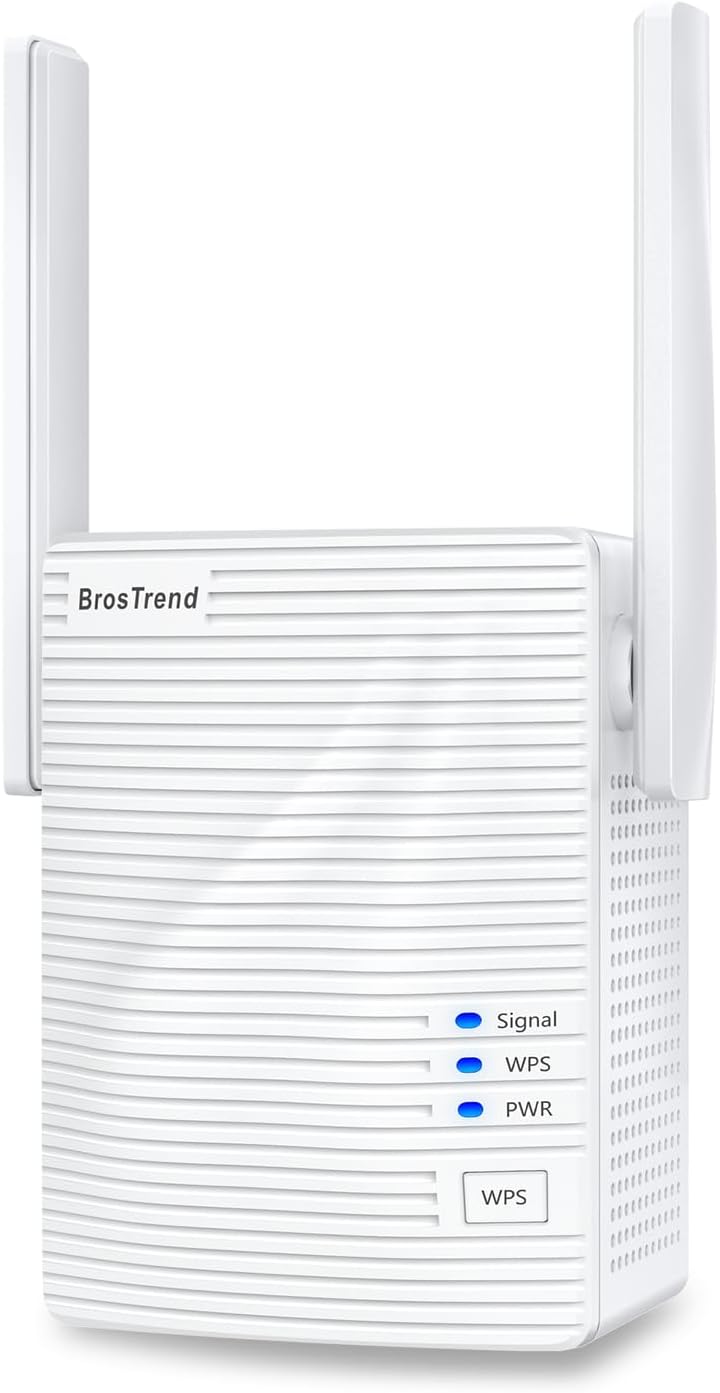
The BrosTrend AC1200 WiFi Booster is a dual-band range extender delivering up to 1200Mbps speeds and expanding your WiFi coverage by 1600 sq.ft. Featuring easy WPS setup, support for 32 devices, and a single Ethernet port, it’s designed to eliminate dead zones in homes with a sleek, compact design. Compatible with all major routers and secured with WPA2 encryption, it’s the perfect upgrade for professionals demanding reliable, fast connectivity across multiple devices.


| ASIN | B07L4BMD34 |
| Best Sellers Rank | 11,377 in Computers & Accessories ( See Top 100 in Computers & Accessories ) 83 in Network Repeaters |
| Box Contents | 3.3 Feet Ethernet Cable, AC1200 WiFi Booster, User Manual |
| Brand Name | BrosTrend |
| Colour | White |
| Compatible Devices | Any Wi-Fi Router, Wireless Modem Routers, Access Point, AP, PC computers, desktop, laptops of Windows, Linux, MAC OS X, Smart TV, game console, PS4, PlayStation, XBox, media players, Smartphones, Tablet, iPhone, iPad, MAC |
| Connector Type | RJ45 |
| Country of Origin | China |
| Customer Reviews | 3.8 3.8 out of 5 stars (16,066) |
| Data Transfer Rate | 1200 Megabits Per Second |
| Frequency | 5 GHz |
| Frequency Band Class | Dual-Band |
| Frequency Bands Supported | 2.4 GHz, 5 GHz |
| Item Dimensions D x W x H | 4.5D x 5.7W x 7.8H centimetres |
| Item Weight | 158 Grams |
| Manufacturer | BrosTrend Technology LLC |
| Manufacturer Part Number | E1 WiFi Extender |
| Model Number | BrosTrend 1200Mbps WiFi Extender |
| Product Warranty | 2 Years Worry-FREE Warranty from Date of Purchase |
| Range | 1600 square feet |
| Special Features | 2 X High Power External Antennas Deliver Better Wireless Range, Antenna Angles Adjustable, your Ideal Wireless Booster for WiFi |
| UPC | 742186982250 |
| Wireless Compability | 802.11a/b/g/n/ac |
M**S
I am not just happy, I am over the moon with the BrosTrend WiFi Booster.
BrosTrend AC1200 WiFi Booster Range Extender There have always been areas in my house where the Wi-Fi coverage is poor, it’s not a big house but for some reason, the Virgin Media hub doesn’t have enough signal strength for those areas. I have tried a couple of signal boosters before but they didn’t give a complete solution to the problem. I noticed that the BrosTrend WiFi Booster supported both 2.4 and 5GHz signals as well as 1200Mbps at a very reasonable price so I thought I would see if it could provide a solution to my problems. To begin with, the BrosTrend WiFi Booster has a very easy to follow video setup guide online as well as good printed instructions, I followed the video purely because it was easier. The video explains exactly what to do and the reasons for doing it, which make a pleasant change these days. I had the unit up and running within minutes of unboxing it and I found an ideal location to install it. I must admit that I wasn’t expecting miracles, I was just hoping for some improvement. However, I was very pleasantly surprised, after re-connecting some of the devices to the BrosTrend WiFi Booster everything now works and works very well. I have surveillance cameras in various places, previously the reception was patchy, at best and sometimes non-existent. Now I can get a solid, strong signal immediately from anywhere in the house. I am not just happy, I am over the moon with the BrosTrend WiFi Booster. Would I recommend it? Most definitely!
S**T
Great device but with certain limitations
In the box you get the WiFi extender and a CAT5 cable and an instructions pamphlet. The extender looks like many other extender brands that plug into a 3 pin UK socket. It has 2 antennae, one on each side of the device, and these can be angled vertically only. Some other brands allow movement across the vertical and horizontal axis making the antennae multi directional. To set up the device, you initially need to place it in proximity to your router, so it can be identified and connected to. From there the configuration is fairly straight forward. The device offers 2 extended WiFi connections ( You still keep your existing one) a 5Ghz connection and a 2.4Ghz connection. You can keep the same WiFi password across all connections or create separate ones, if you prefer. Once the device is configured to your preference, it is a question of placing it in an optimum position to receive from your router and transmit to your intended device/s. The way these devices work to solve the problem of getting connectivity to hard to reach places is by providing a stepping stone. By doing this they need to split the bandwidth between each hop. There are lights on the device to indicate that it is receiving a good signal and that it is transmitting to connected devices. There is also a RJ45 port to cable to a receiving device. Everyone has their own set up , so I can only talk from my own circumstance. I have a virgin hub 3.0 on the ground floor and I get about 250mbps standing next to it. I'm in a 1930s terrace house, with a loft conversion. It is in the loft I need the WiFi extender. Up there I have a desktop PC with a BrosTrend 1200Mbps Long Range USB WiFi Dongle Adapter connected to my network interface card. Most of the time that connects to the router directly ok, and I prefer that. When I try the WiFi extender on 5Ghz , the signal is stronger but every so often it lost the connection, and when I run a diagnostics it tell me there is no gateway. So I prefer not to use it for my PC. I do need it however for my printer, as that only supports 2.4Ghz, and it cannot connect directly to the router over that distance. Connectivity with the WiFi extender is solid, and I have not had that irritating situation where you lose connection whilst printing a full colour photo. Given that this is the set up I want to use, I hoped I would be able to use the WiFi extender in 2.4Ghz mode only. I could not see how to do that, so i contacted tech support. I was dealt with quickly, but I did not get an exact answer. The reply I got was I could hide the 5Ghz connection , which is not the same thing. There are other brands that let you do that. Another configuration limitation was setting your device up so that the hop from your router to WiFi extender is 5Ghz and from WiFi extender to device in 2.4Ghz, which some other brands also allow. So in conclusion, reasonable solid device for basic connectivity extension, but with no extra configuration options.
M**H
Wi-Fi Issues solved - thanks to this clever device :)
I recently changed over to Virgin Media for my Broadband services and was supplied with the Hub 3 Router. Having set the route up I noticed intermittent connection issues and signal dropout. After numerous phone calls with Virgin Media Tech support I was told that I needed their Wi-Fi Booster Pod which would resolve my issues......one problem none were available. So a little hunting around on Amazon and I come across BrosTrend AC1200 WiFi Booster Range Extender. From receiving the item to setting it up took literally minutes. Their is a helpful YouTube video link card that came with the product. But the instructions included were simple and straightforward to follow as well. Many routers now have the WPS function which makes the setup process even easier. Do follow the instructions though and set the device up initially close to your Wi-Fi router before repositioning to a mid point in your house. You'll know when you've found the ideal spot as the signal light indicator on the front of the device will stay 'solid blue' rather than 'solid red'. In any case my connection issues are now resolved and I have strong Wi-Fi connection (2.4Ghz and 5Ghz) everywhere in my house and even out into the garden. If you are having issues like I have described above and aren't getting the support you need from you service provider - give this device a shot.....You'll be glad you did. I hope this helps.
A**R
Almost useless as a wifi extender
On the plus side, the product is pretty easy to set up, particularly if your router has WPS functionality. I was able to get both blue lights on the extender working within a couple of minutes and could log into the extender's wifi signal with the unit plugged in nearby to my router. Then I tried moving the extender into another room and that's when the problems started. Even though I was able to receive wifi from my router in this room on my iPad, when powered up the top light on the extender remained red and I was unable to log onto the extender's wifi with the unit only about 15 feet away from my router and with only one wall between the two units. I fiddled with the two aerials and tried different plug sockets but to no avail. Bottom line for me is that this is almost useless as a wifi extender. I may have had a duff unit, but with so many contenders on offer in this market, I don't fancy wasting any more time on this particular product.
D**S
Didn`t work properly
I was really hopeful for this. Set it up as per instructions ( pretty straightforward ). Then had to position router so a blue light indicated it was close enough to router. Here I encountered problem 1. - The router is upstairs and this extender couldn`t pick up a `blue` signal anywhere downstairs - even though my phone was receiving 3 bars. I had to get pretty close to the router ( about 8 ft) to get a blue signal. This meant that the extender`s signal reaches almost no further than my router. So instead I set it in a place downstairs where it received an orange signal. Problem 2. It hooked up ok and worked ok - the signal was extended and the down load speeds improved considerably. Problem was it just seemed to drop signal from my devices and wouldn`t let me re connect unless I switched the extender off and then back on again. This could be because it was on orange signal? Problem 3. There were no instructions on how to set this up in AP mode which could have cured the problem so I emailed tech support. Still waiting for a reply. Problem 4. My Virgin Media router blocked the web address for the extender so I couldn`t get into it to make changes so that it could work in AP mode anyway. I dare say there is away round this but had just had enough by then so sent it back. It`s a shame because when it worked it was great. You`d have thought that Brostrend would have sorted out the issues with VirginMedia to make it easier to set up.
J**R
At last a device that works without stress and hassle. Brilliant piece of kit.
I have nothing but praise for this great little hub wifi signal extender. I read lots of the very helpful reviews and decided this was the one to go for. Straight out of the box - read the useful leaflet instructions. Really clear and using the WPS method to connect it to my home WiFi Router/Modem the device took less than 2 minutes to be up and running fine. I have a WPS button on my router and this device so plugged it in to mains - waited about 30 seconds for the right lights to show. Pressed WPS button on Router and then the one on this device and it connected no fuss - no password peril. Strong signal showing. Tried connecting to it with Android phone no problem. Tried with Windows Laptop - straight on and EXT2 and EXT5 showed available and it went on immediately. Moved the unit upstairs where a stronger signal is needed for Zoom online meetings and wow no dropping out. Does the job and for such a reasonable price. Can't say better than that. 5 Stars it is.
S**L
No good for my needs
I bought this so I could 'hardwire' my mums smart TV in the living room (as the fibre router is upstairs). The TV had a decent wifi signal from the start as my router gives good coverage (netgear night-hawk), However when playing from my plex server (locally) it could be a little spotty when streaming HD content. Probably due to the TV being on the 2.4Ghz wifi-band. I bought this to 'boost' the 5Ghz band and use the LAN port on the booster to provide a more stable connection. Setup was easy enough using WPS setup however it gave a weak signal light when plugged in downstairs, A speed test on the device (TV) showed a worse connection then the built in wifi card on the TV, it was still 8Mbps so in theory should be adequate for 1080p streams but when playing media it buffered so much more than it did before using this plug. I wound up returning this plug the next working day. I dug out my old 'powerline adapters' and connected the TV to the lan cable using them, Its been flawless ever since. So overall I would recommend power-line adapters if you are trying to achieve a setup similar to mine. I'm not saying these are no good. They just didn't help me. Good luck, Stay safe.
P**L
EASY TO SET UP
WOW! This literally took just a few minutes via the simple WPS to set up. Highly recommended
B**R
Supposedly Too Far Away But Works Great
I bought a BrosTrend Wifi AC Adapter a while back. It was easy to install and has worked flawlessly since I got it. For that reason, I thought I'd give their wifi extender a chance. The product arrived on time. Unfortunately for me, my router doesn't have a WPS button so I had to set up the extender the old-fashioned way. (Otherwise it probably would have taken only a few seconds using the WPS button.) The most difficult part of the set up was trying to find/locate my network password. Otherwise, it was straightforward. No issues connecting to the extender, scanning networks, or getting access. Feb. 7th, 2021: Hi, everybody, I thought I'd provide an update in the midst of a pandemic. The extender has been constantly plugged in since my original review and is still working flawlessly. I haven't checked on it at all, it just works. Since there's a pandemic, my mother has participated in a lot of video conferences since all of her kids, grandkids, and other family want to keep a safe distance away from her. She uses the Facebook Portal for the video conferences and the extender has kept the wifi signal going strong. Every time I'm on a call with her, I think it's pretty amazing that she doesn't experience any issues. My daughter is complaining that she's experiencing wifi connectivity issues in our own home (she's upstairs and the router is in the basement). I may have to buy another one of these routers to address the issue. The price of the extender has gone up considerably but I guess you get what you pay for. This device works. I live in a duplex. My mother lives on the other side. I've always wanted to extend my wifi signal over to her side. I plugged the extender into at least 4 or 5 different outlets and always got the red light indicating the extender is too far away from the router. I moved the extender back to the closest outlet and tried connecting to my network. The signal was, at best, medium strength. I had no problems connecting to the network. I also had no problems accessing a variety of web sites. Response was amazingly fast, as if I was at home in my side of the duplex. I tried different rooms in my mother's side and only had one brief disconnect. No big deal considering the extender is supposedly too far away from the router. One caveat - I've only had the extender for about 24 hours so there's always the possibility my review may change. But if the extender is anything like the adapter I bought, I think it will be fine.
R**L
Sehr gutes Preis Leistungsverhältnis
Preiswert und funktioniert
J**.
Buen producto
Fácil de configurar y bastante útil el uso del cable ethernet en mi caso a Sido bastante útil lo hace más versátil y práctico dando una buena calidad en la señal
A**N
WIFI BOOSTER
Wifi Booster works well, but ensure the doors are open where you experience wifi blackspots.
⚡**️
Nice, compact unit that was easy to connect.
The unit was just what I was hoping for, compact, ethernet port and easy pairing with my router. I have a Comcast/Xfinity router, for some reason, even though the extended network signal looked strong, the speed was only about 30-60mbs while the existing network speed is usually 200-300mbs. I emailed tech support and received an answer very quickly about things to try but nothing helped to get the speed up higher wirelessly. The Ethernet signal seemed to help me a bit more than wireless but not enough to keep the unit. Tech support apologized for the inconvenience and my patience. They asked me to return it for a full refund, which I did. For the above reasons I gave the 5 star ratings but the booster did not work for me.
Trustpilot
2 weeks ago
3 weeks ago