Buy anything from 5,000+ international stores. One checkout price. No surprise fees. Join 2M+ shoppers on Desertcart.
Desertcart purchases this item on your behalf and handles shipping, customs, and support to Vanuatu.
⚡ Power, Ports & Performance — All in One Hub, All the Time.
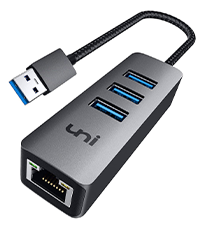
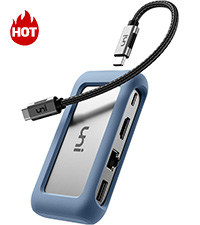
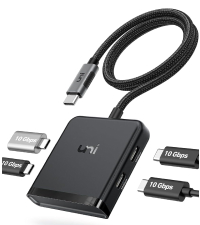
The uni USB C Hub Multiport Adapter is a premium 8-in-1 solution designed for the modern professional. Featuring 4K HDMI output, 1Gbps Ethernet, dual SD card readers, and 100W Power Delivery, it seamlessly integrates with MacBook Pro 2023, iPad Pro 2023, Galaxy S24/S23, and more. Its detachable cable and compact aluminum design offer unmatched portability and flexibility, backed by an 18-month warranty for peace of mind.


| ASIN | B07Q6YS7W2 |
| Additional Features | 18-month Warranty, Fast Charging, Fast Data Transfer, Lightweight |
| Best Sellers Rank | #313 in USB Hubs |
| Brand | uni |
| Color | silver" or "gray |
| Compatible Devices | MacBook Pro 2023, Air, iPad Galaxy S24/S23, laptops, smartphones, tablets, desktops, monitors, projectors, cameras, card readers, USB flash drives, hard disk and other USB-C Thunderbolt 3 devices Compatible Devices MacBook Pro 2023, Air, iPad Galaxy S24/S23, laptops, smartphones, tablets, desktops, monitors, projectors, cameras, card readers, USB flash drives, hard disk and other USB-C Thunderbolt 3 devices See more |
| Customer Reviews | 4.4 out of 5 stars 392 Reviews |
| Data Transfer Rate | 5 Gigabits Per Second |
| Enclosure Material | Aluminum |
| Hardware Interface | Ethernet , HDMI , MicroSD, USB 3.0, USB Type C |
| Item Dimensions L x W x H | 4.25"L x 2.25"W x 0.88"H |
| Manufacturer | uni |
| Mfr Part Number | unic8in1ks |
| Model Number | 27-23 |
| Number of Ports | 8 |
| Operating System | Linux, Mac OS X 10.6 Snow Leopard, Windows 10, Windows 7, Windows 8 |
| Special Feature | 18-month Warranty, Fast Charging, Fast Data Transfer, Lightweight |
| Total USB Ports | 3 |
| Total Usb Ports | 3 |
| UPC | 787446459455 |
| Unit Count | 1 Count |
| Warranty Description | 18 MONTH WARRANTY |
C**.
Solid!
Mosdef a great product. Just buy it..its durable, reliable and universal...I also use it with my phone/tablet.
N**C
Sturdy and reliable...mostly
I had bought the original version when I got my 16" MacBook Pro in 2022. Love the MBP but I normally push around files too heavy for WiFi so I miss a real Ethernet port and this seemed of fill the bill. Seemed pointless to have both the USB-C connection for data and the power cable for the MagSafe 3 connector since it's going to be plugged in almost all the time. 100w is what the MBP will take through its USB3/Thunderbolt 3 ports even when it's being juiced by its 140w power supply, so this hub is perfect. While I was transferring files from my dead 2011 MacBook Pro's SSDs onto the spiffy new M1 this hub did everything I asked of it. The setup was rock solid for a couple of years, then every couple of months my screen would dim and I'd see my charger icon said I was running on battery. If I unplugged from the hub both the cable to the Apple power supply and the USB-C cable to the MBP, then plugged them back in all was well again. Then a few months ago I suddenly started getting a pop-up alert every day or so saying "USB Accessories Disabled. Unplug the accessory using too much power to re-enable USB devices." This is odd because the only external USB device normally plugged in is this hub - which is powering the MBP. Not sure if the hub is starting to have issues, or if the MBP's original power supply is fading. I do need to investigate more. For normal users who unplug their 'book to go mobile regularly, this hub should be great. Update: 2025.09.18 Once I stopped using the Uni hub for power the "USB Accessories Disabled. Unplug the accessory using too much power to re-enable USB devices." alert stopped. Means I have both a heavy-duty USB3 cable and the light-as-a-feather Apple MagSafe cable plugged in, but say-la-vee. I got a second one for my spouse's M1 MacBook Pro too for her wired mouse and speedy Ethernet. Works great most of the time but about 1/3 of the time she has no mouse. We'd have to unplug from the Uni and plug back in before the connection was restored. It appeared the blue silicon case was pushing the host USB cable out slightly so I slipped off the case. Now it's down to about one day in five - down to the annoying but can live with it level.
J**Q
The detachable host cable is magic
I have a lot of “7-in-1”-style USB-C dongles. Almost all models on the market have a short captive cable; this has a detachable USB-C cable, which solves one problem with the other dongles: poor strain relief eventually kills the host cable, making the dongle useless. With this one, you can replace the cable. More importantly, you can replace the short USB-C cable which comes with this hub with a much longer one. If you are using a laptop in your lap, the weight of a dongle hanging off the port — not to mention the HDMI and other cables hanging off the dongle — is both annoying and bad for the expensive USB-C port in the laptop. Better to put the hub on a side table or floor, and have only a single visible cable connecting you to power, video, network, etc. I am not sure what restrictions there are on the cable to the host. I think any “100W USB-C 10Gbps” cable under 2 meters should work. A particular company makes a Fas “piece of” Gear: 2m and 3m USB-C cables, with a right-angle connector on one end. Those connectors are great for MacBooks and tablets, and I haven’t had any problems with power or data or video. Only downside: Limited to slower video and data speeds. At 4k, this hub is limited to 30Hz on HDMI, although 1080p60 is fine. The pair of USB A 3.0 ports are limited to 5Gbps; the side with a solo USB A port is USB 2.0 — which you could claim is a feature, because USB 3 interferes with 2.4G wireless keyboard/mouse reception. Ethernet is “only” 1Gbps, but most people don’t have 2.5Gbps Ethernet yet anyway. Several family members and relatives have and use these on my recommendation. My mom was confused by a USB 7-in-1 dongle which *didn’t* have a detachable cable. If you want products with “official” detachable cables, look at “1 in, 3 out” TB4/USB4 hubs: they also support “old” USB-C video+data hosts too. You can plug one of the 7-in-1 dongles into a TB4/USB4 hub port.
O**N
USB C for power delivery only, no data
Works well, high quality build, only shortcoming is the USB C port is for power only, wont work for data
C**S
Best hub I've ever come across, except 1 issue
I was coming from the Anker 555 hub using M1 MBP. This hub is in every way better for me except 1 aspect. My Anker hub was interrupting Mac's sleep function, and the UNI hub did not have than issue, regardless whether I use the PD function on the hubs. Another added benefit for me aside from maintaining all the ports I needed was the detachable USB C connection. I was able to use a longer Thunderbolt 3 cable I have laying around, which offered me much better flexibility in my setup. The port locations are also worked really well for me. My previous Anker hub had cable coming out in 4 directions, imagine how awkward that can be to situate the hub. With the UNI hub, cables come out in 2 directions, making it much easier to tuck the unit out of the way and offering better cable manageability. Lastly, the "issue" I'm seeing. Somehow, the PD function on my hub may not work the way it should've been. I'm not sure if this is actually a real issue. On Macs, they report the power source rating. If the chargers are connected directly, the system reports the charger rating. Through PD ports on the hubs, it usually comes out around 80 - 90% of the charger capacity. For the UNI hub, the reported capacity caps at 50W, even when I use the 140W Mac charger, which is odd. The good thing is I can use this hub with using the PD port. Overall, it's probably still the best hub I've used so far.
C**W
Rugged High-Quality USB-C Multiport Adapter
I use mine to connect my MacBook Pro to the same wired network as my Atem Mini Extreme, enabling a reliable Ethernet connection for my iPad Mini 6th Generation. Consequently, this setup allows me to use MixEffect Pro to create incredible SuperSource layouts with smooth, animated transitions. Moreover, the adapter is immediately and easily recognized by my MacBook Pro, allowing me to get up and running quickly when recording my multicam YouTube videos with the Atomos Ninja V. In addition to that, it is quite rugged, and the softer, shell-like edges feel very nice to the touch. This dongle was recommended by Adam Tow on his YouTube channel—he's the CEO of MixEffect Pro. Overall, I highly recommend this adapter!
T**A
HDMI failed X2 units
The first one I tried the HDMI worked for a couple of days and then stopped functioning. Figured it was a fluke, returned it, and purchased a second one. On the second unit, the HDMI didn't work at all. The other functions seemed to work fine, but I need the HDMI for a second monitor. Love the idea of this device, was great in that I could reduce my cords to the computer down to 1, and I love Uni products, but this one seems to have an inherent issue.
X**R
Best dock for my use case
I use a 10ft usb c cable to charge my laptop and Steam Deck on the couch. I get 1gbps internet so wanted to provide my couch devices an ethernet connection as well, so I needed a dock with a detachable cable and at least 100w power pass through. This dock checks both those boxes at half the price of almost any other. I get reliable 1gbps on any device I plug into it, even my phone which is cool. I quickly tested the display and USB and they seem to work well but that's not what I got it for. Unfortunately it doesn't support the 15v PD level, so my Steam Deck charges slowly at 9v. It's enough that it doesn't lose percentage while I'm playing, so it's adequate while a little disappointing. Being able to download games much faster than wifi or stream games with no latency makes it worth it.
Trustpilot
1 month ago
3 days ago