Buy anything from 5,000+ international stores. One checkout price. No surprise fees. Join 2M+ shoppers on Desertcart.
Desertcart purchases this item on your behalf and handles shipping, customs, and support to Vanuatu.
🎮 Elevate your game with silent power and 4K clarity — don’t just play, dominate!
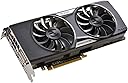
The EVGA GeForce GTX 960 4GB SSC GAMING ACX 2.0+ is a high-performance graphics card featuring NVIDIA Maxwell architecture, delivering 60% faster performance and double the power efficiency over previous generations. Equipped with 4GB of GDDR5 memory, a base clock of 1279 MHz (boost up to 1342 MHz), and advanced ACX 2.0+ cooling technology, it ensures quiet operation and superior thermal management. Supporting 4K resolution and NVIDIA GSYNC, it’s designed for gamers and professionals seeking crisp visuals and reliable performance.


| ASIN | B00UOYQ5LA |
| Antenna Location | Gaming |
| Best Sellers Rank | #906 in Computer Graphics Cards |
| Brand | EVGA |
| Compatible Devices | Desktop |
| Customer Reviews | 4.6 4.6 out of 5 stars (333) |
| Display Maximum Resolution | 4096 x 2160 |
| Display Resolution Maximum | 4096x2160 |
| Global Trade Identification Number | 00843368034382 |
| Graphics Card Interface | PCI Express |
| Graphics Card Ram | 4 GB |
| Graphics Coprocessor | Nvidia GeForce |
| Graphics Description | GeForce GTX 960 |
| Graphics Ram Type | GDDR5 |
| Item Weight | 1.5 Pounds |
| Manufacturer | EVGA |
| Memory Clock Speed | 7010 MHz |
| Mfr Part Number | 04G-P4-3966-KR |
| Model Name | GeForce GTX 960-ACX |
| Model Number | 04G-P4-3966-KR |
| UPC | 809395439057 843368034382 |
| Unit Count | 1.0 Count |
| Video Output Interface | HDMI |
| Video Processor | NVIDIA |
M**Y
An Absolutely Excellent Video Gaming Card
Specific Model Reviewed: EVGA GeForce GTX 960 4GB SuperSC ACX 2.0+ (04G-P4-3966-KR) Packaging: The video card is packed in a clear plastic clamshell suspension 'box.' This 'box' is then placed in cardboard display box. On the back of the box is a clear plastic window which lines up with the sticker on the video card showing the model and serial numbers of the video card. A duplicate of the sticker is placed on the exterior of the display box. There is a cautionary note which warns the purchaser to ensure all the numbers match on the two stickers before purchasing the video card. I had not seen this security measure in use before and found it intriguing. However, since I purchased this video card from Amazon.com I obviously could not make this comparison until after I had purchased the video card. Nonetheless I like the idea. Unboxing: I sliced through one of the two security stickers (one on each end of the display box), opened the flaps and easily pulled out the clamshell suspension 'box.' I pried open the clamshell 'box' and then pulled the video card out from the bottom half of the 'box.' The only thing left to do was to remove the three pieces of plastic film protecting the front, back and top of the video card and remove the I/O port covers. Unboxing complete! Observations Regarding the Physical Aspects of the Video Card: The card looks good, with obvious attention to detail regarding the quality of design and engineering, selection of components, and build. The card has a heft to it which projects a feel of quality and durability. It feels like a solid piece of work, with pride of manufacturing very much in evidence. The back plate is a nice addition to the card. Does it offer a tangible increase in the card’s performance (due to the possibility of providing additional cooling), I don’t know, although I am suspect it does. It certainly does add heft and rigidity to the card. I feel it is a positive addition. The fans are large and well balanced. The sweep of the fan blades certainly looks good, although, since I am not an airflow engineer, I haven’t a clue as to whether or not the design of the fan blades makes a measurable difference regarding the ability of the fans to move larger volumes of air, more quietly, than do regular fan blades. Due to the design of the video card, most of the hot air is exhausted out the rear of the card (when the fans are running, where the I/O connections are made. This should certainly help to keep the interior of the computer case cooler than it would be otherwise. (On my particular computer, the single case fan resides immediately above the video card slot, exhausting hot air out the back of the case. This should help in keeping the video card, and the other components of the system, cool.) Installation: My computer is a Lenovo K450e, with an Intel Core i5 (4460). I had no problem removing the OEM video card (GT 720) and installing the GTX 960. There is plenty of room on all sides for installation and air flow. The card was very easy to insert into the graphics card slot. Connecting the 8-pin power connector was just as easy, although it did require a bit of force to insert all the way in. Boot Up and Installation of Software: The computer booted up just fine when I pressed the power button. (I am running Windows 8.1.) As I already had an NVidia video card installed, I did not remove the original video card drivers, but I did use the NVidia’s “GeForce Experience” program to check for video card driver updates. An update was found and installed. I rebooted the computer again, in order to ensure any system settings, which needed to be reset due to the new video card, could be adjusted as the system determined. Noise In short, I have not yet heard the fans on the video card. (I have had the card five days.) I have not adjusted the default factory settings for when the fans turn on and at what RPM, and expect I will not need to do so. The longest opportunity I have had to use the card, in one session, has been approximately three hours straight. During the entire time, I did not once hear the video card’s fans. (Although I did hear the power supply fans and the case fan. Fortunately, none of them are extremely loud or annoying.) Video Game Quality (Note: The native resolution of my monitor is 1920 x 1200 pixels and this is what setting I use for all of my games, if they allow it.) World of Warcraft, Diablo III, Hearthstone, Heroes of the Storm, Skyrim, Dragon Age: Origins, Dragon Age II, Witcher II, Crysis III, Archage, etc. all look beautiful. As I use the settings for each game recommended by NVidia’s “GeForce Experience,” most of which are ‘high’ or ‘ultra,’ I won’t list specifically what they are. I will say I am more than happy and pleased with the results. For the first time since I have been playing video games on a computer, I find myself immersed in each game. I am not distracted by poor video quality or slow frame rates. The games just play, and play very well indeed. It is almost a liberating experience. Video effects which I didn’t even know my games could display are displayed in their full glory and without introducing video artifacts. Will I tweak each of the games’ settings as the weeks go on, of course! However, this will be more for academic reasons than for actually trying to improve the video quality. 4GB versus 2GB of VRAM As this card is still new to the market, there are many people performing reviews and posting them online. Many of these reviewers perform tests which try to ascertain if the extra two gigabytes of VRAM are actually useful in the real world and if it is worth the extra money. I will let those sites try to answer those questions. What I will say is your extra cash goes not only for an extra two gigabytes of VRAM, but also for the back plate. Whether or not this makes a difference to you, only you can decide. As for me, I feel the extra VRAM and addition of the back plate is worth the extra money. One more note on this discussion: As video cards with 4GB of VRAM become more prevalent, I believe video game programmers will code their games to take advantage of the extra storage space. How soon this will happen, who knows? But at least for now, my system can play those games which require (or can take advantage of) the extra VRAM. Conclusion Will this card satisfy hard core video game enthusiasts? No. That is why NVidia offers the GTX 970, 980 and Titan video cards. If you have the disposable income, get one of those cards. And even then, those cards will have hard core enthusiasts looking for more. For the remaining 99% of the buying public, I feel the GTX 960 offers an outstanding balance of graphics quality, power efficiency and price-to-performance ratio to more than meet our PC gaming needs. I heartily recommend this card to anyone who wants to play their video games with excellent graphics quality, while not having to spend a fortune doing so. Two thumbs up!
R**R
GTX 960 4G SSC installed in Dell XPS 8500
Situation: just successfully upgraded a Dell XPS 8500 (GTX620, 385 Watt PSU and i7 3370 CPU OEM) with EVGA GTX 960 4G SSC and Corsair RM750W PSU. Two days running older games like Skyrim and Witcher 2, at high/ultra. Just tried Nvidia ' s DSR resolution tweek with success; provides better resolution at higher refresh than monitor's native resolution. I DID get the Witcher 3 Wild Hunt PC code via Amazon. Thanks to other tenacious Amazon users, I knew to contact Amazon customer support via CHAT and received the code immediately. Then had to redeem on Nvidia 's portal which redirects to GOG.com, run by ProjektCD, producer of Witcher series. Pre-installed Wild Hunt DRM free on my upgraded mediocre Dell as we speak. I anticipate being able to run Witcher 3 at medium high to high based on what I've read and seen: time will tell. I admit to buying this card due to limited information found online concerning upgrades for older Dell desktops. I didn't take the time to find out if the GTX 970 or above could be shoehorned into this piece as there was limited info. Couldn't afford much more anyway. That being said, the net reads that I got the best bang for my $ with this card; 4G VRAM may be a benefit at $30 more than 2G version, why not. Obviously, this set up will not impress the hardcore PC master race elite (wish I could afford to be among them), but this upgrade has brought me up to a decent level of performance for an older rig. This is more of a PSA to those looking to upgrade, specifically a Dell XPS 8500... I rolled the dice and it worked out for now. 5 star rating pending future performance with newer games. Hope to be able to run Witcher 3 on 5/19 without too much turned down/off. If so, there's always my PS4 at 30 fps, haha. Update: this GTX 960 4G SSC card runs Witcher 3 smoothly enough. For smoothest gameplay, not all ultra settings can be active, though compromise between high and ultra definitely satisfies. Fans haven't kicked in yet. I highly recommend this GPU. ☆☆☆☆☆
F**.
Really Impressive Card for the Price! But...
Overall this card worked for what I needed at the moment, which was a "Starter" card for my machine so I could save for a better one. But... Don't let that fool you. I can run BF: Hardline and Batman Arkham Origins with little to no latency on the card. Mind that the fans don't start up till the card gets to 70 Celsius, it runs pretty quiet. The only problem I have with this card is that I didn't have a modern monitor at the time of installation, so I had no digital inputs on the monitor. Now, EVGA did think of this problem by including a DVI to VGA adapter. However; even with the adapter, THAT EVGA INCLUDED, I had a pink hue on my monitor that I couldn't get rid of, even by changing my color sets. I called EVGA and the representative told me that the included adapter doesn't really work because it was passive and I would need an active adapter or a new monitor. Active adapter = $50. That's almost a 1/4 of a 60hz monitor. Now, I'm not gonna say, "Oh EVGA, how dare you include an adapter that doesn't work! 1 STAR!!!" because I know that the monitor was old and honestly gaming through an analog connection isn't the best thing in the world. I knew eventually that I would need a new monitor and well that day was when all this happened. So to wrap it up. Great starter card. I wouldn't keep this thing forever because the 128 bit bus ain't gonna help in the long run. Quiet. Really can't hear it over my 5.1 surround system. Looks really sleek. CAME WITH WITCHER 3 (at the time of writing this review) Be prepared to dish out some money for an active adapter, play on a TV (eww), or buy a new monitor (What I did) if you only have analog (VGA) ins on your current monitor.
B**.
Esta tarjeta es bastante potente. Tiende a hacer poco ruido, ahorra energia, mantenter temperatura por debajo de 70° y ademas es muy rapida. Casi todos mis juegos corren a 60FPS. En precio no es muy cara respecto a su rendimiento, juego a 1080p sin ningun problema, ademas de que no requiere de una gran fuente de poder(para lo que se tendria que gastar un poco mas). Y por si fuera poco es muy mona tiene su blackplate y todo el unico incoveniente es que es grande. La recomiendo ampliamente para aquellos que quieran una tarjeta con mucho de todo (exeptuando el precio), potencia, enfriamiento, estetica, consumo de energia.
T**M
Recently, I purchased a GTX 960 to run The Witcher 3 and GTA V on PC. So far, I've only actually run one new game on the new card, but it does run perfectly ! The Witcher 3 is able to run at a stable 30 frames per second with all of the settings at Ultra, even with my older i5-3750K processor. The game looks beautiful on my new card, and runs very smooth. A significant step up in frame rate, and quality from the PS4 and X-Box One versions. I also popped in a slightly older game to see how the 960 compares to the PS4 and X-Box One, with Dragon Age Inquisition. I was able to run this game at a steady high framerate once again, with all the settings at the max, whereas both console versions have frequent framerate drops in gameplay, and literally constant jittering in cutscenes, that really takes you out of the game, if you look up a comparison on digital foundry, you'll also find that both console versions, regardless of framerate, just do not look as good as the game will on ultra settings, on PC. None of these issues with my new 960. Easily outperforms both of the new consoles, while having a similar pricetag.
C**K
With an AMD FX4300 processor and this added into the mix I can play a lot of games on high settings without major stutter. I'd say this card is a great choice if you want to upgrade from a medium end graphics card from a few years back, but don't want to go crazy with your wallet. Note that you will need a proper power supply to run this. Get something in the 600W+ range with a good warranty so you're not pushing the limits of the PSU all the time, causing premature failure of it. Currently enjoying ARKL Survival pre-access with this running the game anywhere from medium to high settings (I've been adjusting to my liking. Stutter of any sort bugs me) at around 35 FPS peak, 20 low, 28 average (this is a pre-access game, so anything higher than 30 is usually considered good.) Looks fantastic.
N**A
Excelente servicio de paquetería, llegó antes de lo esperado y pude rastrear el envío continuamente. El producto es excelente cumple con las especificaciones descritas y la instalación es sencilla y rápida, no más de 15min.
C**N
La tarjeta está en perfectas condiciones lo malo me la cobraron doble Amazon dice que fue el banco y el banco dice que fue Amazon
Trustpilot
3 weeks ago
1 month ago