Buy anything from 5,000+ international stores. One checkout price. No surprise fees. Join 2M+ shoppers on Desertcart.
Desertcart purchases this item on your behalf and handles shipping, customs, and support to Vanuatu.
๐ฅ๏ธ Elevate your space with the mount thatโs as sharp as your style.
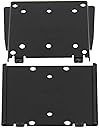
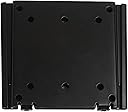
The VideoSecu LCD LED Monitor TV Wall Mount is a sleek, ultra-thin bracket designed for 19" to 40" flat panel screens with VESA 75/100 mounting patterns. Supporting up to 66 lbs, it offers a low-profile 0.6" distance from the wall, combining minimalist aesthetics with robust metal construction. Its easy slide-on installation and universal compatibility make it a top choice for professionals seeking a clean, secure display setup.
| ASIN | B000VKCIJU |
| Best Sellers Rank | #23,219 in Electronics ( See Top 100 in Electronics ) #347 in TV Wall & Ceiling Mounts |
| Brand | VideoSecu |
| Color | black |
| Compatible Devices | Monitor, Television |
| Customer Reviews | 4.6 out of 5 stars 1,756 Reviews |
| Enclosure Material | Metal |
| Global Trade Identification Number | 00887470334800 |
| Manufacturer | VideoSecu |
| Material | Metal |
| Maximum-Supported Screen Size | 40 Inches |
| Mfr Part Number | FBA_ML20B |
| Minimum-Supported Screen Size | 19 Inches |
| Model Number | FBA_ML20B |
| Mounting Type | Wall Mount |
| Movement Type | Fixed |
| UPC | 887470334800 |
| Unit Count | 1.0 Count |
J**H
Good quality parts and very flush mount
Excellent mount to use a monitor as a family calendar. Hugs the monitor very closely to the wall. All youโll need is a way to hid the cords and itโll look like it was made to be there. Easy to install and comes with high quality parts. I highly recommend this mount. My monitor is a 32โ LG
J**Y
Exactly what I needed
Very easy to install. Works great. Fine quality. simply screw the back piece to the wall (on a stud) and attach the other piece to the back of the TV and slide the two pieces together. It's not meant for large TV's, but worked perfectly for installing a 22" in my trailer. I did note that one of the screw holes was a millimeter or so off center from one of the holes on the TV, but it wasn't much trouble coaxing the mounting bolt into place. It comes with a few different sizes of mounting bolts to accommodate the differences in TVs. As has been said, it does mount the TV very close to the wall, so if the TV is also very thin, swapping cables might be tricky. My only warning is that if you are installing this in a confined space, such as close to a ceiling, or in in a cabinet, you will need to have at least 6 inches above where you want to your TV to be positioned in order to slide the TV plate into the wall plate.
J**S
Amazing Quality and Value... Easy to Use...
For under ten bucks this is an amazing product. It works perfectly! The quality is solid and the design is simple. There's only two pieces. One slides into the other. You mount one plate on the wall with 4 screws and the other plate gets screwed to the monitor with 4 included screws. The package comes with 3 sets of machine screws in different sizes for mounting the other plate to the screen - so the screws you need for this will probably be included in one of those sets. The whole thing is very slim - the back of the screen mounts about 5/8" away from the wall - that's just about the closest you could possibly expect with any mount. HIGHLY RECOMMENDED!
H**I
Nice low profile mount but might be tricky to install
I decided to set up a secondary stand up workstation for my work from home needs. I decided to go for this low profile mount for a 27" external monitor since I don't need a swing out arm that extends away from the wall. The mount comes with a variety of screws to use with your monitor. Unfortunately, my monitor's VESA mounting holes were recessed so the included screws were too short. Luckily, I had some longer screws on hand and I was able to make the mount work. This is not really the mount's fault but it's worth noting that you might need longer screws. It's also worth mentioning that the instructions say that the mount MUST be installed into a wood wall stud or solid concrete wall. The mount comes in 2 pieces with one piece going on the monitor and the other going on the wall. After both installing both halves, you slide the monitor down onto the wall mounted piece. This was a little tricky but doable. After I initially slid the monitor down into the wall mount, I couldn't install the power cable and the hdmi cable since the space was too tight (about 1/2 an inch). I ended up removing the monitor, installing the cables, and sliding the monitor back down on the wall mount with the cables hanging down. If your monitor's connections stick out from the back, this mount might not work or you might need cables with 90 degree connections. Luckily, my monitor's connections are on the bottom so this mount works with standard cables. Overall, it might be a little tricky to install the mount depending on how your monitor is configured but the end result is nice and tight to the wall. Seems pretty stable too.
S**H
If you want a super flat and low profile mount, this fits the bill.
Even came with very short screws to mount the TV with. Works as expected and solid heavy metal construction. Easily would support a much heavier TV than my 32" LG at 19 lbs. I am using two of these in my office and guest room so I can slide the TV out of my office and into the guest room when we have company. ***Take note: In my case, it was actually too close to the wall to allow the cable coax connection because of the location and angle of the connection on my TV. I added a piece of 3/4 inch plywood behind it to provide the extra space. I may add a in-wall connection box later to solve this, but works/looks perfectly fine with the plywood behind it. This was not a negative to me because frankly, I can't understand who thinks it's a good idea to have the cable connector pointing towards the wall rather than down.
N**Y
Use this when close to the wall is more important than pivoting. Strong and easy to mount.
It does exactly what it purports to do: Mont a VESA monitor something like a half inch off your wall. Any thinner would be a drawback. If you have a really thin monitor, there won't be enough room for fingers behind it when you have it on the wall, so think about connecting the cables before hanging the panel. It doesn't pivot and you might find that you want it to pivot because the angles aren't perfect - tough luck! The price we pay for flush to the wall is that there is nor room for pivoting. In my application, I put up with suboptimal angles because I need it to sink into the wall as much as possible. For me, if it stuck out any more, the panel would obscure another monitor that I can't move. So think carefully about if you need it to pivot! If you need to pivot, this is not the mount you are looking for. Actually, it's the other way around - this is the mount you want ONLY if getting it as close as possible to the wall is the most important thing.
R**M
Not a universal fit without some modifications, but solid and stable once installed
I am using 2 sets of these with Dell brand 27 inch Ultrasharp monitors. They would not work without modification. The back of the Dell monitors has a recessed VESA mounting surface. I placed the brackets on the back and screwed them in but since the mounting location is recessed, the 2 brackets would not line up and slide into each other. The mount that goes onto the monitor needs to be raised to be flush with the sides of the back of the monitor but it didnโt come with the proper washers to act as spacers. It came with some really thin washers but even using all of them it wasnโt enough to bring it flush with the back so I had to buy some plastic spacer type of washers to put under the brackets and now they work. Once installed and the security screws installed they are solid and stable, just be prepared to spend a little extra getting spacers if your monitors arenโt flat on the back.
J**N
Does what it should.
I had very little space for a mount and found this one. I had 1-1/2" of space when the door was closed on this Box. The Display I'm using is just under 1/2" thick. This mount is just under 1/2" thick. I need a little bit of room to be able to hit the buttons on the back of the display. You can see the small buttons in the second picture on the top of the display there, which is the left side when looking at it from the front. So I added some spacers behind the mount on the back of the cabinet. it also gave me a bit more room to kind of slip in sideways and down. Because I'm limited on how high I can go inside that box. Another thing this mount has going for it is that it's VESA 75x75 or 100x100, on both the mount going onto the TV and the back bracket. The other 2 I also got, it was either for the TV, but the back mount was something else. Which if you're just mounting onto whatever, may be OK. But this Box was set up with holes for VESA 75x75 or 100x100 also. That was what won this mount over the others I had. With limited room, this mount couldn't have gotten much thinner!!! It also included all the screws and stuff you should need the normally mount your screen. It's well made. Comes with all the hardware you need. The one problem I ran into, I have the display bracket mounted. It's 75x75. I mounted the back bracket also 75x75, and the bolts I guess were hitting over the screws on the display bracket and so I couldn't get it to go down into the mount all the way as they were hitting each other. I ended up grinding the bold heads down to half the thickness they were for the back bracket. Mounted it back, and the Monitor slid into place. More than strong enough still to hold that little display up. If you can, use the 75x75 mount on the display side, use the 100x100 on the wall mount side. Then there's no chance of the screw heads on the one side hitting the bolt heads on the other side. or Visa-Versa. I also didn't use the screws to hold the 2 pieces together to lock the display on the mount. Because it's just too hard in that box to get to the bottom, and it's not going anywhere in that box anyway!!!
S**N
Wall mount
Sturdy and easy to install. Locate stud for added strength. Mount wall bracket, mount the other bracket to tv or monitor. Slides unit in place.
S**N
Five Stars
Great light duty mount. Very slim.
L**C
Worked great.
Excellent. Super strong.
Trustpilot
1 month ago
1 month ago