Buy anything from 5,000+ international stores. One checkout price. No surprise fees. Join 2M+ shoppers on Desertcart.
Desertcart purchases this item on your behalf and handles shipping, customs, and support to Vanuatu.
🖥️ Elevate your workspace — because four screens are better than one!
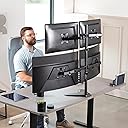
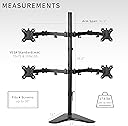
The VIVO Quad Monitor Mount STAND-V004F is a robust, fully adjustable freestanding desk stand designed to hold four flat or curved monitors ranging from 13 to 30 inches and up to 17.6 lbs each. Featuring versatile articulation with tilt, swivel, rotation, and height adjustments, plus detachable cable clips for superior cable management, it offers a stable, ergonomic, and clutter-free multi-monitor setup ideal for professionals seeking productivity and style.


| ASIN | B00DGSI5WS |
| Best Sellers Rank | #162 in Computer Monitor Arms |
| Brand | VIVO |
| Color | Black |
| Compatible Devices | Monitor |
| Customer Reviews | 4.4 out of 5 stars 2,714 Reviews |
| Enclosure Material | Aluminum |
| Global Trade Identification Number | 00617401139361 |
| Manufacturer | VIVO |
| Material | Aluminum |
| Maximum-Supported Screen Size | 30 Inches |
| Mfr Part Number | STAND-V004F |
| Minimum-Supported Screen Size | 13 Inches |
| Model Number | STAND-V004F |
| Mounting Type | Tabletop Mount |
| Movement Type | Articulating |
| UPC | 617401139361 |
| Unit Count | 4.0 Count |
| Warranty Description | 3 Year Warranty |
J**A
Works great with my dual 27" monitors
I purchased two Acer K272HUL monitors and the included stands were at a set height. Because of my desk that has a steel bar that runs along each side underneath, getting a dual monitor stand that mounts to the desk with a clamp was not an option. This is a great alternative and really cleans up your desk space. The clamps for cable management are great too. If anyone has any doubts about the stability of the stand with two 27" monitors, any instability is only due to the fact that the arms need to be folded in a 'W' shape, not a double arc. If you attempt to keep the arms in a double arc and set the stand upright with the two monitors, the stand will easily tip over. Once I folded the arms in a 'W' shape, the stand was perfectly stable and has withstood my adjustments to the positioning and angles of the monitors without any concern of tipping over. Overall the quality of the hardware feels really good too. I would definitely not hesitate to use it on a more expensive monitor setup if I were to upgrade in the future. Just be very careful if you decide to set the monitors back down on a flat surface while mounted to the stand, as the arms will swing together and cause your monitors to collide. I had quite a scare when it happened earlier, but fortunately no damage was done. Edit: Not going to change my review, but one thing that is extremely annoying and a fail on the part of the engineer(s) is that the bolt for the adjustment for forward and rear tilt on the left arm is on the inside of the arm. Having to reach over the arm of the stand and the monitor both simultaneously to tighten and loosen the bolt that enables the monitor to tilt forward or backward is extremely troublesome. On the right arm this is not an issue, because the bolt head is on the outside so you simply can reach around the side to tighten or loosen the bolt. Being a mechanic, I fortunately have the tools. I was able to use a long handle ratchet with a hex socket to tighten/loosen the bolt on the left arm. I really do not feel like the included hex tool is adequate for this adjustment and you will be cursing the engineer(s) in no time if you try to get the monitor to sit level without a good ratchet and hex socket. I would also strongly suggest you have a small plastic level to check the monitors as you make your adjustments to get the monitor to sit level, because the bolt has to be very tight and will have a tendency to droop slightly if it is not tightened adequately. If I had to guess, I'd say I used approximately 30 to 40 ft-lbs of torque on the bolts that control the monitors ability to tilt.
A**R
Great sturdy dual stand - with base version
I'll start with the cons - which may not happen in case of others. So I did not take off any star. 1. There are 3 screws that connect the base to the vertical pipe/rod. One of the screw female thread hole had a small welding metal drop, which prevented the screw to go in. I had to take a hammer and a screw driver to chisel the metal droplet out. It was a small metal drop that might have fallen near the thread when the welding was done on the rod. Did not take much time, but my hassle could have been lesser if quality control was in place. 2. One of the monitor mounting connector was fitted the opposite way. I had to unscrew that connector and fit it the right way so monitor swivel tightness can be done from the outer side. 3. The height of each monitor cannot be adjusted separately. Both monitors will remain at the same height. Now on the Pros: 1. All parts are metal and very sturdy. 2. Base is heavy and sturdy but will not stand upright if you fit only one monitor on one side. 3. I've put a 27" and a 25" monitor on it and if I try to push the vertical rod with force, the entire table shakes but the base doesn't even lift a bit. So it is extremely stable. 4. Cable management is superb. I have loads or cables behind the monitors but the cable management adapters/connectors could get it all in and hide the cables properly. 5. The base can sit 1.5 inches from the wall and can take 2 27" monitors with hardly any gap between the monitors. 6. The swivel friction can be adjusted .
G**K
Good Product
Not hard to assemble, I did it by myself - Monitors and all, in less than 30 minutes. Getting the monitors into position is not too bad, but you really must watch the center of gravity and not over extend the arms. I recommend keeping the monitors as close to the base as possible. If you are sure you know where you want the stand - you can drill a couple holes in the base and screw it to the table. I am not sure yet, so I am still moving it around. My main complaint is that the joints are TOO TIGHT and it's VERY HARD TO MOVE the monitors easily. And since the stand is not in a fixed position, it's not easy to yank the monitors around without the stand moving as well. I tried loosening the bolts at the hinges - WOULD NOT BUDGE! The bolts are frozen in place. That is a problem - hence the 4 Stars. *UPDATE - As I stated earlier, the hinges were very tight which made it excessively difficult to position the monitors. I tried to loosen the bolts on the hinges so that I could move the monitors more easily, but the bolts were frozen in place. I put an extension on the Allen Wrench (Hex Head) so that I could apply more torque. I still had to use an excessive amount of force to get the bolts to break free. I thought I might break something or strip the head out of the bolt. But they did finally break loose, and I was able to loosen them slightly so that the monitors are much easier to move around. Someone posted in a previous review that the bolts are Painted (Powder Coated) in place, which would account for them being so hard to break loose initially. I would recommend to the manufacturer that they DO NOT paint the hinge bolts in place. I would have given 5 Stars if not for this issue.
S**L
Revamp Your Workspace with the VIVO Quad Monitor Free-Standing Mount!
Overview: The VIVO Quad Monitor Free-Standing Mount, model STAND-V004F, is a robust and highly adjustable desk stand that has completely transformed my workspace. With its ability to hold up to four flat or curved display screens ranging from 13 to 30 inches, this monitor mount provides an exceptional solution for those seeking a versatile and ergonomic setup. Design and Construction: The build quality of the VIVO STAND-V004F is impressive. Its sturdy construction ensures stability and durability, while the sleek black finish adds a touch of sophistication to my workstation. The free-standing design eliminates the need for drilling or clamping, allowing for easy installation and flexibility in desk placement. Adjustability: One of the standout features of this monitor mount is its exceptional adjustability. Each of the four arms can be independently adjusted in height, tilt, swivel, and rotation, providing a customizable viewing experience. I appreciate the full 360-degree rotation capability, which enables effortless screen sharing or collaboration. The VESA plates offer compatibility with various monitor models, making it suitable for a wide range of setups. Cable Management: The integrated cable management system helps keep my workspace tidy and organized. The included clips and hooks allow me to route the cables along the arms, keeping them hidden from view and preventing tangling. This thoughtful design feature adds to the overall aesthetics and functionality of the mount. Space-Saving Solution: With the VIVO STAND-V004F, I can maximize my desk space. The ability to mount four monitors on a single stand not only saves valuable real estate but also promotes an efficient workflow. I no longer have to deal with multiple monitor stands cluttering my workspace, allowing me to focus on my tasks without distractions. Versatility: Whether you have flat or curved monitors, this VIVO monitor mount is compatible with both. The wide range of screen sizes it can accommodate, from 13 to 30 inches, offers flexibility and future-proofing. Whether you're a content creator, gamer, programmer, or professional multitasker, the STAND-V004F is sure to meet your needs. Overall Experience: In conclusion, the VIVO Quad 13 to 30-Inch Monitor Free-Standing Mount, STAND-V004F, has exceeded my expectations in every aspect. Its sturdy construction, exceptional adjustability, cable management system, space-saving design, and versatility make it a must-have accessory for anyone looking to optimize their workstation. I highly recommend this monitor mount for its outstanding performance, ergonomic benefits, and the enhanced productivity it brings to any workspace.
T**E
Excellent Stand--but adjust swivel stiffness when you put this together
Based upon the recommendations I purchased this stand. I previously had an Ergotron stand which was really heavy duty but only had 100mm VESA mounts. The four new monitors I purchased were LG 22" LED monitors and even though the salesman at Fry's assured me the LG's had 100mm mounts, not so--they were 75mm. To get replacement 75 mm Ergotron mounts was going to be more expensive than buying this VIVO stand. The VIVO stand is substantial and has both 75mm and 100mm VESA mount holes. A Suggestion: When you assemble the VIVO stand, pop off all of the bolt/nut covers and tighten all swivels to the point where they are very stiff to move. This will avoid the problems noted by other reviewers of having their monitors "sag" or "droop" and save you time. (The "factory setting" for stiffness is pretty loose so an adjustment will be required for most set ups.) The LG monitors I purchased are very light so once I tightened the swivels I did not have to go back and re-tighten them. The only suggestion I have for VIVO is to include knobbed/knurled bolts to attach the monitors to the VESA mount. The Phillip's head screw mounts included make it difficult for one person to mount the monitors. I used the knurled/knobbed VESA bolts from my Ergotron mount and it was very easy for me to mount the monitors by myself. Excellent stand and a very attractive price. Not quite as heavy duty as the Ergotron stand I had before, but substantial enough to hold four monitors securely. (But the Ergotron was 3 + times as expensive as the VIVO stand, so a very good bargain.)
M**L
Not stable. Prone to falling
I was told VIVO is a good brand and I have used a few of the dual monitor stands for work. I had an extra 2 monitors so I decided to try this one out to replace my current 2 monitor setup. I currently use 2 27" Dell Monitors that weigh about 8 lbs on the bottom, and I was planning to use my older ASUS 24" Monitors that are about the same weight on the top. Installation was a bit tricky on my Dell monitors because the VESA mount location is indented into the monitor so I couldn't just slide the monitor with the VESA mount attached. Once everything was set up - the top arms were not leveled even after using the VESA adjustment screw. The left side was lower than the right. I also noticed that a small shake would cause the base to tilt forward and the monitors are not even stretched forward. After about 30 minutes of using - the mount decided to just fall forward with all my monitors still attached. Thankfully I was able to catch the stand without damaging my monitors. That was the moment where I just started to take apart the monitors and put everything back in the box. This is definitely not a secure mount and the weight limit might not be accurate. My monitors were way below the 22lb weight limit and the whole stand did not feel sturdy.
T**.
Seems to be okay.
Works for what I need it for. Simple to put together, but boy did I have a hard time trying to get everything adjusted. The stand seems very tippy which makes it hard to hard to adjust the heights the monitors. I seemed like you needed to install the monitors to get the top and bottom arms spaced correctly so you don't have huge gaps in-between. I would advise altering the base to have more weight for safety of your equipment. I work in a metal shop so I will be able to make it work. Overall, for how much it cost it seems to be of value. I do like how it looks after getting it all setup.
C**E
Sturdy stand with full range of motion and easy assembly
We shopped around, and most local stores had similar mounts priced at $200, so I was a bit doubtful of the quality an $85 mount would have. I figured I would get this one and when it failed in a few months, I would "upgrade". Doesn't look like it will fail for quite some time. First, this thing is *heavy*. I have three monitors on it right now, and no matter how I move them around (to be fair, I haven't attempted putting all three on one side of the stand), it doesn't even threaten to tip over. The base is large, but not half as large as three monitors on my desk. The frame is also magnetic, so I am fairly positive it's made of steel. The range of motion is fabulous. I can flip the monitors backwards, parallel to the ground facing up or down (why?? Actually was useful for plugging in cords), sideways, frontways, and pretty much every angle in between. The joints have to be loosened by allen wrench if you really need to, and with all my fiddling and playing, none have loosened, nor stiffened up. I didn't need to loosen the joints: they are hard to manuever with your hands, but once the monitors are on, they move easily with slight pressure. I'm not necessarily the most mechanically inclined, but I was easily able to assemble the entire device in about an hour with no assistance and while running interference with a 2yr old. Everything is included except a #2 Philips head screwdriver: all screws, washers, spacers, and three allen wrenches. If you need to adjust the height of the arms, I recommend removing the monitors first, as the arms are quite heavy by themselves, and much more so with the monitors on. The "powdered" coating makes the device easy to move and hard to scratch, and pads on the base prevent scratching your desk.
M**S
Home Operations Center
Super stable. The only thing I will say is that be careful setting the arms in the position you want as this is when it is most likely to fall. Makes my home office feel like a command center I'm in love.
J**S
Gran precio y bueno.
La instalación es bastante sencilla y muy intuitiva. El peso de los monitores los aguanta, bastante estable, se puede acomodar los monitores a gusto. Bastante bueno.
A**Y
Solid construction
This review is written only after 2 days of putting this mount together. For now, I am using it for 2 monitors but plan to add 2 more within a month or so. Looks like a well-built, solid mount.. it's a bit tricky to "hang" the monitors once you put together the mount.. simply because holding a 27 inch monitor while you are trying to adjust heights and tighten the bolts, it's best to use 4 hands (aka, 2 people). After that, the mount seems to be doing its job: standing without wobbling and holding (for now) 2 screens. In other words, so far so good.. I am happy with the purchase. I'll report back in a few months.
U**R
tippar lätt.
Kontrollera att armarna för skärmarna är raka. så inte den ena skärmen hamnar lite längre ner än den andra. Upptäckte att stativ lät vikar mot dig om inte skärmarna står precis veticalt mot stolpen.
A**T
Great product
Does exactly what it says. It can easily hold my two 27" monitors.
Trustpilot
3 weeks ago
2 weeks ago