We remain fully operational. Our teams are working around the clock to ensure your deliveries continue safely.

DOWNLOAD THE APP


Copyright © 2025 Desertcart Holdings Limited
DOWNLOAD THE APP
Buy anything from 5,000+ international stores. One checkout price. No surprise fees. Join 2M+ shoppers on Desertcart.
Desertcart purchases this item on your behalf and handles shipping, customs, and support to Vanuatu.
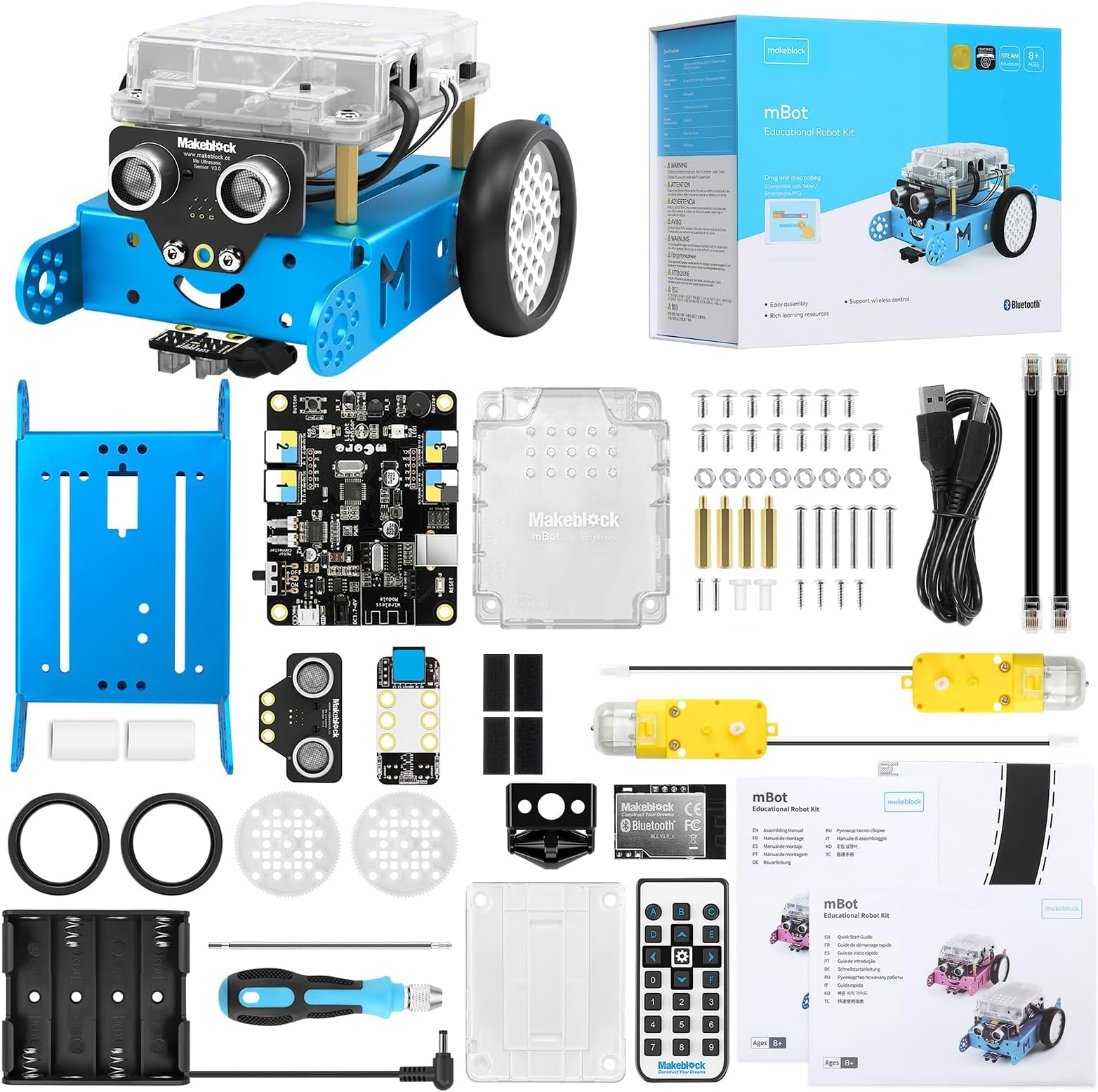
🤖 Unlock your child’s future with the coolest coding robot kit!
The Makeblock mBot Robot Kit is an entry-level STEM toy designed for kids aged 8-12 to learn coding and robotics through Scratch and Arduino. It features a quick 15-minute build, interactive programming tutorials, and multi-functional play modes like line-following and obstacle avoidance. Compatible with over 100 add-on modules and LEGO parts, this metal and plastic robot kit encourages creativity, problem-solving, and hands-on learning, making it a perfect educational gift.






| ASIN | B00SK5RUQY |
| Age Range Description | Kid |
| Battery Description | Lithium-Ion |
| Best Sellers Rank | #12,331 in Toys & Games ( See Top 100 in Toys & Games ) #131 in Educational Science Kits |
| Brand Name | Makeblock |
| Customer Reviews | 4.6 4.6 out of 5 stars (2,836) |
| Educational Objective | Coding Skills, Construction Skills, Creative Skills, Critical Thinking, Imagination Development, Problem Solving Skills, Programming Skills, STEM |
| Global Trade Identification Number | 00070264060065 |
| Included Components | Robot Kit |
| Is Assembly Required | Yes |
| Item Dimensions | 6.69 x 3.54 x 7.87 inches |
| Item Type Name | Robot Kit |
| Manufacturer | Makeblock |
| Manufacturer Maximum Age (MONTHS) | 1440.0 |
| Manufacturer Minimum Age (MONTHS) | 96 |
| Manufacturer Part Number | 90053 |
| Material Type | Metal, Plastic |
| Model Number | 90053 |
| Set Name | mBot Robot Kit |
| Size | mBot Blue |
| Theme | Educational |
| UPC | 070264060065 701142930674 702865447913 |
| Unit Count | 1.0 Count |
J**A
Great robot gift
App Can be installed on Amazon fire tablet Easy to assemble Easy to connect to the app
G**G
Amazing for Kids to Learn about Technology
This is not a toy, but that doesn’t mean it’s not fun! It’s a very sturdy machine with legit parts for a robot. I find the programming just as fun and addictive as my kid. The projects are fun, but we went through them quickly so I’ve had to make up more challenges to keep the interest going. A few notes: the software and documentation are not bulletproof. I’ve had to do a bit of debugging through the process that I don’t think a parent without prior experience with programming and basic knowledge of electronics would easily figure out. The makeblock forums are very helpful when you run into issues. Overall, everyone loves mBot and its been a great learning experience
R**R
Lots of fun
Great robotic construction toy, grandson loved it
P**H
Can't Download Makeblock App
Makeblock will not run on my Android phone. The app isn't available because it was made for an older version of Android. Nor will it run on Windows 11. I know I read somewhere that it did. If I can't figure it out in the next few days, it will be returned. The instructions are not helpful. After more searching on Youtube and various web sites I was able to download to my Kindle. It wasn't easy to find, but it did work. Changed to 4 stars. A 9-year-old could not do it on their own.
A**E
Perfect for 11 year old
This was an easy and fun build. My kid has easily gotten it to do things, but probably because he uses similar apps/code at school. He really enjoys it. The only downside is that it doesn't always reconnect via Bluetooth on its own and he needs a little help with that. It's perfect for his age (11) and I'd buy again for my other kids.
V**R
Easy code program, easy assemble.
We liked it. We assembled it with my children who are 6 and 5 years old. I helped a few items to assemble. Robot is already installed codes. At the beginning of using, you don't need to make it program. Remote Control is synchronized with the robot. A B C letter represents a different mode. A mode is manual control, b mode is I couldn’t find it because just movingly, c mode is follow the black line. It has website that supports to learn how to code or assemble. It doesn’t has battery that you will need to 4 AA battery for robot and 1 3.0 V flat battery for remote control. I think that battery code is cr2025. If you don’t want to go out for battery. You should write them on your shopping list before assemble. Because you will screw the main board top of the battery. It was great experience for my kids. I consider that I will start to teach coding with it to my kids. I hope that. Then when i saw the coding program, my hopes raised because it is so easy. My son wrote one code for it that I took picture.
M**L
Robotic Kit
Great gift for kid to learn mechanical
T**K
Self build robot
My grandson loves it.
S**L
Good product
A**.
I bought this for my nephew for Christmas and it was by far the most successful gift. Both of his parents are engineers and so we got a lot of help building it. I don’t know how user-friendly it is for families without pros to assemble it but it’s worth the risk. The following Christmas I bought one of the add-ons and they were another big hit. Really impressed with the quality and ingenuity. If you’re looking for a good stem gift this is the one.
A**R
سلعة تعليمية جيدة ولكن تعذر استمرارها بعد نصف ساعة عندما تعطل الموتور اليمين عن العمل لم يكن هناك كتلوج مرفق
U**O
小学生(4年)に購入しました。 組み立て、使用共に問題視なし。 クオリティ高いと思います、子供も色々遊んでます。
T**S
RAPIDISIMO LA ENTREGA..... MUY FACIL DE USAR....EXCELENTE
Trustpilot
1 day ago
2 weeks ago