


Buy anything from 5,000+ international stores. One checkout price. No surprise fees. Join 2M+ shoppers on Desertcart.
Desertcart purchases this item on your behalf and handles shipping, customs, and support to Vanuatu.
🚀 Unlock your wired devices’ wireless potential—stay connected, stay ahead!
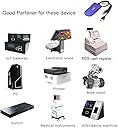
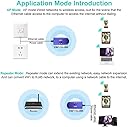
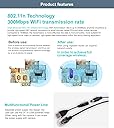
The VONETS Mini WiFi Bridge is a compact, industrial-grade adapter that converts WiFi to Ethernet and vice versa, supporting 300 Mbps speeds on the 2.4 GHz band. With flexible USB or DC power options and a 100-meter wireless range, it’s designed to extend network coverage and connect wired devices like DVRs, IP cameras, and IoT equipment effortlessly. Its smart bridge and repeater functions ensure reliable, seamless connectivity in both home and industrial environments.






| ASIN | B014SK2H6W |
| Best Sellers Rank | 16,617 in Computers & Accessories ( See Top 100 in Computers & Accessories ) 118 in Network Repeaters |
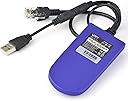
| Box Contents | RJ45 ethernet cable, USB/DC cable |
| Brand Name | Vonets |
| Colour | 2.4GHz |
| Compatible Devices | Router |
| Connector Type | RJ45 |
| Country of Origin | China |
| Customer Reviews | 4.0 4.0 out of 5 stars (2,842) |
| Data Transfer Rate | 300 Megabits Per Second |
| Frequency | 2.4 GHz |
| Frequency Band Class | Single-Band |
| Frequency Bands Supported | 2.4 GHz |
| Item Dimensions D x W x H | 92D x 47W x 21H millimetres |
| Item Weight | 60 Grams |
| Manufacturer | Shenzhen HouTian Network Communication Technology Co., Ltd. |
| Manufacturer Part Number | VAP11G-300 |
| Model Number | VAP11G-300 |
| Product Warranty | 1year |
| Range | 100 |
| Smart Home Compatibility | Not Smart Home Compatible |
| Special Features | smart bridge function |
| UPC | 641945149906 641945150315 714169876030 714169875668 |
| Unit Count | 1.0 count |
| Wireless Compability | 2.4 GHz Radio Frequency |
J**3
Great for youview box application
Brilliant little dongle! Bought this when we moved the BT youview box up into the bedroom, as you may know the youbox a wired internet connection and though i would give this a try. Powered by the USB socket on the back of the box and it works a treat. Really simple to setup even for a novice with networking experience, instructions aren't the best but can make out what to do, even a simple youtube search will give a clear video on how to do it. I have tested this for amazon prime streaming and so far it hasn't missed a beat. My router is sat in the living room and we have a solid brick built house so would expect some buffering but so far nothing! Have had this setup for a little over a month. Would recommend if you are looking to get over any hardwired issues and have limited plug sockets at your disposal!
D**M
Decent bit of kit
Great item for networking Ethernet-only devices to WiFi networks. I use them mainly for large photocopiers so they only require a power socket where they are to be located. Pity they only work on older 2.4Ghz WiFi networks. Small enough to be fitted discreetly to the back of the copiers. Very reliable. instructions not the best.
K**H
Works well as a WIFI bridge to WIFI access point (hotspot)
Very simple to setup and use. Used in bridge mode to connect a remote switch to a WIFI access point (hotspot) Also very helpful was that the power USB connector can be removed to allow running on12v DC which was the only available power source available in the remote location.
A**S
Look out for Ethernet connection replacing wifi when setting up
Documentation a little confusing but when you have worked out what this gadget is to do for you (in my case a bridge so I could connect a CCTV NVR wirelessly to my home router), set up is painless. Connected it to my laptop (which had an existing wifi connection) via RJ45 to my Ethernet port, and USB, connect to it using a browser with the IP address given, Login in using creds supplied, pick the wifi source it is to bridge to, turn off hotspot so it cannot be seen as another wifi source. Hit Apply, then Reboot - and in my case the browser screen sat there with 'Please wait' showing. However after a couple of minutes or so my laptop network connection switched to Ethernet meaning it was using the gadget instead of the laptop wifi. Setup job done even though 'Please wait' still showed. Tested by turning off my laptop wifi - laptop remained connected to my router via Ethernet and the gadget. Unplugged the gadget, plugged into my NVR, laptop wifi reconnected itself and my NVR is now happily wireless to my network. :-)
H**L
Garden WiFi is go
I am using this, along with some cable extenders/couplers to extend the WiFi into the garden. I'm using an RJ45 input that's coming from a powerline adaptor, and pretty much just had to plug it in then work out the correct website link to configure it a little and to change the SSID and password. I had to go to a Vonets page rather than an IP address link, and ensure my laptop was on the same network as the bridge, which was a little confusing but nothing too taxing. I gave the SSID its own name so it's a secondary network, so other devices don't get confused and it works nicely sending the WiFi signal out at least 8m into the garden. I'm now able to use my smartphone in the garden, and have been able to have an Echo Dot out in the garden to use Alexa (using a battery pack too and making sure the Dot was on the new network). Really happy with how this has worked out and how easy it was.
A**R
Cannot get it function. Unable to contact vonets.cfg.operating but not connecting for config.
The unit is a great idea but is very difficult to configure. it is impossible to get to vonets.cfg to try and configure the unit. It should be a plug and play unit but does not allow for plug and play. Also it says there is a CD but this was not supplied. Not easy piece of hardware for someone who is not computer literate.
R**Y
Works great in the end.
Bought this to connect my cctv dvr to my virgin media super hub via WiFi. I esed the USB port on the front of the cctv dvr to power the unit and plugged the rj45 into my laptop. ( ethernet port ) turned off the wireless connection on my laptop and opened my browser then typed in on the on the top search bar 192.168.254.254 enter. It brought up the home page for the device and I configured it to search for hot spots ( my virgin media hub ) entered the hub password etc then opened the WiFi repeater tab and clicked on the appropriate tab to connect to the Internet. It stated connected and I logged out. Then unplugged the rj45 ( ethernet plug ) and plugged it into the back of the cctv dvr and went through the cctv systems set up feature and hey presto it's connected to my hub via WiFi. Remember to use the USB on the cctv dvr to keep it powered do not unplug it. Its working great. However s little knowledge of setting up routers would be an advantage.
J**G
Does what it says on the tin
Ok, so I'm far from an Apple fan, but the one thing Mr Jobs got very very right was the user interface. The interface here is as per a bad/ below average switch or router config. Which for us technical peeps is fine, but I would assume this is where many of the bad reviews or people saying the item doesn't work are coming from...its just too technical for some. A proper Interface or even some well worded explanations...or even just a menu button that sets Bridge or Repeater! Otherwise the device works flawlessly so far (have had it plugged in half an hour). Good reliable connection and a great bridge.
S**N
自分の部屋(事務所)までの有線LANが不調のため購入しました。パソコンでセットアップ後にハブに差し込んで使用できました。
V**N
Me ha encantado este producto. Lo utilizo con una torre con Ubuntu. Fácil de configurar y permite configuraciones avanzadas según las necesidades de cada uno.
P**N
If you don't mind the fact that this device is Chinese developed and manufactured and not audited for security (though the brand has been around quite a while), then this is a great and inexpensive way to extend your wi-fi or provide an inexpensive travel router, assuming you don't mind a cap of 300Mbps. I purchased this to use with an LG OLED C8, whose wi-fi chip has been rendered borderline useless by a recent firmware update. It's being used as a bridge to connect to my wi-fi and then pass that onto the TV through it's Ethernet port. After hours of using it with 4K content, it hasn't missed a beat and is doing a great job. The firmware is basic and full of bad English (not unusual), but it's functional and even if you're not technical, following the quick start guide should get you up and running. It also has a one-button firmware update function built-in, which is very handy. This is a device for specific purposes but it serves that purpose well and for a cheap price. If you're concerned about security though, you might want to make sure it only has a connection directly to your router and not the wider Internet directly.
M**S
It works exactly as promissed, But you have to be in the Wifi zone to install it correctle and make it working
E**O
Cumplió al cien con todas las características mencionadas en la publicacion
Trustpilot
3 weeks ago
3 weeks ago