Buy anything from 5,000+ international stores. One checkout price. No surprise fees. Join 2M+ shoppers on Desertcart.
Desertcart purchases this item on your behalf and handles shipping, customs, and support to Vanuatu.
🎮 Elevate your game with ultrawide clarity and lightning-fast refresh—don’t just play, dominate!
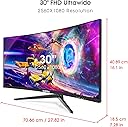
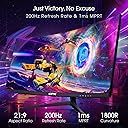
The Sceptre 30-inch Curved Gaming Monitor delivers a stunning 2560x1080 ultrawide Full HD experience with a rapid 200Hz refresh rate and 5ms response time, optimized for competitive gaming. Featuring AMD FreeSync technology, built-in speakers, and eye-friendly blue light shift, this sleek metal black monitor combines immersive visuals with practical features like VESA wall mount compatibility and multiple HDMI/DisplayPort inputs. Perfect for millennials seeking high performance and style without breaking the bank.


| ASIN | B07TXM7K4T |
| Adaptive Sync | FreeSync |
| Additional Features | Blue Light Filter, Built-In Speakers, Curved, Flicker-Free, High Dynamic Range, Tilt Adjustment, Ultrawide Screen |
| Aspect Ratio | 21:9 |
| Best Sellers Rank | #5,584 in Electronics ( See Top 100 in Electronics ) #204 in Computer Monitors |
| Brand | Sceptre |
| Brightness | 350 Lux |
| Built-In Media | 3 x HDMI Ports, 1 x Display Port. |
| Color | Metal Black |
| Color Gamut | 99.0 |
| Compatible Devices | Any device with HDMI or DisplayPort output that supports the monitor's resolution and refresh rate |
| Connectivity Technology | DisplayPort, HDMI |
| Contrast Ratio | 3000:1 |
| Customer Reviews | 4.5 out of 5 stars 12,750 Reviews |
| Display Resolution Maximum | 2560 x 1080 Pixels |
| Display Technology | LED |
| Display Type | LED |
| Global Trade Identification Number | 00792343330028, 00792343330035 |
| Hardware Connectivity | DisplayPort, HDMI |
| Has Color Screen | Yes |
| Image Contrast Ratio | 3000:1 |
| Item Dimensions D x W x H | 7.28"D x 27.82"W x 16.1"H |
| Item Type Name | 30" Curved 200Hz |
| Item Weight | 12.2 Pounds |
| Manufacturer | Sceptre |
| Model Name | C305B-200UN1T.1 |
| Model Number | C305B-200UN1T.1 |
| Mounting Type | Wall Mount |
| Native Resolution | 2560x1080 |
| Number of Component Outputs | 3 |
| Picture Quality Enhancement Technology | True |
| Power Consumption | 52 Watts |
| Refresh Rate | 200 Hz |
| Resolution | FHD 1080p Ultra Wide |
| Response Time | 1 Milliseconds |
| Screen Finish | Anti-glare, Hard coating (3H) |
| Screen Size | 30 Inches |
| Screen Surface Description | Anti-glare, Hard coating (3H) |
| Series Number | 2025 |
| Shape | Square |
| Specific Uses For Product | Business, Gaming, Personal |
| Total Number of HDMI Ports | 3 |
| UPC | 792343330028 792343330035 655360822047 |
| Viewing Angle | 170 Degrees |
| Voltage | 120 Volts |
| Warranty Description | limited 1 year |
| Warranty Type | 1 Year Manufacturer Warranty |
K**N
Best features and performance to price sub-$300 gaming monitor on Amazon!
Was shopping online with my son for his first gaming PC (which we decided upon an AMD Ryzen 5 3600 CPU with Nvidia RTX 2060 Super GPU model) and I quickly realized handing him down my old Samsung 27" 1080p 60hz LCD monitor as was the original plan would have been a total waste of his new computer! So having saved a couple hundred bucks buying a pre-built instead of building our own with the same specs (as PC components are experiencing shortages cause of COVID-19 and have gone up drastically in price), I told my son he could pick out any monitor on Amazon he wanted on a budget of $300, and he picked out this one. I could instantly see why he chose this model which at 30" was bigger than most other gaming monitors with decent specs at this price range and it was an ultrawide, which made me proud (like him being a chip off the old block) as I game on a 49" super ultrawide monitor myself. But the real "wow factor" of this model, of course, is the 200hz refresh rate which is a rarity in itself especially for ultrawides but almost unheard of at this price range. The only thing I wasn't sure about was I wasn't familiar with the Sceptre brand. Generally as a rule I've stayed away from buying displays from lesser-known manufacturers as with panels you often get what you pay for and "cheap" usually turns out more "expensive" in the long run, if not just "frustrating" and "disappointing". But this was my son's computer and his pick for the monitor and I was proud that he did all his own research so I wanted to support him. So Sceptre it was! Well I'm glad I didn't say anything cause this monitor rocks! The colors looked great straight out of the box and I haven't felt the need to do any calibration of any sort. Contrast and blacks are above average on this display and well beyond my expectations for a sub-$300 model. Even though there's no HDR and I believe it's rated at just 250 nits, it looks much brighter than that, possibly because of its high native contrast. But what both my son and I were most looking forward to see, of course, was how it performed at 200hz. So I fired up 3DMark and ran a few benchmark tests and...WOW! The motion on all frame rates was buttery smooth. On some tests we were reaching fps of over 600 so we knew we hit the monitor's 200 frames per second limit and it looked incredible! No tearing or ghosting or any sign of distortion whatsoever. My own 49" super ultrawide only goes up to 144hz and I could see a discernible difference in frame rate running identical tests on our PCs both of which were pushing frames well beyond the limits of our monitors. This monitor's 200hz refresh rate is legit! Another great feature of this monitor is its support of AMD Freesync. It worked flawlessly with my son's RTX 2060 Super both in fullscreen and windowed mode, even though the Nvidia Control Panel said the monitor wasn't "validated as G-SYNC Compatible". I've actually had problems in the past getting this compatibility feature to work on other Freesync monitors so was really relieved to find it working perfectly on the Sceptre. Overall this is a fantastic gaming monitor that performs well in all its highlighted and advertised features, and phenomenally when you also factor in its price. Highly recommended and most importantly for me is my son couldn't be happier!
N**Y
QUALITY! Metal stand - Zero dead pixals - Ability to change the blue to ease eye strain
I was immediately impressed with the metal stand. 1) The design of the stand provides PLENTY of room underneath to store my tape, stapler, paperclips etc., so they are out of the way. The stand will NOT move as it has stay put rubber feet! When you put it into place; you can be sure (unless it's SHOVED) it will stay put! Also there is a hole in the back of the stand to run your wires through. 2) However I did have to go into the NVIDIA CONTROL PANEL to set it correctly. Mine was defaulted at 1920 x 1080p (this setting did not utilize the full 30" screen) So I went to the Search box, down by the start button, and I typed NVIDIA control panel. Then, under display, I clicked on: Change Resolution and chose 2560 x 1080 (native). It stretched the screen out to the actual full screen. 3) Speakers: There are mixed reviews on the built in speakers. IMO they are just fine for people talking, but only for people talking. You'll not be happy for music nor movies. I can use my laptop speakers or plug in my external speakers to my laptop. I don't like to keep them plugged all the time in as I don't have room for the USB, and I do not wish to use a USB hub. 4) There are 2 HDMI and 1 Data Port. I didn't bother with the Data Port because I have a nice certified HDMI cable. 5) I didn't do too much to the settings on the monitor (buttons on the right). I did change the blue light shift to 30%. Either would probably be fine as it will be easier on the eyes. 6) I purchased this particular monitor because of the great price. Also that I had seen a review done by someone that had it for 2 years and said it held up very well. 7) I'm sitting a distance of about 2 feet from it, and it's good. I'm glad I didn't get the 32" 8) Measurements: Distance from desk to bottom of the frame 3 1/2", Vertical; About 11 inches, Horizontal: A little under 27 inches, Actual diagonal: About 29 1/2 inches (which they did disclose). 9) Curved: It's not noticeable (that's a good thing). I "thought" I wanted a flat screen, but my son talked me into the curved, and I'm glad. I did purchase the 3 year warranty, which I don't usually do, but it was only $20. I hope this helps someone!
D**I
Good for the price.
I've been using this for about almost 2yrs and it's nice. Very large screen. Not so great sound but what monitors have good speakers right? Color was pretty spot on out of the box. Mainly the issues I have are not with the monitor but support for ultra wide screens. Sometimes I have issues with video games and netflix doesn't like to run it in fullscreen without edges. Anyways small annoyances.
A**R
As Advertised (vesa mounting)
I think this is a great monitor has no problems with running high performance games and gives you an immersive experience when you want to be in that atmosphere. Very durable and not to heavy and intense curved visuals for the price along with the monitor curve is nice and adds aesthetic. the settings for gaming and casual use are helpful and help maintain eye protection the monitor tilting is a little stiff but I think with the right mounting arm you can fix that.
J**W
Beautiful monitor for the value
Start off by prefacing I'm on a novice when it comes to monitors of this scale (as you can see by my 2nd monitor in the picture), but from a basic point of view this monitor is truly beautiful. Been playing a few games now and there's no dead pixels, gorgeous picture on even older games, mount is sturdy and easy to install, and the best part is the price compared to others. I have yet to see another of similar size and Hz offered that even comes close to this in price, with most being at least $100 more for what I can see as barely any difference in quality. I should also mention, this product comes with a Display Port cord, so no need to buy one separate if you plan to use that port. I'm not sure about the two recent 1-star reviews below me, as I had no issues, and all the parts were wrapped in included in an orderly manner, and Sceptre has a warranty, as well as a support line, that they could have contacted at any time (information included in the box). Some advice for them, and to others to potentially avoid their fate: DON'T GRAB THE MONITOR BY THE SCREEN WHEN YOU TAKE IT OUT OF THE BOX. There's a warning on the side of the box when you open it saying if you do it could potentially damage the monitor, but I could see how someone could miss this and do that, and then blame the product as being defective. Second, the AC adapter for the power cord is in a separate part of the box from the main cord, so you could potentially miss this if you open the other side first and assume it wasn't included, and then throw away the piece of foam which has the adapter in it. All that being said, would definitely recommend this product if you want good quality for cheaper. Update: 5 months in and I still couldn’t be happier with this purchase, not a dead pixel in sight. My first flat screen was a Sceptre and lasted for 5-6 years, and this one is shaping up to be the same. Good value, good quality
L**E
Fantastic work or gaming monitor for those with limited space
I could not be happier with my purchase of this monitor. It works perfectly for me, except for one niggle which I'll get to at the end. Since I've been working at home more these past few months, I was really missing the two monitor setup I had at work. The inability to open two documents side-by-side (with enough real estate to get things done) was a limitation. Unfortunately, I have a small ladder-desk at home, so I didn't have enough space for two monitors. Enter this Sceptre ultrawide. The ultrawide format is perfect. It gives me enough space to have two windows side-by-side (say a browser window and a PowerPoint window). It's not quite two FHD monitors wide, but it's enough. Add the Windows 10 snap feature and it's super easy to be more productive. This is my first curved monitor. I have to say that having a curved ultrawide is perfect. The curvature makes using the monitor very comfortable. As to the performance of the monitor, it seems great. I'm definitely not a spec-aficionado. I don't know what to look for to tell the difference between a 60Hz refresh and a 200Hz refresh rate, but all I'll say is the monitor looks great. Whether it's work, watching movies/TV/YouTube or some light gaming, the performance is perfect. I also understand that the color gamut is limited, but as a non-graphics professional, I honestly don't notice what I'm supposedly missing. Connectivity is fantastic. Four ports (one DisplayPort and three HDMI). I have my home PC, work laptop, home Mac all connected and still have an extra port! Switching between the three devices is easy. The buttons feel a little 90's, but they get the job done. I have the monitor mounted to a Amazon Basics single monitor arm to save desktop space. No problems at all with the VESA mount on the back of this monitor. The internal speakers are perfectly adequate for system sounds, but are not great for music or video or gaming. Therefore, I have desktop speakers connected to the stereo mini jack output on the monitor. This allows me to get audio from any device (via DisplayPort or HDMI) out to a set of speakers. So my one niggle... when the monitor wakes from sleep mode, there is a slight audio crackle as current is reapplied to the audio circuitry. This did not happen with my previous monitor, so it's definitely not my speakers. So that's it. The one thing I wish could be fixed. Bottomline... if you have limited space and need more room to work (or play), this is a great option.
I**.
Impressive monitors for the price!! The wide screen is super nice!!!
Ok, I bought a mini pc replacing a much older gaming pc. I had dual 23" monitors, one was only few years old the other was gawd how old, early HDMI days.. The older monitor didnt want to work well with the mini pc's integrated graphic card. So I started doing my research for a new monitor. I am not one to spend alot on electronics but I wanted a decent monitor that was larger then my 23". I went to several websites over the course of a few days and made a list of the ones that were commonly on them with good critic reviews. Sceptre C30 was on that list. I game alittle but work from home and I zoom call few times a month. With Windows 11 easy split screen it was like having 3 monitors. It was so nice!!! I had 3 full windows up and easy to read with the ultra wide screens. So after few weeks of using the Speptre C30 it was actually getting annoying how much better the picture quality was on the Sceptre verses the other monitor..... To be fair and transparent both monitors have the same picture resolution specs and were on the same settings. The 1 ms response time works well for gaming also. For what I paid, $220ish for ea it was so worth it. I just showed a few pictures to a friend who spent over twice for one monitor, 40", and he was amazed at how much viewing screen I got for what $440.... And he was here the other day showing me how to play a character in a game. He said the picture on this monitor was amazing especially for the price!!! Now nothing is perfect!!! A big pitfall for me was the monitors have a very low profile and the height can't be adjusted!! I am a pretty tall guy so this was a big problem. I had to spend $38 on monitor stands. But the reality is I found so much value in this monitor I bought a second one. And as I was writing this I had 4 windows going and it was like having 4 monitors. I am not an expert or pretend to be on computers but I am liking this set up alot. And the total price of everything was under $1000. new PC, 2x cables, 2x monitor stands, usb hub and a really nice keyboard and mouse. I paid more for just the gaming PC I replaced with alot worse monitors and keyboard. This monitor is a great buy!! Really gave me alot for very little money!!!
A**R
Not for someone who needs to ever move them or wants to use more than one side by side.
As a disclaimer: my biggest issue with these could have been avoided by me. I put too much faith in such a low quality product and will admit that that is completely on me. This review is negative because I feel the structural quality of the product is WAY too low to be reasonable for somewhat average needs. If you are someone who isn’t planning on using multiple monitors, or moving them. This screen will most likely work extremely well for you. If you might ever move them. You will need to take added precautions over what you may be used to. If you’re purchasing more than one with the idea of using them side by side, prepare to also purchase a mounting solution. In May 2023, I purchased three of these monitors. I was extremely apprehensive about purchasing them because of their low cost. With that said, I wanted three ultra-wide monitors for sim racing and I have fallen on hard times since covid layoffs and have been trying to scratch and claw my way back up with no avail. Even these at low cost was a MASSIVE purchase for me that took many months of researching, and saving. In that time I scoured multiple sources and reviews, and for the most part, they were either extremely positive or extremely negative referred to dead pixels. These monitors worked phenomenally until recently when moved with these monitors (it is currently December 2023.) Only one survived the move, which is sadly the one that has recently developed dead pixels. For context about my moving situation, these monitors were placed back to front (Imagine (((, for a better idea of what went wrong.) in a well packaged moving box. I was VERY careful and took the same precautions I have done in the past with my two curved monitors of a higher quality brand; Each screen was wrapped in a moving blanket. Today, I unpacked them. The box was undamaged. I took care in where they were packed in the moving vehicle. I was sure to set them in a spot where the box would not be squished from either side, with no boxes placed on top. I also placed them in an area where the box wouldn’t slide around. The box stayed put the whole trip and there was no outer damage to the box. At no point was there any opportunity for any damage. I was confident looking at the box and the screens they made it okay. This, to my great sadness, wasn’t the case after turning them on. With that in mind, it is quite clear by how the screen is damaged. The issue was placing them front to back. Even with wrapping them in thick moving blankets, the stand of the screen in front of each must have “rocked” enough to damage the screen behind it even with the blankets and tight wrapping. I wish I could have shown a picture of how well I packed them so you can understand why I am giving a low rating for what probably appears as a clear user mistake. However, you can only take my word. To tie this back to the beginning: the quality of the screen in terms of visuals is phenomenal. So why is this monitor so cheap? I am now a firm believer that these monitors are so cheap because there has been such a massive sacrifice made in the physical quality of each component. The screen broke through a thick moving blanket to what could only imagine to be a slight rocking. I am extremely tempted to take the broken monitors and test the actual structural integrity by measuring force required to damage the screen. There is not visible damage on the outer plastic, it is solely on the display. To add, in general, I do NOT recommend these screens to anyone who is planning on purchasing more than one with an idea to use them side by side. Mounting the included stands leaves the screen lopsided by up to -3 degrees on the worst one. While that may not sound like much, when putting the monitors side by side the tops touched, but the bottoms did not as the tilting of the screen left over a 1” gap between screens. As I couldn’t afford more adjustable monitor stands yet, I just sort of lived with it with hopes of getting some better stands in the future. With this in mind, that added cost alone makes these monitors not worth it even for extremely low end monitors. The screen quality is very bright and washed out at times. This can be adjusted, but then darker scenes are harder to see. Any ambient lighting will have great impact on viewing quality. I had to turn my RGB keyboard off as it would reflect BADLY on the screen. This is to be expected with this display type and quality/price level. I expected this, but I just thought others might benefit from reading this if they aren’t expecting that. I was deeply hoping I could get away with cheap monitors, but I will likely just save for a few years and purchase higher quality ones to replace the broken ones here.
Trustpilot
1 week ago
1 month ago