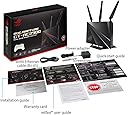
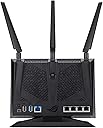
🎮 Dominate your digital domain with ASUS ROG Rapture – where speed meets style!
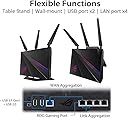
The ASUS ROG Rapture GT-AC2900 is a dual-band gigabit gaming router featuring a 1.8GHz dual-core processor, triple-level game acceleration, and lifetime AiProtection Pro security. Designed for pro gamers and streamers, it supports NVIDIA GeForce Now for cloud gaming, customizable Aura RGB lighting, and AiMesh for whole-home Wi-Fi coverage. VPNFusion technology enables multiple VPN protocols simultaneously, ensuring secure, high-speed connections across numerous devices.



| ASIN | B07VPL5WP3 |
| Best Sellers Rank | #341,845 in Electronics ( See Top 100 in Electronics ) #2,074 in Computer Routers |
| Customer Reviews | 4.4 4.4 out of 5 stars (1,730) |
| Date First Available | July 24, 2019 |
| Item Weight | 1.72 pounds |
| Item model number | GT-AC2900 |
| Manufacturer | ASUS |
| Product Dimensions | 13.9 x 9.65 x 4.33 inches |
G**G
This is a very strong, and well made router!
This router has impressed me. Before hand I was using a Linksys WRT32X which is similar to the Linksys 3200ACM. I would run my whole network through a VPN (ExpressVPN) to be exact. It would bogg down my network speed to 50mbps up and down. This Asus GT-AC2900 can run my VPN at 220mps down and 180mbps up without a problem through OpenVPN. In the past I've used L2TP encrycrption on a TP-link 3200 archer and was able to achieve 100mbps but that router died. Using VPNfusion I am able to select individual devices to run directly from my ISP and the surprising thing to me is how flawlessly it performs. I have about 10- 19 devices running at any given time. I configured the router to send every connection through a openVPN tunnel. So any device that enters my network is protected but I manually selected 3 desktops we use for gaming to go through our basic internet for lowest ping times and fastest download and upload speeds. I experienced some issues visiting websites like Amazon through the connections I made exceptions for and had to manually configure a DNS for each to solve the problem, that seems to be my ISP's fault. My full connection speed from my ISP is 500mbps up and down and on the connections outside of the VPN I am getting the full bandwidth of my connection. The dual core processor should be more than enough horse power for anyone I assume. I also understand OpenVPN is a single threaded application and I'm sure that plays a huge part in why it runs so well, since one core is free to do the other tasks. I've currently only had the router for a few days so time will tell how it holds up but so far it's been great. Anyone looking to use the Game Boost features though alongside a VPN might run into problems though. When I had to tried to run it through my nonVPN connections it caused my VPN connections to disconnect and run through my native internet which wasn't ideal. WTFast seemed to work I didn't get an improvement in ping times from it though and it only supports one device on your network at a time. I took a risk going with this router over the Asus 86u since I couldn't find out any information about it's VPN performance. The Asus 86u is a very similar router but it has a 32bit 1.8ghz processor this one is a 64bit 1.8ghz processor and as far as I know the Asus 86u doesn't have VPNfusion allowing you to run multiple connection types at once. Some details on VPNfusion I would like to share I figure someone might want to know. You can run up to 4 protocols at once and it works with OpenVPN, L2TP, and PPTP in client mode. You can also store up to 16 configurations (different servers) I've only used OpenVPN though. It also have VPN server functionality for PPTP, OpenVPN and IPSec VPN. Lastly in terms of ping times I had a significant reduction going from the Linksys WRT32X to this Asus GT AC-2900 in Fortnite my ping would be around 36-32 on my closest server and now sits around 22-14 I also play on a further server to play with friends on the other side of the world and used to get 100ping there and now I get 75-65. In Modern Warfare I dropped by about 15-20 there as well. I hope this helps someone, I would have liked to have this information myself previous to buying but I'm so glad I took my chance with it!
A**N
Reliable and good gaming router!
Have this paired with modem netgear cm-1200, ASUS extender rp-ac1900 (Ethernet back on for the ai mesh system). And Comcast gigabit internet. And all Ethernet cables are cat7. Always have 2 wired desktop PCs, 9 wireless connections. I recommend for any gamer. I love this router! Super easy set up, easy mesh setup. If you do wifi mesh you will drop a lot of MB’s. I only got 150 after wifi mesh. But it was solid and reliable. So I went with Ethernet back haul and got 600+on the other end of my house (60ft away from router.) 650 on the same side of the house as the router. 998Mbs lan to pc. I also only use the 5G wifi. Turned off 2.4G. After a month I had the issues everyone else had. Actually had it on the last router cause this was its replacement (old:asus ac-68u). Still had internet wifi issues. Had Comcast come out and look things over. They said since I just replace the router my less than 1 year old arris sb-8200 modem was the issue. Yeah, ok… So I bought the net gear cm-1200 to make sure. Still had issues. I really wanted to solve this wifi dropping the internet issue. Found a connection for the cable out side my house, looked good but when the problem happened if I disconnected it and reconnected it the issue would go away for a few days. I replaced the cable with a 100’ Kable direct cable and ran directly from the modem to the isp connection. Never had an issue again. Has been 12 months no problems. Have had the router for 16 months. Great features on the ap. Firmware updates via the app. I love this router. All in all, the issues I had was all the bad reviews on all sites. Turns out it was just a bad connection to isp. How many others have this issue and don’t know/think to check the connection to the modem from isp. Also this router has a feature called Dfs to change the frequency of the wifi. Found a really old thread on Reddit about a50s losing connection to base station due to wifi interference. And Omg my gen 2 asto A50s work again no cutting out. Who would of thought. That router signals was what was causing the astro a50s to lose connection to base station. Even better for ASUS to put that Dfs button click to fix the issue instead of trying to change the frequency manually. After all of that having solid internet and then getting to use my a50s again was total bonus!
K**G
REVIEW FOR ASUS RAPTURE GT-AC2900
The ASUS rog rapture 2900 has been live for 7 hours now and all I can say is that I’m extremely satisfied. Upload and download prior to today has been disconnecting intermittently for 4 weeks. When it’s been online my download will be exactly what I’m paying for while my upload wouldn’t even give me 70-80% of what I’m paying for. I’m talking paying for ten upload and getting 4-6 at its worst 2. Disconnecting me from discord causing constant disconnects/reconnects. Troubleshot over the course of those weeks and all this started happening when I received spectrums new modem and router. I ran plenty of tests while on the router to deem it the issue. Ran plenty of tests while solely connected to the modem and it was stable and I was getting exactly what I was paying for from my isp. After a long and long search going down the craziest rabbit hole. I came across this router from ASUS. Setup was so easy and FUN. The moment I turned off the modem. Connected my router and plugged everything in, powered it all on and the router was already receiving internet. Got on my computer and I was able to set it up following the wizard with ease. Ran a speed test every thirty or so minutes and my upload locked at 10 even 11 at times. Getting as low as 8-9 only for once of those tests. Configured adaptive qos. Game boost. Played with the rgb. Enabled air protection. Fully configurable firewall. Mac filtering. This thing is awesome and it has VPN. Absolutely ridiculously awesome. I will provide an update after a month or so if she remains stable! Six days later and I AM STILL getting speeds locked at exactly what I’m paying for. Can’t say enough good things about this router. Qos was simple. My twitch streams are smooth as eggs now with my upload not spiking all over the place. All I could honestly ask for. Great router
T**H
Very easy to setup. Excellent quality. Excellent signal. Awesome company. Never had an issue with ASUS equipment. Works beyond expectations. A wesome S pectacular U nbelievable S ensational
S**S
Dos meses de uso y estoy muy satisfecho. Adquirí este ruouter para colocarlo en modo puente con el modem Arris que me proporcinó Megacable, mi proveedor de internet. La configuración es delicada, ya que la primera vez no lo configuré bien y no funcionó como esperaba, pero después de revisar varios video tutoriales pude configurarlo correctamente y me encuentro muy satisfecho con el resultado. Al ser un router diseñado para gaming, cuenta con varias herramientas integradas para mejorar el desempeño en juegos en línea. Si eres un apasionado del PC gaming, este router es una magnífica opción. Algo costoso, pero vale la pena una vez que lo ajustas correctamente.
R**A
Same ping
M**D
Nothing
D**O
This router solved the vast majority of the networking issues I have been having. Its signal strength is more than triple what I was receiving with my Hitron CGN3 from the same room, and its easy to use QoS settings were able to fix 100% of my bandwidth issues. Dead spots no longer exist in my house, which is perfect. Its footprint on my desk is also great, and doesn't look like the mothership from District 9 like a lot of the contemporary routers look like nowadays. The only gripes I do have are A) the price is a bit steep given you can pick up the similar performing RT-AC68U for almost $100 cheaper; however, if you're completely addicted to RGB like the rest of us are then you obviously can't stop at RGB headphones and RGB deskmats; might as well go all-out and get an RGB router too. The other issue I have is that I wish there was more customization in terms of the offered RGB; you're stuck with either one static colour or a rainbow effect on every setting with no in between at all. In all seriousness though, I'd recommend this 100% if you're in the market for a router that also functions as an odd conversation piece.
Trustpilot
1 month ago
1 month ago