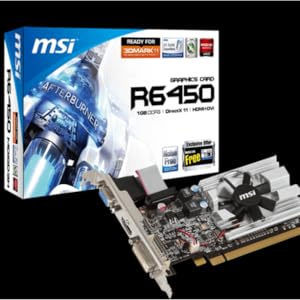
🚀 Elevate your workstation with compact, reliable graphics power!
The MSI Radeon HD 6450 is a low-profile PCI Express graphics card featuring a 625 MHz AMD GPU, 2GB of 64-bit DDR3 memory running at 1066 MHz, and support for VGA, DVI-I, and HDMI outputs. It delivers up to 2560x1600 resolution, built with durable solid capacitors, and includes MSI's Afterburner overclocking and Predator video capture utilities, making it a versatile choice for professional setups needing efficient, space-saving graphics performance.

| ASIN | B00CRY47K6 |
| Antenna Location | Gaming |
| Brand | msi |
| Compatible Devices | Desktop |
| Customer Reviews | 4.3 out of 5 stars 1,158 Reviews |
| Display Maximum Resolution | 2560 x 1600 |
| Display Resolution Maximum | 2560x1600 |
| Global Trade Identification Number | 00816909105179 |
| Graphics Card Interface | PCI Express |
| Graphics Card Ram | 2 GB |
| Graphics Coprocessor | AMD |
| Graphics Description | AMD Radeon HD 6450, 2GB DDR3, 625 MHz Engine Clock, 1066 MHz Memory Clock |
| Graphics Processor Manufacturer | ATI |
| Graphics RAM Type | VRAM |
| Graphics Ram Size | 2 GB |
| Graphics Ram Type | VRAM |
| Manufacturer | MSI Computer Corp. |
| Memory Clock Speed | 1066 MHz |
| Mfr Part Number | R6450-2GD3H/LP |
| Model Name | R6450-2GD3H/LP |
| Model Number | R6450-2GD3H/LP |
| Number of Fans | 1 |
| UPC | 803982781000 069060200249 898029655796 012300429115 634054837024 044111228519 163120882915 041114202843 816909105179 172304349328 012305077229 |
| Video Output Interface | PCI-E 2.0 |
| Video Processor | ATI |
| Warranty Description | Comes with Manufacturer Warranty. |
J**S
Good video card for a good price.
I purchased and installed the MSI ATI Radeon HD6450 video card on my (six year old) Windows 7 64-bit PC in March 2018. The fan on my old video card failed and the card had to be replaced. If you are comfortable with replacing computer components then you will have no issues installing this card. I don't replace PC components often and I was frustrated with parts of the process. I am including a few issues here in the hopes that it may help others. I still give this card five stars because it was inexpensive and works just fine. I did not lose any noticeable performance compared to my old card. Installation annoyances: 1) The "Quick User's Guide" that comes with the card (and is accessible in the Amazon listing) does not show the actual product. Step 3 of the installation shows the card getting plugged into external power connectors. This card is completely self-contained and does not need extra power from the motherboard to work. Plugging it into the PCI Express slot is the only thing you need to do to get it to work. 2) The box says a 400W power supply is recommended. I have a 350W power supply and have had no issues. 3) After installing the card and starting Windows for the first time, I let Windows Update find and install the card driver. I needed to perform a reboot and logged into my PC again. The maximum resolution at that time was very low so I tried to install the video card driver through the CD. I accessed the setup on the CD by running the The "DVDSetup.exe" file. This would open but then say "the program encountered a problem and needs to close". It had that issue each time I tried. Finally, I accessed the "Driver" folder on the CD and ran the setup.exe file from the WIN7_64 folder (as that is the folder that corresponds to my Windows 7 64-bit PC). 4) The setup file opened and I chose to install the driver, which took a really long time to analyze my PC and then start the install. I let it run for over an hour and it eventually finished. After a reboot, I was able to login and have the proper screen resolution (my monitor's maximum resolution is 1920x1080). 5) After completing the install and rebooting, I was prompted to update the driver. The update pop-up window took me to a website that had the latest driver of the video card. The last driver version was updated in 2016 and there was a message on the site indicating that this video card has been classified as a "legacy" video card and will no longer receive updates from the manufacturer. This isn't a problem for me since the driver that was included with the CD does everything I need. I am not a gamer and the most video intensive thing I do is edit pictures in Adobe Lightroom. But, if you want a card that gets updates/ongoing support from the manufacturer you should choose a different card.
J**S
Decent card for an Excellent price!
This little card got me out of a jam quickly and efficiently. Had an old 4 core desktop lying around, nice box with 16GB ram and a decent 128GB SSD. Decided it would be a great computer for our guest room so that when my step son came to stay over he would be able to surf the web, play some light games and youtube. Problem is that the card I had was an older Radeon with only DVI out and the TV in this room only has HDMI. So got video but no audio. The card came fast, PRIME - Nuff Said. You don't have Prime? Seriously missing out. Anyways, got the car, popped open the box and swapped out cards in about 5 minutes. One thing, this card is tiny! I mean really tiny compared to the old Radeon 3850 it replaced. Closed up[ case, plugged in hdmi and... Boom! Booted straight into windows, the card was recognized automatically and the Catalyst software alerted me of a new version available. Downloaded that (box hadn't been brought up for over a year!). Then rebooted and the thing works amazing. I even installed a few PC games to see what I could throw at it. First off was Mass Effect3 - Played game at 1080p, no hiccups , no drama, nothing but butter! Then I said, ok lets try some more challenging graphics. Installed COD MW3, again pretty decent , not as good as my main gaming box of course. But that one is an watercooled, 8 core, 32GB beast with crossfired 7950's! Then it started to update and I decided to stop the update and drop the new Win10 technical preview on it for giggles ( I know I know I am a geek). The clean install went of without a hitch and upon bootup the right drivers were found (of course no catalyst) and the machine is running like a charm. What I am trying to say, is that if you don't expect this to run like a HUGE card you wont be dissapointed. Needless to say that the kid was completely blown away with his new setup when he came to visit next weekend. Do you need a decent card? In my opinion you can't go wrong with this one. Really impressed me.
T**T
UPDATE: Was...Works well, took too much work to get it to work... NOW = much better
My original review is as follows and carried a 3-star rating......1.5-hours to get it working which for me is about 1.25-hours too long. Is it the fault of the card? Mostly... I have always built my systems for myself, so I am familiar with what I am doing, in this case it simply decided to have a mind of its own. The system that I used this in was an Asus system I bought from a local big box store for work. My system has been great for over a year, but I bought a new 24" monitor to replace one of my 19" monitors and for some reason it was glitching-- returned it thinking it was the monitor, bought a different one from a different manufacturer and same result....also changed cables too and still the same problem... so it has to be something funky with the video card. Done deal, ordered this HD6450. Powered down the system, removed the old card, installed this new MSI card... will not post. Really? So I go through the steps in reverse, and then it will post.... do it all over again, same no post result. So the next time I get into the BIOS and turn off the external card and force the use of the on-board video set... then it goes through a tantrum. Great, just what I needed. Having work to actually do, this is not cooperating. Then out of the blue it likes the HDMI on the motherboard and I get a signal. New video card is not recognized....so I pop in the CD and that is the next part.... it will not autorun. Open the disc and even then, I cannot get anything to run. Great, so now I have to download drivers.... on DSL it took 30-min. Had some lunch and then kept at it. So now for some reason it decided to turn on my second monitor and then I moved the HDMI cable over to the card... all was working. Great, so then I do the right thing and reboot.... back to square one with no video. This time I switched back to the internal and decided to uninstall all drivers and utilities related to any graphics card.... then I reboot and then from my download, I install the software. Now the system recognizes the card and all is good and my primary monitor is now switched over to the card as well as my second monitor is also running.... reboot was necessary... back to square one. Really, again?!?! So I go back to the on-board HDMI and go into the BIOS and force it to use the video card over the on-board set.... reboot... good to go. Did three more reboots and it is behaving correctly. So what was the issue...first it lies somewhere in the previous video card that was factory installed. I think the chipset was close and it simply didn't figure out that there was a change and it just did nothing. Beyond that it helped that I went and removed everything related to any video card and then installed the new drivers, etc. In the end, 1-star knocked off for the CD being worthless. Files are there but could not get it to run and forced me to download it from their site. I do not mind downloading a new version after installing the one on CD, but to not get that far is annoying. Another 1-star knocked off for it not being as easy to install as every other video card I have ever installed. Should have been recognized the first time and been on my way without any fuss. So the end result? It works well and has solved my glitching. I also chose this card because I was running my previous setup with one HDMI to DVI and the other on a VGA monitor cable. So when I determined it was the video card, I was looking for one that had HDMI and DVI and could run them the same time--- this one did plus it also has a VGA connector as well if ever needed. So now the smaller 19" monitor runs on a straight DVI cable and the new 24" monitor runs on HDMI. 5/22 UPDATE: As far as video quality it still is good and runs without issue until I do updates. For some reason it has a quirky sense of humor and the settings for my second monitor being flipped 90-degrees do not persist. Have to go and reset it which is not a big deal, but honestly should be a non-issue. Otherwise, it still is working well and video quality has been what I expected. 8/12 UPDATE: Just went to a new system of the same manufacture and configuration and took my original system and reinstalled the original graphics card without issue. Went to uninstall the drivers and AMD interface--- had to use RevoProUninstaller to find it and uninstall it as for some reason it was not listed in installed programs yet was installed and functional! So with the new system which is simply a newer version of what I had, it still did not support a HDMI and DVI cable, only HDMI and VGA as most people use one monitor. So this time I completely skipped MSi's website or anything to do with them and went directly to AMD's website and searched for drivers for the Radeon HD6450 and it basically steered me through a set of drop down menus to find my card and came up with the Catalyst Control suite with drivers for me to download which I did FIRST. After that I installed the software and then powered down the system, THEN installed the card, connected everything, powered back up. This is the the best order as this time (once the software downloaded and installed) it took less than 5-minutes to get back up and running. Much better and definitely less frustrating. I will also add that this system is now on Windows 10 which has been good to me and the other was on Windows 8.1 which was also good and it too was updated recently to Windows 10 without issue. So the steps I followed to install it were as follows and simply because the included disc and instructions were useless, 1-star off! So here is how I did it the second time: 1. Go to AMD's website and do the usual search for drivers, etc and go through the steps to get the right ones. In this case it was a Radeon HD-6450 which in their world was a Radeon HD-6xxx series under desktops. Take the disc that comes with it and put it away or discard it as for me it was a source of frustration. 2. Download then install. I did not install their "Gaming Evolved" part, so I chose "custom" install and unchecked it. Simply did not need or want it. 3. Once it is installed it requires a system reboot... great! Shut down the system, disconnect power, and now install the new graphics card. 4. Reconnect everything and power system back on. 5. Wait for system to load. On the first boot both monitors were the same output which is fine. Once logged into windows, it updated a driver based on hardware installed, and then the monitors became a left and a right without adjusting any settings. 6. Done. I did check the settings and overall everything was good to go. Total time from download on slow DSL to back up and running was less than 20-minutes which beat my first go around by a mile.
J**S
Amazing Card for HTPC
This card is perfect for a dedicated 3D Media Center. I needed a card that would handle 3D better then my EVGA GeForce GT 740 Superclocked Single Slot 4GB DDR3 Graphics Cards 04G-P4-2744-KR would. When I wanted to watch a 3D movie, I would have to manually turn on 3DVision, which detracts from the Home Theater experience. After doing some research, I decided to try a Radeon 6400 series card. For the price, I chose this one. Some Back-end Information : Windows 7 x64 This Video Card 8 GB RAM AMD FX-8350 Black Intel 256 GB SSD I have the HDMI out from the PC to my Denon AVR-X1100W 7.2 Channel Full 4K Ultra HD A/V Receiver with Bluetooth and Wi-Fi (Discontinued by Manufacturer) and then passed to my VIZIO M651d-A2R 65-Inch 1080p 3D Smart LED HDTV . I use Windows Media Center with 2 Ceton Cable cards to watch live TV and Emby for my movie server. The card is able to handle 3D Blu-Ray playback (via disc, or MKV rip) without an issue, and also allows for bitstreaming (TrueHD Audio pass-though) via the HDMI. AMD's drivers automatically tell my TV to go into 3D mode, which is something I couldn't get nVidia to do without some creative scripts. I ran Disney WOW: World of Wonder [Blu-ray ] to re-calibrate the colors, and had to remove a lot of the adjustments that I had to make when I was running the nVidia card. Seems MSI has done a great job keeping the color palates cleaner and true-er. Well done! Pros : Amazing Performance Great Price Low Profile Cons : A tad noisy (for a HTPC in a quite room) (Might not be so bad for a normal desktop) All and all, I have recommended this card to 3 friends who are also building media centers, and have already bought a spare, just in case.
P**F
Working great on a Dell XPS 420
I just installed this card in my 2007 vintage Dell XPS 420 and it is working great so far. Just installed it a few minutues ago, so need more run time for a better report. The video is really clear and smooth. I feel getting this card was a good choice for my modest needs. By that I mean that I am not a gamer, just do that other simpler stuff. For some reason the included cd didn't do the setup for me. I must have messed up somehow. So, I ended up going to the msi.com website and doing the install from there. Once I got to the correct page it worked great. The install went real smooth. For my usage, this card is working at least as well as my old GeForce 8600 GTS. Of course, this card is 8 years newer, has 1 g memory while my old card has only 256m. Update: This card is still working great. When I installed it I was having a problem with my PC and was forced to reinstall the DELL provided Vista cd that came with my system. Yes, an older PC here. I installed this card with Vista, and later updated back to Win 7. No problems on either OS. On Win 7 the driver install went even easier. I would certainly recommend this card. However, as I said I am not doing serious gaming and don't need a $200++ card.
M**K
Had Problems With Utility and/or Drivers Bricking Win7 - 3rd Attempt Worked Using Only Driver via Windows Update
I installed the card into my lovely girlfriend's SFF PC, as an early gift. It was very easy to swap the regular plate with the included low-profile plate, with just a small Phillips screwdriver and a pair of needle-nose pliers. The card seated very easily, and all of the cables plugged in with a very secure click. The system booted up without any problems, and Windows 7 Home Premium 64-bit recognized it almost immediately. It installed the basic drivers, and the everything worked well. Then I made the mistake of installing the latest utility from MSI... After installing, it notified me that there were new final release drivers. I allowed it to install new drivers, and it BSODed Windows. After the BSOD, I was unable to boot into Windows 7 (the glowing windows icon would freeze), unable to boot into Safe Mode (it would hang up while loading), Last Known Good would boot past the logo before BSODing again, and the repair console was unable to fix the problem - before and after I removed the card. Every time I rolled back to a new restore point before the drivers, it would still freeze. Every utility I used confirmed nothing else was wrong with her system (HDD, memory, mobo, etc). After a pow-wow with another IT friend, I booted from an Ubuntu CD and was able to access the HDD, and manually removed the MSI utility, driver, and all instances written in the registry. From there, I was finally able to boot into Windows 7. I rolled back to a restore point before I installed the driver, and the system seems to be in good working order again. For now, I'm running the system without the card. I will attempt to install the card again, after I do a full backup of the system. From what I can tell, there was nothing wrong with the hardware. This seemed like it was entirely the fault of the latest drivers. Once I reinstall the card, and - goodness willing - get to test its performance, I'll re-review the card. Until then, I'm not particularly happy about my purchase. ~~~ UPDATE (December 28, 2014): Third time is apparently the charm. After another failed attempt to install and use the card, I made sure to wipe out every single file written by the graphics utility. I was able to easily revert back to a manual Windows Restore Point I had made, unlike last time. Finally, I re-inserted the card, booted into Windows 7 Home Premium 64-bit, and allowed Windows Update to add the drivers. After restarting, everything appears to work well. Video is VERY crisp. I did some quick benchmarking, and I received a noticeable boost in graphics performance after the upgrade. As such, I am raising my review from 1 star to 3 stars. I will continue to evaluate the performance of the card, and update my review as needed. ~~~ UPDATE (December 13, 2016): I've been buying these for several work computers, and haven't been having any problems (I've been avoiding the MSI utility). They're easy to install, and each of the small form factor work PCs (most of which have really dinky power supplies) do get a boost in graphic fidelity on the newer monitors. They're even good for the occasional office Minecraft party (though I have bump down resolution to 1280x720 to maintain 50+ FPS). For our modest needs, and for keeping power consumption low, I'm pretty pleased with this series of card.
S**K
I love this HD6450 graphics card
I bought the MSI HD6450 graphics card because the HDMI port on my PC died. I was just using the HD6450 to output video to our HDTV set via HDMI. It did a great job and the videos we watched were perfect with no loss of quality. I wanted to buy a 27" Dell U2713HM monitor that has 2560 x 1440 native resolution. My computer's motherboard does not support that resolution. But then I had the HD6450 sitting there. Yep, sure enough it supports resolutions up to 2560 x 1600 so it would work with a 2560 x 1440 res monitor. I bought the U2713HM monitor from amazon (it's perfect by-the-way with no dead or bright pixels) and connected it to the HD6450 using the DVI-D cable that came with the monitor. The display is perfect! Text is sharp and crisp. Everything is extremely sharp and crisp. I've read that the HD6450 cards are not powerful enough to support higher end gaming. But I don't do gaming. The HD6450 is plenty powerful enough for movies via it's HDMI port and displays on 2560 x 1440 monitors. And I can display both simultaneously using this card. I love this card. Great bang for the buck.
K**E
Great Buy!
I use this on my Refurbished, Dell Optiplex 760 Compact tower, with it's whooping 220 watt power supply. NO ISSUES. I play games like World of Warcraft on HIGH settings and keep a good 30 FPS, I tone it down when in raids but have never had an issue, it's very quiet to me and I'm loving it! It plays Arch Age on lower/med settings, and League of Legends on HIGH. Lets see, Hearthstone is on Max and.. well. Over all, this is a great buy at a great price! So happy I got it! Con: The only Con I have is where the VGA plug is, the cord is to short to put it into place below the Graphics Card where the space is for it on my pc, once it's moved to the compact tower slips for my mini tower. I can't fit it in. So you have to buy a VGA to DVI adapter, OR do what I did, and just leave the side of the PC off and plug it in that way.. LOL
C**L
Nice and quiet card
I'm using this in a Linux media centre box and it works fine. Does video acceleration fine and it's nice and quiet since it's fanless. I haven't tried it for any gaming, but it would probably handle Fortnight and any of the Blizzard games fine. Probably not a great choice for heavier games considering the chipset's age.
J**O
value for the money
This can run on 250 W power old OS good buy if wanting 2 monitors.
O**F
Debi reemplazar hace años
Compre esta tarjeta ya que mi antigua radeon 4600 luego de 4 o 5 años empezo a dar los signos de que llego a su fin, imagen distorsionada con ruido, o a veces se congelaba, asi que decidí probar la radeon mas economica que fue esta R6450 de 1GB, la primera gran diferencia es que esta no emite el ruido de la anterior, se solucionaron detalles que tenia la otra ya que a veces solo emitía por el HDMI señal de video sin sonido, ¿juegos? por desgracia no tengo juegos actuales para ver si los puede correr, pero Alan Wake con un i5 primera gen y 4gb de ram lo mueve a penas a 720p asi que eso ya es una idea de que juegos de esta generación quiza tengan tan bajo desempeño para ser jugables, pero no la compre para ese fin, sino para seguir usando la PC ya que no cuenta con video integrado y de vez en cuando jugar algo de la generación pasada, como Bioshock, Dead Space, Resident Evil 5, ahora que si lo que quieres es correr juegos actuales mejor ahorra para una mas potente como la GTX1050 o 1050ti
M**O
Exactamente lo que buscaba
La tarjeta es exactamente la que buscaba dado que la PC en la que la quería instalar es LP, tiene los adaptadores para ésta. La frecuencia y versión PCIe es la adecuada a mi motherboard.
C**N
Excelente compra.
Baatante buena, la he estado usando con juegos de generacion pasada y los corre sin problemas. Por el precio es excelente ademas me llego un dia antes de lo esperado.
Trustpilot
1 week ago
2 weeks ago