Buy anything from 5,000+ international stores. One checkout price. No surprise fees. Join 2M+ shoppers on Desertcart.
Desertcart purchases this item on your behalf and handles shipping, customs, and support to Vanuatu.
🚀 Upgrade your rig with lightning-fast SATA expansion — don’t get left behind!
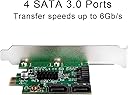
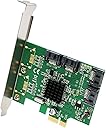
The IO CREST SI-PEX40064 is a high-performance 4-port SATA III expansion card powered by the Marvell 88SE9215 chipset. It delivers blazing 6Gbps transfer speeds via PCIe x1 interface, supports multiple SATA generations, and includes both full and low profile brackets for versatile installation. Ideal for professionals seeking reliable, scalable storage upgrades compatible with Windows and Linux systems.
| ASIN | B00AZ9T3OU |
| Brand | IO CREST |
| Built-In Media | 4 X Sata Cables (16"), Driver Cd, Low Profile Bracket, Sata Iii (6Gbps) 8-Port Pci-Express Controller Card, User Manual |
| Compatible Devices | Laptop, Personal Computer |
| Customer Reviews | 4.5 out of 5 stars 2,102 Reviews |
| Hardware Interface | PCI Express x1 |
| Item Type Name | I/O Crest 4 Port SATA III PCI-e 2.0 x1 Controller Card Marvell 9215 Non-Raid with Low Profile Bracket SI-PEX40064 |
| Item Weight | 0.2 Pounds |
| Manufacturer | Syba |
| Mfr Part Number | SI-PEX40064 |
| Model Number | SI-PEX40064 |
| Operating System | other |
| Style | MV 4-Port |
| Style Name | MV 4-Port |
| UPC | 809395440770 |
| Unit Count | 4.0 Count |
| Warranty Description | One year warranty |
N**D
Wow. What a steal this is....
For my intended purpose this is ridiculous. So cheap for exactly what I was looking for. I have several hard drives and disk drives and ran out of SATA ports to use on my mother board (only has 6). Was looking for a adapter that would make use of my unused pci-e 2.0x1 slots on my board (or even the pci-e 2.0 x8 and x4 slot since I only run 1 video card these other ports just collect dust) but give me more SATA ports. This fit the bill perfectly and for much less than several other brands adapters on the market. Not only do you gain 4 SATA III(6gb/s) rather than most other adapters only give you 2 SATA ports and are not always SATA III. I followed instructions but if you are even slightly schooled on computers and computer parts you could just guess what to do fairly easily. Unhook everything, power cord disconnect and install the card in the pci-e 2.0x1 (or x4 x8 x16) or pci-e 1.0x1 (or x4 x8 x16). With the pci-e 1.0 it will just run at half the speed if you have an ancient board but is still compatible. Also I didn't seem to find anywhere in the description about the SATA cables so I ordered some.... It comes with 2 and they are both SATA III capable. I had no issue with the drivers, didn't even need the disc. windows 7 x64 recognized the device and downloaded them. FOR PEEPS WITH WORRIES ABOUT POSSIBLE COMPATIBILITY PROBLEMS- This is my system setup and install and use went without any issues. (I doubt there should be any unless the pci-e slot you are trying to use is malfunctioning on the Mobo....) --Intel I5-2500K (Sandy) Processor --EVGA Z68 ATX DDR3 2133 Intel - LGA 1155 Motherboards 130-SB-E685-KR --EVGA GeForce GTX760 FTW with ACX Cooler 4GB GDDR5 256Bit Dual-Link DVI-I DVI-D HDMI DP SLI Ready 04G-P4-3768-KR --2x--Kingston Technology HyperX 8 GB (2x4 GB Modules) 1600 MHz DDR3 Dual Channel Kit (PC3 12800) 240-Pin SDRAM KHX1600C9D3K2/8GX --Windows 7 Home Premium SP1 64bit (Full) --Samsung Electronics 840 EVO-Series 250GB 2.5-Inch SATA III Single Unit Version Internal Solid State Drive MZ-7TE250BW --Western Digital 500GB and 1TB Blue HDD (7200rpm) SATA III ---Pioneer Electronics USA 15x SATA Internal BD/DVD/CD Burner with 4 MB Buffer BDR-208DBK --Sony AD-7280S-0B 24x SATA Internal DVD+/-RW Drive (Black) I have swapped all my HDD's, SSD, and Optical drives to this adapter and ALL OF THEM WORK on ALL SATA PORTS. SO to sum up..... This thing is an absolute STEAL if you are trying to make use of some pci-e 2.0 or 1.0x1 slots and would like some more SATA ports :) I actually may buy another one of these in case my motherboard SATAs decide to fry and then I won't have to get a new motherboard. I hope this helps you in your decision, if you have any questions or comments please ask!
S**C
Just Work!
I bought this to add on to my current Dell Studio XPS 9100 which doesn't have SATA 3 to support my new Samsung EVO SSD 250GB (boot drive). This device works right out of the box without any update from the CD, took me about 10 minutes to install it. You will get 4 port of Sata 3 no eSata but that's okay with me. It comes with 2 and they are both SATA 3 capable but I opted to use real Sata 3 cables. Didn’t setup my optical drives with this device but I don't think I need to at this time. Thanks for other reviews to help me make up my mind to purchase this device. For what I need, this card is an excellent purchase for the price/performance. One more thing, Amazon is great and always has been for me as for their services and products, kudos to Amazon. I hope this review would help you. This is my current system setup: Main Board: Dell 05DN3X Chipset: Intel X58 Processor: Intel Core i7 960 @3200 MHz (max: 3458) - 4 Core - Socket 1366 LGA Physical Memory: 12288 MB (6 x 2048 DDR3-SDRAM) Video Card: AMD Radeon HD 6600 Series (will be replaced soon) SSD: Samsung 840 EVO 250 GB ATA Device (Sata 6 GB/s) HDD: Seagate ST32000641AS ATA Device (2000 GB - Sata 6 GB/s - 7200 rpm) DVD-Rom Drive: HL-DT-ST DVDRWBD CH20N DVD-Rom Drive: HL-DT-ST BD-RE BH10LS30 Network Card: Realtek Semiconductor RTL8168/8111 PCIe Gigabit Ethernet Adapter Operating System: Windows 7 Home Premium Home Edition Media Center 6.01.7601 Service Pack 1 (64-bit) Disc Controller 1: Intel 82801J (ICH10) 6 port Sata I/O controller 1 CC-AHCI (Dell) - Sata 2 - 3 GB/s - Gen 2 Disc Controller 2: Marvell Peripheral type Sata (this device - SI-PEX40064) - Sata 3 - 6 GB/s - Gen 3 - No RAID or eSata - X1 port Have a great day! :)
S**E
Works for Optical Drives!
I bought this SATA card with my fingers crossed that it would work with SATA optical drives after finding a few reviews that said as much. I can definitely confirm it works with the slew of optical drives I've thrown at it. I've tried multiple DVD burners and Blu-Ray burners and have been able to burn and read discs without any issues. It works as well as the Intel SATA ports on my Haswell Z87 chipset motherboard. I am using it in an ASRock Z87 Extreme6 motherboard. Ironically I bought the Extreme6 because it has 10 SATA ports. 6 from Intel and 4 from two ASMedia chips. Five of the Intel SATA ports are used by SSD and 4 HDDs in RAID which left me with five ports for SATA optical drives and eSATA. Everything was good, or so I thought. Unfortunately, the ASMedia SATA ports don't work with optical drives and you'll see all sorts of issues like the drives dropping from the controller when loading discs if you try it. Somehow this issue wasn't mentioned anywhere in the ASRock documentation. Kudos to IO Crest / Syba and Marvell for making a clean solution to my problem and saving me from putting a RAID card in this PC to free up the Intel ports for optical drives instead. Long story short, this card works great with SATA optical drives. I didn't see any UEFI BIOS issues. It's BIOS screen appears during the boot sequence as expected as long as at least one drive is connected. I'm using it under Windows 7 x64 SP1. I didn't need to load loading any drivers, though it comes with a mini-CD with drivers on it if you do.
N**K
Great card with limited lifespan
I have bought numerous of these over the years and am generally satisfied with their function and usability. About once a year though, after continual use in large media servers, the card goes bad and needs to be replaced. This has happened numerous times over various machines. One day, the system refuses to boot (it gets past POST but then hangs before Windows) as the controller is bad and the system recognizes that and won't boot past it. Even removal of all attached devices fails to resolve the issue, so it's the card, not the connections. Pulling the card or swapping it out with a new one results in normal booting and it gets to Windows. Basically, if I get a system that refuses to boot (despite the fact that the controller was operating normally just prior to a reboot), I know that the controller has gone bad and needs replacing. It's so routine that I keep a spare or two of these lying around just for such occurrences. Amazon notes that I bought my latest one in April 2015, so the fact that it went bad in Dec 2016 means that I got 18 months out of the card before failure. At $25-$30 a card, it means that they are costing me roughly $2/month to own and use. For the limited longevity (and the need to swap them out in the systems employing them), I'm taking off one star. Otherwise, they are rock solid during functional use and pretty much plug-and-play in modern Windows environments. I never have one of the ports go bad or be intermittent in their connection. The card either works perfectly or it goes bad one day and needs to be replaced. For what they are, I'm happy with them, as it fulfills the need to add much-needed SATA ports to a motherboard that doesn't have enough. If they lasted longer, it would be a 5 star product.
M**E
Perfect 5 Stars. Works flawlessly.
I have one of the first Intel Extreme edition Sandy bridge-based motherboards. Unfortunately, this particular motherboard had a critical manufacturing flaw that would cause the SATA II controller ports to cease functioning, leaving me with only two (2) SATA III ports to run my entire rig. It forced me to use the two ports for my 256GB Samsung Evo SSD primary, and 500GB Seagate SSD secondary drives. My Blu-ray burner had to be disconnected, and I had to use an older external USB-powered DVD Burner. I purchased this card after I began running low on disk space. Along with this card, I installed 3 2TB Samsung 7200 RPM HDDs running in RAID 0. When transferring data from one of my SSD drives onto this RAID 0 (striped) array, the computer achieves transfer speeds of 96+ MBPS. The performance of this card is great, it is easily configurable, and it is in a single PCI-E slot. There is only one (1) thing I do not like about this product; the driver's CD does not have a setup program that installs the proper drivers, nor a readme file outlining the steps needed to install the driver. I ended up scanning through the files on the disk and was able to use the digital signatures on the MSIs to determine which files were for this particular hardware device. I would definitely recommend this SATA Controller to everyone.
S**8
FAST install, worked perfect, very happy!!! GIGABYTE ga-Z170x Ultra Gaming MB all SATA channels in use on MB along with card.
4-port Marvell 88SE9215 - I was not expecting it to work so easily! On a Gigabyte ga-Z170x Utra Gaming motherboard. Since I used on board SSD and a PCIe 4 channel SSD card I was left with only 2 SATA channels. After installing the writable CD-Rom which I use to create images I was left with 1 SATA Channel and 5 SATA HDD's I needed that were used for file storage. The card loaded the drive before the BIOS screen was even displayed (You can not see the drives in the BIOS, but you will see the drive names as the first item as the computer starts before the BIOS splash). I was expecting to fight with drivers once in windows to get this to work but I was pleasantly surprised, I think I spent a total of less than one minute installing the card, pluging the SATA connectors in and then popping the case top back on. -----Windows 10 on a Z170 type motherboard, no issues------ Once in I needed to move about a terabyte of files from one SATA drive to another, both sitting on the card. I do not remember if the drives were older 3 Gbps or 6Gbps but the actual data transfer rate for larger (1 GB+) plus files was a steady 100 to 110 MBps transfer rate. Very happy with this card
D**X
A Good Upgrade
This is a useful upgrade for older computers. It gives you faster drive performance if you computer did not come with PCI. This is the second one for me. The first one worked well for 6 years with every day use. Then it failed totally, and I had to re-route the boot disk to the motherboard to get the computer to work. Six years is not bad and I thought the performance was pretty good, so I got another one.
M**E
Nice way to add SATA ports
Update Aug 2015: I was actually having problems with an optical drive before which caused some headaches. Now I'm using two new optical drives (LG WH16NS40) and this card works perfectly with them. Changing to 5 stars. Original Review: I was initially hoping to use this card for hard drives and optical drives. Shortly after I installed it I began to see weird issues that looked like my optical drives were failing, as well as my first Win8.1 "bluescreen" crash which was a STOP 0x24 NTFS error. I was getting frustrated with general system instability for a few days. When I disconnected my two HDDs and just left the optical drives, no more problems. As some reviewers have noted, the card treats your HDDs as hot swappable so they show up in the "Safely Remove Hardware" system tray. Some may not like that. And as others have noted, the card may be squirly with HDDs in some configurations. I used the card with: Windows 8.1 Pro, Gigabyte H97-D3H board, Intel i7-4790k, 2x Seagate Barracuda 1TB, Lite-On BD-ROM, Pioneer BD-ROM/DVD-RW
T**.
Juste le top
Si vous voulez du RAID performant, il vous faut une carte contrôleur RAID orientée performance, qu'on reconnaît à son prix et à sa ventilation notamment. Y'en a sur Amazon (LSI, Adaptec), comptez 200 euros. Si, comme moi, vous voulez juste connecter des disques supplémentaires en usages NAS ou standard, cette carte est PARFAITE. Un chip Marvell à la barre, comme sur les cartes-mère haut de gamme, et avec une ventilation passive prévue au cas où il serait bien sollicité. Une reconnaissance parfaite de la carte sans avoir rien à faire. 4 ports, pour voir venir. Idéal pour compenser un achat hâtif d'une petite carte-mère peu chère et avare en ports. Un prix très raisonnable pour une 4 ports. Vous pouvez également brancher des SSD dessus si vous en avez, mais je recommande d'utiliser plutôt les ports présents sur votre CM. La bande passante totale disponible sur la carte est de 500 Mo/s: c'est largement suffisant pour 4 disques mécaniques, qui auront du mal à dépasser les 100-120 mo/s individuellement, et tournent plus usuellement dans les 50-60. Ca ne suffira sans doute pas pour 4 SSD, mais perso je ne les ai pas :P Voilà, donc foncez Je trouve cette carte super dans son rôle, à savoir une connexion ultra-stable de disques supplémentaires et sans contrainte de goulet d'étranglement pour ce pour quoi elle est prévue (4 disques mécaniques qui consomment ensemble 100 mo/s, c'est pas commun). Chip Marvel qui va bien, aucune fausse note, prix raisonnable: bref, le meilleur du made in china.
A**T
Perfetta
Il controller funziona perfettamente e ha fatto si che il disco ssd sata venga riconosciuto come ahci anche se la mia vecchia scheda madre non supportava quella modalità. In sostanza il controller fa si che la scheda madre, pur contrassegnadolo come ide, si interfacci con l'ssd sata con modalità ahci e velocità di trasferimento nominale sata 3. È aumentata la velocità di lettura scrittura su ssd (che è passata da 1.500, quando il disco era attaccato direttamente alla porta sata della scheda madre, a 2.000) ma soprattuto sono stato attivati la modalità ahci e trim, vantaggiosi per l'ssd anche per evitarne il deterioramento. Windows 10 riconosce automaticamente il controller e installa il driver storahci che gestisce il disco meglio del driver marvell (che si trova nel cd all'interno della scatola). Per far si che la scheda madre faccia il boot bisogna ricordarsi di indicare l'ssd come primo dei dischi collegati. La cosa non è automatica perché la scheda madre vorrebbe mettere per primi gli altri dischi (sata meccanici). Invece bisogna specificare che si vuole fare il boot dal disco ide. Il controller, nell'interfacciarsi con la vecchia scheda madre, indica il disco come ide, ma in realtà, dopo il boot, il disco viene riconosciuto correttamente come sata 3, con il driver storahci e la fubzione trim attivati. Chiaramente la scheda pcie x1 a cui è collegato il controller, ha i suoi limiti, quindi il disco ssd non viaggierà comunque al massimo delle sue possibilità. Però, come ho già detto, i protocolli di gestione adesso sono quelli ahci (che prima di fare il collegamento che ho descritto non potevo attivare perché non previsti dalla motherboard). Consiglio di collegare altri dischi(meccanici) alle porte sata della scheda madre e non al controller, in modo che tutta la banda della scheda pcie x1 resti dedicata al controller e al disco ssd di boot (su cui ho installato tutti i programmi e il sistema operativo). Ho finito con le espansioni possibili, non mi resta in futuro che cambiare scheda madre (e quindi ram e processore). Però il mio vecchio pc (con 8 giga di ram ddr2 e processore phenom) , truccato com'è regge ancora botta e windows 10 si avvia in modo istantaneo
J**E
Consigue definitivamente mejorar el rendimiento de discos duros SSD en placas sata 2
Tras muchos cálculos y dudas iniciales, ya he llegado a una conclusión... Un crucial mx100 que no pasaba de 85 Mb/s reales en lectura/escritura simultanea (lo que viene siendo copiar y pegar un archivo en el mismo HD) conectado por sata 2, ha pasado a 120Mb/s con esta tarjetita pci, con picos de hasta 150Mb/s; lo cual, por ese dinero, me parece un puntazo... Suscribo lo que dicen muchos, que SÍ vale la pena conectar por PCI un sata 3 y que si bien es cierto que no llega a un rendimiento de sata 3 nativo de la placa, alcanzas un "sata 2,5" muy aceptable. Los que dicen que no vale la pena pasar de sata 2 a 3 por el cuello de botella del pci x1 no saben lo que dicen. Yo lo uso solo para el SSD de sistema y va como un tirazo... Mi placa antigua ASUS extreme rampage 2 renace de sus cenizas gracias a un ssd con "sata casi3" para dar guerra unos cuantos años más. Por cierto, la tarjeta no me la ha reconocido directamente la placa, hay que instalar la aplicación marvel 91xx driver que viene en el CD, y luego, una vez que te la reconoce, actualizar los drivers como viene en las instrucciones del paquete. Bien por amazon, bien por Syba
K**H
AFFORDABLE ADDITIONAL SATA PORT SOLUTION
Ok, just so that everyone is clear, this card does NOT support RAID or HyperDuo!! What this card does, and does very well, is to add an additional four internal SATA ports to your system via the PCIe slot, which is perfect if you have an older motherboard, like mine, and need additional SATA ports, but don't have the money to buy a new board, or simply have no reason to change your existing motherboard. The card come supplied with two SATA cables, which by my guess are 45cm in length, the driver CD and a low profile backing plate. It turned out I didn't need the driver CD, because after inserting the card, connecting my drives and powering the system back up again, Windows installed the needed drivers perfectly and my attached drives appeared straight away. If you're after a quick and affordable solution to add additional SATA ports to your system, this is it. But once again, this card does NOT do RAID or HyperDuo...
R**G
WILL RECOMMEND TO EVERYONE LOOKING FOR UPGRADING
SHORTAGE OF SATA III ON MOTHERBOARD RESOLVED IN ONE STEP. SATA III PORTS ON THE CARD AS FAST AS THE ONES ON THE MOTHERBOARD. WILL RECOMMEND TO EVERYONE LOOKING FOR UPGRADING.
Trustpilot
5 days ago
4 days ago