Buy anything from 5,000+ international stores. One checkout price. No surprise fees. Join 2M+ shoppers on Desertcart.
Desertcart purchases this item on your behalf and handles shipping, customs, and support to Vanuatu.
โก Power your productivity with gigabit speed and effortless setup!
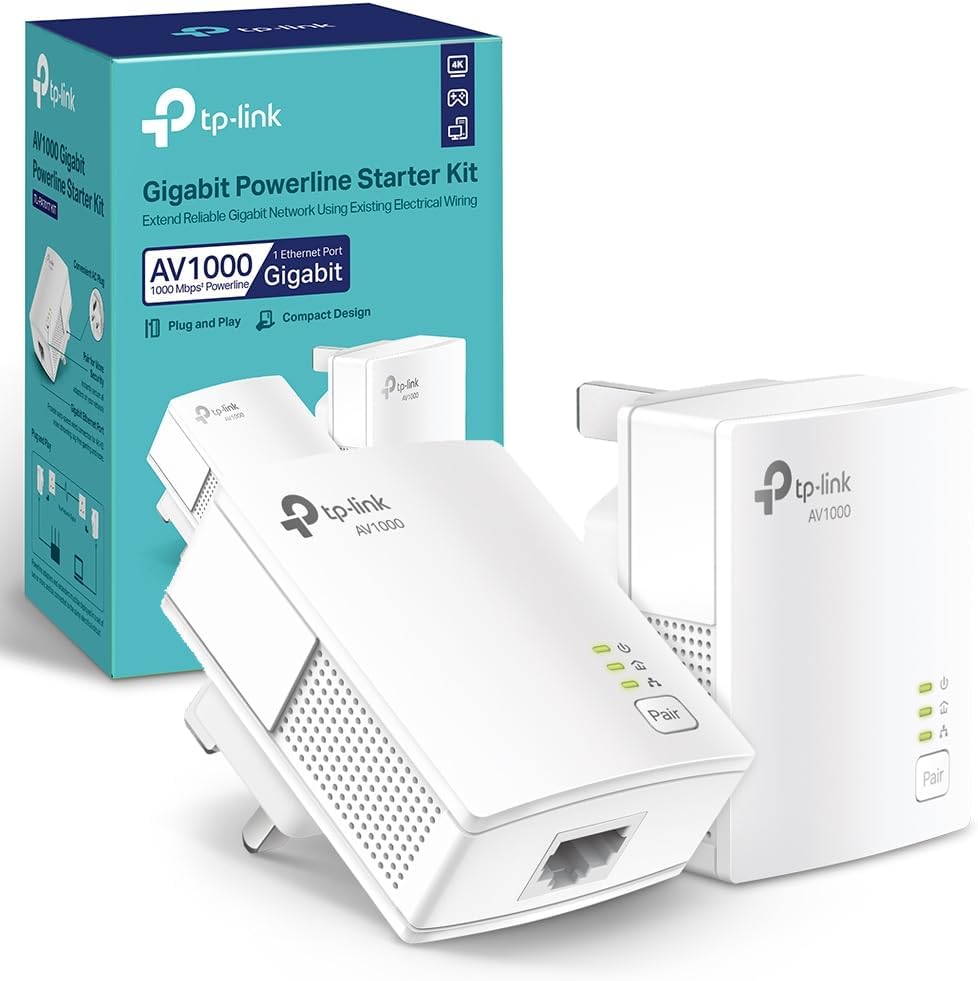
The TP-Link TL-PA7017KIT is a high-performance Powerline adapter kit delivering up to 1000 Mbps data transfer via your homeโs electrical wiring. Featuring a gigabit Ethernet port, plug-and-play setup, and patented power-saving mode reducing energy consumption by 85%, itโs ideal for seamless 4K streaming, gaming, and stable wired connections in Wi-Fi-challenged environments. Compatible across major OS platforms and expandable for whole-home coverage, itโs the smart upgrade for professionals demanding fast, reliable networking without rewiring.


| ASIN | B07ZWFMYTY |
| Best Sellers Rank | 4,769 in Computers & Accessories ( See Top 100 in Computers & Accessories ) 17 in Powerline Network Adapters |
| Box Contents | TL-PA7017 KIT |
| Brand Name | TP-Link |
| Color | White |
| Compatible Devices | Desktop, Laptop, Printer, Projector, Smartphone, Tablet |
| Compatible Operating System Family | Windows |
| Customer Reviews | 4.5 4.5 out of 5 stars (1,394) |
| Data Link Protocol | Gigabit Ethernet |
| Data Transfer Rate | 1000 Megabits Per Second |
| Hardware Interface | Ethernet |
| Item Dimensions L x W x H | 6.5L x 5.2W x 5.8H centimetres |
| Item Weight | 0.42 Kilograms |
| Manufacturer | TP-Link |
| Manufacturer Part Number | TL-PA7017 KIT |
| Model Number | TL-PA7017 KIT |
| Product Warranty | 3 year manufacturer |
| Unit Count | 1.00 count |
T**E
Replaced an old WD Powerline set-up; useful improvement in network speeds
Major house renovations (lots of steel joists) mean Wi-Fi isn't great at home, so I stream all my TV over wired ethernet, but my router is in one room and the TV, Firestick, Sky Puck, etc are all in the next room. I solved this problem originally using an old WD Powerline set-up I had, which had a capacity of 200-300 MB/Sec. I've just replaced that with this TP-Link Gigabit kit. The TP-Link system was very quick and easy to install and set-up (took about 3 minutes), and while there is no change in picture or audio quality, streamed content loads more quickly (pretty much instantly now) and fast-forwarding or rewinding is smoother and quicker. Not life-changing, but a useful improvement in functionality. It's only been a couple of weeks, but so far the signal has been rock-solid, with no drop-outs or other issues, but then the old WD system had no issues in nearly ten years. Overall, very happy with this upgrade.
A**T
So easy to install and works perfectly!
Nice and compact little units. I replaced my 500Mbps TP Link units with these twice as fast Gigabit ones and I no longer have problems when watching iPlayer or any other Internet based programs on my TV. I have one adapter upstairs next to our WiFi router and the next one next to our TV downstairs in the lounge. Uses the house wiring perfectly. Took less than 2minutes to set it up. Brilliant and I do recommend these. The 500Mbps adapters were pretty much ok for most Internet based programs, but on occasion, the data rate was not quite good enough and we had quite a bit of buffering going on.
T**T
Easy to install and solved major WiFi issues
Easy to install and solved my major WiFi issues of living in an old big house with tall ceilings where getting large cables was not a friendly option. I tried to switch them off when I no longer needed them just to avoid overheating, just in case - but never had any problem after long hours of use. Not sure however if would be compatible with newer Ethernet cables, might be worth to check that first. Also Be advised the performance of the device will depend on the quality of your electrical signal. Sometimes old electrical installations are not necessarily a problem and new ones could be! Do not fall into fake myths - there are many other environmental factors involved. So you might want to check that with a measurer or a technician first.
R**G
The best investment I have ever made!!
I read hundreds so many reviews here with many stating that this kit was just a waste of time. But then I thought, hiw could this have 4 and a half stars with nearly 8k reviews, something must be good about. I really needed a wired output behind my TV to provide a fast and consistent wired internet to my many devices. I firstly sought confirmation as to whether a powerline adapter could be connected to a switch thereby providing extra ports to serve each device. Thus was duly confirmed so half way there. The next and most important question was whether these would provide the same speed as I was paying for which is 100mb from Virgin Media. From the many reviews I have read here it appeared that I was only going to get about a third of the speed which I would expect from a direct connection to my router. There were however a few reviews which stated that they have achieved excellent speeds with this TP-link poweline adapters. I took a gamble the current price of ยฃ29.99 thinking to myself that if they are worthless Iโll just return them, what could I possibly lose and I wouldnโt know unless I tried them out myself. Well what can I say about these beauties. They are so small and beautifully designed so that was a great start. Two 5e cat cables included in the box. Even better. Now for testing these. Plugged one behind my tv and the other two rooms away in my study where I have my router and connected this to one of the spare router ports. Pressed on the pair button and then walked to to my lounge and pressed on the the pair button of the second adapter. Bingo both paired up within a minute. This was really easy. Now to check the speed and find out if these really are the bees knees. Hooked up my laptop and did a speed test. Oh boy only 37mb per second download speed and the usual 9mb upload speed. Well that was disappointing. Ready to return them as they were no way near my download speed I get when hooked up directly to my router. Oh wait I thought to my self, I did read somewhere that if you connect to an extention lead then you will not get the best speed and the adapters should be plugged in directly to a wall socket. My router is connected to an extension lead and the adapter I plugged in was sitting right next to it on the same extension cord. I unplugged it, hooked the adapter to a longer cat5e cable and plugged it to a wall socket. Letโs check the speed again I thought. Did the speed test and WOW full 105mb download speed and 20 up. What can I say about these adapters they are absolutely brilliant. People say you get what you pay for, but I feel I literally paid peanuts for this excellent pair of powerline adapters. Who needs to get their homes hard wired with internet cables when these will do the same job using you wall AC cables to run internet through them. Genuine!
A**Y
It works.
Truly plug and play. Got an old place where the router is about as far away from the sky TV puck as you could get. WiFi mesh system wasn't reliable enough and kept dropping out causing annoying breaks in sound and freezing visuals. Plugged this in (it comes with 2 ethernet cables about 1m long each) and bingo, a reliable signal Goes from about 800mbs at the router to about 60mbps at the TV, which is way fast enough.
T**S
These are great. Speed went from 12.5 to 75.5 Mbps.
Strongly recommend these. Really easy to install. I was previously using a WiFi extender (on a Virgin 3.0 hub) and getting speeds around 12.5 - 13.5 Mbps. Plugged in one of these and got 75.5Mbps. If you already have a TP powerline network with the older TP link adapter, they are backwards compatible and work in seconds. The only thing to bear in mind is that they only work plugged direct into a wall socket. Not if you are using an extension cable with multiple sockets.
T**S
Very much dependent on the wiring of your house.
I have tried out various other non Gigabit Home Plugs with varying degrees of success previously, and I gave these a try out as I wanted as close as I could to a wired Gigabit connection to my Home Network downstairs, without running a Cat 5e cable up my stairs. Unfortunately my experience was not a great one. It's partly nothing to do with the Home Plug, but also partly to do with what comes with the Home Plug as a package. (All testing was done with marked and tested Cat 5e Ethernet Cables). 1: It is very much dependent on how your home is wired what speeds you will be achieving via the Home Plug. My home is a new build, so the wiring is new, however I was getting less than 10/100 mpbs speeds via the Gigabit plug. This could be down to what is plugged in around the home, safety mechanisms on the Consumer Unit or just the wiring in some way. At first testing I was getting a data transfer rate of 5mbs on my home network. I then tried the home plugs in several different outlets (which could not have been used as a permanently by the Home Plug, but just for testing purposes). I eventually got the speed of data transfer up to 10mbs, still only 10/100 and a long way of a Gigabit connection. That's from the Home Network perspective, performance of the actual internet connection was usable enough, but there was still no difference between using a Gigabit Home Plug and a cheaper home plug that is not capable of Gigabit speeds. I tested using a couple of different game streaming applications, Nvidia GeForce Now & Google Stadia. Performance in this sort of application was not great, despite internet speed tests showing the connection was strong with a low ping, the actual end result of game streaming left a lot of be desired. It rarely kept the resolution up to 1080p, had just about noticeable input lag and would drop far too many frames every second or two to consider it even slightly playable . Compared to the old Cat 5 cable I have running up my stairs at the moment, it's a no contest. Plugged into the old Cable I have then performance is smooth at 1080p almost constantly with next to no input lag. As a home office solution for general internet usage, they seemed fine, but for maxing out the potential of Gigabit speeds, whether for a home network or internet, then it's going to be hit and miss depending on the wiring of your home. 2: This part confused me, and left me quite disappointing with the product as a whole in the end. The Home Plugs come with two Ethernet cables in the box. Both cables are unmarked, but logic would dictate that as the big Selling point of these home plugs are that they are capable of Gigabit Speeds, they would supply Cat 5e Ethernet cables. However it seems as though the cables were Cat 5, and could never transfer Gigabit speeds in the first place?! This was the case with both cables supplied. I tested this several times on my home network (Raspberry pi NAS connected directly to my P.C via a switcher). The best data transfer speed I could obtain on both cables was 10mbs. Very odd and not at all clear, also frustrating as I had to run all my tests again after I swapped out the included cables with Cat 5e marked ethernet cables. If you want to give it a try, then as long as you keep everything in a like new condition in case you need to return the units, then it's worth a go. But just make sure you also test different cables if you are not getting the speeds you expect first time round.
S**T
Good improvement on Wi-Fi and internet strength
I have an ongoing battle with virgin internet in my home, the Wi-Fi signal drops regular and I interrupts games and web conferences so needed to try something. These have worked great I now have no black spots upstairs as I have plugged in my laptop directly to the unit which is providing wired internet connection in a room that doesnโt reach the router. Very easy to set up practically plug and play. I have an old house though so plug sockets are limited and the one disadvantage is that the unit needs to be plugged directly into the wall and not an extension lead. Otherwise great product Iโve purchased a second set to add to my PlayStation and tv too
Trustpilot
1 month ago
2 months ago