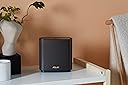
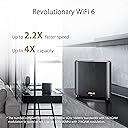
🚀 Elevate your home network to pro-level speed and coverage—because buffering is so last decade.
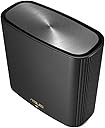
The ASUS ZenWiFi XT8 AX6600 is a premium tri-band mesh WiFi 6 system designed to blanket your home with ultra-fast 6.6 Gbps wireless speeds across up to 5500 sq ft. Featuring advanced antenna placement, a dedicated 2.5G wired port, and robust network security, it supports multiple SSIDs and is optimized for high-demand devices like the PS5, ensuring seamless connectivity for work, play, and everything in between.


| ASIN | B082T48132 |
| Antenna Location | Home |
| Best Sellers Rank | 9,365 in Computers & Accessories ( See Top 100 in Computers & Accessories ) 39 in Whole Home & Mesh Wi-Fi Systems |
| Box Contents | 2 x xt8, set up guide, uk plug |
| Brand | ASUS |
| Brand Name | ASUS |
| Colour | Black |
| Compatible Devices | Cellphone |
| Compatible devices | Cellphone |
| Connectivity Protocol | Wi-Fi |
| Connectivity Range | 510 Square Metres |
| Connectivity Technology | Wi-Fi |
| Control Method | App |
| Controller Type | Push Button |
| Coverage | 510 square meters or 5500 square feet, 6+ rooms |
| Customer Reviews | 4.3 out of 5 stars 2,075 Reviews |
| Data Transfer Rate | 12 Gigabits Per Second |
| Frequency | 5 GHz |
| Frequency Band Class | Tri-Band |
| Frequency band class | Tri-Band |
| Global Trade Identification Number | 04718017436670 |
| Has Internet Connectivity | Yes |
| Is Modem Compatible | No |
| Item Dimensions L x W x H | 16L x 7.5W x 16.2H centimetres |
| Item Weight | 1.58 Pounds |
| LAN Port Bandwidth | 1000 Mbps |
| Manufacturer | ASUS |
| Manufacturer Part Number | 90IG0590-MO3G20 |
| Maximum Upstream Data Transfer Rate | 3300 Megabits Per Second |
| Model Name | ZenWiFi XT8 |
| Model Number | 90IG0590-MO3G60 |
| Model name | ZenWiFi XT8 |
| Number of Ports | 5 |
| Operating System | Android 10.0, RouterOS |
| Other Special Features of the Product | Remote Access |
| RAM Memory Installed | 16 GB |
| Security Protocol | WPA3 |
| Special feature | Remote Access |
| Unit Count | 1.0 count |
| Voltage | 220 |
| Wi-Fi Generation | Wi-Fi 6 |
| Wireless Compability | 802.11ax |
| Wireless communication standard | 802.11ax |
L**G
Most stable and fastest mesh network on the market
TL;DR If you have a lot of WiFi devices and need speed, stability and range - just get it, you won't regret. I've had a lot of routers and mesh networks, pretty much from every brand, and this is by the the most stable, fastest and seamless network. I'll cut to the chase now - in order to get most of it you need you tweak settings a bit. It'll work plug & play, but it really shines once it is fully setup. 1) For initial setup, it needs to be close together, connected via wireless backhaul - easiest to do with the mobile app. Once done, I would recommend wired backhaul between nodes, however 4x4 160MHz 4800Mbps backhaul is fast enough, even at a distance. 2) Setup 2.4GHz, 5GHz-1 and 5GHz-2 networks as 3 separate SSID and don't use smart connect. Use 2.4GHz for all IoT smart devices, 5GHz-1 for TVs and non-WiFi 6 gear, and 5GHz-2 for WiFi 6 gear only (set network as AX only) 3) From then on, I recommend using web browser console, you have more settings there and it's easier to use. 4) For those working from home on VPN and having issues with MS Teams calls and Outlook desktop client - use your broadband provided kit as router with wi-fi off, and switch ZenWifi to AP mode. 5) Turn off smart connect, don't turn on any QoS or AI protect stuff 6) Tweak roaming mode to your own needs. I've included sample settings for 5GHz-2 network which gives full 1.2Gbps, I also get 1.2Gbps on 5GHz-1, this maxes out our 910Mbps fibre optic broadband anyway. With all above, our 2 x Galaxy S20s and laptops with Killer 1650 M.2 Wifi 6 AX are a lot more responsive - not to mention much faster max speeds - that's thanks to improved latency on WiFi 6, regardless whether it's 5GHz-1 or 5GHz-2, but separation gives better overall performance kids with their TVs and tablets are not impacting our work. Note 1 - currently it is not possible to use 5GHz-2 network in 4x4 mode, so max you can get is 1.2Gbps rather than 4.8Gbps, but this is irrelevant since you would need multi WAN internet connection to go over 1Gbps anyway, and gigabit is plenty fast. Note 2- NAS functions (whether FTP or Samba) maxes out at ~67MBps (536Mbps) even with Samsung T5 which gives me over 500MBps (4Gbps) when connected directly to PC - that's not great, but fast enough for a NAS. Note 3 - I'm currently on firmware 25524, it is stable, no issues, everything gets signal across 3 floors and in both front and back garden - and I have rather large network: 2 x XT8 in AP mode 3 x network switches 4 x 4K smart TVs (2 wired, 2 wireless) 5 PCs (2 wired, 1 on VPN all the time) 5 tablets 4 x TV streaming devices (1 wired) 4 x phones 7 x Ring devices 14 smart plugs 9 smart speakers 13 other smart wifi devices To finish off I'm going to add that the actual hardware is a lot smaller and lighter than I thought it is, less obstructive, looks very good in any room, it shows quality and it's very well designed and built. Highly recommended, especially considering it is actually cheaper than WiFi 6 mesh from other brands. UPDATE: Attached 2 more screenshots with speedtest over wire and wireless. Can't get much better than that!
B**D
Outstanding coverage coupled with great throughput
I bought 2 x 2 packs of the ZenWiFi AX to replace 7 Linksys Velop 7 Pros that were failing miserably, given I was in a late Victorian multi-storey house covering 3,000sq.ft., due to their poor coverage in my environment. These ZenWiFi AXs are fantastic, cover a large area with client speeds in the 500-700Mps range and backhaul in the multi-gigabit range. A stable mesh system makes for highly reliable inter-node connections and for trouble free 4K+ video streaming. I ran a ping for a week and only 1 in 20,000 packets dropped (34 out of 636,000 packets sent). The 4 units cover all four floors with the lowest speeds I am seeing around 300-400Mbs mark. Setup when using the router capability looked straight forward, but I did not want to change my addressing scheme and have subnets so needed to run in AP mode with AiMesh. This proved not so intuitive to set up and took a few hours, using a combination of the App and the Web Interface. That said it all works beautifully. The Asus App and Web interface knock spots of Linksys equivalent. Very happy with my purchase, highly recommend.
S**X
This review is for the XT9s
Firstly these are so much better than the XT8s that i tried around 18 months back. On paper there is not much difference between the two but in real life this couldn’t be further from the truth. The XT9s were a breeze to setup and I was up and running in 15 mins. I live in a 950 Sq ft apartment in London with brick walls and found the range and speed to be consistent. There were no black spots. I have a Virgin 500 mbps plans and I got speeds around 250 - 400 depending on my location. No drop outs, however I did find the satellite using the 2.4ghz randomly for wireless backhaul connection. This impacted the overall speed and this was despite me setting 5ghz-2 as a dedicated wireless backhaul band. This happened a number of times and was sorted by scheduling an auto reboot every 24 hours on the app. The app is good you can do loads of tweaking if you want to. The XT9s are a far better choice than the Eero Pros, Deco X90 and X95. Better/consistent performance for lesser money. I got a great deal on these on prime day. I have given it 4 stars and not 5 as I could not achieve full speed even seated next to the router.
S**B
Very good coverage, consistent speed, stable and controllable.
After two weeks of use I am very pleased with this new system. I bought a two unit pack, plus one additional unit, to replace a flaky Linksys Velop tri-band setup. My stone terraced house is between two others which have been converted to flats, so the WiFi spectrum is quite crowded and my old system failed to hold a manually set channel, and was constantly hunting for a 'better' signal with frequent drops in speed. This only became a problem after neighbours switched to Virgin Broadband and changed their routers. These new units have similar range, and i can set all three to use the same channel and they stay on that chosen channel. Now we do not have frequent channel hopping for my own, and neighbouring, networks. I have strong coverage across three floors and into the extension - with some solid walls and some lath and plaster walls, with full speed throughout the main house and around a 30% speed drop in the extension and garage. Setup was simple once my telephone connected to the first unit, I then powered up the additional units when prompted in the app, and in around six minutes they were all linked together and ready to place where needed. Signal strength stabilised quite quickly in the new locations. The AI Protection feature has already protected one user from malicious site visits and I could quickly and easily activate parental controls for devices used by visiting grandsons. Parental controls vary by age group, and devices can be grouped for easy admin. Almost all features can be set in the phone app, with slightly different options in the web interface, and it was easy to set up using my phone, with the website only needed to refine some settings for connected storage.
P**1
Wi-Fi nodes
Great work Wi-Fi performance and easy enough to setup if you are using it via lan it is a nice and compact size which is good meaning that once it is setup to go you don’t really notice it anymore whilst I have 3 of these nodes I would say they are very expensive for that they are if you have brought ASUS Wi-Fi before there is not much change in the interface even the app is the same for this model but yes if you are looking for performance this does deliver that couple of issues I did notice was the system ram gets used up very fast when you use anymore features that is absolutely needed to setup the network don’t know why that is had not issues with previous asus Wi-Fi nodes also if you have a firmware update you will after the initial install have too reset the device back to manufacture default if you don’t do this you will have issues with network stability and standard reset does not solve this
M**.
Too many problems with an expensive system.
I don’t often write Amazon reviews, but spent so much time on problems with this product, before ultimately returning it, that I thought it worth sharing my experiences. If you don’t want to read the detailed technical stuff below the summary is: - Mesh did provide an excellent Wifi signal everywhere. - The manual, online information and technical support are all terrible. - System doesn’t have all the functionality listed in the user guide. Specifically you can’t share a network disk if you have both Windows and Apple Mac PCs on the same network. - Initially worked fine for a few days, then kept on crashing so had to be returned. Overall a £400 system really should be a lot better than this. I chose this system improve the Wifi signal everywhere at home because my Virgin Hub router couldn’t cope with very crowded Wifi channels due to the neighbours’ systems and to setup a NAS. Initially I was very impressed, the ASUS system was quick and easy to setup and it provided a perfect Wifi Signal everywhere. However the problems started with setting up a NAS connected to the USB port on the main router. The drive setup didn’t work when following the instructions in the user guide. ASUS phone technical support were not helpful simply saying the problem needed to be escalated to the next level of support. After a lot of trial and error I managed to setup a network drive that was accessible from some machines, but would not stay connected. When ASUS support did get back to me (after 3 days) I was informed “you can use it either with a MAC OS device or with a Windows device, you would not be able to use it with both at the same time”. This was surprising because the user guide says disks can be shared using Samba share which is supposed to allow sharing between Windows and Mac. After a few days the Wifi signal began to repeatedly stop and the ASUS router had a blue light on it (as opposed to a white light indicating everything OK). Again, the user guide was not helpful - nowhere does it mention what a blue light means. ASUS phone support was not available to discuss this with since they do not work at weekends. Careful investigation of the log files showed the problem was the router was installing a firmware upgrade then re-booting which stopped the Wifi. However the firmware upgrade failed, so it attempted to reinstall it, reboot and stop the WiFi again. This process happened repeatedly every 20minutes with no obvious way to prevent it. At that point I decided to waste no further time on this and returned it to Amazon for a refund. A £400 system really should be a lot better than this!
A**Y
Great for delivering quality WiFi in older buildings. Powerful feature set.
I am an experienced IT pro, so I expected to do a fair bit of customization on this unit. More on that later. The basics: Initial setup is pretty easy. The app finds the devices and the node attaches to the master pretty easily as part of the setup. As we are all advised, I updated the firmware during initial install, to get off on the right foot. This went well, except the node had a bit of a meltdown and needed to be manually powered off and restarted, after which everything went well. One problem I did run into related to power. These things are really hard to find right now. I bought mine from the Amazon UK store, but they were shipped from the EU with EU-style 2-prong plugs. So, I went back to Amazon and bought a pair of EU->UK adapters. Problem solved. Next came placement. You want to strike the balance between the devices being widely enough separated to cover the whole space, but close enough that they maintain good communication with each other. I am in a 250 year-old set of cottages with 18-inch thick solid stone walls, so this is not a trivial challenge. Initially, I tried to live with just the Wifi backhaul between the nodes. This was OK but the layout of the property really compromised the signal. (If you click on AIMesh in the control interface - app or web admin page - It will classify the connection OK/Good/Great, so it's pretty easy). So, next I tried a hard-wired backhaul using NetGear PowerLine adapters to pipe Gigabit over the house electrical wiring. This improved the backhaul connection considerably. However, the connection is not always really stable and this caused a number of remote mesh node dropouts, with consequent internet disconnection for any clients attached to that node. It also sometimes caused the remote node to lose its mind a bit and need rebooting. So, eventually, I caved, bought a really long Cat6 ethernet cable and wired them together. The ASUS picked up the connection instantly and connectivity between master/node is excellent. Since I have had this arrangement in place, everything has been super stable and performance excellent. As a bonus, I have been able to mess around with placement, since Cat 6 cables can be really long, and I have been able to find unobtrusive locations for master and node but still get excellent signal coverage. Now, configuration: To set the context, here are the things I needed to set up: 1. Custom LAN subnet and DHCP configuration, including many static leases 2. Virtual server port forwarding to Kubernetes and OpenVPN server 3. QoS to keep my son's gaming habit from overwhelming everybody 4. DoS protection 5. Custom SSL certificate and CA for device management 6. Multiple guest networks 7. Dynamic DNS I quickly found that I didn't like the app for managing all of the above. Others with simpler configurations may like it just fine. Or perhaps it's just that I am too used to the more traditional management UIs using an embedded web server. Anyway, I abandoned the fancy app and HTTP'd directly to the master node (immediately reconfiguring it to HTTPS only) from where I found myself in the excellent, familiar, but subtly expanded web admin interface. Everything an experienced ASUS user would expect to find is exactly where it should be. (I don't understand why some vendors think it's a good idea to continually rearrange an established UI.). You will also find new areas to manage things like the mesh. (The Traffic Analyzer is particularly nice - good job ASUS.) So, in summary, an excellent, capable, powerful mesh router, but you probably want to find a way to leverage the hardwired ethernet backhaul to get all of its potential.
A**R
I really wanted to love this, but...
Having done a fair bit of research and considering my budget I decided to buy the dual XT8 pack. I really wanted to love these, but unfortunately I am having to return these. The main reason for purchasing these is so that I can have WiFi 6 capabilities for future proofing. There are a number of important factors which impacted my decision to return these and they're probably more specific to my own personal circumstances. I have 5 users in my household living in an extended 4 bedroom detached house. I love tech and have multiple smart home devices, Sky Broadband, Sky Q plus additional Sky Q mini TV boxes, NAS Device, Cctv POE cameras, Arlo Doorbell & floodlight camera and finally 3 unmanaged network switches for cctv and ethernet wired TVs and PCs. The setup was relatively smooth and everything seemed to work well with good coverage. However, when it came to connecting up my Sky Q boxes (3 of them) they experienced lots of connectivity related issues and the main Sky Q box was okay, but the two Sky Q mini boxes were always dropping out either with not being able to connect to the Internet or connecting to the main Sky Q box. I tried tirelessly for two days trying both wired and wireless connections to now avail. Unfortunately, I have concluded that Sky Q boxes work better with Sky Q Router/Hub. I don't know why. It seems bizarre because I know the Asus has great WiFi (both 2.4 and 5ghz bands) and ethernet connectivity across my house. I have switched everything back over to my Sky Router/Hub now and although WiFi signals and speeds are a weaker and slower all my devices are working normally. For now I am settling on upgrading from Sky Super fast broadband to Ultrafast Plus broadband with an upgraded more powerful Router/Hub. Fingers crossed it will keep the family happy for while longer. 😊 Shame about these. They are really great bang for buck mesh network Routers. If I didn't have Sky Q boxes I probably would have kept them but they are unusable within my current setup circumstances.
Trustpilot
2 weeks ago
3 weeks ago