Buy anything from 5,000+ international stores. One checkout price. No surprise fees. Join 2M+ shoppers on Desertcart.
Desertcart purchases this item on your behalf and handles shipping, customs, and support to Vanuatu.
🎯 Elevate your creative edge with color accuracy that commands attention.
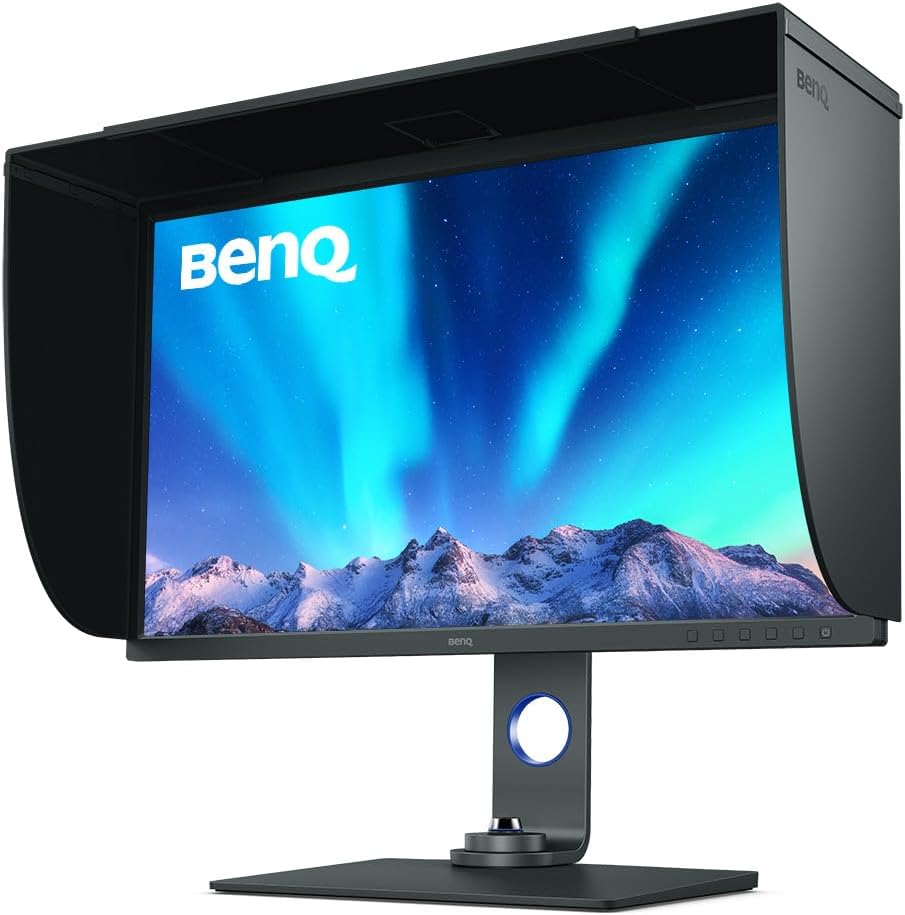
The BenQ SW321C is a 32-inch 4K UHD professional monitor featuring AQCOLOR technology with 99% AdobeRGB and P3 wide color gamut coverage. It supports hardware calibration via Palette Master Element software, USB-C connectivity with 60W power delivery, HDR for enhanced dynamic range, and Paper Color Sync for precise screen-to-print color matching—ideal for photographers, videographers, and creative pros demanding impeccable color fidelity.


| ASIN | B082PKRK5H |
| Are Batteries Included | No |
| Best Sellers Rank | 43,762 in Computers & Accessories ( See Top 100 in Computers & Accessories ) 765 in Monitors |
| Brand | BenQ |
| Colour | Grey |
| Computer Memory Type | DIMM |
| Customer Reviews | 4.5 4.5 out of 5 stars (87) |
| Date First Available | 6 Dec. 2019 |
| Guaranteed software updates until | unknown |
| Item Weight | 25.6 kg |
| Item model number | SW321C |
| Manufacturer | BenQ |
| Number of HDMI Ports | 2 |
| Product Dimensions | 34.05 x 75.94 x 66.36 cm; 25.6 kg |
| Resolution | 3840 x 2160 |
| Screen Resolution | 3840x2160 |
| Series | SW321C |
| Standing screen display size | 32 Inches |
| Voltage | 220 Volts |
| Wattage | 170 watts |
A**H
Professional Grade Monitor
If you’re a photographer, videographer, graphic designer, or creative professional, this monitor is one of the most impressive displays you can choose for colour-critical work. Designed from the ground up for accurate colour reproduction, detailed editing, and professional workflows, it’s packed with features that justify its premium price tag.
M**C
Can check the right colours
Husband loves it stops light on the screen
S**T
Great quality, no compromises
Probably the best quality colour accurate monitor money can buy at this price point. Half the price of an Eizo but only very slightly inferior.
P**I
The best
So far, so good. Hard to fault it. For the price there is nothing better out there which can be used as a reference monitor for either grading or photo editing. The fact that different calibrations can be switched on the fly it is an absolute God send. Calibration is obviously a must and whilst the process is a little tedious and not very straightforward, once it is done it will not need repeating for sometime. How long it will depend on how much you use the monitor. I use 3 stored Calibration settings: photo editing, video grading, photo printing. Great monitor overall.
E**N
So far so good
I was a bit nervous ordering an item like a monitor from Amazon as Ive seen how these delivery 'guys' sometimes handle the boxes they deliver. This one however was shipped straight from BenQ. The packaging the monitor came in must have been designed by a former tank or bomb shelter designer! What they did with the cardboard was something else. While the construction was mostly from cardboard the protection it provide for the monitor was spot on. In other words don't have any fear about ordering direct from BenQ through Amazon. The display SW321C itself is a real step up from their cheaper version or should I say less expensive, the BenQ PD3220U that I was not particularly happy with. So far the display which Im currently running off my 2020 iMac looks pretty awesome. Just waiting for my Mac Studio to arrive. Images in Lightroom and Photoshop look great and the ability to switch from Adobe RGB to B@W is a great feature as are all the other colour spaces that are available. Using it for video editing and colour correcting in FCP looks to be a real step up from the 5K iMac display colour wise. Ive never used a monitor with a hood and have to say what a difference. the hood makes as there is zero glare on the monitor. I think that partly due to its very matt finish. All in all it's a great looking display and cant wait to use its Paper Colour Sync feature for printing. Being able to do proper accurate WYSIWYG on screen soft proofing is going to be a printing game changer. Like all feature rich tech its going to take time to fully test and try and become comfortable with all the features.
P**E
DANGER. NOT ONE REVIEW ON HERE IS FOR THIS MONITOR.
This monitor came out in the UK March 2020. EVERY review so far is on old monitors of different sizes and models. People are complaining about other lesser monitors.
S**K
This BenQ SW321C, 32 inch 4K is a fantastic monitor but...
This is a review of the BenQ SW321C 32 inch 4K photographer monitor - BenQ's top of the range monitor. There is no doubt that this is a fantastic monitor but... The only negative is the backlight bleed in 2 or three corners. I returned the first three monitors for this reason and decided to keep the fourth. All four had virtually the same issue with backlight bleed. In the end I decided I could live with it as it is only visible on a completely black screen, or black in those corners, which is extremely rare. From reading reviews, it seems that this anomaly is present on virtually all 32 inch IPS monitors currently. In all other respects the monitor is 5-star. Great and accurate colours out of the box, great uniformity, great anti-reflective screen, great ergonomics and menu system, great Hot-key Puck for quick switching between colour spaces and brightness and a superb shading hood. The monitor is very sturdy with a good swivel base and the bezels are a little thicker than many monitors but I quite like that as it helps define the screen and avoids distractions. The connections are easy to access if you slightly swivel the monitor by 45-90 degrees. I like the easy to access buttons on the bottom right bezel but due to the Hot-key Puck, I rarely need to use them. I am a professional photographer so the price, although expensive, I felt I could justify. Professionally, I am mostly using Adobe Lightroom and Adobe Photoshop software, both of which scale fine on a monitor of this size and resolution. I do also use the monitor for a little gaming, mainly Microsoft Flight Simulator and Perfect Golf, both of which do not require high refresh rates, and the monitor really brings these games, or simulations, to life with the 32 inch size, 4k resolution and sublime colours. One other thing, I found that running my desktop at native 100% 4k resolution, the text was just a bit too small for me. I found the "recommended" or default scaling of 150% meant I didn't see as much on screen as I would like and seemed to waste the purpose of a 32 inch screen. However, I found 125% scaling suited me best and is a good compromise. If price is not a major issue or if you earn your living doing colour critical work on a monitor, then I would highly recommend this. So far, very happy with it... despite the slight annoyance of backlight bleed.
J**Y
Huge detailed and colour-accurate screen.
The 32 inch screen allows lots of space for the control sliders of photo-editing software, while providing an image almost as big as a 20x16 print. With 4K resolution this means that even from 12 inches away there are no visible dots to interfere with the actual image. The monitor is carefully calibrated before leaving the factory and full printed report is provided to prove it, meaning you can assess, edit and print photos straight to your printer and expect a very close match. The matt screen makes it easy to work with ambient light and presents images much more like photo-quality printing paper.
B**O
Auf der Suche nach einem 32" Monitor zur Bildbearbeitung mit USB-C Anschluss zur Nutzung an einem MacBook Pro 16" habe ich den Benq SW321C bestellt. Als Fazit vorab, ich würde den Monitor zu diesem Preis jederzeit wieder bestellen. Aber der Reihe nach: Der Aufbau: DHL kündigt Sperrgut an, das lässt nichts Gutes vermuten. Die Box ist gigantisch, aber alles ist bombensicher verpackt. Der Aufbau geht sehr schnell vonstatten, der Fuß besteht aus zwei Teilen, die im Grunde nur ineinander geklipst werden, danach wird das Panel auch nur am Fuß angehängt, fertig. Am meisten Zeit kostet noch das zusammensetzen der (sehr gut verarbeiteten) Blendschutzschaube, die im Übrigen praktischerweise eine schließbare Öffnung für ein Colorimeter besitzt. 32" sind auf dem Schreibtisch ein Wort. Ich würde empfehlen, ab ca. 80 cm Sitzabstand über diese Größe nachzudenken. Wer näher sitzt, wird wahrscheinlich den Kopf zu sehr bewegen müssen, um alles auf dem Display zu erfassen, das ganz dann zu viel sein. Man braucht also etwas Platz. Der Anschluss: Alle relevanten Anschlüsse sind vorhanden, und, viel wichtiger, für jeden Anschluss ist im Lieferumfang ein hochwertiges Kabel vorhanden. In meinem Fall habe ich ein Macbook Pro nur über das USB-C Kabel am Monitor angeschlossen. Das funktioniert tadellos, das Macbook wird problemlos geladen, 4K/60p HDR werden anstandslos übertragen. Das Bild: Mein Exemplar ist hervorragend harmonisch ausgeleuchtet, da wurde bei Prad von einem etwas schlechterem Exemplar berichtet, wobei man sagen muss, wir jammern auf ganz hohem Niveau. Ich habe knapp 1600,- Euro bezahlt, bei Eizo werden über 4700,- Euro fällig, und dafür gibt es keine riesigen Sprünge sondern Nuancen. Allerdings möchte ich mich hier nicht noch weiter aus dem Fenster lehnen, da ich den Eizo nur auf einer Messe ca. eine halbe Stunde ausprobiert und keinen echten Vergleichstest gemacht habe. Der Benq wird vorkalibriert geliefert, ein Protokoll liegt bei. Der SW321C ist über die Benq-Software "Palette Master Element" (liegt auf CD bei, kann aber auch für Windows und macOS runtergeladen werden) hardware-kalibrierbar, was ich mit einem Spyder X getan habe. Im Ergebnis war die Werkskalibrierung schon nahezu perfekt, man kann also ohne Sorge auch ohne Colorimeter direkt starten. Allerdings altert ein Monitor und muss regelmäßig nach kalibriert werden, hier kann einen der Monitor regelmäßig erinnern. Es gibt einen sogenannten Puck, eine Art kabelgebundene Fernbedienung, die ich unbedingt erwähnen möchte. Hier kann ich im Standard direkt die Anschlüsse umschalten, die Helligkeit regeln und zwischen den Modi sRGB, AdobeRGB und SW (super um mal kurz zu testen, wie ein Bild in SW wirken würde) umschalten. Nach einem Tag möchte ich das schon nicht mehr missen. Die Belegung der Tasten kann übrigens auch angepasst werden. IPS Glow ist vorhanden. Aber bei meinem Exemplar keineswegs störend, im Gegenteil, ich habe noch keinen Monitor ausprobiert, bei dem das Problem so gut kontrolliert ist. Für mich absolut nicht der Rede wert. Fazit: Interessant wäre an direkter Vergleich zum Eizo CG319X. Natürlich ist der Eizo die Referenz, aber ich kann nach meinem oberflächlichen Vergleich keineswegs sagen, dass der dreifache Preis im Vergleich zum Benq lohnenswert wäre, es sei denn, man möchte (oder braucht) das Beste vom Besten. Für mich als Hobby-Fotograf ist der SW321C das perfekte Gerät, das mich hoffentlich viele Jahre begleiten wird. Kaufempfehlung und 5 Sterne von mir!
H**R
Super Bildschirm. Gute Verarbeitung, robust und exzellente Darstellung. Muss allerdings kalibriert werden. Mitgelieferte Profile liefern zum Teil sehr merkwürdige Ergebnisse. Trotzdem 5 Sterne.
N**.
Nicht gerade preiswert, aber sein Geld wert
L**R
An excellent monitor! Picture quality is crisp and colour-authentic, with plenty of space for text editing and other stuff. Functions seamlessly in an Apple ecosystem, too. Warmly recommended!
L**E
Top Monitor in vielen Aspekten (Ausstattung, etc), aber es ist sehr schade dass genau meiner offenbar einfach ein mieses Display erwischt hat. Er kommt einfach nicht an meine 5 (!) anderen Bildschirme heran, ist auffallen blass und zwei verschiedene Spiders messen auch eine sehr unterdurchschnitltiche Farbraumabdeckung, Reset brachte auch nichts, etc
Trustpilot
1 month ago
2 months ago