We remain fully operational. Our teams are working around the clock to ensure your deliveries continue safely.

DOWNLOAD THE APP


Copyright © 2025 Desertcart Holdings Limited
DOWNLOAD THE APP
Buy anything from 5,000+ international stores. One checkout price. No surprise fees. Join 2M+ shoppers on Desertcart.
Desertcart purchases this item on your behalf and handles shipping, customs, and support to Vanuatu.
🚀 Print Big, Save Bigger — The Future of Office Efficiency is Here!
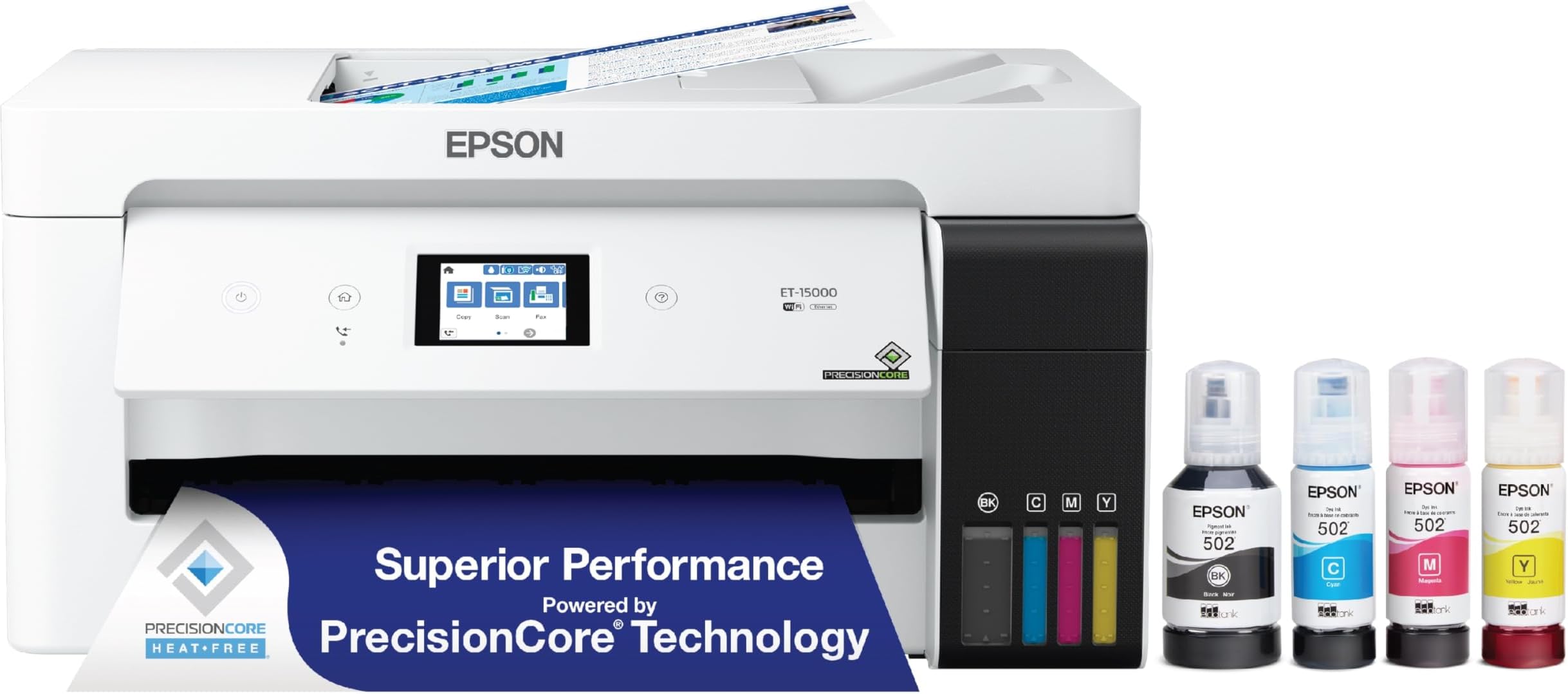
The Epson EcoTank ET-15000 is a wireless all-in-one inkjet printer designed for professionals who demand high-volume, cost-efficient printing. It features supersized refillable ink tanks that deliver up to 2 years of printing per refill, borderless color printing up to 13 x 19 inches, and versatile connectivity options including Wi-Fi, Ethernet, and USB. With a 2.7" touchscreen, voice-activated printing, auto-duplex, and a 250-sheet capacity, it streamlines office workflows while reducing waste and ink expenses.


| ASIN | B084TV6NTZ |
| Additional Printer Functions | All In One |
| B&W Pages per Minute | 17 ppm |
| Best Sellers Rank | #7,580 in Office Products ( See Top 100 in Office Products ) #19 in Ink Tank Printers |
| Brand | Epson |
| Built-In Media | EcoTank ET-15000 all-in-one, power cord, 1 bottle of Black ink (127 mL) and 1 bottle each of 502 Cyan, Magenta, Yellow (70 mL), CD-ROM for product setup |
| Color | White |
| Color Depth | 24 bpp |
| Color Pages per Minute | 9 ppm |
| Compatible Cartridge | [Epson Genuine Ink and EcoFit ink bottles] |
| Compatible Devices | Laptops, PC |
| Control Method | Touch |
| Controller Type | Android |
| Customer Reviews | 4.2 4.2 out of 5 stars (2,406) |
| Dual-sided printing | Yes |
| Duplex | auto |
| Hardware Interface | Ethernet |
| Ink Color | White |
| Item Dimensions D x W x H | 29.6"D x 19.6"W x 14.3"H |
| Item Type Name | Printer |
| Item Weight | 26.46 Pounds |
| Manufacturer | Epson |
| Maximum Copy Resolution Black and White | 8.5 x 14 dpi |
| Maximum Copy Resolution Color | 600 dpi |
| Maximum Copy Speed Black and White | 17 ppm |
| Maximum Media Size | 11 x 17 inch |
| Maximum Print Resolution Black and White | 600 dpi |
| Maximum Sheet Capacity | 250 |
| Maximum print Resolution Color | 4800 x 1200 |
| Model Name | EcoTank ET-15000 |
| Model Number | ET-15000 |
| Model Series | EcoTank |
| Number of Trays | 2 |
| Other Special Features of the Product | Auto Document Feeder, Auto-Duplex, Energy Star, Refillable Ink Tank |
| Paper Size | 11 x 17 |
| Print media | Paper (plain) |
| Printer Connectivity Type | Wi-Fi |
| Printer Output Type | Color |
| Printer Type | Inkjet |
| Processor Count | 1 |
| Resolution | 4800 x 1200 |
| Scanner Type | Sheetfed |
| Series Number | 15000 |
| Specific Uses For Product | Standard or Sublimation Ink |
| Total Usb Ports | 1 |
| UPC | 010343950900 |
| Unit Count | 1.0 Count |
| Warranty Description | 1-year limited warranty |
| Warranty Type | limited warranty |
| Wattage | 20 watts |
T**B
Inkjets have come a long way
Just a lot to like about this printer and nothing I don't like. Very capable for the price. I do mostly black and white printing, rarely print photos. (This will supposedly do a credible job of photo printing too but I haven't tried it). If you want professional caliber photo printing, you probably want the Epson 8550 which is similar to this, a bit more expensive, but does 6 color printing. If you are doing more like every day business printing the 15000 might be a better choice because it's built more for speed. The tank system means I can just replace the black because I use it a lot. The black ink tank is double size of the others and based on my experience so far, I think I'll easily get over a thousand pages on the standard-vivid setting which is very strong black but still relatively high speed printing. Given that the black ink bottles are under $30 I think the cost per page will be comparable to laser. The booklet/pamphlet printing can be complicated to work out with layers of PDF software and the Epson printer driver. But once you work it through, it's super capable. I've printed a lot of 12 x 18 double-sided for booklets and the paper handling has been flawless. (It can duplex automatically for 8 1/2 x 11 but for other sizes you have to manually duplex, which you can do by printing back/front or even/odd.) It's not as fast as a laser printer but it's pretty fast -- inkjets have improved so much.
C**Y
Excellent printer for business use!
Purchased the Epson EcoTank ET-15000 for ReVibe Facilities in Denver to handle our marketing outreach materials. Super easy to install and set up right out of the box – ink tanks filled quickly, wireless connection was seamless. Print quality is outstanding: sharp colors, crisp text, and handles larger formats perfectly without breaking the bank on ink. Highly recommend for small businesses or anyone needing reliable, high-volume printing.
W**E
Nice large format printer which is what I needed
I make stained glass panels and needed a printer that I could make larger copies with. I also wanted one that I could manipulate my images with. This was my best option and I love the Eco-Tank printers. After reading the reviews I made sure to add a couple years of additional warranty for my peace of mind. Finding 13 x 19 paper that was affordable was a tough challenge. I found a bunch on FB marketplace and bought everything they had to offer. This printer was very easy to set-up. I just followed the instructions and then followed what was on my computer screen. At first I thought I would have an issue connecting to Wi-Fi but when it failed on the computer, I was able to go to the printer and do it from the control panel - Easy peesey. I have used it several times since filling, charging, and installing and everything works as it should. My husband has an Eco-Tank printer and I've wanted one since he got his. I love that the ink will last a very long time and that it will be cost efficient. I am not overly interested in photo printing so this was the perfect choice for my needs. The print quality is fairly good when comparing it to my old Canon and e that there are several paper trays and ways to make copies, especially the automatic feed and the larger scanner bed.
J**C
document feeder not working on first real use.
Serious reliability issues and concerns. We have owned the printer for about 1 month and printed a limited amount. For the first time today I tried scanning with the document feeder. I was scanning about 12 pages that should of been 1 document. The first page scanned and then stopped. I started the scanner again and it scanned about 5 pages and then jammed. The rest of the pages were a constant jamming/not feeding fiasco. I would run to the computer and hit scan, then run to the printer and manually push on the paper as hard as i could without the paper bending. if I pushed just right i could get a few pages through without jamming. I ended up with about 6 pdf's instead of one document and constant jamming in the paper feeder. Frustrating from a brand new printer and the first time using the paper scanner. There is a clicking noise when it scans. a few of the pages fed properly but the rest had to be forced. No obvious obstructions or other issues. I tried cleaning the rollers with no success. Then attempted to reach out to Epson support. The only support option I could find was an email form that put me in a captia loop after entering all the information so I had to start over on the ticket submission. No chat support, no phone number, brand new higher priced printer with serious build/reliability issues. Frustrating.
C**E
This is a great printer. I love it.
I’ve been using the Epson ET‑15000 for custom chip bags and ran into a huge issue with my original paper choice. The printer itself is great, but the Koala 30 lb glossy paper did not play well with the black ink at all. Even after letting my prints sit for a full two days, the black areas would still smear and come off on my fingers as soon as I started folding and assembling the bags. It was super frustrating and made it hard to trust my prints for orders. I decided to try Eshang high gloss paper instead, and the difference has been night and day. With the same Epson ET‑15000 and the same designs, the Eshang paper works like a charm. The black ink dries quickly, doesn’t rub off when handled, and holds up beautifully while I’m folding and sealing my chip bags. Colors look vibrant, the finish is nice and glossy, and I don’t have to worry about smudging anymore. If you’re using an Epson EcoTank like the ET‑15000 and struggling with black ink smearing on Koala glossy, I highly recommend switching to Eshang high gloss. It completely solved the problem for me and made my chip bag printing so much easier and more professional.
A**S
This is a very capable wide format printer, which I purchased to replace a 1 year old wide format HP cartridge printer. The cost of this EPSON printer, including enough ink for a couple of years of printing, was less than the cost of the replacement ink cartridges from HP. So I tossed the HP in the garbage (because I don't like being held hostage with their cartridge policy). I print letter and 11x17 format, and this printer can print from both the main tray (letter) and the rear feed (11x17) without having to manually switch the paper source. That alone is a major upgrade from the HP. Print quality is excellent for my needs (engineering drawings, not photographs) and it prints fairly quickly too. Overall no complaints. I'm glad I threw out the HP.
A**O
I honestly can't say enough good things about the Epson EcoTank ET-15000. It's been an absolute game-changer for my printing needs, especially for vibrant, high-quality color prints! Setup & Ink Experience: Yes, I used non-Epson dye-based inks right from the initial setup—and I kept the original ink bottles as backups—and the results are simply phenomenal. I was slightly nervous about using third-party inks, but the machine handled the process perfectly, and the colors I'm getting are just wonderful! Seriously, the depth and vibrance of the color output truly exceeded all my expectations. Key Features I Love: Color Quality: The prints are gorgeous. Rich, saturated, and incredibly detailed. This machine is a color beast. EcoTank System: The days of worrying about expensive, tiny cartridges are over. The tanks are easy to fill, easy to monitor, and the ink lasts forever. The ink cost savings alone make this printer worth the price. Wide Format Capability: Being able to print up to 13x19 inches is invaluable for posters, wide art prints, and professional-looking reports. Reliability: The machine consistently performs, whether I'm running simple documents or complex, full-coverage photo prints. If you are looking for a reliable, wide-format EcoTank printer that delivers professional-grade color, look no further. This printer has earned its five stars and my highest recommendation!
J**E
Will not print. Waste of my time. Delivery guy just flipped the box onto my porch. I have a good idea how it was treated on it route to me. Every reason it doesn’t work. Will never do that again.
V**S
What I Like - I’m using this for sublimation to make custom shirts, towels and other items. It prints really good quality images. Wifi works really well, even down in the basement while modem is on the main floor. Settings are easy to go through and change. This printer holds bigger paper for those larger projects. It doesn’t take up too much space, but it definitely makes a statement. A really good value for a Eco Tank. It’s really nice to be able to just dump ink into a printer instead of worrying about cartridges and mixed cartridges, the cost difference will pay for itself if you do a moderate amount of printing. What I Don’t Like - It does take a bit of time to set up for sublimation, so just be prepared to really educate yourself and also have a few trial by error situations.
K**I
Bought this printer because I saw Shaq advertising it. I want to personally thank my goat shaq. It's a great product. Has some connectivity issues sometimes. But print quality is great and it doesn't cost as much as refilling a cartridge printer. 12/10 recommend
Trustpilot
1 month ago
1 month ago