Buy anything from 5,000+ international stores. One checkout price. No surprise fees. Join 2M+ shoppers on Desertcart.
Desertcart purchases this item on your behalf and handles shipping, customs, and support to Vanuatu.
🎯 Elevate your vintage gear to modern brilliance—don’t get left behind!
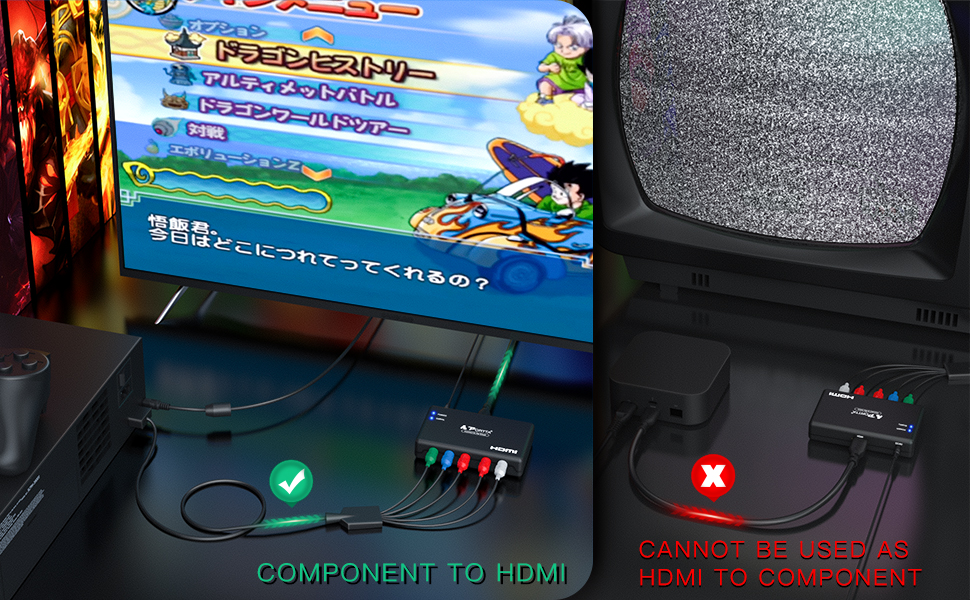
The Portta Component to HDMI Converter transforms analog YPbPr video and stereo audio signals into high-definition HDMI output supporting up to 1080p at 60Hz. Compatible with a wide range of legacy devices including PS2, PS3, Xbox, Wii, and DVD players, it ensures vibrant video and uncompressed 2-channel LPCM audio with no delay. Backed by a 5-year warranty, this compact adapter is the perfect bridge to modern HDTVs and projectors.


| ASIN | B003VJ9RP6 |
| Best Sellers Rank | #125 in HDMI Cables |
| Brand | Portta |
| Built-In Media | main unit |
| Color | Black |
| Compatible Devices | Television |
| Connector Type | Component |
| Current Rating | 1.5 Amps |
| Customer Reviews | 4.1 out of 5 stars 2,943 Reviews |
| External Testing Certification | - FCC,CE |
| Finish | Hdmi,Projector |
| Global Trade Identification Number | 00846561005296 |
| Input Voltage | 5 Volts |
| Item Dimensions | 3.78 x 2.36 x 0.79 inches |
| Item Weight | 2.8 ounces |
| Item dimensions L x W x H | 3.78 x 2.36 x 0.79 inches |
| Manufacturer | Portta Electronics & Technology Limited |
| Mfr Part Number | N3CVRHP |
| Model Number | PETRH |
| Number of Items | 1 |
| Number of Ports | 5 |
| Package Quantity | 1 |
| Power Plug Type | No Plug |
| Smart Home Compatibility | Not Smart Home Compatible |
| Specific Uses For Product | Monitor,Projector |
| UPC | 846561005296 |
| Unit Count | 1.0 Count |
| Warranty Description | 5 Years |
| Warranty Type | Limited |
M**A
Worked well with my mom's older DVD to HDMI TV
Bought this so my mom's older DVD player would work with her TV that only had HDMI inputs. The adapter needs AC power, as most of them do, which is a bit of a drag but necessary. It worked well though and did the job.
A**R
Seamless Component to HDMI Conversion!
The Portta Component to HDMI Converter is an absolute game-changer for anyone needing to connect legacy devices to modern displays. This converter offers seamless conversion and delivers exceptional performance, earning my full five-star rating. The conversion process with this device is flawless. It effortlessly transforms component video signals into high-quality HDMI output, allowing me to connect my older devices to newer TVs and monitors without any compatibility issues. The picture quality is impressive, with vibrant colors and sharp details. Setting up the Portta Component to HDMI Converter is a breeze. It's a plug-and-play solution that requires no complex configurations or additional software. Simply connect the component cables, power up the converter, and enjoy the converted signal on your HDMI display. It's hassle-free and user-friendly. The build quality of this converter is excellent. It feels sturdy and well-made, ensuring durability for long-term use. The compact design makes it easy to place and integrate into any setup, whether it's a home theater system or a professional AV environment. One of the standout features of this converter is its support for audio. It not only converts video signals but also includes an audio output, allowing me to enjoy both video and audio in sync. This eliminates the need for separate audio connections and enhances the overall viewing experience. The Portta Component to HDMI Converter offers great value for the price. It provides a cost-effective solution for connecting older devices to modern displays without the need for expensive equipment upgrades. It's a worthwhile investment that extends the lifespan of my legacy devices. In summary, the Portta Component to HDMI Converter is a reliable and high-performance solution. Its seamless conversion, easy setup, and audio support make it an excellent choice for anyone seeking to connect component video devices to HDMI displays. This five-star rating is well-deserved for its outstanding performance and value.
C**T
GREAT!
Awesome little product for a great price! I bought this for my ancient Xbox 360 (before they had hdmi) so I could have a "one cable solution" for plugging into my surround sound / projector system (which doesn't support component sadly). It works great and does a nice job of pushing both audio/video via one cable. Just what you wanted it to do right? Don't do like I did and piddle around wondering if this is the right product. It probably is. :D I've had this product for a few months and have had no trouble out of it. The only trouble I have had has been from faulty HDMI cables. If you're in the market do yourself a favor and spring for an $8-9 HDMI cable, because yes... an HDMI for $1.50 is too good to be true because they have a pretty high failure rate. I have 3 cables that can attest to that. Other thoughts: Just because you've converted the signal over to HDMI isn't going to magically make it look better or the audio better. This is a product for a person (like me) that has something like a projector that doesn't have Component inputs and/or just wants to have one simple HDMI cable going from their device --> TV. Used it with my Wii and it looses its signal a lot I'm not sure if it's the box or my projector that receives the signal. It only usually loses its signal when a big flash hits the screen like if someone uses the lightning bolt on Mario Kart. This is kinda obnoxious but what are you gonna do? I guess if you're getting this for just a Wii Would look elsewhere cause the cutting in and out is bad times :( (Note: I checked and it is the unit I have tried 2 sets of Wii components and several different HDMI cables and when it happens the green light flickers and my screen loses the video signal for a few seconds)
A**R
Great for retro gaming!
Works flawlessly and can even be powered by the USB port on my PS2 so I don't have to use up 2 outlets!
J**R
failed to work
I have a old VCR/DVD combo that doesn't have HDMI out. So bought this and connected to my YPbPr composite cable and RCA audio cable. I have no idea why but nothing work. No audio, no image. Usually, one work and one doesn't, but this one just doesn't work. Disconnected both cables several time thinking it's connectivity issue, but still no audio or video image. I even tried just the audio, but nothing. My TV doesn't even recognize the devise, but when I disconnect the HDMI cable, my TV tells me "the cable is disconnected" so it does recognize that cable was connected to something. Wanted to return and replace it with the new one, but threw away the original package which is needed to make the return. Oh, well. Guess I have to eat the price. Mine failed out of the package. So be warned. And keep the package until you confirm the function of the device. Don't make the same mistake I made.
J**A
Works well for my needs.
I purchased this mainly for connecting older gaming consoles to my Smart TVs that lacked Y/Pb/Pr component video support. I tested this out on an Onn Smart TV from Walmart as well as another Smart TV by Toshiba using a PS2 Slim and a Nintendo Wii. Both worked well and even supported games that have a Progressive Scan feature. Gamecube games also worked with this device when I played them on my Wii. There are slight image issues during game play such as "jailbars" and the occasional "screen-tearing," but those are given expectations when mixing analog and digital signals to begin with; I still felt satisfied with the sharp and clear images thanks to this product. I also tested a Sega Saturn console since I had procured component cables for it, but sadly it wasn't perfect. The startup screen on the Saturn didn't appear at all and games that toggle between different video resolutions like Virtua Fighter 2 and Fighting Vipers can drop the display signal in-between gameplay. I also tried testing out PS1 games using Resident Evil 2 on the PS2 Slim. The PS1 logo shows up for a few seconds, but the video signal drops afterwards, rendering the game unplayable. Physically the device's Right Audio connector is fixed too close to the left of its hole as shown in the photo which made it awkward to connect the red audio cable through it, but the sound managed to work fine anyway. All and all this a good device for its cost and I will have fun using it to play my PS2 and Wii games : ) .
L**O
Dont get for ps2
It will get an image on screen but the quality of that image will be fairly poor. I have cheap aliexpress adapters that work better. Also the color space is still incorrect when using ps2 as image will be dark and have crushed blacks losing midtones. It works but there is way better at cheaper prices.
L**Y
Great Component to HDMI Converter For the Price. Works well for 480p Gamecube games through Wii. Read comments for monitor suppo
I bought this converter in order to connect my original Wii to my monitor to play classic Gamecube games in full 480P resolution. Although I'd like to say it just "worked" I ran into a couple of small issues getting it to work with my monitor that I ultimately resolved. The connection looked like this. Original Wii to the Portta box via Component cable. Then from the Portta to Dell monitor via HDMI. Upon first boot the monitor remained black with a message box that reported that the input device's refresh timing and resolution were not supported. Although the Wii has 2 video modes: 480i and 480p, you have to actually have the Wii on screen to get to that menu. By default the video mode is 480i, which my monitor didn't support. I was able to connect the Wii via components to my roommate's TV and set the correct video mode to 480p. The Wii then properly displayed on the monitor. Until... I tried to boot a Gamecube game. Upon doing this, the screen went black again. Because the Wii has actual Gamecube hardware inside of it, the video output switched from the 480p Wii to the Gamecube 480i default. I had to move the Wii back to the TV in order to boot a Gamecube game WHILE holding down the "B" button in order to prompt the "progressive" (480p) mode. Once this mode is selected at least once the Gamecube will always prompt this message until "No" is selected. After plugged it back into my monitor, booting up the Wii and selecting the Gamecube disc, the screen does go black BUT because the Gamecube is still running even though the monitor cannot display the Gamecube default of 480i, you can press "A" which is currently sitting on the "Would you like to enable progressive 480p mode? Yes or No". Yes in this case. Once you select that, the video appears with the Gamecube game booting and I'm not a happy camper!!
N**Y
Bien
Funciona sin problema
S**N
It works
It works as described, Good product
D**S
Working well out of the box! MAKE SURE TO SET UP TV PROPERLY
I used this to test connecting my Wii via an HDMI connection, as newer TVs have ditched all the RCA style jacks altogether. At first there was some input lag BUT this is because I did not set up the TV and the console properly. The TV needs to be in its Game mode, and the Wii needs to be on 480p instead of 480i. After that the quality looked great and there was no input lag! This is a great option if you are not looking to perform any additional upscaling or modifications to the image. I saw this converter was recommended on Reddit for this purpose, over more expensive converters such as RetroTINK or GBS-C. Time will have to tell as to its longevity. If I end up with any major problems, this review will be updated. Tested with the following setup: Sony X80K 55" Original Wii using unknown third party component cable Bomberman Blast MarioKart Double Dash on progressive mode with a Wavebird controller
R**E
product quality
met to my requirements...happy for the item
C**N
Excelente producto
Tengo mi PS2 Fat, y tengo el cable original de video componente (el que tiene aleación en oro) y mi pantalla gamer lo detecto sin problemas, si de por sí en una televisión viejita mi cable se veía perfecto, ahora con el adaptador y mi pantalla gamer de última generación los colores son más brillantes y la imagen más definida
Trustpilot
3 days ago
2 months ago