👁️🗨️ See everything, miss nothing—your window to smarter security.
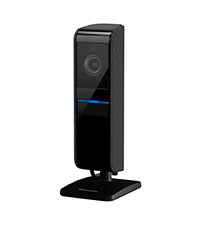
The Panasonic HomeHawk WINDOW camera revolutionizes home security by mounting inside your window with no drilling required, delivering 1080p full HD video and bright color night vision through a 150° wide lens. Powered continuously via a standard outlet, it eliminates battery worries while providing AI-driven person detection to reduce false alerts. Compatible with Alexa and Google Assistant, it offers seamless smart home integration and local microSD storage with no monthly fees, making it a sleek, reliable, and cost-effective solution for vigilant outdoor monitoring from the comfort of indoors.


| ASIN | B085FXFS41 |
| Alert Type | Motion Only |
| Antenna Location | Outdoor Security |
| Are Batteries Required | No |
| Best Sellers Rank | #477 in Home Security Systems |
| Brand | Panasonic |
| Built-In Media | Window Camera |
| Compatible Devices | Alexa |
| Connectivity Protocol | Wi-Fi |
| Connectivity Technology | Wired |
| Control Method | Voice |
| Controller Type | Amazon Alexa, Google Assistant |
| Customer Reviews | 4.1 out of 5 stars 2,022 Reviews |
| Effective Video Resolution | 1080 |
| Form Factor | Box |
| Global Trade Identification Number | 00885170361201 |
| Indoor Outdoor Usage | Indoor, Outdoor |
| Indoor/Outdoor Usage | Indoor, Outdoor |
| Installation Type | Self Adhesive |
| Item Dimensions | 5.1 x 2.9 x 1.3 inches |
| Item Type Name | Window Home Monitoring Camera |
| Item Weight | 0.86 Pounds |
| Manufacturer | Panasonic |
| Manufacturer Warranty Description | 1 year manufacturer |
| Model Name | HomeHawk WINDOW Home Monitoring Camera for Outdoor Monitoring |
| Model Number | KX-HNC500W |
| Mount Type | Wall Mount |
| Night Vision | Night Color |
| Number of Channels | 2 |
| Number of IR LEDs | 1 |
| Number of Items | 1 |
| Optical Zoom | 1 x |
| Other Special Features of the Product | Night Vision, Motion sensor, HD Resolution |
| Power Source | Corded Electric |
| Recommended Uses For Product | Outdoor Security |
| Room Type | Office |
| Special Feature | Night Vision, Motion sensor, HD Resolution |
| UPC | 885170361201 |
| Unit Count | 1.0 Count |
| Video Capture Format | MP4 |
| Video Capture Resolution | 1080p |
| Waterproof Rating | IP65 |
| Wattage | 6 watts |
| Wireless Technology | Wi-Fi |
Y**Y
I love it!!!!
I love it!!!! I put the camera on our garage door window, using the blue wide masking tape, a extension cord and some hooks that the camera stays on the window and the cord won't touch on anything when garage door opens. It works out great looking over our driveway. I wish I could angle down a little bit, but I still like the fact that the camera is securely installed inside of the window, I don't need to worry about the battery, and on the top of it, there is no monthly fees (WooHooooo!!!)!! Like many reviewers say, the app could have some improvements probably because I'm used to Ring app. (I have a Ring Doorbell Pro.) I wish I could delete the video clips in the "recording list" by swiping it out (or check multiple photos to delete them all at once). Setting up the camera in the app is a bit confusing. First, you need to turn on your location on your device. Then I suggest you to be near router when you connect your camera to your wifi, then the camera to your device following the in-app step-by-step installation guide. After you finished setting up the connections, then you can simply unplug the camera and take it to wherever you want to install it. Once wifi is all connected, you can easily plug/unplug the camera from the power outlet and no need to set up the wifi again and again like Ring Doorbell cameras which is very frustrating. (UPDATES: I found a quick delete selection in the app! "Show All">"Select". And I started to like this app as I'm getting used to it! I lower the sensitivity on my motion detection, but there are still a lot of videos recorded. What I like about this app is that I can chose "Person Only" recordings to review the recordings. That way, I don't have to waste my time looking for the ones that shows some human activities in my property. Another option that I like is that I can easily protect some of the video clips with one click. I used to use Ring app. That's why it took for me to get used to the Homwhawk app. But now I actually like this app better than Ting app. It's well coordinated once you get used to it. ) It takes some delay to watch the live view, but I personally think it's slightly faster than Ring. (It depends on my wifi strength too.) But it doesn't really matter to me since I don't have to "answer" to the camera activities. If there is any action going on, then the camera is already recording the activities anyway. So I won't worry about the little delay so much. My garage windows are all tinted dark. But the picture quality is excellent even at night! We have a street light 2 houses away across the street which seems to give enough lighting for our camera to be able to pick up the images in color! (I don't even have the highest quality setting.) I also lower the motion sensitivity but it catches all of the activities in the area I chose. There is no microphone on this camera. So the noises won't trigger the recordings. Your privacy inside of your house is protected. I purchased 128GB of micro SD card for the camera as Amazon suggested, and it's working just fine although I later noticed that the camera is supposed to take up to 64GB of micro SD card as some reviewers stated. I can choose if I want to turn the LED light (which is located on back of the camera) on/off in the app, and there is no light shown in front of it. My daughter also downloaded the app to check her car on the driveway. It seems like up to 4 devices can be connected to this camera at once. Overall, I'm so happy with the purchase! I don't have to worry about my neighbor getting on to our camera when I'm setting it up as they have no idea when we are setting it up. (My neighbor who also has the Ring doorbell has sneakily gotten on to our camera once (this really happened) when I had hard time setting up our Ring Doorbell Pro for the first time. Now I know why I had a hard time connecting it because they were stealing our Ring signal before we were trying to connect with it. Creep!) Even we get power outage, this camera would just reconnect the wifi itself when the power is back. You can relocate this camera anywhere you want in your house. You don't need to recharge the battery. It's Panasonic. They are good and I trust many of their products! Lastly, I'd like to request to Panasonic to make more products like the doorbell cameras, the outdoor motion detection driveway/front porch alarms (with no camera--to be less expensive), and less expensive window cameras, outdoor gate camera (like a peeping hole camera with weather proof) which all come with wired or wireless. I would definitely buy more Panasonic products to protect all around my property! Anyways, I'm really happy with the purchase, and HIGHLY recommend it. It's impressive!!
J**J
Good Quality video and easy to install
I was looking for a 24/7 recording camera that I could install easily without drilling holes outside, and I found the perfect match. Installation: I just plugged in the camera, downloaded the Homehawk app, followed instructions to pair the camera, and that's it. It was straightforward. After completing the steps, I kept repositioning the camera without sticking it to find the best spot. Once I found it, I cleaned the window, removed the protective cover, and attached the camera to the window. I did not use the additional stickers provided as the camera feels firmly attached to the window. This way, I can reposition again if needed. Quality: Don't compare this to an outdoor camera. It won't capture faces or license plates perfectly, but it does capture it pretty well for a camera mounted on an inside window. Even at night, the quality is pretty decent, and the video is bright. Even without any street lights, the video is bright. Recording: You have to purchase a Micro SD card. I recommend 512 GB. 512 will give you almost 25 days of recording. 128 GB, which would be the minimum, will give you approximately 5-6 days of recording. 512 GB card is pretty reasonable in price and is the best option. You can add 1TB, but they are costly. 1 month's worth of recording is pretty good enough. The camera stores the file in 5-minute intervals, and once the memory is full, it will automatically overwrite the oldest file. This way you never have to touch the memory card again. You can easily view the recordings from your Homehawk app anytime, even if you are away. You can also download the video if needed. Videos are date and time stamped at the top. You can also do a live video anytime you want from your app. If you do not want a memory card, you can just have it for live view and motion detection. Even with a memory card, you can just have it for motion detection, and a 128 GB card would be sufficient to store these clips. The only con about this is to find a good location. Since it can only be mounted on a window, you need a window with a clear, unobstructed view. Make sure you have a window that will work before purchasing. Clean the window inside and outside before mounting to get the best recording. Look through the window, and you see what the camera will see (maybe more as the camera has a wide angle). Overall, I love it. Installing a camera outside is expensive and takes much work (24/7 camera). This camera makes it so easy to just mount something on a window and get continuous recording. The app makes it easy to view videos as well. From outside, you just see a black thing on your window, and no one will know that it's a camera, so it's very subtle. The quality is pretty decent for an indoor camera. I highly recommend it if you want something easy to install with no monthly subscriptions.
H**D
Unique camera worth the price
I have a pair of Blink camera's and if anyone has them you know the video quality is pretty abysmal and getting a live view is next to impossible. They are cheap and for the price they aren't a bad deal. This was onsale for Prime Day and decided to take a chance and see how this works out. First thing is, read the installation instructions which are pretty simple. The biggest thing is clean the window well and the camera will stick to it (3 days and still going). I didn't clean the window and it would stay on for about 4 hours. The rest of the setup is pretty simple The app is actually pretty well done and it pairs up easily with multiple phones. The app features are pretty easy to navigate as well. I have mine set to continuous record which gets 32Gb about 1.2 days of recording before it starts overwriting. The only weakness is motion detection. If *anything* moves, it's going to go off so if you have a tree in the frame and there's wind, it's going off non stop. There's also a person detection feature which works pretty well. When you go to review videos you can look at all saved video, person, motion, etc. I usually just filter on Person and it will grab the 5 min video and start playing it. The cool thing is the app does mark where in the 5 min the person is detected. It would be nice if they had marks for motion though there'd be a lot of marks. Live view syncs up pretty quick and picture quality is excellent. The camera is very difficult to see in the window which is nice. Some things to be aware of, the video only exists on the camera in the SD card so if you see something interesting, it might be worth downloading it before it can be overwritten or damaged. You can lock videos which prevents overwrite. Also, it's AC powered so as soon as the power goes out, this thing is done. There is no capacitor or any type of battery backup. The color night vision is spectacular though the area I'm is somewhat illuminated. I doubt this would work well in very dark places and there is no IR illuminator. Wish list...I wish I could angle the lens a bit. I realize this is a slim window mount but this would be perfect if I could get about 5 deg down angle. There is no adjusting this but I knew this going in so I can't complain.
E**S
There's no subscription
UPDATE::: My camera doesn't work. So I contact Amazon with help. They stated they couldn't help me. Amazon was going to give me a refund. I stated no please just send replacement. Amazon stated they will send a replacement. I had received the replacement. Now it doesn't record nor see Live. Once contact panasonic by phone. Once you press what you wanted. They tell you go online. So when I went online. It sent you to page that doesn't exist. It had so many errors message. Now, with that I was scared thinking I might got a virus. I had looked over several times the website is legit. The help it's not . If panasonic reviewing your review. Can you please have a live person contact me? Also, panasonic has technical website. But that one you have to pay them to help you. Which actually a 3rd party. I went on YouTube University there's absolutely no help. All it keep showing how to set it up. I know that part. I need to know why it is not recording or showing me live. If anyone out there please let me know. It is very annoying. This camera has no subscription. (At this time) when I purchase others' cameras. They will tell you no subscription. However, they never tell you it will be 30 or either 90 days until you start paying. The camera was very easy to set up. The pictures are great. I can control how many times my alert goes off. Unfortunately, it's a lot. There are definitely a lot of activities going on. I guess I really did need this camera. Or maybe the location I have it makes it keep alerting me. This camera may be used for very medium risk of activities. It's not the frustrating part. Every camera I purchased . I make sure it's links up to my echo and TV. According to some Q/A, my answer stated they didn't know or it doesn't. Therefore, I check on YouTube University and the website. There was nothing explaining how to register. Their instructions definitely didn't help at all. Then I contacted Amazon troubleshooting, but they didn't know. So, I'd finally figured it out. I wish this was put in the manual instructions. Here's the steps who want to know: 1st, you need to go to the panasonic website. Register your device. Make sure you screenshot your order/serial number/model/purchase price/date paid. 2nd go to the panasonic app. Go to setting. Then click on the device you want to add. Mine Amazon. 3rd, then click on create. It will ask you your panasonic email. It will be the one you set up when registering. Then, it will ask for your panasonic ID. (This was the main problem. No one knew. The panasonic id is your email you registered thru panasonic. Then, fill out the rest .you will need to make sure that once you register, go back to that email and click verify. Then you are all set from there. Once you did that, then you go on your alexa app and register there.
S**K
Super Security Camera That May be One Of A Kind . . . .
I'm not sure how I came across this camera, unless it was an Amazon daily deal. Even doing a search for "window security camera" does not bring up this Panasonic camera. It doesn't bring up any type of window security camera. Is this the only one out there? Whatever, it is exactly the type of camera I have wanted for years. In fact, when I got the Panasonic HomeHawk floor camera a while back, I tried to see if it would work through a window. It did not. For me, a window camera is perfect. No installation problems or expense, no wiring needed, no batteries that needed to be replaced in cameras hung high, no weather problems. No, you just stick this window camera to a window inside with the powerful suction cups, or you can use the included double sided sticky tape. You will then see a live crystal clear colored picture of outdoors day and night. I have mine in a front dining room window, where I can see anyone coming on to the front porch, part of the porch, part of the front yard, part of the driveway and cars passing on the street. When the camera detects movement or people, it starts filming. It stops when the movement or person is gone, and never has continued taping blowing leaves or anything like that for very long. When you look at the recordings, you even have the option of seeing only ones with a person in them. (However, if movement set off the camera first, while it will keep filming if a person enters the picture, that recording may be listed under "motion"", instead of "person".) Detection sensitivity can be adjusted, too, as can the detection area. The camera will show a grid of the detection area, and you just put an "x" in each box you don't want the camera to focus on. Playback is easy, as well as deleting individual recordings. Just remember to notice the date arrows that take you back to the day before. You can also lock in recordings you don't want deleted and take a picture of any part of a recording. If the micro memory card gets filled, the camera starts recording over old recordings. (I'm using the Samsung PRO Endurance 128GB 100MB/s (U1) MicroSDXC Memory Card.) So far, I've had no problem with the camera falling off he window, and I did not apply the tape. The window is a thick glass one that does not open, and is sheltered from the elements, so there is no condensation on it ever, or intense heat hitting it. I'm thinking of getting a camera for an upstairs window which will show the full road, and would be putting it on a window that gets direct sunlight on it in the morning. I'll update this review if I do get a second camera and if the heat on the window affects the suction cups. The HomeHawk app was simple to download when I got my floor camera, and it was simple to add on this camera. The app has the user guides, too, and do read all that's there to understand what the HomeHawk cameras can and cannot do. The only shortcoming I see with this window camera is if the electricity or internet goes out, the camera will not work. Other than that, I love everything about this Panasonic. It's not that noticeable in the window, either, especially at night. There is either a blue or flashing red light visible inside on the back of the camera, but no light on the very dark front of the camera. The white cord is noticeable, but I wasn't looking for a hidden type camera; just one that would provide live and recorded images of outside; in the simplest, least costly way possible.
P**R
This is a great product to have especially if you live in an apartment
From the outside, nobody will be able to even see your camera. If you get a 512 memory card. This product will keep on rewriting over your old videos. You’re able to see through day and night. The set up is extremely easy. The product Goes on the window. If you live in a condo or an apartment, you could have a camera on the window and nobody will know about it. And you will not be breaking the lease or the law. I highly recommend this product, especially if you have a window that is facing your vehicle. This way if you go out in the morning and you see that your vehicle has been damaged either through vandalism or an accident. You can go back to your camera and review the exact time and day. Download that to the police station. Then go over and file a report where they will have your videos that are time stamped with the date the time and probably the license number of the vehicle that did the damage. This could be day or night excellent night resolution. For the price I don’t think it could be beaten. With many cameras if you put it up against the window, you will get the glare shining back at the camera. Therefore, you will not be able to see outside. With this camera, you are able to see outside even if you have a screen down. It is easy to take off of the window and put it on any other window that you might have interest in viewing. Altogether this is an excellent bye, and I highly recommend it. It comes with its own app. That would be used on your phone. So you would always have access to your vehicle or your backyard or whatever you would be looking at. Be careful that make sure that you’re in a one party consent state. That means that you don’t need both parties to consent to being recorded. In the two party consent if you don’t have the other parties consent, you could wind up in jail with a felony. Is only a few states that do this. So I would purchase with confidence. Arrived undamaged, and on time.
J**N
It works as described. It doesn't last long after the warranty ends.
After following the instructions to connect the camera to WiFi, I cleaned the window and attached the camera. The picture is excellent and the app works well, though it takes some practice to learn the functions. I mounted my camera at the top of the window in the middle to get a broad view over some bushes. The power cable is routed along the top of the window frame and connected to a UPS to keep it active in case of a power outage. The night vision is clear, especially since there is a streetlight outside. The motion detection is effective and I'll see how it goes before making changes. With a 256mb memory card, there's plenty of storage space. Video can be reviewed on the app and there are several options for recording setup. I'll update the review if I think of anything useful. ------- April 17, 2026: It seems that this product like many others is designed to fail shortly after the warranty expires. The first camera had a fan error; fortunately within the original warranty period. Panasonic did honor their warranty (I only paid to ship it to them). The replacement has stopped working and is no longer covered by the warranty. I was prepared to accept that, but when I called support to troubleshoot an error light that is not described in the manual, I was informed that there would be a fee for troubleshooting. That is unacceptable. If they had helped me by troubleshooting and it was determined to be beyond fixing, I would have considered purchasing a replacement. Now I won't consider buying another Homehawk product, no matter how well it works during the warranty period.
C**M
Perfect, and works on double-glass facing outside.
Perfect. I have two of these. If a south-facing window, you might consider a high-temp memory card, and the extended re-wright kind is most suitable. They solve the double-glass reflection problem, and stick to the glass very well. Refresh the suction-mount as the software reminds you. I did not use the double-stick tape on either of mine, but consider the advice in the directions. Online interface is better than the regular Panasonic cameras. I like the ability to block out parts of the view. Perfect for vegetation than sways in the wind, and neighbor's lights. Does get triggered by cats and racoons as 'people'. First quality. No batteries but there is a cord to an outlet. Wireless. Mounts inside the window facing outdoors.
R**Y
No app available
App not available in UK
E**Y
Homehawk app not available in Australia
I really wish I’d read the Amazon reviews of this product before purchasing. The Panasonic Homehawk app is not available for download from the iOS store in Australia, so the device is useless here. Shouldn’t be available on the Amazon Australia store!!
J**S
Great camera with no online subscription needed
The night vision on this camera is excellent and the image is crisp and clear. Easily mounts on the inside of glass and can be triggered automatically to record on motion detection. A good solution for anyone looking for some security and privacy but without paying some subscription to upload data to China. No internet needed but its convenient to access your camera via WiFi to view the live feed. It's a bit pricey but worth it for some peace of mind.
A**R
This item CANNOT be used in Australia
I have spent weeks wondering what I did wrong and the answer is nothing - the app is not available in Australia so the two cameras I purchased are useless. This should not be an international ship item
C**L
La meilleure caméra de toutes celles que j’ai essayées!
Cette caméra est vraiment super. Les enregistrements qu’elle me donne sont parfaits, j’adore les notifications lorsqu’une personne est aperçue par la caméra, fonction qui marche très bien avec cette caméra, comparativement à d’autres. J’ai attendu de l’avoir eue depuis un bon moment avant de rédiger mon commentaire. Donc, la caméra ne devrait pas vous lâcher dans trois mois!
Trustpilot
1 month ago
2 months ago