Buy anything from 5,000+ international stores. One checkout price. No surprise fees. Join 2M+ shoppers on Desertcart.
Desertcart purchases this item on your behalf and handles shipping, customs, and support to Vanuatu.
🚀 Unlock lightning-fast external storage with sleek, cool confidence!
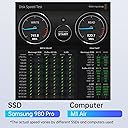
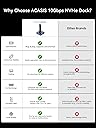
The ACASIS NVME SSD Reader Adapter is a compact, high-performance M.2 SSD docking station featuring a 10Gbps USB 3.2 Type-C interface. Crafted from premium aluminum alloy, it ensures superior heat dissipation for sustained SSD performance. Its innovative toaster-style design allows tool-free, driver-free plug & play compatibility with both NVMe (M Key) and SATA (B+M Key) SSDs up to 8TB, supporting all major operating systems. Ideal for professionals needing fast, reliable external storage and backup solutions on the go.


| ASIN | B084ZKLQR8 |
| Best Sellers Rank | #21 in Enclosures |
| Brand | FREEGENE |
| Built-In Media | M2 SSD ENCLOSURE |
| Color | Dark Gray |
| Compatible Devices | Personal Computer |
| Customer Reviews | 4.6 4.6 out of 5 stars (1,140) |
| Data Transfer Rate | 10 Gigabits Per Second |
| Enclosure Material | Aluminum |
| Hardware Interface | USB |
| Hardware Platform | Windows |
| Item Dimensions L x W x H | 1.93"L x 1.93"W x 0.47"H |
| Item Weight | 56 Grams |
| Manufacturer | ACASIS |
| Memory Storage Capacity | 8 TB |
| Mfr Part Number | M04 |
| Model Number | M04 |
| Supported Devices Quantity | 1 |
| UPC | 705338038977 |
| Unit Count | 1.0 Count |
| Warranty Description | 1 Year Warranty |
J**R
EXCELLENT M2 style ssd docking station! Solved TWO problems.
This is a great tool. Excellent quality. Great design with on/off switch on the base. HIGHLY recommend if you have loose m2 style drives, or in my case, a Macbook air/pro 2015 ssd that I couldn't find a good reliable enclosure for but did find a good adapter. Recommended if you don't need to use the ssd all the time, or just need to read a few loose m2 drives from upgrades or as a backup tool. Nice compact size, comes with a USB C - male C with an A adapter. I expected it to be much larger from the image, so this makes this a very handy and portable tool. I needed this because another adapter I found - "chenyang 12+16Pin MAC SSD to Motherboard M.2 NVME NGFF M-Key Convert Adapter Card" was able to read a Macbook Air/Pro 2015 m2 style drive while using my SSK enclosure with the case off. BUT COULD NOT FIND AN ENCLOSURE THAT WOULD HANDLE THE LENGTH OR HEIGHT WITH THAT ADAPTER... Now I can plug that adapter and 2TB mac ssd into this DOCK to transfer files, or backup a system. IT is a useful DOCKING TOOL! I would NOT recommend using this as a "permanent" auxiliary drive mainly because the drive is standing up in the socket and could easily be bumped while in use and possibly corrupt a file or filesystem. This is a great TOOL and worth the price, but this is NOT a permanent solution for constant use, unless you can put this out of the way. It should work fine in continued use as the drive is open to the air for cooling and the base is metal. The mac ssd adapter worked perfectly in this DOCK, but its design made it longer and taller than a standard enclosure. So, I was very happy to find this product. It solved TWO problems for me: 1) being able to use a "loose" mac 2tb ssd and 2) seeing what's on other M2 drives I have in my bin from laptop upgrades. This is a very handy tool for file transfers, or if you're reinstalling the OS on your laptop, FIRST install the new m2 ssd in your laptop, configure, then plug in your old m2 into this dock and copy files onto your fresh drive. If you were planning on simply moving to a larger ssd, then you could put the NEW ssd in this docking station, properly format it and then use RSYNC or other tools to copy the entire OS and files over to the new drive, test it, then save the ORIGINAL drive if the new drive fails or you sell the laptop. This would work well as a backup tool for any system, especially if you are using Linux or MacOSx as you could completely copy the drive using RSYNC. (can use --exclude for any directories you don't want to save, like /tmp or ~/.ssh )
J**M
Simple and Fast NVMe SSD Adapter
I bought this Adapter to access an old M.2 drive, and it worked exactly as expected. Installation was very easy, just plug the SSD in and connect it to the computer. No drivers or tools were needed. The transfer speeds feel fast, especially when moving large files, thanks to the 10Gbps USB interface. The aluminum housing also helps keep the drive cooler during use. It’s a simple and convenient way to turn an NVMe or SATA M.2 SSD into external storage. Overall, it’s a reliable little adapter and very useful if you need to recover files or reuse an old SSD.
S**.
A perfect M.2 reader
Very easy to use this SSD M.2 reader, works fast, great data transfer rate, and flexible for use with multi types.
L**E
Good product, easy to use
Worked very well. Easy to recover data from NVMe card from damaged laptop.
R**T
Disappointed With Acasis Adapter
Why did I buy this Acasis adapter, rather than a Sabrent or SSK enclosure? Sometimes I need to reformat a NVME drive with a built-in heat sink. (An NVME drive with heatsink doesn't fit into a Sabrent of SSK enclosure)! The adapter worked fine after attaching an NVME drive--no problem. However, what I didn't like was that the cord was about 11.5 inches, so the adapter base didn't even reach the floor, when connected to a desktop computer. It needs to be about 18 inches. Further, I was surprised that the base was so tiny: less that 2 inches by 2 inches. The positive aspect is that it is easy to connect an NVME drive to the base. So, anyway, I have connected a longer cable to the Adapter.
U**O
The device is small and portable, making it easy to take with me wherever I go.
Back on Dec 15, 2023, I purchased ACASIS NVME to USB Docking Station and have been extremely happy with its performance. The device is small and portable, making it easy to take with me wherever I go. It is also very easy to use - simply insert the M.2 SSD into the appropriate slot and connect it to your computer via the USB port. One of the things I appreciate most about this docking station is its versatility. It is compatible with both M Key and B+M Key M.2 NVMe SSDs as well as SATA-based SSDs, so it can accommodate a wide range of different drives. It is also compatible with Thunderbolt 4 and 3, so it can be used with a variety of different computers and devices. I have used this docking station to transfer data between different computers and to make backups of my files, and it has worked flawlessly every time. The transfer speeds are fast and reliable, and I have not experienced any issues with data corruption or loss. Overall, I would highly recommend the ACASIS NVME to USB Docking Station to anyone in need of a reliable, high-quality device for transferring data between M.2 SSDs and their computer. It is a great value for the price and has exceeded my expectations in terms of performance and convenience
L**.
Works as advertised!
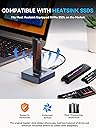
Was able to read an older m2 drive and retrieve the data I needed. I selected this model for the capability of connecting m2 drives with heat sinks such as the Samsung pro series ssd.
D**R
Worked great and for a low cost!
I used it to clone my 2TB M.2 drive onto a 4TB M.2 drive that has a heatsink. It worked fine for me, transferring about 1.4 TB of data in around an hour. The cable supplied is pretty short, but I ended up cloning it twice due to a mistake I made. One mistake I made was to use a USB cable that I already had because it was longer. The first time I cloned it, it took 10 hours to copy the data. The second time I did it, I used the provided short cable (which was labeled as being capable of 10 Gbps) and it only took a little over an hour. I also switched my boot type from MBR to GPT after verifying the clone was successful, and then after changing from legacy boot to UEFI, the drive booted up just fine. If I had more confidence in the process of switching over to GPT, I probably would have tried changing the original to GPT first, then I probably wouldn't have had to move the recovery partition to the end of the unallocated space because it probably would have allocated all of it. That happened because MBR is limited to 2TB partitions.
M**L
Funktioniert einwandfrei.
J**.
Initial review: Package arrived on time and in a sealed box. No defects or damage observed. Product is too cool - Full alu. construction and good design - small foot print makes it easier to carry - convenient and practical to use. No more screw drivers and thermals pads - open design would assist in heat dissipation. Only issue is, user needs to be careful when using this, as the ssd is vulnerable to contact damage since its open. Otherwise great product...
R**S
I've been using this for my storage swapping between machines and it's been very convenient. I haven't had any issues inserting drives into this and having them recognized which makes the whole process of cloning drives or troubleshooting drives from other machines very smooth. Without this, the mentioned processes can be a little more annoying, but this makes everything much simpler. I haven't had any issues with this yet so I am a very happy camper. I recommend.
M**L
Works great on Ubuntu 24.04. Plug and play.
B**R
وصلني الكرتون فارررررررغ Dont pay …. Empty Product ⚠️⚠️⚠️
Trustpilot
2 weeks ago
2 weeks ago