
Desertcart purchases this item on your behalf and handles shipping, customs, and support to Vanuatu.
📶 Elevate your workspace with unstoppable Wi-Fi power!
The TP-Link TL-WA801N is a high-performance Wireless N Access Point delivering up to 300 Mbps speed with advanced MIMO technology. It supports multiple operation modes including Access Point, Range Extender, Client, and Multi-SSID, offering flexible network solutions. Featuring Passive PoE for up to 30 meters deployment, WPA2 security, and a 10/100M Ethernet port, it’s designed to enhance connectivity in homes and offices with reliable, scalable wireless coverage.
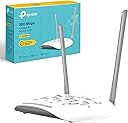
| ASIN | B085M4ZJ2L |
| Antenna Location | Home |
| Best Sellers Rank | 802 in Computers & Accessories ( See Top 100 in Computers & Accessories ) 1 in Wireless Access Points |
| Box Contents | TL-WA801N |
| Brand | TP-Link |
| Brand Name | TP-Link |
| Colour | White |
| Compatible Devices | Desktop |
| Compatible devices | Desktop |
| Connectivity Protocol | Wi-Fi |
| Connectivity Range | 30 Square Metres |
| Connectivity Technology | Ethernet Port(RJ45) |
| Country of Origin | China |
| Coverage | 30 meters |
| Customer Reviews | 4.5 out of 5 stars 2,817 Reviews |
| Data Transfer Rate | 300 Megabits Per Second |
| Frequency | 5 GHz |
| Frequency Band Class | Single-Band |
| Frequency band class | Single-Band |
| Has Internet Connectivity | Yes |
| Is Modem Compatible | No |
| Item Dimensions L x W x H | 18.2L x 13W x 3.6H centimetres |
| LAN Port Bandwidth | 100 Mbps |
| Manufacturer | TP-Link |
| Manufacturer Part Number | TL-WA801N |
| Maximum Upstream Data Transfer Rate | 300 Megabits Per Second |
| Model Name | TL-WA801N |
| Model Number | TL-WA801N |
| Model name | TL-WA801N |
| Number of Items | 1 |
| Number of Packs | 1 |
| Number of Ports | 1 |
| Operating System | TP-Link OS |
| Other Special Features of the Product | Multiple Operation Modes, Passive PoE Support |
| Product Warranty | 3 year Manufacturer |
| Router Network Type | hybrid |
| Security Protocol | WPA2-PSK |
| Special feature | Multiple Operation Modes, Passive PoE Support |
| Unit Count | 1.0 count |
| Wi-Fi Generation | Wi-Fi 4 |
| Wireless Compability | 802.11n |
| Wireless communication standard | 802.11n |
R**E
WiFi access made easy
This is a versatile device that many buyers will use as for WiFi access. In this mode (WAP mode, the default setting) the TP 300 is connected by ethernet cable to an existing router and, after simple setting up from eg a mobile browser, enables mobile WiFi devices to access the home network of the router, typically in a part of the house (or garden - see PoE discussion below) where the WiFi signal from the router does not reach. There is a variant of the WAP mode, known as Client Mode, in which the TP 300 connects wirelessly to the router. The TP 300 can also be set up in Range Extender mode, in which it connects to the router by WiFi (typically in or near a part of the house where the router's WiFi signal is weak) to provide a much stronger local WiFi signal. In a variant which the manual calls "Multi-SSID Mode" multiple WiFi networks are created, which might be suitable for eg small businesses. As noted in the first paragraph above, there is a very useful PoE (Power over Ethernet) option applicable to all the above modes, involving plugging in the power supply and the ethernet cable from the existing router into a connector (an accessory supplied with the TP 300) and then connecting the TP 300 by an ethernet cable to the connector. In this manner the TP 300 can be located in eg a garden building where there is no mains power. The manual states that the cable connection to the TP 300 can be up to 30 metres. The manual is a single A3 sheet, with all the modes of use clearly illustrated and succinctly described in excellent English. I got tripped up by trying to set up the device from a desktop computer linked by cable to the home network (doesn't work) but the tplinkap.net site pointed this out and I then had no trouble in setting it up using an iPad. In total it took me about 10 minutes. The WiFi signal from the TP 300 will provde adequate signal in two or three adjacent rooms, typically. I would recommend switching it off at night. Wireless settings can be adjusted on the tplinkap site, but the default settings were fine in my experience. The box comes plentifully supplied with fresh air, in mainly cardboard packaging. Users in sensitive applications should bear in mind that tp-link is a Chinese company.
G**M
A strong and reliable wifi signal, very pleased.
Used this to replace an old BT-Hub3 that kept dropping the wifi connection. This unit is excellent value, went for the 1200 as for the small price difference it was the most powerful one (1200 is the amount of square feet it covers). I now get good signal (50%) in the furthest part of the house where before I didn’t get any signal. I did read somewhere that the wifi units with external (not outside but sticking out of the unit) antennas are better than the ones with internal antennas and this one has four externals. As mine is in the loft its not going to be seen anyway. Very easy to install, especially as my setup was the default setup for the unit. There are other ways you can set it up and full instructions are included, access to the settings allows you to change how it is used. It can extend the existing wifi via cable or wirelessly, but I used it as a separate access point hardwired back to the main BT Hub as it is about 25m away (in a static a caravan as we are self-building). It does not come with Ethernet ports to add devices, just the one to connect it to a router/modem, so I also purchased a TP-Link 16 port, 10/100mbps, metal case switch unit which was also very good value (£28) and works superbly for my Ethernet circuits, mainly supplying streaming TV’s, but thats another review. At the moment the wifi unit is also connected to the switch and although it works fine I intend to wire separate Ethernet circuits back to the main hub, one for the wifi and one for the switch, mainly just because I can and not because i need to. Test results for the TP-Link wifi was 243ms response time / 4.4mbps download and the same test done directly at the main BT hub gave 225ms response time / 4.5mbps download, so hardly any difference and certainly not enough to notice.
A**S
Good, but needs to connect to tether app more easier.
Its good, but a improvement should be the tether app support.i cant connect it, and its been almost a week since I tried to fix it. Also it needs more ethernet ports so if in acsess point mode we can connect another wired device. But most of all its fast, basic, and very simple to use.
M**A
Reliable connection, easy setup
Setup with my cctv system working well easy to setup.
O**K
Good AP for the price
I won't go in depth with this review. Initially I was unimpressed that it didn't have a hidden network function, but after a firmware update (that the router can't do automatically) it now has that feature. Good AP for the price, v and having a POE adapter with it is a nice touch.
S**0
Perfect WiFi solution for your home
I started having problems with my service providers router after a number of years without issue, no matter what I did the wifi kept cutting out daily. As a result I searched the net and found this brand was one of the top ones and this AP had the right specs to provide WiFi to our whole house, it is also easy to configure, I now connect all our devices in the house to the AP and I now have no wifi drop outs. It works perfectly to provide a strong signal to our whole house which is a big improvement, both upstairs and downstairs. Would definitely recommend this unit if you have a fast broadband incoming speed but the wifi output from the router is not ideal. Also make sure to download the app to help configuring as it is pretty straight forward too. I would recommend hiding the ssid for your main router rather than turning it off fully, just in case you need to log into it and change any settings etc. (I say this from experience as I then had to plug my laptop into the router via Ethernet to resolve the issue)
M**.
TREAT WITH CAUTION
Tricky review this……. Good point is i get a signal to end of garden. Bad points: i now have 3 WiFi passwords they dont merge as advertised by changing passwords on TP unit to my home WiFi one. Secondly the instructions are really bad, presented as “so easy a chimpanzee can install” in reality they faintly miss staffed out and ionclude no trouble shooting or detail. Now for really bad…. The offered help line is a con…. AI asks a few clarification points then directs you to a third party that only allows access if you put in credit card etc details and then allows a 1 week subscription and refundable initial £1 “latch lifter payment” refund, easily cancellable (would i really trust this statement? NO WAY)….. i was sorely tempted to smash this with a lump hammer as a protest and return it ….. but… it does give WiFi to bottom of garden ( about 15 yards) so a generous 3 star review. Would i use or recommend TP again …… definitely NOT.
G**A
Works as intended
I got this to have WiFi in the outbuilding out the back of our house. I had a powerline adapter in there already, so I did have the internet, but only via the Ethernet port on the powerline adapter. This is no good for getting the internet on my phone when I’m in there. So I bought this to create a new WiFi hotspot in the outbuilding. It was easy to set up. If using an iPhone to set it up as I did, make sure you turn off ‘hide IP’, ‘private relay’ or whatever it is in your safari settings. You cannot connect to the ip address of this hub until it’s turned off. Or just use a laptop/PC to set it up. Once set up, this works great. It takes a minute or so for my phone to automatically connect to this WiFi hub from the one in my main house, as the outbuilding is just out of range of the house one. But other than that it works great. You can also use this to extend the reach of another WiFi signal. I did try this at first, but the outbuilding is just out of range so it didn’t work (the hub in the house is at the front, the outbuilding is out back), but at least you have this option if you’re able to use it. It would be useful in the house if you struggle to get WiFi in rooms furthest away from the hub.
C**N
Ok en point access
Utiliser pour faire une point access. Il fonctionne bien et a été facile à mettre en place.
R**R
ACHTUNG!!!
Versand aus GB... darum war er auch doppel so teuer als Anbieter aus der EU! Rückversand auf eigene Kosten mit Zollpapiere und so weiter... ein Riesen Aufwand!!! Weiter ist ein GB Netzadapter dabei... Muss man sich extra einen EU Adapter 220V dazu bestellen! Auf den Warenversandwert nicht zumutbar!
C**N
Impresionante
Espectacular , lo compré para la planta de arriba , más concretamente para mi cuarto por qué no llegaba ningún tipo de señal , ya que el wifi está en la planta de abajo en la otra punta . Bien pues compré este dispositivo conecte un cable ethernet al wifi de abajo y el otro al tplink que estaba en mi cuarto y funciona espectacularmente bien , no pierde ni un mega y en ocasiones hasta coge más señal que el de abajo , ahora puedo jugar a mi Playstation y PC con una rapidez espectacular , y encima da wifi a toda la planta de arriba , de los mejores productos que he comprado .
A**A
ممتاز ولكن
الجهاز ممتاز wifi 6 من افضل الاكسس الموجودة بس لسة بقاله اسبوع عيبه بالنسبالى عدم وجود بورتات تانية وانه واى فاى بس
M**Y
ممتاز
حقق الغرض منه
Trustpilot
2 months ago
1 day ago