🚀 Elevate your Mac workflow with the MX Master 3 — where speed meets style.
The Logitech MX Master 3 for Mac is a premium wireless mouse designed specifically for Apple users, featuring a high-precision 4000 DPI Darkfield sensor that works on any surface, including glass. Its Swiss-engineered electromagnetic MagSpeed scroll wheel offers ultrafast and silent scrolling. Ergonomically sculpted with a sleek Space Gray aluminium finish, it seamlessly integrates with macOS and iPadOS devices. The mouse supports effortless multi-device control via Bluetooth and Logitech Flow technology, enabling smooth transitions and file sharing across up to three devices. With up to 70 days of battery life and fast USB-C charging, it’s built for professionals seeking comfort, precision, and productivity in one stylish package.
| ASIN | B07W6HDNNV |
| Antenna Location | Office |
| Are Batteries Included? | Yes |
| Are Batteries Required | Yes |
| Battery Average Life | 70 days |
| Best Sellers Rank | 27,709 in PC & Video Games ( See Top 100 in PC & Video Games ) 2,342 in Mice 5,584 in PC Consoles, Games & Accessories |
| Box Contents | Wireless Mouse, Charging cable (USB-C to USB-C), User documentation |
| Brand | Logitech |
| Brand Name | Logitech |
| Button Quantity | 7 |
| Colour | Space Grey |
| Compatible Devices | Macbook, Macbook Pro, iMac, iPad (iPadOS 13.4 of later) |
| Connectivity technology | Bluetooth |
| Country of Origin | China |
| Customer Reviews | 4.6 out of 5 stars 5,807 Reviews |
| Enclosure Material | Aluminium,Metal,Stainless Steel |
| Global Trade Identification Number | 05099206085824 |
| Hand Orientation | Right |
| Hardware Platform | Mac |
| Item Dimensions L x W | 12.5L x 8.4W centimetres |
| Item Type Name | Wireless Mouse for Mac |
| Item Weight | 141 Grams |
| Manufacturer | Logitech |
| Manufacturer Part Number | 910-005696 |
| Model Name | Logitech MX Master 3 for Mac Advanced Wireless Mouse |
| Model Number | 910-005696 |
| Mouse Maximum Sensitivity | 4000 Dots per Inch |
| Movement Detection | Laser |
| Movement detection technology | Laser |
| Network Connectivity Technology | Bluetooth |
| Number of Batteries | 1 Lithium Polymer batteries required. (included) |
| Number of buttons | 7 |
| Operating System | Mac |
| Pattern | Mx Master 3 for Mac |
| Power Source | Battery Powered |
| Product Features | Ergonomic Design, Wireless |
| Product Finish Type | Metallic |
| Product Warranty | 2 year manufacturer |
| Range | 10 meters |
| Special feature | Ergonomic Design, Wireless |
| Style Name | Mx Master 3 for Mac |
| Theme | Mac-compatible |
D**1
Superb Alternative for Apple Mouse
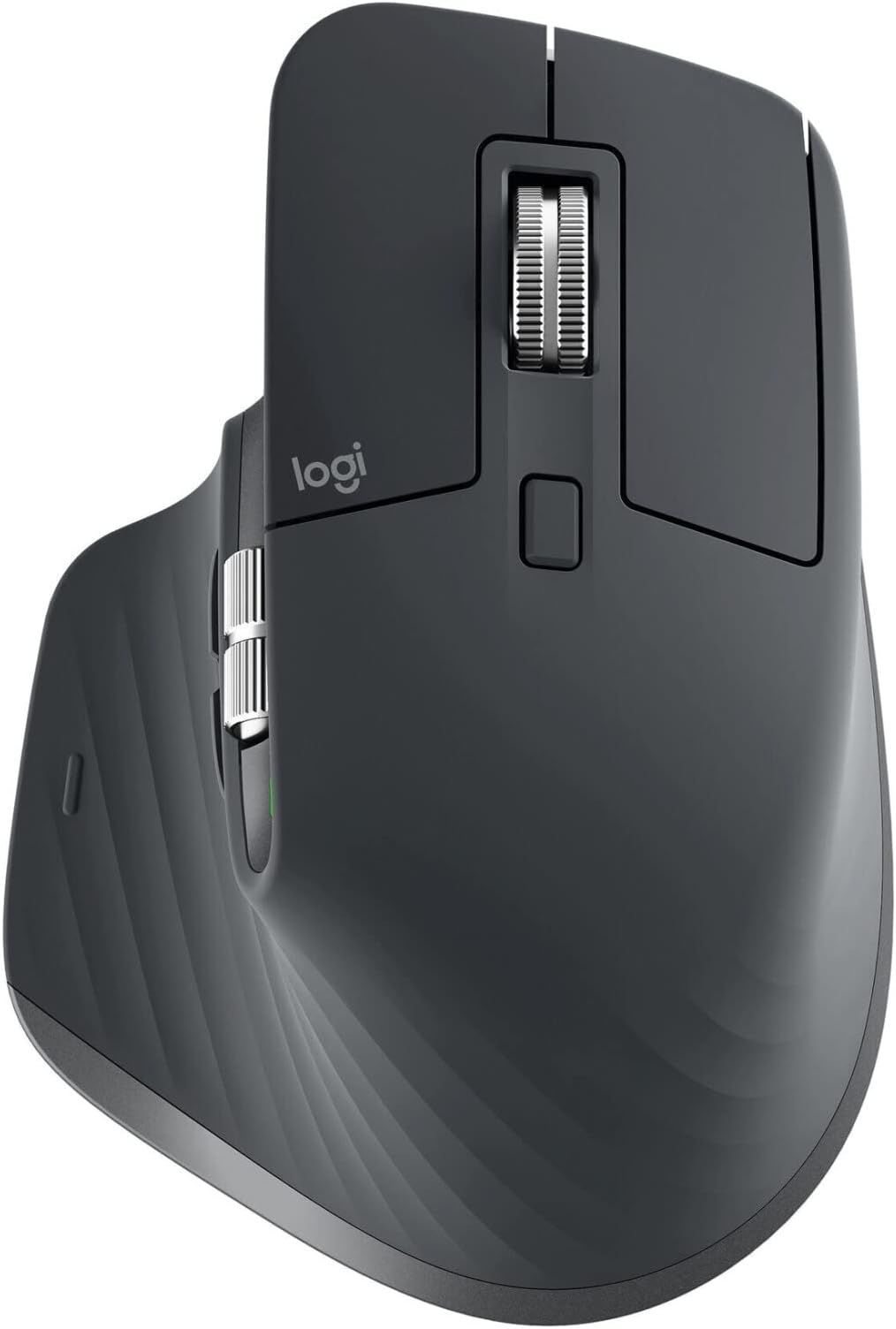
As an apple lover Im pretty much full of praise for almost all of the current product range. They are probably a little overpriced for what they are but like a beautiful car they are designed with form and aesthetics as well as function. You enjoy looking at and interacting with them, so that makes you want to use them. I feel the same way about Fuji cameras and Jaguar cars. Well the one design aesthetic I HATE about Apples desktop range of computers is the ridiculous mouse design that has varied from a puck to a pebble over the last 10 years, but although beautiful to look at performs like a pudding. The aesthetics have pushed the ergonomics and performance so far into the background you need a telescope to see them. Enter Logitech with a version of the MX mouse designed specifically for use with Apple products. The MX Master 3 for Mac is a wireless mouse with a built in rechargeable battery that comes with and is charged by a USB C cable. This plugs into the front of the mouse allowing you to use it while it charges, unlike the Apple mouse, which has its charging plug underneath the mouse, meaning you will have to remember to plug it in to charge when you are not using the computer, or else, have two mice so that one is permanently charged. The MX Master 3 comes in a clean black textured covering which has a rubberised texture to the body, that feels soft and grippy to the touch. It has space grey accents around the base and the scroll wheels mounted on top and the left side. It has a left and right button that fall under the index and middle fingers when the mouse is cradled in the palm, and the scroll wheel is also able to be pressed adding a third option on top. It also has a front and back button under the side scroll wheel, selectable with the thumb, and the base of the thumb rest is also a button, all of these are assignable using the Logi Options App that is a free download. This app also lets you adjust things such as scroll speed, mouse sensitivity and so forth. Behind the top scroll wheel is a further small button which allows you to select whether the wheel is free running or gives you a clicking sensation as you scroll. The Logi Options app has some pre-defined setup options for commonly used programs such as photoshop, setting for example the side wheel up to alter brush size without needing to use the keyboard or dive into the menus. These pre-defined setups can also be adjusted to suit your taste. Underneath the mouse is the On/Off slider at the front which switches on the bluetooth allowing paring with your device (did I mention it was a bluetooth mouse?) the sensor array (which works even on my glass desk without a mousepad) and a small button at the back which lets you switch between up to three paired devices. So you could use it for your desktop, laptop and compatible tablet device (such as recent iPads). There is also a feature that Logitech calls Flow that allows you to setup two devices to work side by side allowing you to move the mouse cursor seamlessly from one screen to another. This allows drag and drop across both devices, or cut and paste, or viewing edits on one screen while assets are on another. This is setup with the Logi Options app, which is extremely easy and intuitive. Awesome The ergonomics, looks and usability of this mouse makes it a strong recommendation for anyone who like me has longed for a mouse that fits the Apple ethos of form, function and design. Its taken Logitech to provide one and the £99 price tag is quite steep but if you spend hours editing photos or videos at your computer the programmable buttons will be a huge timesaver. Thoroughly Recommended.
A**R
Still the Best Mouse After 5 Years of Daily Use
I’ve been using the MX Master 3 for Mac every single day for around five years, and it’s still the best mouse I’ve ever owned — both in performance and durability. Nothing else I’ve tried even comes close in terms of comfort, build quality, and customisation. Why I Bought It I spend a lot of time switching between different applications — Adobe Premiere, Excel, Chrome, and general macOS work — and I wanted a mouse that could speed up my workflow. The MX Master series is often recommended for productivity, so I decided to try the Mac version specifically for its native compatibility with macOS. Setup & Connectivity The setup was extremely simple. It connected immediately via Bluetooth, and I’ve never had issues with lag, dropouts, or pairing problems. It also switches between devices smoothly if you work across more than one machine. Performance & Responsiveness Even after years of use, the scroll wheel and buttons still feel precise and smooth. The electromagnetic MagSpeed wheel is especially impressive — fast when I need to scroll through long timelines or spreadsheets, but accurate when I need single-line control. Customisation (My Favourite Feature) The customisable buttons are genuinely a productivity booster. In Adobe Premiere, I map buttons for timeline navigation. In Excel, I use them for quick shortcuts. In Chrome, I have one programmed to close tabs and another to reopen the last closed tab. The mouse automatically switches profiles based on the app I’m using, which saves time and feels seamless. Comfort & Build Quality The ergonomic shape makes a massive difference during long working sessions. It supports the hand well and reduces strain compared to flat or compact mice. After five years, the structure is still solid — no rattling or loose parts. Only the rubber coating shows minor wear, which is normal with heavy daily use. Noise Level The buttons and wheels have a soft, satisfying click that isn’t loud or distracting. Perfect for shared spaces or quiet environments. Value for Money Considering the amount of use it’s had and how well it still performs, the value is outstanding. It easily outlasts cheaper mice and delivers a much better experience. Final Thoughts After five years of continuous daily use, this is still the mouse I recommend to anyone who wants comfort, performance, and customisation. A fantastic long-term investment for anyone working on a Mac.
R**E
Possibly the Best Mouse On the Market.
Next Gen Mouse. After having used the original Magic Mouse (battery powered) for 8 years which was ingenious at the time of release and arguably still is. The Magic Mouse functions based on the glass touch surface and the use of various touch gestures produces a different function I.e. forward and back. The MX Master 3 has the ability to do functions and more, despite not being touch gestures which isn’t a significant drawback. The MX Master 3 uses side buttons, side scroll and also directional movement gestures as functions. In addition, you can personalise each gesture and button to function as you like (E.g. volume up, volume down etc.) by using the Logitech Desktop App. Personalising functions has never been so good! The Logitech MX Master 3 for Mac is designed beautifully it terms of ergonomics and the major selling point for me. It fits the shape of my hand and cuffs well. The Magic Mouse always dragged my wrist due to the slim design but didn’t cause significant issues. However, after using the MX Master 3 you can’t really go back due to the difference in comfort. The infinite scroll wheel is something that is very handy too. You can change between line-by-line scrolling or infinite scrolling which keeps scrolling as long as you want it to without disruptions in haptics. The colour design and USB dongle is the difference between the normal MX Master 3 and the MX Master 3 for Mac but they both function as well as each other - In the design perspective it made sense to not include a dongle with the Mac version of the mouse as Mac tends to use less cables and extensions. I’m not using the mouse for gaming so I can’t comment on how good it is for gaming but I’ll give the benefit of the doubt. Overall, a fantastic mouse that I am very happy with. No more replacing physical batteries.
S**N
Pay attention to which model you're buying
Primarily a Windows user here. I accidentally bought the Mac version of this mouse, and while yes, this is mainly down to my own carelessness, I feel like the Mac aspect could be made a little bit more obvious in the listing. Thankfully the Mac version does seem to work quite well with Windows, but be aware that it does not come with a USB-A cable or any sort of USB receiver, meaning you will have to buy these separately or rely on USB-C and Bluetooth to use the mouse. Also, note that you need to have at least Bluetooth 4.0 with Low Energy capability or the mouse simply won't work. I had to buy a separate adapter to get it working with my 2013 desktop. Another extra cost. The mouse only works wirelessly and will not do anything apart from charging over USB. The fact that you seem to get less in the box for the same price and what seems to be essentially the same mouse leaves a bit of a sour taste in my mouth. Apart from the Space Grey coloring and some changes in software to optimize the mouse for Mac usage, there seems to be no physical difference between the two versions. I have been having a lot of problems with Bluetooth connectivity dropping every 20-30 minutes, but I can't determine yet if this is a problem with the mouse itself, the version of the mouse I have, my Bluetooth adapter, or Windows itself. Now, onto the mouse itself: The accuracy of the pointing feels excellent. If your work involves doing a lot of very precise, pixel perfect mouse movements, you will like this mouse for that aspect alone. It certainly seems to outperform my G600, but it's a subtle difference. One disappointing aspect was the discovery that the mouse only updates at 80-90Hz. Coming from a G600, the downgrade from ~500Hz was noticeable and disappointing at first, though I did get used to it very quickly (primarily working, not gaming). I assume this is mainly down to the fact that the mouse is wireless, and I wish it was possible to use the mouse wired over USB to get a higher polling rate. Also, as can be expected from a wireless mouse, if you leave it idle for more than a few minutes, it goes into sleep mode and needs to turn itself back on again before it can be used. It can take up to a second before the mouse will start responding again and the lag is noticeable. Ergonomically, it feels great. (I use a palm grip and am coming from a Logitech G600) It is an extremely well built product and every part of it feels great in your hand. The only complaints I have are that the thumb wheel is not as capable as the main scroll wheel (it will just spin freely but much more stiffly than the main wheel, it doesn't click), and the thumb button is very difficult to press sometimes, requiring a little bit too much force. The scrolling: Physically, it feels great to use. It seems a bit fiddly to me and doesn't feel as precise as my G600, but I think this is just a matter of getting used to it and getting the adjustment right. The smart scrolling (where the scroll wheel changes between clicking and free-spinning) takes some adjustment for it to feel right. To make matters worse, what's happening on screen doesn't always seem to correspond to how the scroll wheel is moving? The scrolling often stops for me well before the wheel itself has stopped spinning. Battery life: As you'd expect, fine. Have only had the mouse for a week and apart from the initial charge, I haven't plugged it in once yet. The software: VERY annoying that you have to make an account with Logitech and sign in just to change vital settings on your mouse. For a $100 product, what on earth were they thinking??? Overall: Perfectly good mouse, but honestly, as I don't need a wireless mouse, I'm kind of wishing I bought something like a wired G502 instead. I feel like I bought into the hype that this is "the king of mice", when in reality, it's a pretty good mouse with some drawbacks.
A**Y
Best mouse I've ever used
Honestly the best mouse for work I've ever used. The ergonomic shape means your hand remains comfortable after long periods of use, unlike others (Apple mouse). Scroll wheels are perfectly positioned and glide smoothly. Buttons again are positioned within easy reach and require minimal movement to click. It has a nice long battery life and can be used whilst charging, unlike others (Apple mouse). So many extra features and uses to be found in conjunction with MX Keys and Logi Options.
A**.
Battery life is amazing, top quality
Battery lasts as it says or longer, automatically sleeps when not in use so it doesn't burn out. Instantly wakes up with no lag when moved. Nice quality finish. Have thrown it across the room by accident as it was my first wireless mouse but there is no issue of breaking. The geared and smooth mouse wheel changers are cool and handy. The app and customisation is great. Cool gesture features and a comfortable grip. Has other cool addons like working with multiple PCs. Happy purchase and still going strong
K**N
Really easy to use mouse, no regrets. USB-C Powered
Device Pairing What I love about this mouse, is the seamless transition between devices. Pair it with up to 3 devices and with a flick of a button you're immediately connected, no need to wait or anything. Scrolling I needed something with horizontal scroll as I do a lot of audio editting, so scrubbing the timeline was a must for me. The vertical scroll has a strange setting where you can roll it freely, this can be disabled but to me this scroll is a bit too loose even with it disabled. Power These last me at least 2 weeks before requiring a charge, I don't use them for gaming and it's fairly light usage all in all but it sure beats needing to replace batteries every so often but finding a good USB C connection might be hard for some on older systems. Other Comments It has a lot of buttons, some of which I've only discovered recently but I don't really take advantage of all of them. Can be useful for others though but I wouldn't want to game with it.
P**R
Mac version works fine on PC
Just in case you were wondering, the Mac branded version is, as far as I can tell, identical to the PC version except for the colour, USB C to C cable for charging, and exclusion of a Bluetooth dongle. As my PC has Bluetooth built in I decided to get this version rather than wait 2 months for the non-Mac branded version to come into stock, but also I prefer the colouring on this one - win win! So far it feels like a very nice, very well constructed mouse. The scroll wheel is premium, managing both a free and ratchet flow. Possibly the only negative I see at the moment is it's marginally too small for my man hands (XL glove size), but I have that problem with everything designed for the average hand. I will continue as with my previous mouse, to grip it purely with my fingers!
P**L
Attention : Mac OS 10.15 et Bluetooth 4.2 nécessaires
J’ai acheté cette souris MX Master 3 version Mac sans vraiment faire attention à la configuration requise. Après tout, c’est une souris Bluetooth, je ne m’attendais pas à de grosses restrictions. Sur la page Amazon, il n’est d’ailleurs rien précisé à part une compatibilité avec « IMac, IPad (iPadOS 13.4 of later), Macbook Pro, Macbook » et Compatibilité MacOS et iPadOS. Seulement, à l’usage, cette souris n’est pas du tout reconnu par mon MacPro 2010, tournant sous MacOS 10.14. En cherchant directement sur le site de Logitech, il est indiqué qu’il faut MacOS 10.15. Dommage que cela ne soit pas indiqué aussi sur le site d’Amazon. Je teste quand même cette souris avec un MacBook Air 2015, équipé de MacOS 10.15 : pareil, ça ne marche pas. Après pas mal de recherche sur internet, je comprends que ça vient de la connexion Bluetooth de mon MacBook Air, qui est en 4.0, alors qu’il faut au minimum du Bluetooth 4.2. D’ailleurs, sur mon PC qui a du Bluetooth 4.2, cette souris version Mac fonctionne sans le moindre problème, un comble. J’achète alors un dongle USB Bluetooth 5.0, qui est bien reconnu par mes différents ordinateurs. Avec mon MacPro (MacOS 10.14 et Bluetooth 5.0 donc) : la souris ne fonctionne pas, elle n’apparaît pas dans les périphériques Bluetooth, impossible de la synchroniser. Avec mon MacBook Air (MacOS 10.15 et Bluetooth 5.0) : la souris est reconnue et utilisable. Avec mon PC (windows 10 et Bluetooth 4.2), pareil la souris est bien reconnue et parfaitement fonctionnelle. Si en plus de Mac OS 10.15, il faut un Mac avec au moins du Bluetooth 4.2, ça limite fortement les modèles. Sauf erreur de ma part, ça veut dire : iMac à partir de 2017, les 2015 sont encore en Bluetooth 4.0 MacMini à partir de 2018, qui ont du Bluetooth 5.0 alors que les modèles 2014 étaient en 4.0 MacPro à partir de 2019, les 2013 sont en 4.0 MacBook Air à partir de 2018 MacBook Pro à partir de 2016 MacBook à partir de 2017 Cette souris en version Mac ne peut que se connecter en Bluetooth par défaut, car elle n’est pas vendue avec le petit dongle Logitech Unifying. Il existe une souris MX Master 3 « standard » (non spécifique Mac), qui est vendu avec ce dongle USB au même prix. Comme ça on ne dépend plus de la version du Bluetooth. Et miracle, ça marche alors sans souci sur des Mac plus anciens comme mon MacPro de 2010. Si vous avez le clavier logitech MX Master pour Mac, qui est bien vendu avec ce dongle, vous pouvez prendre cette souris version Mac et utiliser ce même dongle pour le clavier et la souris en même temps, sans vous souciez de la version Bluetooth de votre Mac. Sinon, je vous conseille la souris en version PC. C’est la même à part la couleur qui varie très légèrement, mais la version PC est plus universelle avec le dongle qui est fourni. A l’usage, cette souris est très agréable. C’est bien de pouvoir la tester avant achat pour voir si elle convient à la taille de votre main, mais dans mon cas, c’est parfait, je la garde. C’est la première fois que j’ai une souris avec une double molette (la molette traditionnelle et une seconde molette pour le pouce), et je m’y suis fait très vite, même si cette molette est un peu plus dur à faire tourner que la molette principale. Elle est je trouve mieux pensée que la souris Apple Magic Mouse 2, car si jamais la batterie est déchargée, on peut brancher le câble USB pour la charger et continuer à l’utilisation comme une souris filaire pendant la charge. La souris Apple ne peut pas s’utiliser pendant la charge. Mon utilisation est clairement orientée travail/bureautique. Je ne fais pas de jeu, je ne sais pas si cette souris est vraiment adaptée à cet usage car elle est quand même assez lourde. Mais pour la bureautique, pas de souci. En conclusion : une très bonne souris 👍👍 je ne regrette pas mon achat, mais pour avoir acheté cette souris en deux versions (une version spécifique Mac et une version standard), je vous conseille la version standard, plus universelle. Le seul cas où la version Mac est utile selon moi, c’est si vous avez le clavier logitech MX keys for Mac et que vous voulez la souris exactement de la même couleur que le clavier. Je mets des photos avec la version Mac et la version universelle, pour mettre en évidence la différence de couleur entre les deux souris, mais ça reste légère comme différence. la différence de couleur varie dès qu'on change l'éclairage. En vrai, les deux souris ont vraiment un coloris très très proche ✅ En espérant que mon commentaire vous soit utile.
M**.
Ottimo 10/10
Il MX Master 3 per Mac è un mouse ergonomico e versatile progettato appositamente per gli utenti Mac. Con il suo design elegante e le sue funzionalità avanzate, è una scelta eccellente per chi cerca un mouse di alta qualità per migliorare la produttività e l'esperienza utente sul Mac. Il design ergonomico del MX Master 3 offre un comfort superiore durante un uso prolungato, grazie alla sua forma curva che si adatta perfettamente alla mano e ai materiali di alta qualità che offrono una sensazione premium al tatto. Una delle caratteristiche più sorprendenti di questo mouse è la sua rotella di scorrimento elettromagnetica MagSpeed, che consente di scorrere rapidamente attraverso documenti e pagine web con una precisione incredibile. Questa rotella può anche essere commutata in modalità click-to-click per una navigazione più precisa. Inoltre, il MX Master 3 offre una connettività multi-dispositivo avanzata, consentendo di collegare e passare facilmente tra più dispositivi Mac e PC tramite Bluetooth o il ricevitore USB Unifying incluso. La batteria ricaricabile del MX Master 3 offre un'autonomia eccezionale, garantendo fino a 70 giorni di utilizzo con una singola carica. La ricarica rapida tramite cavo USB-C assicura che il mouse sia sempre pronto all'uso quando ne hai bisogno. Infine, il software Logitech Options offre una serie di personalizzazioni e funzionalità aggiuntive per ottimizzare l'esperienza d'uso del MX Master 3, tra cui assegnazioni di tasti personalizzate, adattamento della sensibilità del mouse e molto altro ancora. In conclusione, il MX Master 3 per Mac è un mouse eccezionale che unisce design ergonomico, funzionalità avanzate e prestazioni affidabili per offrire un'esperienza utente superiore su Mac. Consiglio vivamente questo mouse a chiunque sia alla ricerca di un mouse di alta qualIta’.
L**S
"Un ratón excepcional para Mac: Mi experiencia con el Logitech MX Master 3"
"Estoy emocionado de compartir mi opinión sobre el Logitech MX Master 3 para Mac, un increíble ratón que he adquirido en Amazon. Desde el momento en que empecé a usar este ratón, quedé impresionado por su rendimiento excepcional. La precisión y la fluidez de los movimientos son sorprendentes, lo cual ha mejorado mi experiencia de uso en mi Mac de manera significativa. El diseño ergonómico del MX Master 3 es simplemente genial. Se ajusta perfectamente a mi mano, proporcionando una comodidad excepcional incluso durante largas sesiones de trabajo. Los botones adicionales y la rueda de desplazamiento lateral son características realmente útiles que me han permitido aumentar mi productividad y realizar tareas de manera más eficiente. La conectividad inalámbrica es rápida y estable, y la batería tiene una duración impresionante. Con una sola carga, puedo usar el ratón durante semanas sin tener que preocuparme por quedarme sin energía. Además, la posibilidad de conectarlo a varios dispositivos a la vez es muy conveniente y me permite cambiar fácilmente entre mi Mac y otros dispositivos. El software de personalización de Logitech es intuitivo y fácil de usar. Me ha permitido personalizar los botones y los ajustes del ratón según mis preferencias, adaptándolo completamente a mis necesidades. Recomendaría sin dudarlo el Logitech MX Master 3 para Mac a cualquier persona que busque un ratón de alta calidad y rendimiento excepcional. Es una inversión que vale la pena y ha superado mis expectativas en todos los aspectos. Estoy encantado con mi compra en Amazon y no puedo imaginar trabajar sin este fantástico ratón."
L**T
Works great
One of the best gears I bought in the past years
U**E
ماوس لوجيتك
المنتج ممتاز والبطارية تعيش فترة طويلة بعد الشحن وممتاز في التحكم حتى على السطح الزجاجي ويمكن ربطه بالبلوتوث او اللاقط الخاص به سرعة استجابة مثالية
Trustpilot
1 day ago
3 weeks ago