Buy anything from 5,000+ international stores. One checkout price. No surprise fees. Join 2M+ shoppers on Desertcart.
Desertcart purchases this item on your behalf and handles shipping, customs, and support to Vanuatu.
🔥 Power, speed, and connectivity — all in one compact beast! 🚀
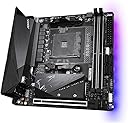
The GIGABYTE B550I AORUS PRO AX is a premium Mini-ITX motherboard designed for AMD Ryzen 3000, 4000, and 5000 series processors. It features a robust 6+2 power phase design, dual M.2 slots with PCIe 4.0 support, advanced thermal armor, integrated WiFi 6, and 2.5 GbE LAN for superior connectivity. Its compact size and DIY-friendly features like Q-Flash Plus make it ideal for professionals and enthusiasts seeking high performance in a small form factor.


| ASIN | B089FWWN62 |
| Best Sellers Rank | #17 in Computer Motherboards |
| Brand | GIGABYTE |
| CPU Model | Ryzen 5 |
| CPU Socket | Socket AM4 |
| Chipset Type | AMD B550 |
| Compatible Devices | Personal Computer |
| Compatible Processors | AMD Ryzen 3000 Series , AMD Ryzen 4000 Series, AMD Ryzen 5000 Series |
| Customer Reviews | 4.3 out of 5 stars 1,653 Reviews |
| Graphics Card Interface | PCI Express 4.0 |
| Item Dimensions L x W x H | 6.69"L x 6.69"W x 1.7"H |
| Item Weight | 1 Kilograms |
| Main Power Connector Type | 24-Pin |
| Manufacturer | GIGABYTE |
| Memory Clock Speed | 3200 MHz |
| Memory Slots Available | 2 |
| Memory Storage Capacity | 128 GB |
| Mfr Part Number | B550I |
| Model Name | B550I AORUS PRO AX |
| Model Number | B550I AORUS PRO AX |
| Number of Ethernet Ports | 1 |
| Number of Ports | 10 |
| Platform | Windows 11 |
| Processor Socket | Socket AM4 |
| RAM Memory Technology | DDR4 |
| Ram Memory Maximum Size | 128 GB |
| System Bus Standard Supported | SATA 3 |
| Total Number of HDMI Ports | 2 |
| Total PCIe Ports | 1 |
| Total SATA Ports | 4 |
| Total Usb Ports | 5 |
| UPC | 889523022986 |
| USB 2.0 | 2 |
| Warranty Description | 3 Years Manufacturer |
W**N
Excellent Hardware with Exceptional Support
The Gigabyte B550I Aorus Pro AX is one of the most affordable B550 ITX motherboards on the market at the time of this review, yet it is also extremely solid with all the latest features that an enthusiast may want in an ITX motherboard. Pros: For myself personally, the reasons for choosing this motherboard or a B550 board in general, is to have better/sooner support for the Ryzen 5000 series, along with things like PCIe 4.0, USB 3.2, and 2.5 Gigabit Ethernet. This board also features a very handy Q-Flash feature for flashing the BIOS without having anything aside from a power supply and a USB stick, so no need to worry about having a Ryzen 3000 series chip on-hand to flash the latest BIOS. The board also features a backplate that really makes it feel like a properly premium and sturdy product. Compared to its X570 sibling, this board is around $30 less expensive but does not lack anything notable in my opinion, aside from the M.2 slot on the back of the board being PCIe 3.0 whereas the X570 version has PCIe 4.0 on both M.2 slots. The B550 also does not have a chipset cooling fan, which to me is an advantage over the X570 because it eliminates a potential source of noise and premature failure. It’s also worth noting that the chipset fan on the X570 version takes up one of the 3 fan headers, whereas all 3 headers on this board are usable. The X570 version also appears to only have USB 3.1 Gen 2 and 1.0 Gigabit Ethernet. Cons: This board does not have any provisions for front panel USB-C ports, so beware if your case features any USB-C ports that will need to be connected to the motherboard. Officially, the B550 chipset only supports Ryzen 3000 series out of the box, with Ryzen 5000 support enabled via a BIOS update. On the other hand, the X570 version will support Ryzen 2000 series as well, so in that regard the B550 board does lack a bit of flexibility. Additional Notes: I picked up this motherboard with the intention of using it with a Ryzen 5000 series chip when I get around to buying one sometime next year. The reason for buying this board now is mainly because availability for this board has been very inconsistent until recently, so I figured it would be wise to buy one while it’s readily available. I’m currently using a Ryzen 2700X which isn’t officially supported by the B550 chipset, so I was originally going to leave this board on the shelf until I got a Ryzen 5000 series CPU. I saw a few reports of people getting 2000 series CPUs to work in B550 boards, though they were few and far in between. However, I was going to go ahead and flash this board to BIOS version F10 to enable Ryzen 5000 support, so I thought it wouldn’t hurt to check if my 2700X will post in this board while I’m at it. The board was probably preloaded with the F1 or F2 BIOS out of the box, and I got nothing but a black screen when I tried to boot. However, after flashing to the F10 BIOS, I was massively surprised to see that it was able to post, and everything seemed to function normally in the BIOS. I proceeded to go a step further and installed my boot drive to see if it will boot into Windows, and I couldn’t quite believe my eyes when it reached desktop without any noticeable issues, and without reinstalling Windows or any of the drivers. Fast forward to today, and I’m running the F11b BIOS from October 19 with “additional optimizations” for Ryzen 5000 series, which actually enabled XMP for me, something that wasn’t working on the F10 BIOS. I have now reinstalled Windows and have been fine-tuning all the details without any problems whatsoever. I couldn’t be any happier with this board, everything from its features and construction to the unexpected support for older chips like mine. I would also like to add that the F10 BIOS which enabled Ryzen 5000 support was released on September 18, before the Ryzen 5000 series was even announced. I don’t see how Gigabyte could possibly have been further ahead of the curve when it comes to product support, and they have done a truly excellent job with this board.
S**Z
Nice mobo...
I got this to throw onto a Hydra Mini chassis build. I am running a Ryzen 3600 with a Scythe Big Shuriken 3, GTX 1080 Founders, G.SKILL Trident Z Neo F4-3600C16D-32GTZN, Samsung 790 EVO PLUS, Samsung 970 EVO, and a Corsair SF600 PSU. Everything went together good. I obviously don't need front panel C with a Hydra Mini so this worked out great for me. I updated to the F2a UEFI update before even trying to install windows. When I turned on above 4g decoding in the UEFI I lost everything connected to the chipset in Windows. Oddly enough I just had this happen on my Asrock Taichi Ultimate with the latest update on it too. I'm thinking there must be a bug in the latest code from AMD because I've always used that setting in the past. Once I turned it off both systems ran normally with all devices detected. Another thing that hung me up for a minute was the M.2 mounting on the front. I took the cover and heatsink off and at first, couldn't figure out why the drive wouldn't lay flat. The post was too high and I was thinking does this thing have to be pushed down beside it then the heatsink put on? After closer examination, I noticed that the top part of the post unscrews and then you put the drive in and screw that down over the drive, then lay the heatsink down and screw it in, and then reattach the cover over all of it. Also, be careful because the heads and threads look and feel easy to strip. I've been running for a couple of days now with no problems and so far would recommend this board. I plan to install one of the next series of Ryzen CPUs and whatever the best upcoming GPU turns out to be. I'll be sure to come back and update if I have any problems.
W**I
Awesome Mini-ITX Motherboard for SFF Builds.
I actually find this motherboard solidly built with plenty of power headroom. I had returned an ASRock B550m-ITX/ac motherboard because if was having fits with Power Reporting Deviations in HWInfo64 that were constantly in the RED, and just wasn't comfortable using it with my Ryzen 7 5800X CPU. I find this motherboard to be much better than their X570 ITX motherboard in that the little BIOS button on the rear I/O of this B550 motherboard is for BIOS Flashback, and not for CMOS reset, something I find very irritating on the X570 motherboard, because I inadvertantly hit this button every time I move that PC.
B**A
Good motherboard
Very solid the only complaint I have is the bluetooth issue. I literally had to buy a separate dongle to make it work. After updates installed and BIOS update as well it will simply no work properly have this in mind if planning on buying it
J**N
Long live AM4
Still a good buy in 2026. RAM slots are far enough away from the socket to fit a large top-flow cooler. Make sure you have a 3/16 motherboard standoff bit or socket wrench to install the M.2 SSD under the heatsink. This replaced a B350 Gigabyte motherboard used for 9 years (and still works!) so I have high hopes for this one too.
M**D
If you like to overclock don't buy this.
The ram slots are crunchy like they have sand in them. It's probably why I've had a lot of trouble getting the ram to seat properly. Trying to reset the bios is like pulling teeth. It doesn't work. It takes me literally hours and the only reason it works sometimes is because I'll make a hardware change like changing the ram or something. Right now I'm trying to reset the bios because I did an unstable CPU overclock and it freezes on the motherboard logo screen (just after post). I've tried everything, flipping the PSU switch and unplugging the power cord (just to be extra sure) and waiting a few minutes, and I've tried holding the pins jumped for varying amount time between 5 seconds and 1 minute. I'll be damned if I have to completely disassemble my PC just to get to the cmos battery. If I can get the bios reset I'm just going to enable XMP and set my custom fan curve. I have zero confidence in overclocking on this board because I can't reset the bios. On all my previous systems, there was no fuss. You just turn it off, disconnect power, jump the pins for about 10 seconds and boom, you can start tinkering again. Not on this board. The drivers for the wifi and bluetooth don't install very well. Windows pops up a prompt asking if they installed properly and I don't know until I restart my system. Luckily they work. I regret buying this board. It's got a few cool features but the bad outweighs the good for me.
C**S
10 out of 10 would buy again
Perfect for my spa for factor build very reliable would honestly recommend
A**Y
If buying "Slightly used, like new" - be prepared for some DIY
Normally items in "Slightly used, like new" state should be clean, functional and without any defects, with full set of included items. I've bought such a used B550I AORUS PRO AX, and it arrived with some issues: 1. It had a lot of thermal grease fingerprints, barely cleaned off, but still visible. 2. Instead of being packed in metallized anti-static bag, motherboard was shipped in cheap pink plastic bag with no anti-static properties. That's a huge no-go, but happily motherboard have survived shipping in such a bag and was fully functional. But it's a gamble, might have been dead on arrival. 3. One of the long screws on massive M.2 heat sink (the one with AORUS logo) was lost and no replacement included. 4. Worst thing - motherboard was shipped with 100% dead CMOS battery cell (I've measured 0,04V instead of 3V on it when got to it finally), so while motherboard was functional, it was unable to keep BIOS settings and time. Point 4 is the worst in this case. Typically it's not a big deal, but on this mini-ITX motherboard engineers were unable to find a place for normal CR2032 element cradle, so they hidden the CR2032 battery vertically behind the I/O shield covering the connectors near the Q-Flash button, and battery itself was with soldered on contact wires, wrapped in heat shrink tube. For normal buyer it would have been instant return, but I'm handy with electronics and PC parts and have all the needed tools and skills. So to replace it I had to remove the I/O shield, disconnect the battery, remove the heat shrink, tear off the contact plates, then solder these to the fresh CR2032 element, doing it very carefully and fast to not overheat it, then put it into new heat shrink tube, and install it back. Everything worked fine after this, but I wouldn't recommend anyone to buy "Slightly used, like new" motherboards if you aren't prepared with what might come with it.
N**S
Bluetooth galère
La MAJ bios semble réduire les évènements de déconnexion mais il y en a toujours, chaque fois la souris et le clavier sont deco donc redémarrage manuelle et ca remarche. Ça fait ieche quand même car j'ai prévu un wake on lan pour éviter toute interaction physique avec le pc mais bon ca marche quand même la plupart du temps. Pour le reste bas j'attendais des températures plus élevée avec le 3200g (qui fonctionne dès la sortie de boîte sans maj d'ailleurs). La carte est solide et le heatsink du m.2 de devant a l'air de tres bonne qualité malgré que je ne l'ai pas encore testé. Globalement pour le prix ce serait un excellent produit (5 étoiles) s'il n'y avait pas de problème bluetooth.
K**N
It works but still it is THE worst decision i have ever made
A llllot of problems with thia motherboard with no fixes. We talking about unstable under/overclock, Bluetooth disappearing from the system entirely without clear reason with weird fixes like unplugging the power cable and pressing on the start button which fixes it (i know how wired) and all of sudden the PC crash and when it auto restart it wont it get stock at the logo screen u need to force stop it and start it agin and when it turn on guess what? Bluetooth gone agin. Just go pick up ASUS or MSI.
J**A
Excelente opción para cualquier procesador AM4
Es una excelente opción si deseas armar una PC mini itx con buenos componentes, la combine con un R7 5800X3D y una RX 6950XT y no he tenido ningún problema con esta motherboar.
A**R
コンパクトなパソコンを求めたい人に
初売りで購入した商品(amazon販売品)が不良、(パソコンショップにて作動しない事を確認済み) 返品し直ぐに交換品を送付して頂いた 交換品は問題なく使用出来ている amazonさんありがとう
J**.
Gran opción
Una gran placa calidad/precio. El envío internacional llegó antes incluso de lo esperado. Buen vendedor
Trustpilot
1 month ago
1 week ago