🎯 Elevate Your Creative Game with Color-Perfect Precision
The BenQ PD2705Q is a 27-inch QHD (2560x1440) IPS monitor designed for creative professionals seeking impeccable color accuracy. Factory-calibrated with Delta E ≤3 and covering 100% sRGB and Rec.709 gamuts, it supports HDR10 and Pantone validation for true-to-life visuals. Featuring USB-C with 65W power delivery, daisy chain connectivity, and a built-in KVM switch, it streamlines multi-device workflows and maximizes desk space. Ideal for graphic designers and video editors who demand precision and efficiency.


| ASIN | B086Z39HSP |
| Additional Features | Anti Glare Screen |
| Aspect Ratio | 16:9 |
| Best Sellers Rank | #6,559 in Electronics ( See Top 100 in Electronics ) #320 in Computer Monitors |
| Brand | BenQ |
| Brightness | 250 nits |
| Built-In Media | USB 3.3 Port,USB-C Port,USB-B Port,DP 1.4,DP Out,HDMI 2.0 |
| Color | Grey |
| Color Gamut | 100.0 |
| Compatible Devices | Laptops, Desktops |
| Connectivity Technology | DisplayPort, HDMI, USB Type C 65W |
| Contrast Ratio | 1000:1 |
| Customer Reviews | 4.5 4.5 out of 5 stars (190) |
| Display Resolution Maximum | 2560 x 1440 Pixels |
| Display Technology | LCD |
| Display Type | LCD |
| Global Trade Identification Number | 00840046042479 |
| Hardware Connectivity | USB Type C |
| Has Color Screen | Yes |
| Is Electric | Yes |
| Item Dimensions D x W x H | 19"D x 26.5"W x 9"H |
| Item Weight | 18.72 Pounds |
| Manufacturer | BenQ |
| Model Name | PD2705Q |
| Model Number | PD2705Q |
| Mounting Type | 100x100 mm |
| Native Resolution | 2560x1440 |
| Number of Component Outputs | 1 |
| Picture Quality Enhancement Technology | AQCOLOR Technology, Brightness Intelligence (B.I.) |
| Power Consumption | 65 Watts |
| Refresh Rate | 60 Hz |
| Resolution | QHD Wide 1440p |
| Response Time | 5 Milliseconds |
| Screen Finish | Matte |
| Screen Size | 27 Inches |
| Shape | Rectangular |
| Specific Uses For Product | Photo Video Editing |
| Total Number of HDMI Ports | 1 |
| Total USB 2.0 Ports | 1 |
| Total USB 3.0 Ports | 1 |
| Total Usb Ports | 3 |
| UPC | 840046042479 |
| Unit Count | 1.0 Count |
| Viewing Angle | 178 Degrees |
| Voltage | 240 Volts |
| Warranty Description | 3 year |
| Warranty Type | 3 Years Limited Warranty |
M**M
One Fantastic Monitor
What can I say, this monitor is a beauty. I tried a 4K screen because many people rave about it and because 4K is better if you have the monitor fairly close to you, but after one entire year, I simply could NOT get used to the 4K screen because the font is just too darn small and fine. Even after increasing the font manually in windows, something was just not right. I got rid of my 4K screen and did a lot of research and decided to buy this 2K screen. It is much much better than a 4K for my professional photography requirements. Fantastic rich colors and everything is so crisp that you can’t tell that is not a 4K screen.
J**R
The best MacBook desktop monitor
Great monitor for the price. Colors are accurate and it works perfectly with my MacBook Pro right out of the box. The 27-inch size is perfect, and it feels professional without being overpriced. Highly recommend.
R**N
Benq rocks
Excellent color, sharpness and brightness. A must-have for a video editor or graphic designer who requires excellent color accuracy. Reliable
A**R
Very good quality and super easy to set up.
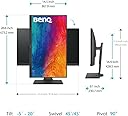
ChatGPT actually recommended this monitor to me. I have an iMac and I just wanted a second monitor that would work well with it and wouldn’t require a lot of set up. It is of incredible quality, very sturdy. It adjust up and down and left to right. I’m glad I made the purchase highly recommend.
J**N
Excellent Monitor for Editing
I use this as a second monitor for my 2019 iMac 5K. The colors are near perfect for photo and video editing and the image is clean. The factory calibration was perfect and my media looks amazing on the screen. Watching HDR YouTube and AppleTV+ content looks phenomenal. The only downside to this monitor is it's half the brightness of the iMac on full blast. I edit in a darkened room so it's less of an issue for me, but it might be a turn off if you plan to use it in a bright environment. Bonus: It came with plenty of cables that should connect to just about anything.
M**Y
Great screen well calibrated easy integration
Great screen from a great brand.
J**N
Great, with one flaw
I've used my BenQ PD2700Q for around four years and have loved it from everything from gaming to graphic work. I was in the market to add another monitor to create a dual-screen setup so naturally went back to BenQ to see what they offered. I could have purchased another of the same monitor for 100 dollars less than this one but was interested in some of the newer features and thinner bezel. So far this monitor has been great. Crisp detail, with great color accuracy. The ONLY downside is the vignette on the left and right, which slightly dims the edges. @BenQ if you're reading this and it's not normal, please let me know. I'm ASSUMING this is not a defect since another purchaser had mentioned it, similar to light bleed on IPS as being inherently part of the tech. Either way, since 99 percent of my work doesn't touch the edges. That's usually set aside for UI, etc, so it hasn't been a huge issue for me. This monitor would be a 5/5 if it had as uniform a picture as my PD2700Q.
M**G
Great monitor! Excellent color and clarity.
This is my 2nd BenQ monitor, they can't be beat for the price, although they offer so many models it's a bit hard to choose. My other 32 inch SW321C is the bomb for photo editing and general use.
A**Y
Bought the monitor in the middle of May 2022. I was worried that I would receive it with defects. But everything is fine. The monitor was manufactured in January 2022. No dead pixels, vignetting is very-very minimal in the corners and almost imperceptible. High color accuracy straight out of the box as promised. With USB-C, I can quickly connect a working laptop. I connect a workstation PC and a laptop to the monitor according to scheme A (2 PC + 1 Monitor) by KVM (on monitor) and everything works well. To avoid problems with the PC falling into sleep mode, I advise you to turn on the mode on the monitor: System --> USB-C Awake (on). I connect the PC to KVM through the Display port and USB, and laptop by USB-C. When the PC falling into sleep mode, everything (KB, mouse etc.) switches automatically to the laptop. If the laptop is unplugged from USB-C you just need to move the mouse or press a KB key. Crisp detail, there is no flickering. So all this is well suited for long-term work with CAD. Someone previously wrote that the monitor cannot be rotated fully to a vertical position. I checked and everything rotates perfectly, although I do not need such a screen position.
L**A
La pantalla es de gran imagen, importante para el diseño y medios digitales ya que puedes tener mejores colores y más reales
J**Q
جودة حلوه واجد بالنسبة لسعرها الوان ممتازة مره
D**Z
funcionna bien para edición de foto y video
S**A
The monitor offers accurate colors with enhanced visibility of blacks when watching content, and I’m impressed with its adjustable design and variety of connectivity options. However, it can be a bit wobbly on the desk, especially if you’re using a pen display on the same surface, as I am.
Trustpilot
1 month ago
2 weeks ago