


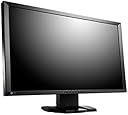

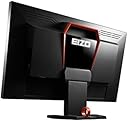
EIZO FORIS FG2421-BK 23.5-Inch Screen LCD Monitor
Product ID: 2415295
Details
- BrandEizo
- Screen Size23.5 Inches
- ResolutionFHD 1080p
- Aspect Ratio1.78:1
- Screen Surface Descriptionflat
🎧3.5mm audio jacks
🔌1 USB port for control
🖥️1920x1080 resolution
Buy anything from 5,000+ international stores. One checkout price. No surprise fees. Join 2M+ shoppers on Desertcart.
Desertcart purchases this item on your behalf and handles shipping, customs, and support to Vanuatu.
🎮 Elevate Your Game with EIZO's Stunning Display!
The EIZO FORIS FG2421-BK is a 23.5-inch LCD monitor designed for gamers and professionals alike, featuring a native resolution of 1920 x 1080, versatile connectivity options, and a robust 5-year warranty, ensuring both performance and reliability.
| ASIN | B00GBG5SPO |
| Additional Features | USB Hub |
| Aspect Ratio | 1.78:1 |
| Brand | Eizo |
| Color | Black |
| Connectivity Technology | DVI, DisplayPort, HDMI, USB |
| Contrast Ratio | 5000:1 |
| Customer Reviews | 3.6 out of 5 stars 13 Reviews |
| Display Resolution Maximum | 1920 x 1080 |
| Display Technology | LCD |
| Display Type | LCD |
| Hardware Connectivity | DisplayPort, HDMI, USB |
| Has Color Screen | Yes |
| Image Contrast Ratio | 5000:1 |
| Item Weight | 13.6 Pounds |
| Manufacturer | EIZO |
| Model Name | FG2421-BK |
| Model Number | FG2421-BK |
| Mounting Type | Wall Mount |
| Native Resolution | 1920x1080 |
| Number of Component Outputs | 1 |
| Refresh Rate | 240 Hz |
| Resolution | FHD 1080p |
| Response Time | 1 Milliseconds |
| Screen Finish | flat |
| Screen Size | 23.5 Inches |
| Screen Surface Description | flat |
| Shape | Rectangular |
| Specific Uses For Product | Gaming |
| Total Number of HDMI Ports | 1 |
| Total USB 2.0 Ports | 2 |
| Total Usb Ports | 3 |
| UPC | 773508364904 690592037104 655200734011 113363332173 |
| Warranty Type | 5 Years Manufacturer Warranty |
M**.
I love it, but buyer beware.
I'm a long time refresh rate addict. I tried the 120Hz TNs as soon as they were available. I've gone through a few high end CRTs. Until now the CRTs were my favorites in spite of their aging problems and low-res for high-refresh. I can't praise the FG2421's picture quality enough. In contrast, black level and motion it's unparalleled among PC monitors, period. Colors are also a major step up from TNs. It's easy to get great white balance and gamma even without a colorimeter or the like. And I easily rank excellent contrast higher than perfect colors. Games or movies with high dynamic range are simply too awesome. Serious Sam 3 showcases it the best in my opinion. Buyer beware though. My monitor was superb... other than randomly rebooting several times a day. You can search for owner threads on any forum and find many complaints for my exact problem, or big blocks of dead pixels, or hideous backlight bleed, and so on. I paid to ship it to Eizo USA for repairs versus a swap because I didn't want to risk getting one with worse problems. That took three weeks altogether from coast to coast. You're playing something of a lottery. I guess that's the rub for choosing this over Eizo's professional model (DuraVision FDF2405W) which is almost ten times the price. At least their customer support was very prompt and accommodating. But I knew what I was getting into and have no regrets. The menu controls could be better. I grope around a lot for the profile switch and brightness buttons, and sometimes end up switching inputs, adjusting volume for the empty headphone jack, or turning it off.
T**N
and you are going to be annoyed. I like how hard it was to actually ...
The issue is the input lag is 100% noticeable when you turn on the Turbo 240. Yes the 240 works well in reducing motion blur almost to the point of being unnoticeable, but the lag is really noticeable if you are a hardcore cs-go player, and you are going to be annoyed. I like how hard it was to actually find info on the actual input lag. Another knock is that I am sensitive to screen flicker, and this seems to amplify the problem when the Turbo is turned on. No one seems to point out that the monitor takes 20-40 mins to warm up. If the rooms ambient temperature is under 65 degrees when you turn it on there is very visible ghosting. I live in VT so it gets cold here! The colors are way way way way better than a TN panel, but the colors definitely aren't 600 dollars better. If you play league or other games this monitor is great, but the price point is still too high for what it is. You can get close to the same color quality with the Benq30T, Acer PredatorH1 which is g-sync and only 385.00 for the TN version. If you hate the TN colors just shell out the extra 150 bucks for the Ips version of the Predator. Just don't waste your money on this, it's all marketing hype.
A**S
it really should be perfect. I'm going to compare this against my other ...
I'll play with it for a few more days, but I'm leaning on returning this. For the amount that it costs, it really should be perfect. I'm going to compare this against my other monitor, the $230 ASUS 24" VG248QE First off, praises. -Very deep blacks. If I set my desktop background to the color black, I can't actually tell if the monitor is on or not. -The blur reduction tech works*** and since it's not a lightboost hack, it just works as a feature of the monitor, whereas the VG248QE requires a utility to set that mode (and requires Windows to set up). -Ambient Light sensor. Sweet! -Nice build quality/design and all that jazz. Handle on the back is nice, the stand works well, etc. Problems -Ghosting. The blur reduction tech works*** but because ghosting is there, the image still appears blurry and hard to focus on. VG248QE does not have this issue, so in terms of raw clarity in motion, VG248QE wins. I used the benchmark tool offered by EIZO and the testufo site from blurbusters to judge this- I can't actually tell you how much it detracts from in game experiences in practice because it's not something I really notice (yet). -Glow/lightbleed. I don't know what the exact problem is or the correct term- I've read that it might not be bleeding. Whatever it is, it's quite thickly framed around all edges of the monitor and there's a rectangular dark spot in the center of the monitor where the "bleed" doesn't reach. It's not excessively noticeable except with certain darker colors, and using EIZO's program I was able to tweak the monitor settings to reduce the effect very significantly- BUT I am not color-educated. It's entirely possible that my color tweaking has made all of the colors wrong. If color accuracy is important to you, this could be a real problem. VG248QE is actually worse- I've had 5 of them (exchanged 2 really bad ones, I only own 3) and all of them have random blobs of bleeding, all of them have different looking colors that I cannot fix using the monitor settings. hhh I don't ever remember this being a problem with any of the monitors I've owned in the past! -USB2.0 hub. OK this isn't really that much of an issue but for the cost of this monitor it's disappointing. My initial impressions of this monitor: it's slightly better than the VG248QE in some aspects, for a lot more money. It's hard for me to justify keeping this when I'm actually not that happy with it and I'll likely be buying something better the moment something better comes out (at a reasonable price, I'm not spending 5000USD on a monitor).
A**X
One Star
Fell apart on me as soon as it came out the box.
R**S
Excellent monitor if you'll get lucky... Unfortunately I wasn't
This is a great monitor for gaming purposes, perhaps the best one there is - it supports native 120 Hz refresh rate for less motion artifacts (less "blur") and for decreasing issues with traditional V-sync implementation in various games, it also allows you to enable optional "Turbo 240 Hz" mode for even more fluid motion, which gives you almost "CRT display"-like display smoothness (with a minor drawback of slightly increased input lag/delay, which is not really noticeable in majority of single-player or MMORPG/MoBA type of online games). It has better viewing angles than any TN monitor and much, MUCH better color accuracy (even uncalibrated... which you should do anyway) and especially contrast ratio. No other TN "gaming" monitor (such as the overpriced junk with 120/144 Hz refresh rate from BenQ/Asus - I've tried most of their models) can come even close to its characteristics, regardless of the price range. Unfortunately these monitors have very severe issues with build quality. You can find huge amount of instances of people receiving these monitors with defects - defects like "crosshatching" (which looks like a very faint "stripes" of mesh-like pattern), backlight issues (which can appear as bright "spots" on any part of the display on the very dark backgrounds) or defective electronics (which can cause monitor to randomly reboot or shut down at random times). You can find 100's of such examples at enthusiast forums such as "[H]ardForum" or "Overclock.net" and others. Some people were more lucky and got relatively issue-free models. I, however, was also one of the unlucky ones. My particular unit had a severe backlight issues, with several large "blobs" of bright areas appearing on the right side of the monitor after the monitor was given sufficient time to warm up (about 15-20 minutes), clearly visible when I was playing games with dark backgrounds or watching movies with dark scenes. I tried to not pay attention to it but I really couldn't because it was so noticeable, especially considering the monitor's high contrast ratio and the fact that I like to play games and watch movies in a darkened room. So I had to return it for a refund - the monitor could not even be replaced by same model because the high rate of defects caused Amazon (as well as other direct resellers like Newegg) to not stock it anymore (it's now mostly available from private 3rd-party resellers). Which is very unfortunate because if manufacturing defects would be eliminated - this would be objectively the BEST gaming monitor in this display size segment. So yea, if you are willing to play the "monitor lottery" and can find this model at a reputable reseller with good return policy - perhaps you should go ahead and try ordering it. Who knows, you might get lucky like some people did... Otherwise you should wait for a more reliable alternative based on similar MVA or IPS type of panels with equal or better characteristics (such as guaranteed 120/144Hz refresh rate). Or stick to "gaming" TN-based monitors, with their awful color accuracy, poor viewing angles and awful contrast ratio - after all plenty of "Pro g4m3r5" seem to be satisfied with these, so do the kids who buy these because they think it will automatically make them as "good" as "Na'Vi/TSM/OpTic Gaming" teams ;-)
B**N
Best monitor buy I have ever done > .!
Great monitor, but remember it runs at 120hz and the monitor itself will turbo itself to 240hz.[No modification available on this profile] So on the Nvida control panel you must set it to 120hz. ( You can turn the turbo mode off and modified your colors...etc when not in turbo[on the monitor settings]) If on turbo mode you can crank up your digital vibrancy on the Nvida control panel to like 75% or what suits you. Just a small heads up for those wondering. It also sometimes the monitor itself restarts for some unknown reason to me, I decided not to send it in for repair since it only happens like every 2-4hrs, even when in game. Prior to this I had a benq xl2720z and i did manage to feel the input lag on the benq and not the Eizo. Worth the buy if you ask me. The VA panel is like a bonus too :D
D**O
can't believe I gave this to my wife
I used this for about 3 months then went to 1440p OC monitor. Every time I walk into her play room where she uses this for FFXIV I'm mesmerized by it. Fantastic monitor if you get a good unit. Some bad QC. Fortunately my marketplace seller did the QC for me :D
A**Y
this FG2421 is the best monitor for gaming
I am a 'computer-gamer'. With it's extremely low lag/latency/fast refresh rate, yet very high picture quality, this FG2421 is the best monitor for gaming, IMHO... (my son and I play 'Battlefield 4', among other PC games).
Trustpilot
3 weeks ago
2 days ago