Buy anything from 5,000+ international stores. One checkout price. No surprise fees. Join 2M+ shoppers on Desertcart.
Desertcart purchases this item on your behalf and handles shipping, customs, and support to Vanuatu.
โ Stay ahead of your health curve with the sleek Wellue O2Ringโwhere comfort meets cutting-edge monitoring.
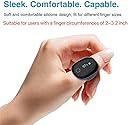
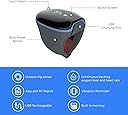
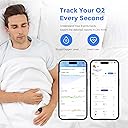
The Wellue O2Ring is a rechargeable, wearable pulse oximeter designed for continuous blood oxygen and heart rate monitoring. Featuring a lightweight, soft ring sensor that fits most adult fingers, it offers up to 16 hours of battery life and Bluetooth connectivity to a free app and PC software. Users benefit from detailed, real-time reports with automatic data uploads and vibration alerts for abnormal readings, making it ideal for sports, aviation, and proactive health tracking.


| ASIN | B08HDGBF7P |
| Are batteries included? | Yes |
| Battery Life | 16 Hours |
| Best Sellers Rank | #47,587 in Health & Household ( See Top 100 in Health & Household ) #35 in Athletic & Aviation Pulse Oximeters |
| Brand | Wellue |
| Brand Name | Wellue |
| Color | black |
| Customer Reviews | 4.1 out of 5 stars 1,820 Reviews |
| Item Weight | 15 Grams |
| Manufacturer | Viatomtech |
| Measuring Range | 70% - 99% SpO2 |
| Model Name | O2Ring |
| Number of Batteries | 1 Lithium Polymer batteries required. (included) |
| UPC | 618056745228 |
| Unit Count | 1.0 Count |
W**9
Works great for tracking Afib while sleeping.
I was recently diagnosed with Atrial Fibrillation (Afib). This works great for tracking my condition while sleeping. I was worried that it wouldn't fit, since it looked big in the product pictures, and I have skinny fingers/thumbs. It fits nice though. Not too big or small, and it's comfortable. I was also worried because some reviews said that it was not accurate, but mine seems to be really accurate. The heart rate matches my Garmin 405CX (w/chest strap) and my Emay portable ECG. The oxygen levels match the small pulse oximeter I have within 1%-2%. It's super easy to use. Just put it on your thumb and it turns on and starts recording. So far I can use it all night, sometimes 9 hours or so, and it still has a little under half battery left. If you have it on over 10 hours it will start a new recording as each one is limited to 10 hours, but it does it automatically so you don't loose any data. The screen goes off after about 30 seconds and you can turn it on (for another 30 seconds) by tapping the round circle on the screen. This lets me easily check if I wake up in the middle of the night. I especially like the graphs that their software produces. The oxygen level and heart rate are vertically lined up so it's easy to see what each was doing at a particular time. I wish the lines/bars on the "movement/activity" graph were a little larger so you could see movement better, but they are good enough. One graph shows all night on a single line with blocks of 1 hour (up to 10 hours) so you get a big picture view. Then it's broken into another graph that spans over 4 pages or so and are in 1-minute blocks displayed at 4-second intervals. For me, I can easily see when I go into and out of Afib. The device uploads data to PC quickly and I especially like that I can convert an entire graph/report to PDF with one click. This makes it super easy to keep permanent records. With my PDF program I can have two windows (with different nights) showing to compare. I also have Sleep Apnea, so this allows me to monitor my oxygen levels, something I've wanted to do for a while. This lets me know that my CPAP is working.
L**S
I reviewed this for my podcast! See my honest review here!
I will absolutely recommend this product! This has helped me have a greater piece of mind and has really impacted how I sleep and live my life. I also suggest listening to my review to find out why! "Welcome to Spitefully Yours, your go-to podcast for candid conversations, heartfelt anecdotes, and now cutting-edge health tech reviews! ๐๏ธ In this episode, we're diving deep into the wellness world with a review that'll leave you breathless! ๐จ Get ready to embark on a journey of discovery as we explore the incredible features of the Wellue O2 Ring Pulse Oximeter. Join us as we unpack the wonders of this sleek device, delivering unparalleled accuracy and comfort to your fingertips. ๐ From tracking oxygen levels to monitoring sleep patterns, the Wellue O2 Ring is your trusty sidekick on the road to optimal health and vitality. ๐ช But that's not all โ we'll also delve into how this innovative gadget revolutionizes our approach of self-care and health monitoring. ๐ With its intuitive app and seamless integration, staying on top of your wellness game has never been easier โ or more stylish! ๐ผ So, whether you're a fitness fanatic, a wellness warrior, or simply curious about the latest in health tech, this episode is a must-listen! ๐ง Tune in to Spitefully Yours and discover why the Wellue O2 Ring Pulse Oximeter is the ultimate game-changer for your health journey. #Wellness #HealthTech #SpitefullyYours #WellueO2Ring #PodcastReview ๐"
J**7
Useful item for continuous oxygen monitoring
This is a useful item that appears to generate reliable (or at least sensible) oxygen data while you sleep. I found it comfortable enough to sleep in even though I have very small hands, and though the app wasnโt incredibly intuitive at first, I did figure it out. Downside, at least with my use, is that it needs to be charged pretty much every day, and if you donโt remember to do that, it quits overnight without capturing O2 in the wee hours if the morning, which for me is the vulnerable spot.
M**E
Great Product - But here's some tips
I bought this to monitor my O2 overnight because I have breathing issues. I like the product and the information it has provided has been VERY helpful to me and my peace of mind. The product seems well built and has worked perfectly. The documentation does not explain the readings very well, but I found a bunch of information online that explained in detail all of the parts of this piece of equipment and what the information means. However, there are some tricks to getting the most reliable readings. Finger position. Before you use this over night, take a few minutes to test the finger position of the device. Put it on a finger and turn on the App, and go to the Dashboard. This will show you O2 and heart rate, PLUS the strength of the O2 pulse signal (green bar graph on the right). I found that putting the device on different fingers, and on different parts of each finger, made a HUGE difference in consistent readings. The device, which uses a rubber band type attachment around the finger, can be uncomfortable on larger fingers and for extended periods of time. The device works best on the meaty part of the finger and I got the best signal on my left index finger. So, play with it. Put it on, give it a minute to catch up, and see which finger gets you the most green on the graph. YOU MUST HAVE A FIRM FIT AND GOOD PI TO GET CONSISTENT RELIABLE READINGS. This is important because if the device is too loose on your finger, your graph in the morning will be all over the place. Too loose and it slips around and does not get enough signal. Move off the meaty part of the finger, for comfort, and you get poor signal. This can give you extremely unreliable information. Once I found my right spot, and left it there, and got used to the device over night, my results were consistent and reliable. This has helped me find the best sleeping position to get the best O2 overnight. It has also alleviate my fears of sleep apnea. Its been well worth the purchase and I recommend the product!
J**F
Doesn't work well at all when walking
I purchased this oxymeter in hopes that I could wear it when walking. The ring certainly fit snugly on my index finger or thumb and even my baby finger, which lead me to believe that it would stay in place on one of my fingers to enable an ongoing oxygen absorption reading when I walk. I was incorrect. The reading when sitting perfectly still was within 1 point of 2 of other oxymeters I own, one by the same manufacturer. However, when I walked with it on my finger (and I tried three different fingers over the period I tested it) were totally inaccurate. Up to 8-9 points off from when I wore one or the other oxymeters in my possession on my other hand, rendering it worthless for the purpose I wanted it for, which was an accurate measurement of my oxygen when walking. It should be noted that I was walking in the house with it, in a controlled weather environment.. I exercise walking two consecutive miles (not on a treadmill) within my house on a daily basis and was interested to see how my oxygen absorption was while walking, besides the daily measurement I take when sitting still. I presently have to hold one of my other oxymeters in place on my fingertip when I walk to accomplish this and with the wearability of this particular device, was hopefull that I could just put it on my finger and not have to hold it like I do with the other ones, when I walked, to get a good reading. It failed. As a matter of experience, although it snugly fit on my finger it did not provide a good reading, even when I attempted to hold it in place on my finger like I do with my other oxymeters. I can't speak how this oxymeter works during sleep, but it certainly did not provide usable readings when walking. When I compared it to the other oxymeter on my other hand, held in place with my thumb as it clipped over my fingertip, the ring oxymeter was up to 8-9 points off a great deal of the time. Again, I can't speak for how it works during sleeping, but suggest not purchasing it as an oxymeter to use when walking, thus my low rating. I subsequently returned it.
C**M
Peace of mind for those at low risk for obstructive sleep apnea (OSA)
I purchased this item because it was cheaper than a sleep study which my insurance (if it covers it) would cost about $700. I became concerned about OSA when my smartwatch measured my SpO2 sometimes as low as 79% when I slept and my wife mentioned that my snoring has gotten worse in the last few years. This device only shows be dipping a smidge below 90% for a few seconds and I am inclined to believe it because this item was designed to measure SpO2 continuously and my watch only has SpO2 monitoring as a feature. I want to be clear that this item is in no way shape or form a substitute for a sleep study and if you have concerns that you may have OSA please talk to your doctor about that; but for an otherwise healthy person, this item can offer peace of mind. Great product! Intuitive to use (app driven, asks for your age, weight, height and sex assigned at birth), and minimalist design does not disrupt sleep. 5/5 review from me!
B**H
Reasons to buy, reasons not to buy, and things to know
This device may work well for some depending on what you want to use it for. It did not work out for me. Here are some pros and cons to help you make your decision: Pros: 1. Seems accurate (as compared to another pulse-oximeter I have) as long as you hold relatively still. 2. Data logging is very powerful and relatively easy to use. I wanted a pulse-oximeter for doing sleep studies and understanding how O2 levels fluctuate doing daily activities. 3. Appears well constructed. 4. Outwardly a nice design and easy to use. 5. The PC desktop app is good and easy to use. 6. Despite negative reviews for the phone app, it does have some good features, if you create an account. Cons: 1. The big one. There appears to be only one size and it is too small, at least for me. Strangles finger if worn very long even when worn on pinky (I have average sized hands for an adult male). 2. Also important (to me). If you use it in motion, like on a walk or just mild activity around the house, it will read wrong frequently including setting off the alarm at below 88% O2. The data logger tracks SPO2%, Pulse Rate and "Motion". So it is clear that motion is an important parameter. I think I read somewhere about how these are not good for measuring during exercise so this may be something that pulse-oximeters don't do well in general. 3. To get the good stuff out of the phone app (history/logged data), you must sign-up with an account. 4. The data takes a long time to refresh in the phone app via Bluetooth. So if you want instant gratification, plug in to the PC and use that app. 5. During overnight sleep study, the data logger sometimes randomly starts a new file (two csv files). Then I had to manually merge them in Excel to get a full graph. Not a huge deal but annoying. Things to know: 1. There are two ways to get data out of the unit. One is via the phone app and Bluetooth. You share the csv file with yourself via email in the app. You must sign up for an account for this to work. As noted, the data can take a while to update on the phone. The other is a USB cable connection to your computer and the O2 Insight Pro app on your PC. There is an Export to CSV button. 2. When it is plugged into the PC it displays charging. When the desktop app is run, the unit displays two opposite facing arrows as a symbol of connection. When you close the app, the connection symbol stays so I was not sure if it was still charging. After some experimentation I determined that it was charging. 3. The data file always has large numbers at end from the time you remove your finger to when it stops logging. These are numbers that are out of range for the sensor. If you are going to plot the data in Excel, you need to remove these numbers. This could have been listed in the cons as seems they could write code around it. Not a huge deal. 4. It logs data 4 times per second. This may be a pro to some and con to others. But since the response time of these devices is no that fast it just causes larger data files to work with than needed. Not a big deal. 5. If you use the USB connection to your PC, then export the CSV you get a nice file name format that contains the year, month and day like a digital photo does. If you transfer the data to your phone via Bluetooth and email it to yourself, you get a random series of numbers in the file name. Also, the data format of the two files is completely different. The PC file includes an AM/PM type time stamp and two additional data columns. The phone app uses military time and the Day/Month/Year format found more in Europe.
D**.
Most comfortable style, good third party software support. Easy to use phone and PC apps.
Performs well, easy to use, has both phone app and PC app. The data can be loaded into OSCAR (Open Source CPAP Analysis Reporter). For me, it is less noticeable than the rubber cup finger sensors with a separate wrist component. I started with one of those because it was cheaper, and if you only need it for a short time or very occasional use, that style might be fine. But, I use it every night. It does seem to be a bit on the small side. My hands are men's med/lg, I'd say. I usually wear it on my ring finger, sometimes pinky. But, the band is rubber, so I can get it on my other fingers. My concern would be if you are a big guy with large hands you may be limited to your pinkies. I've been very satisfied with my purchase and would buy it again.
S**E
Loving it
Loving the information provided, seems to be accurate with my sleep,study. Easy to wear & the app is simple. Love that I can export the data to excel too.
D**C
Works, but keep in mind it shows a low reading if you move
A few days into using this product, I'd say that overall I'm very happy. One thing that caught me off guard though is that if you have this on you while walking, you can get sudden low oxygen readings and warnings being triggered. Looking into this some more I found out that one must stay still and keep the hand still while taking a measurement. Just something to be aware of so you don't go into a mini panic attack like I did ๐ The Apple Watch that I have will detect movement and warn me to keep my hands still. Once I started doing this then I saw the blood oxygen levels going back to normal again.
M**M
O Ring monitor
This is the 4th new device I have had in the last 3 years. Two were replaced under warranty. The O2 and Pulse readings are quite accurate and the monitoring app is excellent. I am hoping for more reliability now.
S**C
A product still in development
The device does what it says on the box; monitors your SPO2 levels. Just to explain, I've had open heart surgery (triple CABG) and I use a CPAP machine. 2 reasons to monitor oxygen levels. I was originally looking for a finger-clip style O2 monitor. I've been using the O2 ring for a week now and have had to only contact support once. The device wasn't being recognised by the PC software. The device is both bulky and fragile. You have to take care when removing clothing over it as you could break the elastic sensor ring. It's easy to forget it's on, so be prepared to quite often get it caught in your clothing. The elastic ring has an expansion section. I don't have large hands but I found that it was quite tight even on my index finger. You can wear it on (in order) Thumb, Index, Little finger. Not middle or ring fingers. I found wearing on my non-dominant index finger worked best. On the little finger it was too loose and kept coming off overnight. The instructions warn against squashing the sensor in either direction; flat against the display or from the sides. This makes it very difficult to hold when attaching the charging cable or removing or attaching the ring to your finger. I found that holding the device at either end of the display to be safest. Unfortunately this puts a bit of strain on the elastic sensor ring when attaching or removing the ring. The device connects to your PC via a "special" read proprietary and expensive cable ($40 USD at time of writing, so don't lose it or break it). When connected to your PC you can use the Wellue O2 ring software to download your 'session' data. But there's a trick/trap. You have to make sure Bluetooth is OFF on your phone (so support advise, however I suspect you can just move your phone out of range or turn it off. There's NOTHING you can do at the ring itself to disconnect Bluetooth) You can then connect the cable, start up the software then wait for the ring to connect and download the data. Once you've downloaded the data you can then disconnect the cable (and cease charging the ring), turn Bluetooth on your phone [ I've found the Bluetooth connectivity to the phone to be a bit random. Sometimes it works, often it doesn't. ] Note that the cable is also a charging cable. I haven't yet checked whether I can charge the device using a 'standard' charging cable while also having it connected to the phone app via Bluetooth. I'm not sure how this might help over say a finger-type O2 monitor for around $30 (less than the cost of the data/charging cable for the O2 Ring), other than the logging facility. For the money spent I can't recommend this device UNLESS you suspect you have serious O2 issues that your health professionals do not accept. This will allow you to prove to them that you have O2 issues. [ In my Country we don't get a subsidy for devices like this so it's cheaper to just make dozens of visits to the doctors and specialists. ] In summary; at the price I can live without it. If it broke outside the warranty period I likely wouldn't replace it. Perhaps I might change my mind as firmware development improves. Hope this helps. Stay safe.
L**I
Work great, easy to use and track data.
Works great for me. Easy to wear and track data.
Trustpilot
5 days ago
1 month ago