Buy anything from 5,000+ international stores. One checkout price. No surprise fees. Join 2M+ shoppers on Desertcart.
Desertcart purchases this item on your behalf and handles shipping, customs, and support to Vanuatu.
🌐 Upgrade your home network to pro-level speed and coverage — don’t get left buffering!
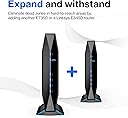
The Linksys AX1800 Wi-Fi 6 Router (E7350) delivers cutting-edge dual-band Wi-Fi 6 technology with speeds up to 1.8 Gbps and coverage spanning 1,500 sq ft. Designed to support over 20 devices simultaneously, it features easy smartphone setup, robust parental controls, guest network access, and push-button WPS for quick device pairing. Ideal for busy homes craving fast, secure, and reliable connectivity.



| ASIN | B08FBNH7MV |
| Antenna Location | Gaming, Home |
| Antenna Type | Internal |
| Best Sellers Rank | #77,977 in Electronics ( See Top 100 in Electronics ) #588 in Computer Routers |
| Brand | Linksys |
| Built-In Media | Linksys Dual-Band WiFi 6 Router (E7350), Quick Start Guide, Ethernet Cable, Power Adapter, Warranty and Regulatory Documentation |
| Color | black |
| Compatible Devices | Gaming Console, Smart Television, Personal Computer, Printer, Smartphone, Tablet, Security Camera, |
| Connectivity Protocol | wi-fi |
| Connectivity Technology | Ethernet, USB, Wi-Fi |
| Control Method | App |
| Controller Type | vera |
| Coverage | Up to 1,500 square feet |
| Customer Reviews | 4.1 4.1 out of 5 stars (802) |
| Data Transfer Rate | 1800 Gigabits Per Second |
| Frequency | 5 GHz |
| Frequency Band Class | Dual-Band |
| Is Modem Compatible | No |
| Item Dimensions L x W x H | 3"L x 1.85"W x 4.53"H |
| Item Weight | 1.64 Pounds |
| LAN Port Bandwidth | 450 Mbps |
| Manufacturer | Linksys |
| Maximum Upstream Data Transfer Rate | 900 Megabits Per Second |
| Mfr Part Number | E7350 |
| Model Name | E7350 |
| Model Number | E7350 |
| Number of Ports | 1 |
| Operating System | RouterOS |
| Other Special Features of the Product | Guest Mode, LED Indicator, Parental Control, WPS |
| RAM Memory Installed | 256 MB |
| Security Protocol | WPA2-PSK |
| Smart Home Compatibility | Smart Home Compatible |
| UPC | 745883799701 |
| Unit Count | 1.0 Count |
| Warranty Description | 18 month |
| Wi-Fi Generation | Wi-Fi 6 |
| Wireless Compability | 802.11ax |
O**.
Simple, fast, reliable
Ordered this router as my frontier fios router wifi started to have hiccups and just getting old. I configure this router to run as an AP since cannot get rid of the fios router using coax cable for internet. I did a quick and simple setup. My wifi has much better coverage and faster speeds. I am running now both 2.4Ghz and 5Ghz channels with no issues (it never worked well on Fios router G1100). I took the simple and easy route to setup. By running it as AP, You lose the router and firewall functionality but that is fine by me. Just keep that in mind. Overall, it is a nice looking router. Interface is simple and easy to understand. Even though it has AX capability, none of my wifi devices network cards can handle the new spec. I ve been using it for over 24hrs with not a single issue so far..... I remember the days Linksys was owned by Cisco. Comes to find out it is now Belkin Company. All brands perform the same more less. I am happy with it. Lets see how long it will last.... :-)
J**I
Good price
Good Router. Knot easy to set up but it works.
O**A
Did not work
I purchased this device to replace the current one I had with Spectrum services. At the beginning everything went fine set up was not that hard and WiFi was working. After 2 weeks I went on vacation and the WiFi disconnected. I called the carrier the review the modem everything looked good on their end and the internet was working fine by being hard wired to the computer. I then had to reset the device and re program the WiFi settings. The WiFi was then working again a few days later the WiFi goes down again and disconnects. I attempted to troubleshoot base on my previous experience and nothing was working. I reset the router just like I did before to see if this was working and nothing worked. I called the company customer service and they were no help. Asking questions that made no sense like are you connected to the WiFi on your computer. How can I be connected if the WiFi is not working, so many questions while being on the phone that did not make sense and seems like the representative had no idea what to do. At the end of the conversation the resolution was that the device is not acting correctly and advice to return it and obtain a new one. Unfortunately this device didn’t even last a month and stop working. I even check for updates, cables I checked so many things and nothing was working. Although it has great reviews for me this device in my are was not the best option and it was returned.
R**D
Good Router with poor set up and miss leading instructions
Before I began the set up I loaded the phone app LINKSYS that appears in the Amazon page displaying the Linksys AX1800 WiFI 6 router. I found as I went into the setup that the phone app didn't connect to router as it should have. I was stuck because when the router was connected to my modem it didn't pass thru the wifi even with an ethernet connection direct from the router to a computer. So I made a decision to call the support line number provided on a set up info card provided in the Linksys AX1800 box. This turned out to be a good decision. I was told by the tech on the support line that the phone app doesn't work for this model. That was a surprise because it is clearly suggested as Amazon shows a person with a phone using the app. The tech had us double check our connections then connect a nearby computer to a wifi signal the router was sending. The Wifi connection required we use the a Username and Password that that were included in a packet in the box. Once the computer picked up the wifi from the router we were asked to open up a browser on the computer and type the following on the address line... https:198.168.1.1 then hit return. This opened up a screen that allows you fill in the set up parameters for the router. If you have done this before you can do this yourself but be sure to hit the SAVE option before you close out this set up screen. If you don't have experience setting up a router, you need to call the tech help line and they will guide you through it step by step.
K**P
Great item
Great item
V**E
Excellent performance for the money
Love this router. Very easy to set up and plenty of options available in the setup pages to configure the router exactly as you need. I've got this one set up in bridge mode so not taking full advantage of all the customizations. My 5g band coverage is good enough for my needs, as I'm getting a strong signal across a living room and two back bedrooms (~ 50 from the location of the router), without losing much in terms of speed or signal strength. Will likely buy a second to replace the cable company's router and save on the fees associated with using their equipment.
B**.
Money Saver
Easy to set up. Nice speed and ability to handle multiple devices. Since we only needed our own router to get internet at our apartment, this reduced our monthly cost by close to 80.00 from what we were paying previously. Would recommend to others.
R**É
Just as advertised
C**N
compre dos equipos para ponerlos en malla y funcionan correctamente con una buena cobertura y velocidad únicamente es importante actualizar el equipo para que funcione sin ningún problema
J**A
es excelente para video juegos reduce el ping al 100% y en reproducción de 4k es magnifico.
C**S
El producto excelente. El proveedor no quizo emitir factura.
L**S
Terrible modem. Nunca se logró conectar a internet y eso que hice cerca de 10 intentos reiniciando y configurándolo desde cero. Cómo pueden ver en fotos todo el set up está correcto, incluso nunca me dio internet el módem conectado a cable ethernet y wifi , ni se diga, nunca me dio red. Cabe mencionar que tengo cerca de 8 módems instalados y este es el único que no funciono. Terrible y muy caro para que nos funcione.
Trustpilot
3 days ago
1 month ago