🎨 Elevate your digital canvas—where precision meets portability.
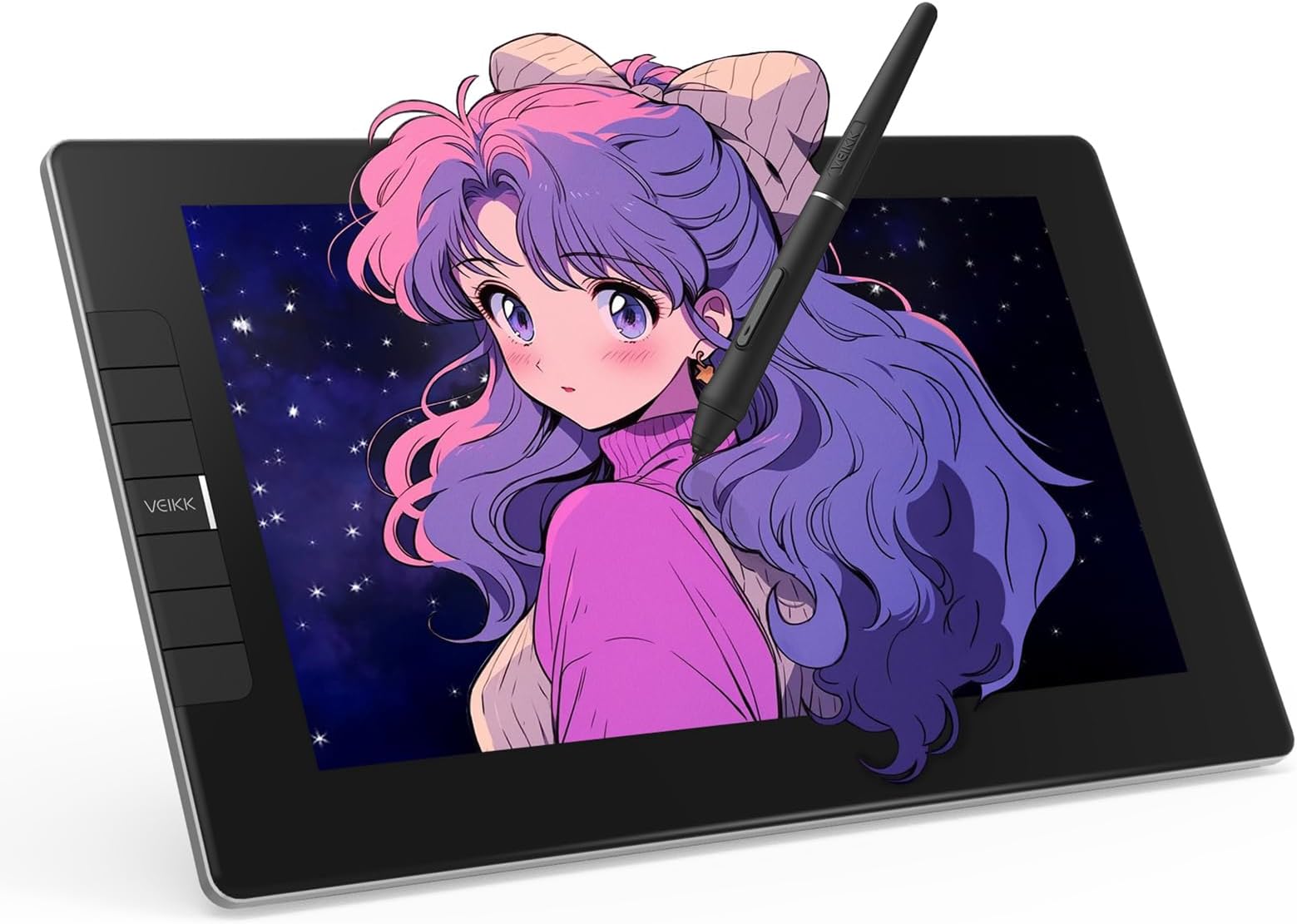
The VEIKK VK1200 V2 is a professional-grade 11.6-inch full-laminated drawing tablet featuring a 1920x1080 IPS display with anti-glare glass, dual battery-free pens with 8192 pressure sensitivity and tilt function, six customizable shortcut keys, and a streamlined single USB-C connection. Designed for Windows, macOS, and Linux, it offers a compact, stylish, and ergonomic solution for creative professionals seeking precision and portability.


| ASIN | B08G8CKSWK |
| Active Surface Area | 11.6 inch |
| Additional Features | Full Lamination, Extra-Slim, Shortcut Key, 60° Tilt Support |
| Best Sellers Rank | #52 in Computer Graphics Tablets |
| Brand | VEIKK |
| Built-In Media | Digital Pen, Pen Nibs, Pen stand, Glove, HDMI Cable, Quick Start Guide, USB Cable |
| Color | black |
| Compatible Devices | Desktop, Laptop |
| Connectivity Technology | HDMI, USB |
| Customer Reviews | 4.3 4.3 out of 5 stars (1,248) |
| Display Type | LED |
| Item Dimensions L x W | 12.52"L x 7.4"W |
| Item Type Name | Drawing tablet with screen |
| Item Weight | 809 Grams |
| Manufacturer | VEIKK |
| Model Name | VK1200V2 |
| Model Number | VK1200 |
| Native Resolution | 1920x1080 |
| Operating System | Windows 7 or later , Mac OS 10.12 or later, Linux |
| Pressure Sensitivity | 8192 Levels |
| Screen Size | 13.3 Centimeters |
| Specific Uses For Product | Designing |
| Target Audience | Teacher |
| UPC | 601707036486 |
| Warranty Description | 1 year |
A**R
A GGreat Product, Well Worth the Money.
Originally, I was going to buy a much cheaper drawing tablet as a treat to myself for Christmas, but my husband looked at it and convinced me to look at the VEIKK instead, and I'm really glad that he did. I was only looking for a digital drawing tablet to play around with, but the VEIKK does so much more than that. For one thing, the screen can lay flat in front of you as a work surface, and you don't have to constantly look up at uncomfortable angles to work. (It can also stand upright as a screen if necessary) But, flat, I can use it to take notes, or write handwritten personal notes to friends, as well and using it to draw. It also brings the screen closer to me, so that I can read books and articles, as well as seeing my email and on line shopping sites better - without enlarging the screen so much that I can no longer see a whole page. A surprisingly valuable addition to my productivity. I'm sure that with time I will find many more advantages, but so far, I have only touched on what the tablet can do. It is not dependent on battery, so none of the worry of having to find a new battery in the middle of a project, and the brightness is easily adjustable to suit personal criteria. One additional advantage that I have found is the well written on line manual. As I said, I have probably only touched on all it can do, but I love using it.
T**S
Great and functional pen display for Linux.
Nice looking colors, decent sized display for drawing without being absolutely overboard like a 22in display or far too small like a 12in display. The pen and display response time seems just fine, though pen placement accuracy around the very edges of the screen are a little bit off, which shouldn't be to much of an issue since that's where your taskbar and title bar and brushes and all that junk are. The drivers function just fine under Arch Linux if you use the debtap package to convert the .deb driver file from Veikk's own website, the Veikk driver in the aur currently is very out of date and broken. I run KDE Plasma as well and mirroring the main display, a 1440p ultrawide, to this 1080p 16:9, is functional, scaling it down bi-linearly or so, not nearest neighbor, and cutting off the edges of the main display. It is not perfect, as there are some small and slightly annoying bugs with unrelated software, but the driver does let the pen constrain to the correct screen area. Unsure of other desktop environments. I also can not speak for the Windows or Mac side of drivers and software, they should work just fine, but obviously those OSes suck lol :3 because I use Arch btw.
J**N
Best upgrade to my workstation.
My wife and I own a home business making promotional products, this also includes making logos and other artwork. I had been using a smaller drawing tablet, but knew I needed a larger one that was a display. I have spent months looking into drawing displays, pricing them, watching reviews, and yes pondering how big of one can I get away with before the wife gets mad. The price on this was perfect with the $50 coupon it was right in my price range and only $20 more than the 16" units I was looking at. The pros for me was the size, hotkeys plus 2 dials, plenty of extra bezzle for hand rest, every review I saw showed it coming with 2 pens, and to top it all off it has visa mount. The only cons I could find before ordering was issues with photo shop, well I don't use adobe so that was a non issue. The unit showed up in great condition, in a box, that was in a box, that was in yet another box. So much care and design went into the packaging that even ups and fedex will be hard pressed to damage. Don't get me wrong they can damage anything, but this will be a challenge. I can't say much about the stand as I put mine on a monitor arm. The image quality is great too, I have heard in reviews about pixelization but on my rtx 2060 powering 3 screens it is clear. The software is easy to use but I wish it had some tool tips. All in all I give it 9/10.
S**N
Drawing table
Love the product! It was well packed and delivered fast. Please handle with care. Thank you. ❤️
S**C
Good quality and budget-friendly. Perfect for travel or beginners.
I had been looking for a decently sized tablet to travel with and I'm really glad I came across this product! I've used a lot of different tablet brands in the past and this is on par with the expensive big name ones. It's portable, budget-friendly, and perfect if you're looking for a good starter for tablet monitors. What you need: 1 desktop or laptop computer 1 USB port 1 HDMI port. That's it! :D - Lightweight but thick enough that I feel safe traveling with it. - No power outlet needed! Power cords also tend to be rather bulky so I'm glad this tablet doesn't need it. - Setup and driver installation was easy. You only have two cords to plug in and the driver is available to download directly from their website. - Pen is very light. I prefer a heavier weight for my stylus so I'll be seeing if I can find a grip to add onto this. (Plus Ergo Grip for Wacom Pro/Pen Stylus does *not* work for this stylus. The pen is too thick to get the grip on.) - Screen has a smooth matte texture! I prefer drawing on matte instead of glossy because it's got a better feel to it. It has the resistance similar to drawing on paper and helps control my brush strokes. - Shortcut buttons can be programmed in multiple ways and you can even set different button functions for different programs! - Battery-free pen!!! All my previous tablet pens required charging and I remember that feeling of waiting for your stylus to charge while your body demands to draw. I'm so happy this pen doesn't need to be charged and works right out of the box. Also, there's two of them :) - Parallax is not as noticeable. From a top view, as you're using the tablet normally, there is no visible gap between the pen nib and the screen. Things to keep in mind: - The USB cord they give you has a black and red connector extension. Make sure to insert the black one into your computer, not the red! - The driver program will not display settings if your tablet is not connected. - If you have another tablet driver installed, uninstall it first or some functions won't work properly. - Remember to calibrate your tablet! :D
B**Z
Genial! Todo perfecto solo que tiene muy pocas puntas de repuesto diría yo.
L**A
tenia mis dudas por el precio, pero resulto una grata sorpresa, es bastante buena
K**N
uzun yıllardır çizimle uğraşan ve grafik tasarım alanında profesyonelleşmiş biri olarak dijital çizim ve genel olarak illüstrasyon işleri için fazlasıyla yeterli bir ürün olduğunu söyleyebilirim. 10.9 inch ipad'in ekranı küçük geldiği için satın aldım. 4 günlük kullanım sonrası majör bir problem yaşamadım. karşınıza çıkması muhtemel ufak tefek yazılım sorunları 2 dakikalık google araştırması ile çözülebiliyor. daha önce pen display veyahut ekransız grafik tablet kullandıysanız hata ayıklama/çözüm yapmak kolay olacaktır. diğer yorumlarda da belirtildiği üzere ekran ghosting yapıyor fakat bu illüstrasyon ve grafik tasarım işleri için sorun teşkil etmiyor. ekranın renk paleti günümüz standartlarını karşılamıyor fakat benim koşullarımda bilgisayarımın ekranını referans olarak kullanabildiğim için problem olmadı. güçlü bir bilgisayar kullanıyorum; çok büyük ve detaylı projelerde çalışırken bile gecikme olmadı. video izlemek için de güzel oluyor, çizim yapmadığım zamanlarda ikinci bir ekran olarak kullanıyorum; ekranın açısını ayarlamak için basit ve etkili bir düzen kurmuşlar, beğendim. ekranın yanındaki hotkeyler ise kullandığınız programa göre ayarlanabiliyor. ben klavyeyi de aktif olarak kullandığım için bu tuşları hiç kullanmıyorum ancak fonksiyonlarında da bir problem görmedim, düzgün çalışıyor. kalemin hassasiyeti çok iyi. lamine ekran üzerinde kullandığımız için neredeyse hiç parallax etkisi olmuyor. adobe programlarıyla ve lazy nezumi ile sorunsuz etkileşime geçiyor. yine de illustrator'da fırça hassasiyeti, kalem açısı gibi fonksiyonları açmak için birkaç ayar yapmanız gerekebilir. geçmişte wacom, huion ve apple kalemlerini kullanmış biri olarak gayet memnun kaldım. iki adet kalem için bir dünya yedek uç eklemiş olmaları da güzel detay olmuş. uzunca yıllar uç derdi olmadan kullanılabilir. paketten çıkan kablolar, eldiven gibi ek ürünler de yeterince kaliteli. her türlü ihtiyaca göre kablo varyasyonları eklemişler, cep telefonuna bile bağlarsın. büyükçe bir ekran olduğu için kablo kalabalığı yaratacaktır. genel olarak çok memnun kaldım. animasyon veyahut 3D gibi işlerde nasıl tepki vereceğini bilememekle beraber çizim yapmak isteyenlere tavsiye edebileceğim versatil bir ürün. muadili olduğu aynı boyutlardaki wacom ürünlerle ekran kalitesi ve renk skalası konusunda baş edemez ancak aradaki ciddi fiyat farkını da hesaba katınca tam bir fiyat-performans canavarı olduğunu söyleyebiliriz. alışveriş ve kargo sürecinde hiçbir problem yaşamadım, teşekkür ederim.
C**N
Es una tableta muy buena por el preció. Incluso sin el driver funciona como un segundo monitor más pequeño. La caja venía con bastantes visitas y muy bien surtida de puntas de repuesto. Los drivers funcionan muy bien en Linux y ofrece la ventaja de trabajar con una laptop es que solo se necesita el cable usbc, aun así es más como trabajar en PC con todo y los cables extra. El único inconveniente fue acostumbrarme a que el de requiere aplicar un poco más de presión para que se registre como click (me había acostumbrado a que tan pronto el lápiz tocaba la superficie se consideraba como uno), pero no es difícil acostumbrarse.
T**V
Nice product.
Trustpilot
3 days ago
1 week ago