🚀 Upgrade your Wi-Fi game — because buffering is so last decade!
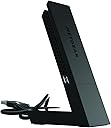
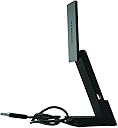
The Netgear NG-A6210 AC1200 Wi-Fi USB 3.0 Adapter delivers dual-band speeds up to 867 Mbps on 5GHz and 300 Mbps on 2.4GHz, enhanced by high-gain antennas and Beamforming+ technology for superior range and reliability. Its USB 3.0 interface ensures fast data transfer, while the included desktop dock allows flexible placement. Compatible with USB 2.0 and designed for desktops, it offers easy installation and a 1-year manufacturer warranty.


| ASIN | B00OT586RQ |
| Best Sellers Rank | #31,480 in Computers ( See Top 100 in Computers ) #265 in USB Computer Network Adapters |
| Brand | NETGEAR |
| Built-In Media | USB |
| Color | Black |
| Compatible Devices | Desktop |
| Compatible Operating System Family | Windows |
| Customer Reviews | 4.2 4.2 out of 5 stars (3,281) |
| Data Link Protocol | USB |
| Data Transfer Rate | 867 Megabits Per Second |
| Global Trade Identification Number | 00606449103328 |
| Hardware Interface | USB, USB 1.1, USB 2.0, USB 3.0 |
| Item Dimensions L x W x H | 14L x 31W x 14H millimeters |
| Item Type Name | NETGEAR A6210 AC1200 802.11ac Dual Band (300/867 Mbps) High Gain Wi-Fi USB 3.0 Adapter |
| Item Weight | 28 Grams |
| Manufacturer | Netgear |
| Mfr Part Number | A6210-PES |
| Model Number | A6210-100PES |
| UPC | 606449103328 |
| Unit Count | 1 Count |
| Warranty Description | Manufacturer warranty for 1 year |
R**Y
Works great
Easy installation and very good connectivity!
A**D
As described, Amazing performance! Definitely Recommended.
Amazing!My laptop had like 50mb/s download speed when Im very close to the router,After Installing this,I got a whopping 120-150mb/s,And It's good if your room is far away from ur router!Make sure You install the drivers for it!Or It won't work properly,They are easy to download and free.
B**E
Improved WiFi
Improved dramatically my WiFi access since most of computer WiFi cards are useless. Great purchased
B**R
Good Product
Very good, Neat packing, good performance so far, easy setup overall I like the product. Value for money.
S**F
it's worth it
I recommend this wifi adapter, It's very good
R**Z
Avoid, Driver Issues and Unstable
Foolishly, i assumed the issues plaguing this device's software and drivers back in 2016, making what was otherwise good hardware, into a useless chunk of plastic. Sadly, in 2021, Netgear has yet to fully resolve these problems for Windows 10. Installation problems, software device detection problems (despite windows detecting and naming the device), inability to consistently connect to wi-fi networks despite having an excellent signal and no recognizable diagnostic problems. Bottom line; Get something else or enjoy playing Netgear roulette with a device they seem to no longer support of care about.
M**I
Deliver fast internet
This is a great adapter because i was used ethernet and the speed was 30~70 mbps, but after this product my internet speed is 250~500 mbps
M**A
Compatibility between 2 electronic instruments
Product is sleek and connected to wifi on our desktop. However it did not help in connecting to big screen TV using Wifi for mirror image as the same was not compatible with TV model though.
N**N
Some laptops face a peculiar problem with the internal network adapter working intermittently when used with Windows 10. Replacement of the adapter may not solve the problem. The Netgear device comes in handy. It can be plugged to an USB port and is easy to set up.. No need to open the laptop and experiment. The signal strength is stronger than the internal one and more reliable.
D**I
The connection is often lost. This is a common problem with this model.
A**S
De verkoper vergist zich in het type adapter.
S**S
I built myself a new desktop PC a few days ago, finally moving back from laptops/all-in-ones, mainly for work purposes. I got an affordable WiFi adaptor and found my internet right down at standard Broadband speeds (5Mbps or so), which was frustrating. After upgrading to this thing, though, it shot up to the kind of speed I'd expect from my fibre connection, and about a third faster than any of my laptops or all-in-one computers reached. If I use the dock and cable and sit this thing on my desk, I get around 35Mbps from speedtest.net. That's right - it comes with a desktop dock, so you can move it away from all the interference your computer will cause and get maximum results. In desktop mode it also unfolds and extends if you need to squeeze a little extra speed out of it. I keep it folded up as it looks much nicer and tidier on my desk that way, but unfolding it does grant me a couple of extra Mbps if I'm in a squeeze (let's be honest, that's not often). If you're using a laptop and don't want to use the desktop dock, unfolded it'll sit at a decent distance from it to cut down on interference, but to be fair most laptops have built in WiFi these days, so you're more likely going to be using this on a desktop. To be honest, you need to use the desktop dock, because it's a little wideand plugged into a tower you'll find it ends up pointing sideways and obscuring the neighbouring USB ports, but the option is there if you really don't want it to be sitting on your desk. Sorted out all my WiFi problems and then some! Nice one guys! Also, I can confirm this is working like a charm on Windows 10 - UPDATE! After just under a month of use, one day I turned my PC on and it just didn't want to connect to the internet. After a lot of trial and error and frustration, the solution was to completely remove all traces of NetGear's drivers and just let Windows 10 do it's thing. In other words - IF YOU WANT THIS THING TO WORK WELL ON WINDOWS 10, DO NOT INSTALL THE SOFTWARE! JUST PLUG IT IN AND LET WINDOWS DO THE REST. NetGear's own software can cause conflict in Windows 10, but Windows 10 already has its own drivers etc to handle it for you.
G**S
Hola, por unos cambios en la colocación del router, necesitaba un conector Wifi USB, me decidi por este por que ya tengo un extensor de red de esta misma marca y me funciona bien. Ahora el router esta en la planta baja y el PC en el primer piso, y la verdad es que desde el primer momento se conecto sin ningún problema, la señal es muy estable, no se desconecta, la velocidad (unos 54 Mbps) se mantiene sin problemas. Incluso sin extender la antena se conecta perfectamente. Cuando cambie a fibra ya os comentare como va la velocidad, el router de ahora es N y son 300 Mbps teóricos, pero con el router AC espero mejorar la velocidad.(unos 1200Mbps) Recomendado
Trustpilot
1 week ago
1 day ago