Buy anything from 5,000+ international stores. One checkout price. No surprise fees. Join 2M+ shoppers on Desertcart.
Desertcart purchases this item on your behalf and handles shipping, customs, and support to Vanuatu.
🌈 Light up your rig, silence your worries.
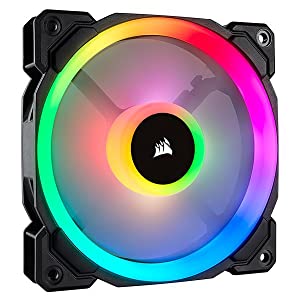
The Corsair LL140 RGB is a 140mm PWM fan featuring dual independent RGB light loops with 16 LEDs, offering extensive customization when paired with Corsair's Lighting Node PRO. It delivers quiet yet powerful cooling with speeds adjustable between 600 and 1300 RPM, maintaining noise levels as low as 25 dBA. Perfect for enthusiasts seeking both style and silent performance in their PC builds.


| ASIN | B075VHBC4S |
| Air Flow Capacity | 51.5 Cubic Feet Per Minute |
| Best Sellers Rank | #33,251 in Computers ( See Top 100 in Computers ) #249 in Computer Case Fans |
| Brand Name | Corsair |
| Compatible Devices | Desktop |
| Cooling Method | Air |
| Customer Reviews | 4.6 4.6 out of 5 stars (2,838) |
| Global Trade Identification Number | 00843591032445 |
| Included Components | 1 Fan, 4 Fan Mounting Screws |
| Item Dimensions L x W x H | 14L x 14W x 2.5H centimeters |
| Item Type Name | Corsair LL Series, LL140 RGB, 140mm Dual Light Loop RGB LED PWM Fan, Single Pack |
| Item Weight | 222 g |
| Manufacturer | Corsair |
| Material Type | Polycarbonate |
| Maximum Rotational Speed | 1300 RPM |
| Model | CO-9050073-WW |
| Noise Level | 25 Decibels |
| Number of Items | 1 |
| Part Number | CO-9050073-WW |
| Power Connector Type | 4-Pin |
| UPC | 843591032445 |
| Unit Count | 1 Count |
| Voltage | 13.2 Volts |
| Warranty Description | This item is eligible for 1 year of warranty provided by the Manufacturer /Brand from the date of purchase. You can contact Manufacturer/Brand or Seller for more details |
D**.
So, I bought 6 of these to redo all the fans in my 760T (there is an optional 120mm fan under the removable drive bay.) Out of all these fans, I really only ran into one problem. The ones that I mounted into my radiator, and front and bottom, all worked flawlessly. The one I mounted on the rear of the case, was a real pain. I had to manually thread the screws through the plastic (the screws that it CAME WITH). I wish I knew I was gonna do that ahead of time, but I pulled it out and screwed all 4 screws in and out a few times, and then I was able to mount it to the rear. As for cooling, I usually set all my stuff to performance mode, so they're not exactly quiet but if you set it in silent mode they are actually silent.. These are in charge of cooling an i7 7700K (with a Kraken X62 AIO,) and GTX 1080. My CPU temp is noticeably lower, probably about 7-10 degree's lower than when I used the stock fans that came with the Kraken. Both the GTX and the i7 7700K now are at idle temps of about 25 Celsius, where they used to idle around 30-35. The lighting is amazing, they are super bright and really light my case up well. One thing I can complain about, is in order to have these fans facing the correct way for the "Pong" lighting effect, is to have the side with the cable pointed towards the outside of the case. Because of this, if you want to use the Pong effect you will have to find a way to hide the wiring, or just don't use it. I can't really say it's too big of a deal because I don't personally use it, and Corsair gives you a bunch of different color effects to use. To have the ability to control the lights, I have a the fan hub that was provided with the triple pack I also purchased, to the Corsair Lighting Node Pro that I got with the lighting strips with Corsair. But due to how Corsair sells these, if you get any pack you have to pay extra to get the Lighting Node Pro, or you have to spend even more to buy the fans individually. No big deal, but I have 2 Corsair Lighting Node Pro's that I don't need and more than likely attempt to resell. I have seen a lot of reviews saying you need to buy an 80 controller to get the lighting effects, that is not true. You need to get a Lighting Node Pro, which connects to an on-board USB header, which is roughly 40-50, and have the fan hub connected to it. Yes, each fan has 2 cables connected to it, and I have 6 so essentially I have 12 cables. Could this have been better designed, yes. Is it necessary for my needs? No, because I have more than enough room around back to have them. Another complaint I have seen, is people cannot get the fans to light up, even with software. Now, I discovered this when I was installing my Corsair LED strips, you have to go into the Corsair Link software, find the lights, and press the + button and apply. Otherwise, you will only have 1 fan lighting up, it's frustrating at first if you didn't figure this out, but now you know. It is important to have the fans on the fan controller, plugged in IN ORDER for certain lighting effects. Also, DO NOT SKIP a port on the fan hub, or else every light after the connector you skipped, will not light up. For instance, don't have them in 1 2 4 5. (4 and 5 will not work.) Make sure they are 1 2 3 4 5, etc. Overall, I do believe these fans were worth the money to replace the stock fans that the case and Kraken X62 came with. Sorry this review is kind of scattered, just had surgery and on medication. But if you skimmed it and you are having problems with your fans, I highly suggest you read it for some tips, and feel free to respond if you have any other questions.
M**L
Einführung: Der Corsair LL140 RGB LED PWM Gehäuselüfter hebt sich durch seine herausragende Kombination aus Effizienz und Ästhetik hervor. Ideal für PC-Bauer, die sowohl Performance als auch Style suchen, bietet dieser Lüfter mehr als nur grundlegende Kühlfunktionen. Leistungsmerkmale: Die RGB-Beleuchtung des Corsair LL140 ist schlichtweg spektakulär. Mit seiner innovativen Lichttechnik, die eine doppelte Lichtschleife umfasst, verwandelt der Lüfter das Innenleben des PCs in ein visuelles Meisterwerk. Die Farbvielfalt und die Intensität sind beeindruckend, und die Anpassungsmöglichkeiten über die Corsair iCUE-Software sind nahezu grenzenlos. Kühlung und Geräuschpegel: Neben dem visuellen Genuss bietet der Lüfter auch hervorragende Kühlleistung. Dank der PWM-Technologie passt sich die Lüftergeschwindigkeit dynamisch an den Kühlbedarf an, was zu einer effizienten Wärmeabfuhr und einem leisen Betrieb führt. Im Vergleich zu vielen anderen Lüftern bleibt der LL140 auch bei hoher Drehzahl erstaunlich ruhig. Installation und Verarbeitung: Die Installation gestaltet sich unkompliziert und problemlos. Der Lüfter ist robust gebaut, und die mitgelieferten Befestigungsmaterialien sind hochwertig. Die Verarbeitung zeugt von Corsairs gewohnt hoher Qualität und Langlebigkeit. Nachteile: Der Preis des LL140 ist höher als bei Standardlüftern, was teilweise durch die zusätzlichen Features wie RGB-Beleuchtung und PWM-Funktion gerechtfertigt ist. Auch sollte beachtet werden, dass für die vollständige RGB-Anpassung die Corsair iCUE-Software erforderlich ist, die möglicherweise zusätzliche Systemressourcen beansprucht.
O**L
Kelimenin tam manasıyla mükemmel. Aura ile çalışmıyor, bunun için denetleyiciye küçük bir modlama yapılabilirdi, sessizliği, devri ve hava akışı kıyaslandığında daha iyisini ancak yine corsairin yapabileceğine inanıyorum. Meteryal kalitesi, yalıtım tasarımı etkileyici, rgb şovundan bahsetmeye zaten gerek yok
V**N
Gewoon 🔝 merk Corsair.
F**.
Ils sont relativement silencieux et le RGB est magnifique (4 led au centre et 12 en périphérie). Par contre, je n'utilise pas les éléments Corsair pour les faire fonctionner en RGB (Hub, node pro, commander) ni le logiciel ICUE. J'utilise un Farbwerk 360 RGB LED Controller + 2 splitty 4 (pour la connexion) de chez Aquacomputer. Avec le logiciel Aquasuite, les possibilités sont beaucoup plus importantes.
Trustpilot
1 week ago
2 months ago