🚀 Elevate Your Connectivity Game!
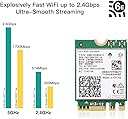
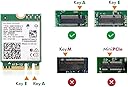
The AX210NGW WiFi Card is a cutting-edge wireless network adapter that supports the latest Wi-Fi 6E standard, offering tri-band connectivity with speeds up to 5400Mbps. It features Bluetooth 5.3 for improved device communication and is designed for easy installation in laptops with an M.2 2230 interface, compatible with Windows 10/11 (64-bit).


| ASIN | B08NSSJNV1 |
| Best Sellers Rank | #931 in Internal Computer Networking Cards |
| Brand | CHILISON |
| Built-In Media | AX210 Wifi module, CD driver, Installation guide |
| Color | multicolor |
| Compatible Devices | Laptop |
| Customer Reviews | 4.6 out of 5 stars 1,852 Reviews |
| Data Link Protocol | IEEE 802.11a |
| Hardware Interface | Bluetooth 5 |
| Item Dimensions L x W x H | 1.18"L x 0.86"W x 0.02"H |
| Item Weight | 50 Grams |
| Manufacturer | WISE TIGER |
| Mfr Part Number | AX210NGW |
| Model Number | AX210NGW |
| Product Dimensions | 1.18"L x 0.86"W x 0.02"H |
| UPC | 793420184640 |
| Warranty Description | 1 year warranty |
T**R
Works Great - But
Great product, great price. It installed no problem with the supplied drivers except no 6Ghz! I installed the AX210 drivers from Intel. No 6Ghz. I have Windows 10 21H2. Turns out, Windows 10 disables 6Ghz because MS wants that to be an attractive feature in Windows 11. So I started looking around and found a post with a modified driver. There may be other hacks too. It worked. I named my 6E 6Ghz network a different SSID so I know it's working and yes it's everything it's supposed to be. I live in a crowded apartment complex and I can finally work at home with all my bandwidth. ×××Update. I've been using this card for a few days and it's great. I've ordered a second for my work laptop. I actually know a bit about this because I map, install, and configure Meraki and Ubiquity Wifi mesh networks for a living. Really Important - On my Dell, the White wire was the Main and the original AC card denoted Main as White, Aux as Black on its' label. This new one is backwards. It shows Main as Black but in the same position and same #2 on the PCB. Do not pay attention to the color coding. Whatever was Main before, regardless of wire color, must be Main now. I went online and looked at pictures of other laptops to make sure mine wasn't miswired by Dell. It seems with AC, White was Main much or all of the time. Some people will argue, say it's just a piece of wire, they're identicle antenna leads. No, not for all systems. If you switch them you may see degraded Wifi or Bluetooth. Main is Main, Aux is Aux.
B**H
Great replacement of Intel 9560NGW
I was having issues with my current wireless card in my Eluktronics brand laptop. The 5Ghz band world lag and disconnect me from games I would try to play. I bought this one in hopes of correcting the issue and I am sold on it! It connects just fine to my network and is an upgrade to Wi-Fi 6 (from Wi-Fi 5). I have no more lags and I can see that the speed tests that I run return faster results. I wood highly recommend this as a replacement if you are having issues or just want an upgrade!
K**G
AMAZING upgrade
I upgraded to this WiFi card from the base line Killer card included with MSI GS 73VR 7RG Stealth Pro laptop. If you feel confident enough to open the back of your laptop, installation is incredibly simple. You will want to use the included CD to install drivers, or download them before you switched WiFi, as the base Windows program won’t recognize it without the driver installer. I derped, and had to use another computer to copy the CD to a USB flash drive to get drivers on my computer, still incredibly easy solution. It was very easy to install, the perfect size, and thickness. Network speed tests are AMAZING, I didn’t realize what a fantastic upgrade it would be. It took me maybe fifteen minutes to install this, and most of that was just carefully unscrewing the case. If you are on the fence, it’s an incredibly affordable upgrade if you can’t use Ethernet reliably. Huge quality of life improvement, if I could give them more stars I would!
J**P
Worked perfect in my Dell Inspiron 17-7000 laptop
The WiFi died on my 15 month old Dell laptop. I did not buy an extended warranty, so I was on my own. Did a little digging on the M.2 NGFF specs and decided to upgrade vs replace. This replacement card worked perfect. It is giving my 300 MBits upload and download which is what the ATT fiber at our house is limited to. The cost is better that just doing a replacement from Dell and about what a used one would cost at eBay. The laptop found a driver for Intel as soon as I booted but I did need to install the bluetooth driver included on the small CD. It is a little challenging to take apart a laptop PC these days and if you are not comfortable doing it you may find this upgrade a little scary at first. I think any reasonably handy individual should be able to handle it. Just get the service manual downloaded or check for youtube videos on how to take apart your laptop. You need to be careful with static energy and should use one of the grounding straps available for that purpose. I have been using it for a couple of weeks so far with zero issues.
P**E
Replaced an AC 7260 without issue
I have an older, Dell XPS 13 9333 laptop that originally came with an Intel AC 7260 WiFi card. Recently, the card would lose connection to my AP, but report to the OS that it was still connected. This was causing me to force my system into, then out of, airplane mode in order to re-establish a connection several times per day. I replaced the failing card with this AX210NGW and have had zero connection failures or losses for over a week. For my laptop, the order of the white (aux) and black (main) antenna wires are swapped from the positions of the original card. This was not a problem since the sockets are only a couple of millimeters apart and the antenna wires are long enough to accommodate the swap. Additionally, there appear to be no BIOS whitelists which prevent the card from functioning. The Bluetooth functionality also works, but because device pairings are tied to each other's MAC addresses, I had to re-pair all of my devices. I would advise that you download the drivers for the card before removing your old card. Intel has separate WiFi and Bluetooth drivers, so be sure to get both. Finally, I was previously having a problem with my touchscreen failing to recognize touches over time which would resolve with either a reboot, or disabling and re-enabling the touchscreen device. Since replacing the WiFi card, this issue seems to have disappeared as well. I can only guess that the failing network card was causing interference with the capacitive touch sensor, likely because the WiFi antennas are directly behind the screen.
K**Y
Works better than expected
Works very fast with a WiFi 6 router. Connects at 2.4 Gbs and transfers files at a steady 200 MBs on the local network. Internet connection runs at full speed. It has never slowed down even when transfering massive disk images (80+GB) from a file server. I had orginally planned to get 2.4Gbs NICs for the computers but now have decided to go all WiFi6. The only 2.5Gbs nic will be in the server and all the other computers will have WiFi cards. 200 GBs is good enough for me.
C**O
Great upgrade over WiFi 5/AC
Purchased 2 cards to upgrade my wife's laptop and our htpc to wifi 6 to go with our new Asus Ax86u router. Installation is fairly easy, though this will depend on the model of machine you're installing it on. For example, my wife's laptop only required removal of the bottom cover to access the wifi card, whereas the htpc required motherboard removal to access the wifi module (it's an Asus that has wifi integrated with the rear I/O). I imagine some models may be more difficult to upgrade than others. You'll likely need to manually install the drivers, at least for Windows (not sure about Linux) before you can connect to the network, so I'd suggest either downloading the drivers to your machine or a usb before the upgrade, or be plugged into ethernet to download the drivers after the install. With the new cards and our new router, we've seen speeds jump from about 90mbps download to 700mbps. They also seem to connect faster than the old cards when booting the machines from sleep or shutdown compared to the non-intel cards we had installed before. If you don't have a wifi 6 or 6E router, I wouldn't suggest this upgrade if you have a decent wifi 5/ac card in your computer. We tried these with our old router first, and there was not a speed difference until we upgraded that too.
N**S
Double the speed compared to Killer 1535 card in my setup!
Definitely worth the money! I have an older ~2017 15in Dell XPS 9560. This was a very simple upgrade - install latest drivers for wifi and bluetooth from intel website, remove the back of the laptop, unplug battery, swap out the wireless card with one screw and two wires that clip in, reconnect everything. It will boot right up and get recognized by your hardware. One thing to note for me, the stock Killer1535 card had a white cable for MAIN and black cable for AUX. The AX210 card on it shows MAIN as black and AUX as white displayed on the sticker. Do not swap these, stick with your original wires whichever was main and aux and you'll have no issues. Speed for download went from 175mbps to about 310mbps with no changes other than the card swap.
F**R
Works nicely
Downloaded drivers before doing the switch. Installation went smoothly and everything works like a charm. Shipping and delivery was very fast as well. Extra : my computer is too far to use the wifi 6e to its full potential. But the 2.4ghz and 5ghz works very nicely. Haven't had any drops. Speed tests results are 400-500mbs which is definitely an improvement compared to my previous wifi card which was giving me 150-200. If I was closer to router I could definitely switch to 6e and have crazy speed but I'm about 40 feet away and going through multiple walls. Update : I've moved my pc close to the router to test. speed and stability are definitely there. Updated with speed test results. (Current isp plan is 1.5gb/s down & 1gb/s up)
R**I
Eccellente scheda WiFi 6E e Bluetooth 5.2
Scheda WiFi e Bluetooth acquistata in quanto, con la scheda WiFi Realtek 8822BE presente sul mio PC, avevo grandi problemi di stabilità (nonostante la continua installazione di driver aggiornati). La scheda WiFi 6E garantisce il supporto di reti WiFi a 2.4GHz, 5GHz e 6GHz, oltre all'aggiornamento dei driver direttamente da Windows (senza dover cercare driver aggiornati chissà dove, che comunque si trovano facilmente anche sul sito di Intel). Anche la componente Bluetooth è molto valida e aggiornatissima, supportando la versione 5.2. Da verificare di avere sul proprio PC il connettore M.2 2230 Key A o Key E e fare attenzione al collegamento delle due antenne alla scheda, in quanto sono microscopiche ed è una operazione non proprio agevole! In conclusione, scheda consigliata per potenziare il proprio PC nell'ambito WiFi-Bluetooth con un prodotto Intel di ottima qualità ed un eccellente rapporto qualità/prezzo.
J**.
Funciona mucho mejor que el tenía mi labtop de fabrica
Funciona mucho mejor que el tenía mi labtop de fabrica, exelente
T**R
Fonctionnellement impeccable
J'ai pris cette carte Wi-Fi pour remplacer la Killer 1550 qui était installée dans mon MSI GS65 et qui rencontrait sans cesse une erreur de driver sous Windows 10 (code 10, impossible de démarrer le périphérique). Lassé de devoir faire les manipulations dans le BIOS pour tenter de redémarrer la carte Wi-Fi (à terme, les manipulations ne résolvaient pas le souci), j'ai décidé de remplacer la carte interne. Le démontage du PC s'est fait sans souci, et l'installation de la carte est très facile. Dans l'idéal, téléchargez les drivers sur le site officiel d'Intel avant d'installer votre nouvelle carte. Une fois mise en place dans votre machine, une simple installation des pilotes et tout se connecte sans souci. Jusqu'à ce jour, après 2~3 semaines d'utilisation, je ne rencontre plus de problèmes de déconnexion ou d'erreur de driver comme la Killer 1550 installée d'origine. Ma raison principale du changement était de résoudre cette erreur, la nouvelle carte est alors parfaite. Ne disposant que d'une Freebox Révolution, je ne peux rien dire sur les capacités du Wifi 6E mais la vitesse en 5 GHz est très efficace. Tarif super correct pour disposer des dernières ondes Wi-Fi en 2021 !
B**F
Werkt prima op een Lenovo T480 met Windows 11
Omdat ik een snellere verbinding wilde hebben dan WiFi4, zoals bij mijn oudere laptops, deze AX210 aangeschaft. Op het internet (LENOVO forum) werd aangegeven, vooraf de drivers voor de WiFi en BT te downloaden. En ja, nadat de AX210 geïnstalleerd was, werd deze niet herkend. Nadat de drivers voor WiFi en BT geïnstalleerd waren, liep alles als een zonnetje. Mijn T480 haalt nu de maximale snelheid van mijn intranet. Heel tevreden. Negatief puntje: De huidige WiFi verbinding stekkers zijn zo priegelig, dat het me bijna 10 minuten kostte om deze goed te plaatsen. Maar dan ligt niet aan deze WiFi kaart. Meer aan de huidige standaard antenne aansluitingen voor WiFi en BlueTooth. Advies: Kijk eerst YouTube video’s om de T480 te openen en de AX210 te installeren.
Trustpilot
3 days ago
2 weeks ago