Buy anything from 5,000+ international stores. One checkout price. No surprise fees. Join 2M+ shoppers on Desertcart.
Desertcart purchases this item on your behalf and handles shipping, customs, and support to Vanuatu.
🔗 Double your display, double your impact!
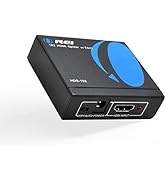
The OREI HDMI Splitter HD-102 duplicates a single HDMI input into two identical outputs supporting resolutions up to 4K at 30Hz and Full HD 1080p. USB-powered for stable operation, it’s compatible with HDMI 1.2 to 1.4 devices including gaming consoles, PCs, and streaming devices. Its robust metal casing ensures durability and heat dissipation, making it an ideal solution for professionals needing reliable dual-display setups without signal loss.


| ASIN | B005HXFARS |
| Additional Features | Lightweight |
| Brand | OREI |
| Built-In Media | HDMI Splitter, USB Cable |
| Bullet Point | Full Video format 3D, 4K x 2K@30hz, 1080P @30hz, 1080P @60hz. Deep Color 4K @ 30Hz / 480i/ 576i/ 480p/ 576p/ 720p/ 1080i/ 1080p/ 1440i/ 1440p eidi duration 6 seconds. DOES NOT SUPPORT HDCP 2.0 & 2.2, Fully Compatible with any HDMI 1.4/ 1.3/ 1.2 version, support HDCP 1.4(NOTE: Will Not BYPASS HDCP), Easily Split Signal for devices with standard HDMI interface. Input: Computer, XBox 360, XBox one, P… |
| Cable Type | HDMI |
| Color | Black |
| Compatible Devices | Devices with HDMI input port |
| Connector Type Used on Cable | HDMI |
| Customer Reviews | 4.4 4.4 out of 5 stars (14,914) |
| Global Trade Identification Number | 00850031132757, 00887470735768 |
| Item Weight | 7.1 Ounces |
| Manufacturer | Orei Products |
| Mfr Part Number | HD-102 |
| Model Name | HD-102 |
| Model Number | HD-102 |
| Model Year | 2013 |
| Number of Ports | 2 |
| Title | OREI HDMI Splitter 1 in 2 Out 4K - 1x2 HDMI Display Duplicate/Mirror - Powered Splitter Full HD 1080P, 4K @ 30Hz (One Input To Two Outputs) - USB Cable Included - 1 Source to 2 Identical Displays |
| UPC | 850031132757 |
| Unit Count | 1 Count |
| Warranty Description | 90 days warranty |
A**Z
Perfect
This is an excellent device for this price, it does the job for HDCP bypass. Recommended
M**I
Good
Perfect
D**Y
Read the Fine Print
After researching more on this splitter, and ordering it, and trying to hook up a 4k monitor and my basic 10+years TV, the description on the manufacturers page states: "If the connected displays do not support the same resolution then the splitter will lower the output resolution to the next best resolution supported by both displays and same goes with the audio signal. We recommend using this splitter with high quality HDMI cables 30 feet or less." This is not mentioned anywhere on this Amazon description page. Not even in the instruction manual included with this product. You have to go to their website. So since I don't have a 4k TV, the splitter lowers the output to match the next best, which in this case is my old TV. My error.
T**T
Quality
It worked perfectly
J**N
Completely satisfied with this spliter using it with the ps3 to capture gameplay to bypass the HDCP. worth the money on this. highly recommend buying this one.
J**A
Works perfectly with a capture card to record PS3 or having live feed in windows of your PS3, the power supply cable is USB, I personally plugged it in the PS3 USB2.0 port and it seems to be sufficient for power I used nanotape to attach it directly to my capture card
G**O
Veio sem o "cabo de alimentação USB" anunciado, o restante está correto.
D**Y
Heavy, solid, well built, worked perfectly, 3 lights - perfection :) What more can be said. NOW, no-one has said HOW this works when connected to a PC... I purchased HD-102. It has 1 IN, and 2 OUT. My question was - if it's a laptop and I plug this into it... what happens? Well, it DOES extend BUT it ALSO ONLY CLONES. What do I mean by this? The built in monitor (or a PC) in the laptop is DISPLAY#1. The PORT on the side of the laptop is going to go to DISPLAY#2. This device will clone DISPLAY#2 to DISPLAY#3. So, you can have DISPLAY#1 and DISPLAY#2 extended BUT DISPLAY#3 will ALWAYS be a clone of DISPLAY#2. You can also have DISPLAY#1, DISPLAY#2, and DISPLAY#3 all the same by going into your OS and cloning DISPLAY#1 and DISPLAY#2 and then the box automatically clones whatever DISPLAY#2 is. :) It would have been nice if the description of this mentioned this as it would have saved me 45 min of trying to find out myself and never finding the answer because everything kept saying "it doesn't extend" BUT in my mind I was thinking... well, the PORT in the system are what determines how many you can extend to... if your computer has 2 ports for displays then you can get 2 displays extended or whatever and then use this box to clone DISPLAY#2. If your PC has a 3 port card, and you plug this in, you still only have 3 ports that can be extended or cloned BUT this device will clone whatever port you plug into it... into DISPLAY#4 IF you were using all 3 ports previously. Basically... it just clones whatever you plug into it. As for extending... this doesn't do that. It ONLY clones what you plug into it... if it's DISPLAY#1 it clones DISPLAY#1. If you plug DISPLAY#2 into it, it clones DISPLAY#2. etc... :) Overly wordy, but without pictures kinda hard to explain. But, this should cover all questions about how it works.
R**O
The product splits image and sound.
Trustpilot
5 days ago
2 weeks ago