

Buy anything from 5,000+ international stores. One checkout price. No surprise fees. Join 2M+ shoppers on Desertcart.
Desertcart purchases this item on your behalf and handles shipping, customs, and support to Vanuatu.
๐ Elevate your workspaceโextend your reach, not your cables!
The v AV Access HDMI USB KVM Extender delivers flawless Full HD 1080p video at 60Hz up to 260ft over Cat5e/6 cables, with dual USB 2.0 ports for keyboard and mouse control. Featuring PoE, adaptive EQ, and a durable metal casing, it ensures zero latency and no signal loss for professional-grade remote workstation setups. Ideal for IT managers seeking reliable, plug-and-play AV extension with a 1-year warranty and advanced ESD protection.
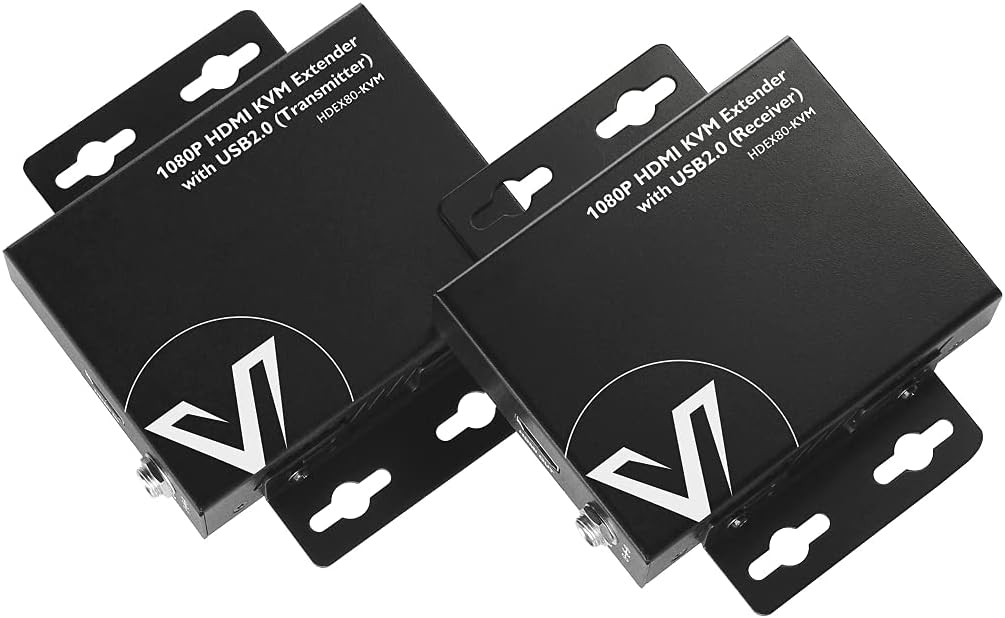


| ASIN | B073B84CY1 |
| Actuator Type | Push Button |
| Best Sellers Rank | #101,841 in Computers ( See Top 100 in Computers ) #222 in KVM Switches |
| Brand Name | v AV Access |
| Circuit Type | 2-way |
| Color | 1080P (HDEX80-KVM) |
| Connectivity Protocol | Ethernet |
| Connector Type | Hdmi,usb-a,rj45 |
| Contact Material | Metal |
| Contact Type | Normally Open |
| Control Method | Remote |
| Controller Type | KVM |
| Current Rating | 2 Amps |
| Customer Reviews | 4.1 4.1 out of 5 stars (135) |
| International Protection Rating | IP54 |
| Item Dimensions | 9.8 x 2.3 x 7.5 centimeters |
| Item Weight | 240 g |
| Manufacturer | v AV Access |
| Material Type | Metal |
| Model | HDEX80-KVM |
| Mounting Type | Rack Mount |
| Number of Items | 1 |
| Number of Positions | 2 |
| Operating Voltage | 12 Volts |
| Operation Mode | manual |
| Switch Type | Slide |
| Terminal | Screw |
| UPC | 300692648871 |
| Unit Count | 1.0 Count |
| Wattage | 6.3 watts |
R**N
Not often to I grant 4 stars. But the only problems I had with this thing is what is the lack of knowledge base thats publicly available to it. I am in IT, this is what I do. To me, a tech savvy guy... This thing was a pain in the ass. So heres the good and the bad: The good: Easy to setup Works when finished 0 Latency The bad: Lack of publicly available knowledge base regarding this product for troubleshooting USB functionality does not cover usb 3.0, I think it's at 1.0 but I could be mistaken since the last time I checked the specs. I spent hours on the phone with their support trying to get this to work. We eventually discovered that there is only 1 known type of display to HDMI cable that works with this system. which is the UGREEN Display to HDMI cable. The product works! But make sure that you have every bit of detail about what you are plugging into your machine before making this purchase. It does not support usb 3.0, so some of your accessories might not work. Very specific cables are needed under different circumstances.
B**E
These are actually great quality and worked well. Want to extend an HDMI monitor, mmouse and keyboard, this worked. Great packaging, solid and take a small footprint.
S**T
I'm very impressed that it meets all of the functional requirements. First time, everything worked! Source: Mac Book Pro M2 with two USBC ports with cables for the 2 HDMI cables and the USB connection Network: 82' Cat 7 cable Receiver: HDMI 1: HDMI to VGA converter with Audio connecting to a KVM switch which shows on a 1080p monitor. I was able to switch between devices and experience no problems reconnecting to the remote machine (unlike other KVM Extenders I've tried). HDMI 2: HDMI to VGA cable with audio connecting to a 1080p monitor. Video and sounds works great! USB1: Connects to KVM USB switch for remote keyboard/mouse operation. Zero Lag! Huge win! USB2: Connects to an iPhone for software development. My Mac & Xcode connected with no problems. No loss of connection for debugging code, etc. USB3: 2nd mouse. USB4: I tried both a Logitech webcam (audio/video) and a HyperX Solocast microphone and both worked without problems. The microphone's better sound quality persisted. I have yet to test using USB3 to connect to the microphone and the USB4 to the webcam (video only) and verify I can use both devices in a virtual meeting. I've used this setup for about 4 hours now. Everything worked - No lag. No issues reconnecting. No video flashing or loss of quality (that I can tell). I maxed out what this product says it could do and it performed.
M**E
Use a SHIELDED cat6 cable when using these. You'll never have an issue. Solid product. Bought 5 direct from manufacturer. Amazon seller overprices these.
E**B
HDEX80-KVM: Games and videos look great with this extender, however, if the screen is busy with small font text, the text becomes noticeably fuzzy with compression artifacts. I'm picky so that's a deal breaker for me. I'm going to instead buy the unit that does uncompressed video. The 4KEX100-KVM video quality is uncompressed and appears perfect. I run a 2560x1440 display at 60Hz. I ran a 50M Cat7 cable. Works great.
Trustpilot
4 days ago
2 weeks ago