🖥️ Elevate Your Workspace with Precision and Style!
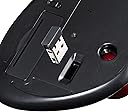
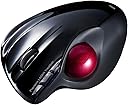
The Sanwa Wireless Trackball Mouse MA-WTB43BK combines modern design with high-performance features, offering wireless Bluetooth connectivity, high-precision movement, and compatibility with both Android and Mac devices. Its rechargeable battery ensures you stay powered without the hassle of disposable batteries.


| ASIN | B00QSZXI28 |
| Batteries | 2 AA batteries required. |
| Customer Reviews | 3.5 3.5 out of 5 stars (102) |
| Date First Available | December 13, 2014 |
| Is Discontinued By Manufacturer | No |
| Item Weight | 3.52 ounces |
| Item model number | MA-WTB43BK |
| Manufacturer | sanwa |
| Product Dimensions | 3.74 x 4.98 x 1.73 inches |
P**Z
great trackball, comfortable and durable
This is the best trackball I've used so far - comfortable and durable. I used to use the popular Logitech one that would break once a year and while it was only $25, it felt wasteful (not to mention annoying) to throw out a trackball every year. This Sanwa trackball is more comfortable for my hand than the Logitech, on top of feeling better made. If you haven't tried a trackball before, they can take some getting used to but unlike my other coworkers and friends (I'm in my mid-30s and do computer work all the time), I don't have any wrist, arm, or hand problems thanks to using this instead of a mouse. It really is ergonomically better and will help tension in your wrists. Give it a try -- this one is a good place to start!
C**N
Best I could find since Logitech Trackman has been discontinued
I've been struggling to find a replacement to Logitech's discontinued Trackman trackball. So far, this is the best replacement I could find, even though I tried quite a few trackballs. In fact, I am purchasing another one for my second computer. PRO: Tracking is very precise. There is a speed switch button (that I do not use, but YMMV) that toggles slow/fast pointer move, and in quite a sensible range. The device is also very comfortable in my hand (I am a man with the glove size L, for a reference). The feature I especially like is the contoured body support for the ring and pinkie fingers, so it feels quite snugly in hand. I think the rests may be a little bit too wide for a smaller hand, however, but that's very individual. The force on the buttons is about same as on the Trackman, so for me it is comfortable to both rest my fingers on the buttons without accidentally clicking, and hold the button for a prolonged dragging without an accidental release. Also, it looks like there is not a wired model of this, but I had not replaced the battery in 4 months of active use. CON: Middle button action of the wheel is okay. It takes a bit more force than Trackman. It also has a left/right click gestures on it, and it is not quite easy to avoid clicking these when intending to do a straight down middle click. This is the reason I am taking one star off. Also, the rubber pads at bottom are coming off, but this is a common problem with any trackball, the Trackman included. A polyurethane glue (e. g. Gorilla Glue Original) solves that once and for years, just follow the glue directions carefully.
J**K
Okay For What It Is
This wireless trackball mouse is okay so far. I had to use a trackball from an old mouse that went bad and it seems to work better. It cannot be more than a foot from the dongle or it will lose signal and start to work sporadically. I've had it about three weeks at the time of this review and one of the buttons sticks occasionally. I have a medium size hand with longer fingers and it fits as well as the Logitech did. If you have a large hand I would not recommend this. I will probably try a different one or go back to Logitech the next time I need to replace it. It is decent enough for the price.
A**E
Best Trackball (so far)
comfortable, easy to set-up. (there isn't much to set up). Only issue that I am having is that it occasionally freezes and needs to be turned off and turned back on or the usb receiver removed and put back in. My Japanese is not very good so the "instructions" are useless. Hoping that the durability will far surpass that of the similar Logitech model that had a life expectancy of about 6 months. Well, had this for FOUR months and today it is dead!! Too bad. It was working out quite nicely
R**Y
Buy it
Great feel in my hand, easy to learn how to use, fast working.
R**.
Died in a month
Bought it in April and it died in May. It froze up occasionally in between. The Logitech will at least last a year, that's 12x better and yet still well below expectations. The trackball is a bit wider and actually a bit better fit for my hand compared to the Logitech M570. The buttons have a good feel, but I can't say that they will last ( a problem for the M570 ).
H**S
Great item for any computer user.
I don't know why I waited so long to get one of these Trackball Mice. It makes things a lot more easier to work with on the computer.
B**.
Very nice trackball
Very comfortable to handle. Very smooth-rolling ball - much moreso than current Logitech trackball. Clicks a little louder than I'd like, but not a big deal. Was very easy to install. As mentioned before, the space for 3rd and 4th fingers are very narrow - I keep thinking I have a stray pen on the desk next to the mouse! - no big deal, though. However, there's one button on the mouse that I can't figure out - the one furthest forward. It seems to accelerate mouse speed beyond control very quickly, with no apparent way to reverse it. The manual that comes with it is NOT multi-lingual, purely Chinese, so I can't find any explanation on how to use that button. I'll just have to avoid it. Overall, though, this has been a great replacement for my Logitech trackball, with which I got sick of having to hear the literal scraping of the ball during any movement (and yes, I cleaned it and everything else I could find, have tried to lubricate it with all the suggested tricks).
ア**ー
ボールの引っかかりありません、反応も良く、使いやすい。 価格も安くなっていてお買い得でした。
A**O
Fantastico prodotto. Inizialmente diffidente ma una volta preso la mano non si torna indietro. Ci vuole un po per arrivare
A**R
トラックボーラーとして使ってみても不満は無いです M570と比べても ただたまにカーソルがワープするのは細かくセッティングなり専用ドライバを入れてないからかは不明 使ってるハードスペックの問題も絡みそうなのでそこらは許容 まM570はそんな事は無かったけれども
ヒ**キ
最初に見たときに印象的だったのが、赤と黒の塗装の美しさ! 形もカッコイイし手にちょうどフィットするから、すぐに気に入りました! トラックボールは初めて使うんだけど、案外慣れる! ただ、慣れる以上に、普段使ってるマウスが恋しくなるから、結局普段のマウスを使う事が多い!
な**ら
【欠点】 自動調整機能がじゃま。 実はチルト機能があるのにドライバが提供されていないのでExcelとかで使えない。 【利点】 ん?なに?なんかいった? -------- 【ボディ】 ホールド感は悪くない、自然に手が乗る感じ。手首右側の机との設置部分に荷重が集中する気がするが、手との相性があるのかもしれない。 親指部は、マットなさらさらした感じ、他指4本部は多少光沢はあるもののやはりさらさらした感じ。 机との設置面の滑り止めのラバーがいまいちな感じがする。 【ボール】 普通に回る。 ただし、ボールのホールド自体に遊びが多少あるので、せわしなくボールを動かしたときなどにガタツキみたいなものを少し感じる時がある。 支持球はセラミック? 【ボタン】 右、左ボタンは、とてもクリック感が良い。結構カチカチと音がするので気になる人または、気になる人が周囲にいる場合は使えないかもしれない。 戻る、進むボタンは、位置的に好みが分かれるだろうが、戻るボタンなら使える。進むボタンはカウント切り替えボタンを間違って押すことが多い気がする(カウント切り替えボタンがすごく出っ張ってる) 【ホイール】 好みによるだろうが、わたしの好みで言えばもう少し軽く回転してほしい。 特に説明はされていないが、チルト機能がある。あるがドライバが無いので殆ど役立たず。 【カウント数自動調整機能】 いらない。いらない。いらない。 いらないよね? 【ワイヤレス機能】 特に問題ないが、わたしの使用環境がレシーバと20cmも離れていない(しかも木の机)ので安定性があるかはわからない。 【電池の持ち】 まだわからん。 結構頻繁にスリープモードに入っているようなのでもしかしたら結構持つかもしれない。 (スリープに入るとボールの動きは認識しない。左クリックでもしてあげて起こしてあげる必要がある) -------- 【総評】 ELECOMが「握りの極み」出したからあわてて出した? MA-TB39BKに戻る、進むとチルトつけて出してくれればいいんですよ!
Trustpilot
3 weeks ago
1 month ago