We remain fully operational. Our teams are working around the clock to ensure your deliveries continue safely.

DOWNLOAD THE APP


Copyright © 2025 Desertcart Holdings Limited
DOWNLOAD THE APP







Buy anything from 5,000+ international stores. One checkout price. No surprise fees. Join 2M+ shoppers on Desertcart.
Desertcart purchases this item on your behalf and handles shipping, customs, and support to Vanuatu.
✂️ Scan, Cut, Create—Crafting Just Got Smarter!
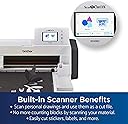
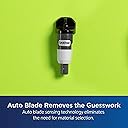
The Brother ScanNCut SDX85C is a professional-grade electronic cutting machine featuring a unique built-in scanner, 251 ready-to-use designs, and an auto blade that cuts materials up to 3mm thick. Designed for millennial makers and DIY pros, it offers wireless connectivity, a 3.5” touchscreen, and seamless integration with Brother sewing machines, empowering you to craft custom vinyl art, appliques, cards, and more with precision and ease.


| ASIN | B08HJNVY3P |
| Active Surface Area | 7 square inches |
| Best Sellers Rank | #120,726 in Arts, Crafts & Sewing ( See Top 100 in Arts, Crafts & Sewing ) #122 in Scrapbooking Die-Cut Machines |
| Brand Name | Brother |
| Color | Charcoal |
| Customer Reviews | 4.4 4.4 out of 5 stars (1,681) |
| Included Components | 12x12” Std Tack Mat; Auto Blade&Holder; Spatula; Stylus; Accessory Bag; Guide |
| Item Dimensions D x W x H | 11.8"D x 24.6"W x 11.3"H |
| Item Type Name | Brother ScanNCut SDX85C Electronic DIY Cutting Machine with Scanner, Make Vinyl Wall Art, Appliques, Homemade Cards and More with 251 Included Patterns |
| Item Weight | 1 Pounds |
| Manufacturer | Brother International Corp |
| Material Type | Plastic |
| Model | SDX85C |
| Operation Mode | Automatic |
| Part Number | SDX85C |
| Print media | Unknown |
| UPC | 012502663904 |
| Unit Count | 1.0 Count |
| Warranty Description | 1 Year Limited |
J**W
best craft shop upgrade
i was on the fence about which machine to purchase when it came to the cricut maker and the brother sdx. after so much research, going through pro’s and cons of both machines i really leaned towards the brother machine. both being costly i really wanted to make sure i was making a good investment for my business. I love that the brother scans your image and sends it right to your computer where you can see what you’re working with on your mat. I print messages in specific fonts for card fronts, place the printed image onto the card mat, scan it in to my computer, and that’s where i place cut files over top of the printed image to create the perfect greeting embellishments. this machine can do way more than just that as well. this machine works amazing for what i purchased it for and i do not regret it one bit.
T**Y
Brother SDX85C feels like the right choice
I have not owned a Brother machine of any kind in decades! My last was a typewriter that I really liked. Lol. I spent a vast amount of time searching for my first cutting machine. I didn't want anything that required a paid subscription, which eliminated the more well-known brand and I was fine with that. So when I first saw a YouTuber demonstrating this Brother ScanNCut SDX85C, I felt like this was the way to go. The scanning ability was the first thing to grab me because I like having versatility. So even though most of my projects will be uploaded to my cutter by way of a USB flash drive, I know that scanning will offer a great alternative for templated projects and patterned materials to be stored onto my flash drive, then uploaded to my Mac for use. I have not used my SDX85C heavily yet, as I am still selecting proper materials for my projects, but I did create the enclosed gift/treat box and it came out perfectly. The instructions were easy to follow, placing and removing the cardstock from the included mat went well too. Each cut was clean and precise. However, I did experiment a little bit by making a tree that I found in the Brother library. I only had a lighter-weight cardstock on-hand and the mat ended up being too sticky for it. So it was a chore removing every bit of the design and excess paper from it, but that was the chance I took. Now I know for that particular cardstock, I'll need to use a light tack mat or find another solution. But I don't blame the machine or the provided mat. My inexperience caused that inconvenience. Plus, the cardstock wasn't coated or textured like the enclosed sample, so surely, that had a lot to do with it. Using the display panel has been easy to understand. There are many shapes and project guides accessible through the touch screen and the Brother CanvasWorkspace. One YouTuber who does how-to videos for Brother cutting machines demonstrated that there are more design options when working through the offline version of the CanvasWorkspace as opposed to the online version. My intention from the very start was to only use the offline version, so I was happy to hear that. I have plans to use my machine for creating projects out of many different types of materials so having the auto-blade included is such a convenience. With a cutting depth of 3 mm, that will be sufficient for every type of material that I can think of, that I would want to cut with this machine. Anything else that is thicker that I care to work with, is generally much harder, so I'd use a laser cutter for such projects. I love that there are two compartments inside of the door where I can store the tools that I will use most often. I can even fit my 8" bookbinding bone folders in the left compartment, along with my rotary cutter and other smaller tools. The cutting surface is an ample and appropriate size for everything that I currently have in mind to cut. Be aware that at times, the cutting mat will shoot part way out the back of the machine to readjust the alignment for certain sections of your material. So be sure to have space to fully extend the rear tray about 3" and another 4-6" for the protrusion of the cutting mat beyond that. Overall the unit does have a large footprint so plan for that. As far as noise, I find it to be at a level that is not bothersome at all. I actually enjoy the sounds of my various machines working hard on my behalf so I may be partial. But the sound definitely isn't overbearing or likely to drown out conversations, TVs, etc. To date, the only complaint that I have is that the mats are quite pricey, especially when compared to other brands selling as multi-packs for the same price or less. I wish that Brother would have also included a light, heavy-duty, and fabric mat. Perhaps the higher priced models do or you'd have to catch a bundling deal, which I didn't. Other than that, I'm not a fan of hard-tipped styluses. I prefer the soft, rubbery tips. So I bought a set to replace the included stylus and purchased some additional hand tools as well. I know that once I really dive in, I'm going to be using my cutter on a daily basis. I'm already planning to get the adapters for foiling and freehand drawing/writing, and who knows what else is out there to expand its already great level of functionality! I'm looking forward to all that I will learn about my machine's capabilities after all this time of dreaming up ways that I'd like to use it, and the multitude of beautiful items that will be created. So far, I am very happy with choosing the Brother SDX85C, and knowing the expansive lengths that my designing mind will go, I'm really hoping that this machine can take me there every step of the way.
J**D
Is “life changing” too cheesy?
In May of last year I started a sticker business to pass the time during the stay at home order and it unexpectedly took off. I would spend hours cutting stickers by hand, and after much research between the Cricket and Silhouette Cameo 4 decided to get the Cameo on Black Friday (let me note that despite multiple searches for a scanner/cutter like this, this never showed up). Well, after a week of it failing to register & multiple phone calls to it support, it still wouldn’t work so I exchanged it for another one thinking that would help. Cut to three months later and hundreds of frustrated hours later and it still hadn’t cut a single sticker, even after buying a pixscan mat. This just happened to pop on my tik tok page of all places, and after some quick research the next day I took the Cameo back and ordered this. Within five minutes of getting it I had already cut the test pattern it came with, and was cutting stickers. My stickers are image based, and this reads it perfectly, and the .08 border seems to look best. There’s a few that have white spots towards the edge, so if upping the color reader to the max 20 doesn’t work (it rarely doesn’t) I just had to throw a quick 1 pixel border around them in photoshop, then set it cut -.05 inside said border and that also works great for keeping the white border look. Ive had this six days and basically cut my work time down by 80% and have cut thousands of stickers already. I did see some complaints about the standard adhesive mat it comes with being too sticky, but mine actually lost stickiness after a day, so now I use a tiny roll of masking tape on each corner then roll it down flat and its worked perfectly. The scanner glass is also very easy to clean if a stray piece of vinyl ends ip sticking to it after a complicated cut. There no wifi or software setup needed, which is also a great bonus as theres having to deal with registration marks. I can’t talk this up enough, and I wish I’d known about it months ago.
T**Z
Me encanta, fácil manejo, de las mejores del mercado.
A**Z
Excelente marca Excelente tanto para una persona que va empezando hasta una ya con más experiencia, el poder manipularla es muy sencillo
O**O
Excelente equipo, podría decir que es el mejor de su categoría (cortadores digitales de escritorio) por la integración del escaner, el plug-in con Adobe Illustrator, la interfaz del equipo es tan inteligente que funciona solo sin una computadora o móvil. Comparado a otros (Cameo) este equipo es intuitivo, preciso, conveniente, silencioso, escalable, multi-propósito, bello. Los creadores deberíamos dar Gracias Brother! por éste equipo. Neta.
D**L
Looked brilliant value for money, unfortunately listing did not specify the unit was 100-120V only, as this was lacking I expected the unit PSU to be dual voltage with a switchable supply (normal for electronic items) also the packing looked like it has done the rounds on some previous return as the actual machine supplied was a SDX125, and there were no accessories at all. Fair play to Amazon they provided a no quibble return, just waiting for the funds to turn up in my account. I'm sure the machine would have been wonderful as is the SDX1200 I went on to buy from Amazon locally supplied. (Although twice the price).
A**R
Once I figured out to activate and connect everything, it did exactly what I purchased it for. Cuts any design that I want. I found many images online and just sent them to the cutter and voila, perfect stencil every time! It's a little pricey for the machine and supplies, but just what I have been looking for!
Trustpilot
1 month ago
2 weeks ago