Buy anything from 5,000+ international stores. One checkout price. No surprise fees. Join 2M+ shoppers on Desertcart.
Desertcart purchases this item on your behalf and handles shipping, customs, and support to Vanuatu.
⌨️ Light up your productivity with style and precision!
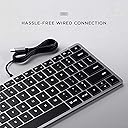
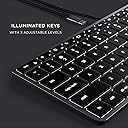
The Satechi Slim W1 Wired Backlit Keyboard is a premium, compact keyboard designed specifically for Apple users and compatible devices. Featuring a USB-C plug-and-play connection, adjustable backlit keys, and a sleek aluminum build, it offers a quiet, tactile typing experience with MacOS-optimized function keys. Perfect for professionals seeking a stylish, reliable, and ergonomic typing solution backed by a 2-year warranty.


| ASIN | B08Q23G9QW |
| Antenna Location | Multimedia |
| Best Sellers Rank | #1,023 in Computer Keyboards |
| Brand | Satechi |
| Built-In Media | User Manual |
| Button Quantity | 78 |
| Color | Space Gray |
| Compatible Devices | MacBook Pro 14/16-inch (2026 M5/M3/M2/M1), MacBook Air 13/15-inch (2026 M5/M4/M3/M2/M1), MacBook Neo 13-inch (2026), iPad Pro 11/13-inch (2025 M5/M4/M3/M2/M1), iPad Air 11/13-inch (2026 M4/M3/M2/M1), iPad Mini (A17 Pro/6), iPad (A16/10th Gen), iPad Pro 12.9-inch (6th/5th/4th/3rd/2nd/1st gen), iPhone 17, iPhone Air, iPhone 17 Pro, iPhone 17 Pro Max, iPhone 16/15/14/13/12 Series, Mac Mini (2024 M4/M2/M1), iMac (2024 M4/M3/M1), Mac Studio (2025 M4/M3/M2/M1), Lenovo ThinkPad, Microsoft Surface, Google Pixelbook, Google Pixel Pro 8/9, Samsung S24/Z Flip 5 Compatible Devices MacBook Pro 14/16-inch (2026 M5/M3/M2/M1), MacBook Air 13/15-inch (2026 M5/M4/M3/M2/M1), MacBook Neo 13-inch (2026), iPad Pro 11/13-inch (2025 M5/M4/M3/M2/M1), iPad Air 11/13-inch (2026 M4/M3/M2/M1), iPad Mini (A17 Pro/6), iPad (A16/10th Gen), iPad Pro 12.9-inch (6th/5th/4th/3rd/2nd/1st gen), iPhone 17, iPhone Air, iPhone 17 Pro, iPhone 17 Pro Max, iPhone 16/15/14/13/12 Series, Mac Mini (2024 M4/M2/M1), iMac (2024 M4/M3/M1), Mac Studio (2025 M4/M3/M2/M1), Lenovo ThinkPad, Microsoft Surface, Google Pixelbook, Google Pixel Pro 8/9, Samsung S24/Z Flip 5 See more |
| Compatible Operating System Family | iPadOS |
| Connectivity Technology | USB-C |
| Customer Reviews | 4.1 out of 5 stars 584 Reviews |
| Enclosure Material | Aluminum |
| External Testing Certification | 16364859011 |
| Global Trade Identification Number | 00879961009069 |
| Hand Orientation | Ambidextrous |
| Item Dimensions L x W x H | 11.18"L x 4.49"W x 0.43"H |
| Item Weight | 299 Grams |
| Keyboard Backlighting Color Support | Single Color |
| Keyboard Description | Wired |
| Keyboard Layout | QWERTY |
| Keyboard Plate Material | Aluminum |
| Manufacturer | Satechi |
| Mechanical Keyboard Switch Model | Cherry MX Tactile |
| Mfr Part Number | ST-UCSW1M |
| Minimum Required Operating System Version | Mac OS 10.12 Sierra |
| Model Name | Slim W1 Wired Backlit Keyboard |
| Model Number | ST-UCSW1M |
| Number of Keys | 78 |
| Number of Sections | 1 |
| Power Source | Corded Electric |
| Recommended Uses For Product | Multimedia |
| Series Number | 11 |
| Style Name | W1 |
| Switch Type | Tactile |
| Theme | Modern |
| UPC | 879961009069 |
| Unit Count | 1.0 Count |
| Warranty Description | 2 Years Manufacturer Warranty |
A**R
Great keyboard with a minor backlight issue
I put my laptops in vertical stands and was looking for a replacement keyboard. I have both a Mac and Windows PC. First I tried a mechanical keyboard, the the Keychron C2 with the blue switches and that was loud. It’s a really high-quality keyboard and I’d highly recommend it if you don’t mind the click-y noise of a mechanical keyboard. Then I tried the Cherry 6000 which was quieter but made a tinny noise when I typed. It was a good keyboard for typing and seemed to be well-made, but the noise was annoying. Maybe it was just defective, I don’t know. Finally I tried this one and I really like it. Its solid and has all a full keyset, but it’s a compact form factor, so it fits on my desk really well. It’s flat and heavy and I don’t mind the risers for a little angle. It’s very quiet and the key action is really good—it’s great for typing on. The only minor issue is the backlighting. The light is really bright under the top rows of keys and bleeds through under the key caps. It also flickers randomly when the computer is asleep, which is kind of weird. (This doesn’t happen if you keep the backlighting turned off, which I do, unless I really need it late at night.). The keys are very easy to see, even in low light. Bottom line: I’d definitely buy this keyboard again and would recommend unless the backlight is really important.
A**B
Great product!
I am so thankful that I found this keyboard! I looked through so many different options both on and off Amazon, and I’m very happy I went with this one. I recently purchased a MacBook Air M2, and although the keyboard works perfectly, I have long, fake nails and needed a keyboard with a little “deeper” keys (hopefully that makes some sense). It connected seamlessly to my MacBook when I plugged it in, and I can type so much easier on it with my nails. It’s not the most ergonomic keyboard, it’s just flat, but nothing a padded mousepad can’t fix. It’s very sturdy and solid material. I love that it has 10-key ability too. I guess I didn’t pay close enough attention to the attachment cable, and I thought I’d have to purchase an adapter for it to plug in to my laptop, but thankfully, that wasn’t the case! Highly, highly recommend.
R**T
Great but Satechi needs to make a couple of small adjustments
Overall very happy with the keyboard, but there are two points of pain that Satechi needs to address. Both have to do with the backlight. First, they need to lower the keys. With the light on, and the keyboard laying flat, the backlight is glaring under the function keys. One should not see the lights coming from under the keys. It does ruin the aesthetic and is annoying at times. The second item is the backlight timer. Satechi needs to make a small change in the firmware to either allow control over the backlight from the system (macOS) or have an 'always on' option mechanically. Nothing more annoying than to have your backlit keyboard go dark after just a few minutes. It's wired, so energy should not be a worry. Beyond those two things the feel is good, looks good, and so far I have had no issue with response or function in the myriad of things I do at the keyboard.
M**O
Decent mid-range keyboard
Overall, this is a perfectly fine keyboard that sits between the Macally Slim and the Apple keyboard in terms of quality. It looks great, and it's really nice to have the option to make the keys light up (though light does creep out from the bottom of the keys, which can be annoying). Generally speaking, it's a decent experience to type on, and the ability to add the stick-on feet is useful, though it would have been nicer if there were a built-in lift so that you could have the option to raise or lower it, but that's not a big deal. After using this for a month, I had to buy an Apple keyboard for one main reason: the keys are too slippery. I was just frequently mistyping, and it was driving me crazy. It's not like your fingers are going to fly off the keyboard, but the Apple keyboard uses a different type of material on the keys that just slightly helps your fingers stay planted, and that makes all the difference. So yeah, I missed the return window and had to plunk down more money for another keyboard, derp! One possible fix would be getting one of those silicon keyboard covers... but I didn't bother. The other thing that is slightly annoying is that there is a little wiggle in the keys, which isn't a big deal, but just doesn't feel as quality and doesn't feel as good when typing. So, if the things I mentioned above don't bug you, then this is a great alternative to the Apple keyboard, and I'd def recommend it over the Macally that I first tried out (which also had the escape key fall off day one). But the real recommendation is just bite the bullet and get an Apple keyboard if you want a slim keyboard that works well. (Also, PS, I wouldn't recommend the Amazon refurbished Apple keyboards... I tried 2. One had the return key fall off, and the other was warped so it wouldn't sit completely flat on the desk. Also, I've never had a key fall off a keyboard in my life, and then twice in one month??? WEIRD.)
W**D
Compact, good key travel (touch) and backlight works well.
The "s" and "g" on may M1 MacBook Pro quite responding and before I could get it to Apple I spilled some liquid on it which met it wouldn't qualify for warranty. I tried the Macally full size USB keyboard I had for my Mac Mini but it was too cumbersome, the key travel is too long and it lacked backlighting. The SATECHI is compact and the key travel is very close to the same as the MacBook Pro and the backlighting works well. I purchase the SATECHI mouse at the same time. The mouse connector is quite a bit longer than the keyboard connector and doesn't fit as snuggly in the port. (see image) The mouse works OK but I prefer the feel and responsiveness of my Microsoft mini laser mouse. The cables for both the mouse and keyboard are pretty stiff which means they don't lay flat and look a messy on the desk.
Z**C
Excellent alterative to Magic Keyboard.
Excellent keyboard. Feels very much like Apple's Magic Keyboard. I actually prefer typing on this keyboard more than Apple's keyboard, and I love that I don't have to worry about batteries or annoying Bluetooth notifications. Keyboard lighting also works great. My only complaint is that it doesn't have a dedicated Launchpad button, like Apple's keyboards. Unless this one thing is a big deal to you, save yourself 70%, and buy this keyboard.
W**E
High-quality, Apple compatible backlit kkeyboard except for ONE HHUGE DEEFECTT!!
I received a replacement and that unit suffers the same problem with improper de-bounce. so you get lots of duplicated key-presses. A google search reveals a Macworld article titled "Satechi Aluminum Bluetooth Keyboard with Numeric Keypad review: A good Magic Keyboard alternative" Quote: //Keystrokes would sometimes repeat, making typing all but impossible. I found I could eradicate those issues on a PC if I kept it plugged in, but I had no such luck on a Mac. And at any rate, keeping a Bluetooth keyboard plugged in kind of defeats the point of a Bluetooth keyboard.// I HAVE THE WIRED W1 VERSION IT"S IMPOSSIBLE TO USE BECAUSE OF KEY PRESS DUPLICATION . I contacted Satechi support and they replied that this device is only compatible with a 2018 or later Mac thunderbolt port, and I didn't read the fine print carefully. Yet Satechi offers a type-C to type-A adapter! According to Satehchi, it's completely reasonable to require committing a 20 gigabit/s I/O port to a 5 bit/s keyboard and my-bad for misunderstanding how this technology works. Also, USB3 is not backwards compatible with previous USB, except when Satechi sells the converter? For fun, I tried it connecting these devices a to a PC type-C USB port and it caused an over-current condition and shut the port down. I am sending the original back to Amazon in exchange for this replacement, and I'm throwing the replacement in the trash and eating the $60 cost. Live and learn. * * * (This is typed on a Satechi Slim W1) Problem with inadequate de-bounce means lots of dupllicate characters. How cann the problem of de-bounce still not bee be solved!! Did I inntend to type these dups? Or is the keyboard adding them on itss own? Too bad because the kkeybooard iss very good ootherwise. Excellent mmaterials and quality feel. Apple layout with helpful labelling of alt/opt key for Windows part time usse. Stable feet are properly grippy. Backlight is excelllent. Note that the backlight adjustment keys are in the Apple standard location but do not inntegrate with the Apple keyboard driver. The backlight adjustment is handled internally in 4 appropriately spaced steps. BBut this also meanns that 'fn' kkey functionnality is not Apple compatible. These are minor compprommisses. Too bad about debounce nnot working properly. This is an literally an '80s PC problem!
T**E
left shift key no longer works
this keyboard has a nice feel and the backlighting is nice. the only problem is that this keyboard doesn't last very long. i understand that the warranty is 2 years but for the price i would have hoped that it would have lasted longer. after almost exactly 3 years of light use, the left shift key no longer works as evidenced by the lack of capitalization in this review. i don't think i'll be purchasing this again.
G**G
Excelente
Excelente porém achei que era sem cabo kkkk
N**A
Dopo 9 mesi di utilizzo, non potrei chiedere di meglio
Dopo nove mesi di utilizzo quotidiano, posso finalmente dire di aver trovato la tastiera perfetta per me. Ho sempre cercato una tastiera che rispondesse a tre criteri fondamentali: compatibilità piena con macOS, layout internazionale (americano) e una sensazione di scrittura simile a quella di una tastiera meccanica, ma senza la necessità di manutenzione e senza rinunciare alla compattezza. Questa Slim W1 con cavo USB ha superato ogni mia aspettativa. Vengo da anni di utilizzo della Logitech K780 che ho sempre considerato un riferimento per comodità. Eppure, da quando ho iniziato a usare questa tastiera, la differenza è stata evidente. La corsa dei tasti è precisa, il feedback alla pressione è soddisfacente e il comfort di digitazione è tale da rendere difficile tornare a usare la tastiera del MacBook, anche solo per poco tempo a tal punto che quando viaggio me la porto con me pur di non rinunciarci. La costruzione è solida: se la si torce non si piega, non scricchiola e non emette suoni indesiderati, nemmeno sotto una pressione più decisa. Nonostante io abbia una digitazione poco ortodossa nell'uso della barra spaziatrice (uso per abitudine il solo pollice sinistro) dopo mesi di utilizzo quotidiano non si è minimamente deformata né ha dato segni di cedimento. La tastiera è bassa e molto stabile. Vengono comunque forniti due piedini di gomma aggiuntivi, alti circa un centimetro, per chi preferisce una maggiore inclinazione. Personalmente non li utilizzo, ma è una questione soggettiva. Penso che l'unico aspetto migliorabile sia la gestione della retroilluminazione: non sembra mantenere in memoria il livello di luminosità impostato che torna al massimo a ogni riavvio del sistema. Personalmente non lo trovo un difetto rilevante, anche perché la retroilluminazione è ben calibrata e non risulta mai fastidiosa, nemmeno in ambienti bui. Una cosa che ho particolarmente apprezzato è che le dimensioni della tastiera sono identiche a quelle della tastiera incorporata nel mio MacBook Pro da 14": questo la rende immediatamente familiare e perfetta per chi è abituato al formato compatto dei portatili Apple. La differenza si nota però nella qualità della scrittura: la corsa dei tasti è più profonda, simile a quella dei vecchi MacBook e conferisce una sensazione molto più appagante alla digitazione. Segnalo anche che, a differenza delle ultime tastiere Apple, i tasti freccia sinistra e destra sono a grandezza piena come gli altri tasti e non ridotti alla stessa altezza di quelli su e giù. Lo segnalo visto che per alcuni potrebbe essere un problema. Infine, un dettaglio marginale ma da segnalare: il tasto “Eject” in alto a destra, ormai inutilizzato sui nuovi MacBook, rimane lì senza reale funzione. Non è un problema, ma è bene saperlo. La lunghezza del cavo usb è di 150 cm ed è rivestito in plastica nera lucida semi rigida. In definitiva, questa tastiera rappresenta per me un equilibrio perfetto tra funzionalità, qualità costruttiva e comfort. Un acquisto che rifarei senza esitazione.
B**U
An excellent keyboard
This is a very high quality, great keyboard. Having tried both the X3 and the W3, I would say this (the W3) is just slightly worse than the X3 (the bluetooth version) in a couple of ways, but is definitely better in one way. In terms of ways in which the W3 is (slightly) worse, firstly the W3 has only 3 brightness levels where the X3 has 10. (However, they 3 levels are still well chosen, and the darkest is not too bright.) Secondly (and slightly weirdly), on the W3 then £ and # symbols are printed the wrong way round on the 3 key. (Since this is basically a US layout keyboard, the # symbol should be printed at the top of the key, not to the side, corresponding to the symbol accessed when pressing shift, as is done on all the other numeric keys on this keyboard, and indeed as is done on the 3 key on the X3, which has the same layout!) Related to this, I (again, only slightly) prefer the X3's key labelling, where they just haven't bothering to include the ALT (€ and £) symbols on the 2 and 3 keys at all, I prefer this as it makes the keyboard look slightly neater and less cluttered. Nevertheless, if you're only going to use the keyboard wired, I'd still get this one, even though the X3 can be used in wired mode. In particular, and one key reason why the W3 is better, if you're the kind of person who regularly uses Del/F2/F12 to break into the BIOS menu, then definitely get this wired model, the W3, as *even when used wired* the X3 cannot consistently do this, and (not always, but often, half the time or more) causes the BIOS to report that there is no keyboard attached. To point out another (very minor) imperfection shared by the X3 and the W3, the lighting on these keyboards is just not quite as beautiful as the lighting on a real Mac laptop keyboard - specifically, there are small overly bright spots here and there around the keys, where the light shows through too much, rather then the really uniform lighting around the keys on real Mac laptop keyboards. Nevertheless in build quality, in looks, and even in the above-mentioned quality of the lighting, this and the X3 are _way_ better than any of the (several) other illuminated external keyboards for the Mac which I have tried recently. Finally, the X3 booklet documents this, but the W3 booklet does not: fn+ESC is the way to swap the default behaviour of the function keys, between multimedia key or function key behaviour. The same key combo works on both keyboards.
不**王
USB-Cケーブルとキーボード本体の接続部分が急所?
MacBookAirをクラムシェルモードで使用するために、3年半前に「Satechi アルミニウム USB-A 有線 キーボード テンキー付き(US配列, シルバー)」を購入。打感のみならず外観も大変気に入っていたが、突然、USB-Aケーブルとキーボード本体の接続部分が接触不良となり、今回こちらの製品を購入。使い勝手は変わらず、とても良い。しかしながら、USB-Cケーブルとキーボード本体の接続部分に同様の接触不良が生じないよう、取り扱いには注意が必要。この接続部分もUSB-C接続であれば文句なしです。
A**ー
コンパクトなのに本体がアルミ製で安っぽさがありません
iMacに繋いで使っています。 基本的にはMac用のキーボードだと思います。 まずテンキーがないのでApple純正よりコンパクトなのが有り難いです。 それと本体がアルミなので安っぽくありません。 他のコンパクトなキーボードも色々買ってみたのですが どれも本体がプラスティックで安っぽく、使う気になれませんでした。 このキーボードはその点、高級感があり愛着も湧きます。 私は付属の大きなゴム足と取り付けて角度を付けて使っています。 少し野暮ったくなりますが裏側を見ることはほとんどないので気になりません。 最近のAppleのデスクトップ用キーボードは薄さを追求しすぎて 平べったくて逆に使いにくくなっていると思います。 私の使い方ではバックライトを使うことはあまりないのですが 暗いところでは重宝すると思います。 USキーボード配列であるところもスッキリしていて好きなのですが JISキーボード配列に慣れている人には逆に使いにくいかも知れません。 入力機器は毎日かなりの時間使うものなので、やはり良いもの 気に入ったものを使いたいものです。予備として2台目も購入しました。
Trustpilot
1 month ago
1 week ago