Buy anything from 5,000+ international stores. One checkout price. No surprise fees. Join 2M+ shoppers on Desertcart.
Desertcart purchases this item on your behalf and handles shipping, customs, and support to Vanuatu.
🚀 Stay connected, stay ahead—your pocket-sized 4G powerhouse!
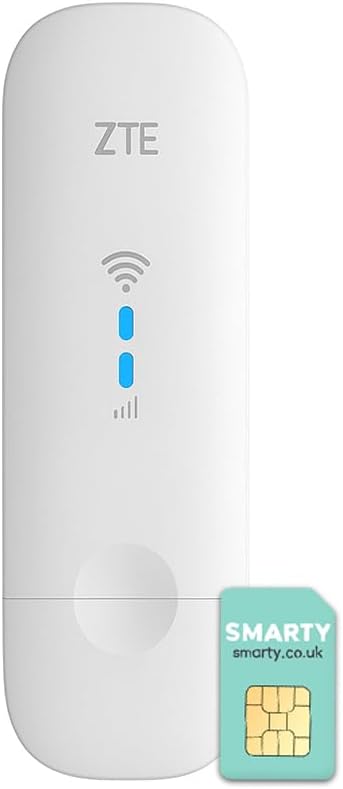
The ZTE MF79N is a compact, unlocked 4G LTE USB modem and WiFi hotspot that delivers up to 150 Mbps download speeds. It supports up to 10 devices simultaneously, powered via USB for ultimate portability and ease of use. Ideal for professionals and travelers seeking reliable, high-speed internet on the go, it features external antenna ports and a sleek design backed by a 2-year warranty.


| ASIN | B08WPXRTRL |
| Antenna Location | Home |
| Antenna Type | Internal |
| Best Sellers Rank | 5,048 in Computers & Accessories ( See Top 100 in Computers & Accessories ) 14 in Mobile Broadband Devices |
| Box Contents | 1 x Quick Start Guide, 1 x SIM Ejector, 1 x USB Charging Cable, 1 x ZTE MF79U (white) |
| Brand | ZTE |
| Brand Name | ZTE |
| Colour | White |
| Compatible Devices | Laptop, Personal Computer, Smartphone, Tablet |
| Compatible devices | Laptop, Personal Computer, Smartphone, Tablet |
| Connectivity Protocol | Wi-Fi, USB |
| Connectivity Technology | USB, Wi-Fi |
| Control Method | Touch |
| Controller Type | Touch, Computer/Laptop |
| Country of Origin | China |
| Customer Reviews | 4.1 out of 5 stars 1,021 Reviews |
| Data Transfer Rate | 150 Megabits Per Second |
| Frequency | 2100 MHz |
| Frequency Band Class | Single-Band |
| Frequency band class | Single-Band |
| Has Internet Connectivity | Yes |
| Has Security Updates | Yes |
| Is Electric | Yes |
| Is Modem Compatible | Yes |
| Item Dimensions L x W x H | 10.2L x 3.1W x 1.4H centimetres |
| Item Type Name | Dongle |
| Item Weight | 0.04 Kilograms |
| LAN Port Bandwidth | 100 Mbps |
| Manufacturer | Livewire Telecom Limited |
| Manufacturer Part Number | MF79U |
| Maximum Upstream Data Transfer Rate | 50 Megabits Per Second |
| Model Name | MF79U |
| Model Number | MF79U |
| Model name | MF79U |
| Number of Antennas | 1 |
| Number of Ports | 2 |
| Operating System | ZyNOS |
| Other Special Features of the Product | Unlocked; USB; Connect 10 Devices; Compact Design; 4G; |
| Router Network Type | Wi-Fi |
| Security Protocol | WPA, WPA2 |
| Smart Home Compatibility | Not Smart Home Compatible |
| Special feature | Unlocked; USB; Connect 10 Devices; Compact Design; 4G; |
| Unit Count | 1.0 count |
| Wireless Compability | 802.11b, 802.11g, 802.11n |
| Wireless communication standard | 802.11b, 802.11g, 802.11n |
Z**E
Works well with Smarty SIM
So far, very happy with this product. I got the ZTE MF79N, the dongle that allows you to connect up to 10 devices to what looks like a large USB stick. The product can be plugged into a computer OR into a USB charger straight into the wall. I got it to use with the Smarty unlimited SIM and it works very well. The dongle itself does come with a free Smarty SIM which was not clarified in the 'what is included' part. The setup can also be done with a macbook which wasn't clear from the instructions so it works for both PCs and Macbooks. The speed is fast enough to stream HD movies on my laptop and fulfils all of my data needs (I use cloud-based graphics software). HOWEVER, some advice: The Smarty SIM needs to get a strong enough signal in order to work well and it uses EE's network. If you're going to be fairly stationary and especially if you already have an EE phone SIM, you can check the reception of where you're planning to use the dongle on your phone. If you have 2 bars and above, you will have sufficient reception when you use the dongle as all it does is it amplifies that and creates a hotspot for your devices to connect to. Otherwise, I can guarantee that you just won't get reception. The same applies on if you have a different company's SIM and use the same one for your phone. About the range: I'm using the SIM in one room and I get full bars, but once I leave the room and close the door, my laptop and phone can't pick up on the dongle much if at all. This one is very much meant to be used in the room where you are, especially if the walls are insulated. I have yet to take it out on the proverbial road as I've been using it in some temporary accommodation where I don't want to get a proper router. I would say this is good if you're someone single living alone or people travelling in a group. Just don't expect it to work for a big house or even a flat with many different rooms... the signal just won't be strong enough.
S**L
Great buy :-)
Been looking for a dongle for a while now and this by far has been the best. Finally I’m able to connect to a reliable WiFi source and work from home without the connection being lost. I even bought a dongle from curry’s which was returned for to not working. So anyone wanting a reliable dongle is strongly recommend.
B**N
You can't get native IPv6 connectivity over this device.
Not 100% happy. It's an RNDIS device which does not offer any bearer IP to the host, and is locked to ZTE's proprietary forwarding plane; there is no e.g. PPPoE over USB CDC ACM for you to use. So you can't get native IPv6 connectivity over this device, at all, and IPv4 will require you to double NAT. It's only good as an emergency backup for that reason.
K**N
doesn't work and doesn't feature on ztedevices website so no support
Straight-forward to set up and is on power supply upstairs but 24 hours later still no wifi. I have another 4G router nearby which is working with 4 bars and from the same telecom provider - the status (despite registering the SIM and waiting 2 hours) has delivered literally no data. The device model doesn't seem to exist on the ZTE Support website so there is no real support for it.
K**C
It does not work in USA
It does not work in USA with some of the services providers. Poor Wifi signal and speed
S**6
Performance seems to degrade over time and it will start to overheat more often
I bought this from another amazon listing which was removed (it was around £37 at the time) and I connected it to external aerials. I noticed the performance was quite eratic at time with varied speeds. The good news that it works fine in the USB port of GL.iNet GL-AR300M16 even when both are powered with just a single 1amp 5v supply (although it seems to require rebooting daily to maintain performance so best to use 2amps for better reliability) I noticed in the other listing someone said theirs overheated on holiday and they drilled holes in it to stop it overheating. I ended up doing something similar recently and it didn't really help with the overheating. It was noticeably hot to the touch which didn't seem to be the case a couple of months ago so it seems to have got worse. The weather isn't even particularly warm at all yet. So what I did was set it up with a couple of 4cm USB fans and splitter cable. It is all running on the same 2amp 5v adapter. It is no rock solid with the constant breeze of the two fans over it. I don't understand why it would degrade like this as it was more reliable before without the need for the fans. Holes in the case didn't help so I need to add the fans. I simply put everything in a small rectangular box which I mount inside a cupboard. I may need to buy something else as I don't really recommend it based on this.
A**R
The speed is so bad
It's so bad. My old phone reaches 40Mbps download speed, I put the sim card into this in the same location and this thing barely reaches 2Mbps. It's an unbelievably slow and weak signal.
Trustpilot
3 days ago
3 weeks ago