🔗 Command your smart world with 4-channel power — don’t get left behind!
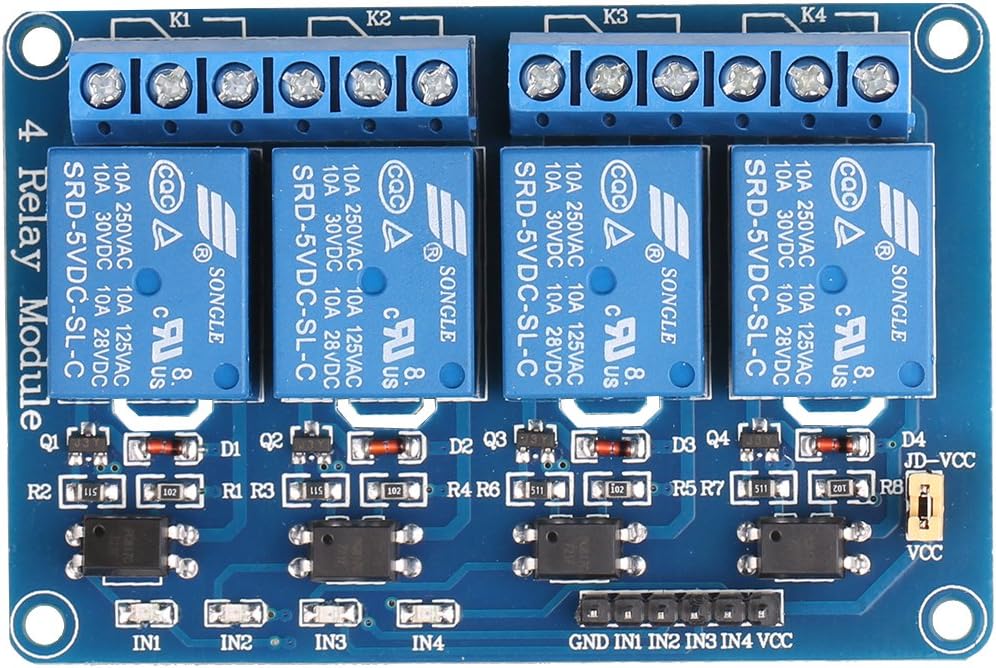
This 4-Channel 5V Relay Module by JBtek offers robust, high-current switching capabilities (AC250V 10A, DC30V 10A) with seamless compatibility across Arduino, Raspberry Pi, and other MCUs. Featuring LED status indicators and a plug-and-play design, it empowers professionals and makers to control multiple high-power devices effortlessly, making it an essential tool for smart home automation and industrial control projects.
| ASIN | B00KTEN3TM |
| Best Sellers Rank | #15,748 in Computers ( See Top 100 in Computers ) #199 in Single-Board Computers |
| Item model number | 4450182 |
| Manufacturer | JBtek |
| Product Dimensions | 6.5 x 5 x 2.01 cm; 9.07 g |
C**N
Funciona perfecto
M**T
Excellent board for Raspberry Pi. Assuming you have a solid power supply, you can run this board off the +5v provided on the pin header (Pin #2). The relay board is fully buffered, meaning that the relay coils are not directly driven from the GPIO pins which protects the Pi and means that this board is plug and play. If you're going to be doing a lot of work with the RasPi, I highly recommend a USB voltmeter/ammeter combo so you can monitor your power usage. At full load, you want to ensure that your voltage on your USB port is as close to 5.0VDC as possible, anything less than 4.65VDC will cause problems with the Pi and stability. Your amperage should never exceed the USB power supply's capability. I use a 2A (2000mA) power supply and with full load (all relays on), the board + Raspberry Pi B+ only gets to .56A (560mA) so I'm well with spec. With all relays off, I pull about .24A (240mA) HOW TO HOOK IT UP: The board has a six pin header labeled GND, IN1, IN2, IN3, IN4, VCC and a two pin jumpered header labelled VCC/JD-VCC. Leave the jumper installed. For GND, you can connect to any of the GND pins on the Pi's header (Pins 6,9,14,20,25,30,34,39). For VCC, connect to pin 2 (+5V). Connect each of the IN pins to a GPIO pin (I used GPIO 8,9,10,11 which are pins 24,19,21,23 respectively). HOW TO CONTROL IT: Use Python (should be available in your RasPi distro) along with the RPI.GPIO library. You'll need to run your scripts with sudo as manipulating the GPIO pins requires root access. You can set the GPIO pin using GPIO.output(PIN, True) to turn off the relay, and GPIO.output(PIN, False) to turn it on. My only nitpick is that the logic is backwards. Driving a GPIO pin high (TRUE), should turn on the relay while driving the GPIO pin low (FALSE) should turn it off, but it's easily fixed in software. Pros: Plug and play, just works. Will be getting more of these. You don't have to worry about building interface circuits, transistors, load calculations down to the mA or anything overly complicated. Basic research into the GPIO library for Python, a couple of GPIO pinouts for the RasPi and I was up and running within minutes. Cons: Logic is backwards, you have to send a GPIO pin LOW to turn on the relay but this is a very minor thing and can be easily fixed in software. Verdict: If you are looking to be able to control equipment using a Raspberry Pi, this is the board to use.
C**V
With low side input voltage the board is great for 3.3 and 5V micro controllers or single board computers (e.g. Raspberry Pi). The board has been in service for a year without any problems (switching 2 to 8amps)
C**E
la tarjeta no trae nada de información, aunque puede ser intuitiva la manera de conectar, siempre es útil que se proporciona
C**H
Great little relay module. Wired it right up and it worked on the first firing. This is the first time I've ever used a multi-channel relay board with an Arduino. The build seemed to comparable to brand-name Arduino card. It's mechanical so there's a click -- you can hear it in the video. All pins were well marked, each channel has its own SMD to let you know when it's active. Terminals screwed down tight. Nothing about it was an issue. I saw some complaints before I ordered it so I was a little nervous but most of them regarded the lack of documentation. It does require a certain knowledge base. There's an Instructable: [...] I'm probably going to order a few more just to have on hand.
Trustpilot
1 month ago
4 days ago