Buy anything from 5,000+ international stores. One checkout price. No surprise fees. Join 2M+ shoppers on Desertcart.
Desertcart purchases this item on your behalf and handles shipping, customs, and support to Vanuatu.
⌨️ Stay connected, stay productive — the keyboard your desk deserves.
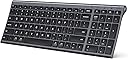
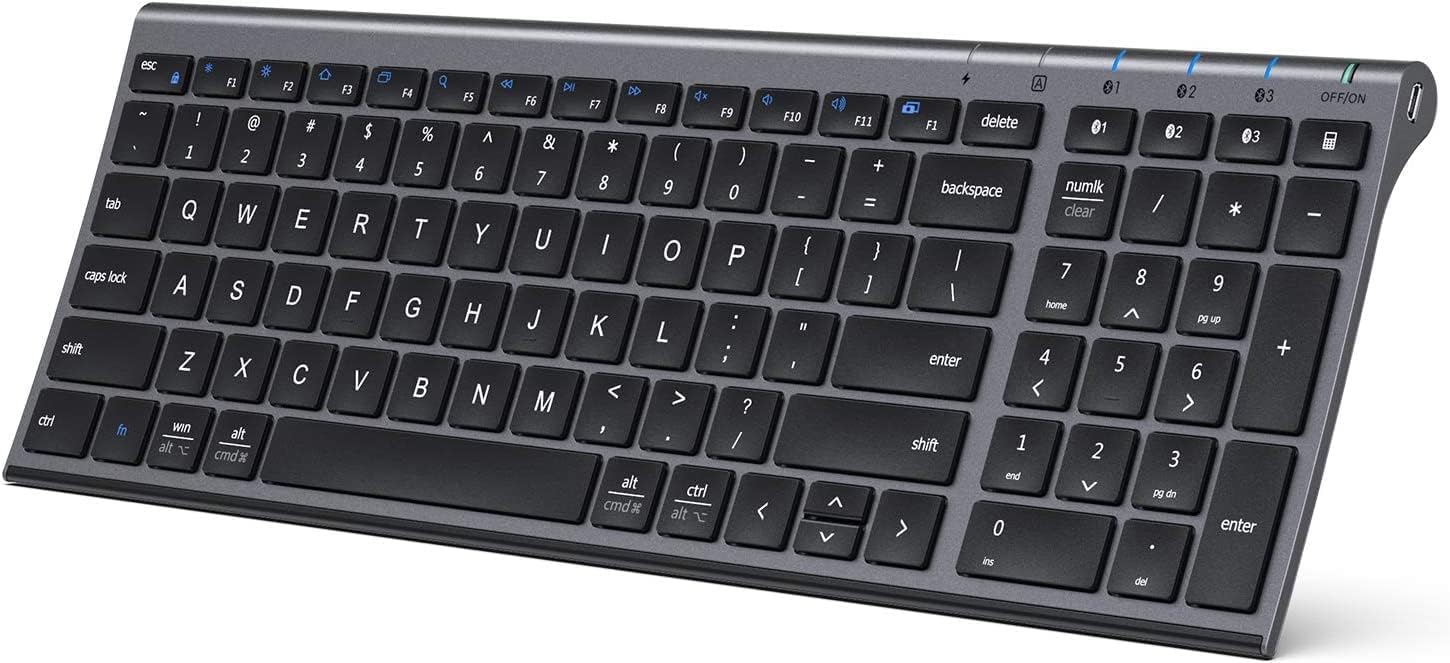
The iClever BK10 is an ultra-slim, rechargeable Bluetooth keyboard featuring quiet scissor-switch keys, a robust 90-day battery life via USB-C charging, and the ability to seamlessly switch between three paired devices. Crafted from premium stainless steel and ABS with an ergonomic design, it offers spill resistance and cross-platform compatibility across iOS, Android, Windows, and Mac, making it the perfect accessory for professionals seeking a stylish, durable, and versatile typing experience.


| ASIN | B08LD5LV22 |
| Additional Features | Quiet scissor-switch keys for low-noise, effortless typing; USB-C rechargeable battery supporting up to 90 days of use; three-device Bluetooth switching; cross-system compatibility for Windows, macOS, iPadOS, Android |
| Antenna Location | Home office typing, multi-device workflows, laptop and tablet setups, study and writing, everyday productivity |
| Best Sellers Rank | #39 in Computer Keyboards |
| Brand | iClever |
| Built-In Media | USB Cable |
| Button Quantity | 61 |
| Color | gray black |
| Compatible Devices | Windows laptops and desktops, MacBook and iMac, iPad and iPhone, Android tablets and phones, Chromebooks with Bluetooth Compatible Devices Windows laptops and desktops, MacBook and iMac, iPad and iPhone, Android tablets and phones, Chromebooks with Bluetooth See more |
| Connectivity Technology | Bluetooth (Bluetooth only) |
| Customer Reviews | 4.2 out of 5 stars 14,873 Reviews |
| Enclosure Material | Acrylonitrile Butadiene Styrene, Aluminum |
| Generation | 1st Generation |
| Hand Orientation | Ambidextrous |
| Item Dimensions L x W x H | 14.41"L x 4.92"W x 0.66"H |
| Item Weight | 320 Grams |
| Keyboard Description | Slim, compact Bluetooth keyboard with chic lavender top and soft white keys, quiet low-profile scissor-switch keys (<50 dB), 3-device pairing with quick-switch buttons, and 99-key US QWERTY layout — perfect for stylish home offices and aesthetic desk setups Keyboard Description Slim, compact Bluetooth keyboard with chic lavender top and soft white keys, quiet low-profile scissor-switch keys (<50 dB), 3-device pairing with quick-switch buttons, and 99-key US QWERTY layout — perfect for stylish home offices and aesthetic desk setups See more |
| Keyboard Layout | QWERTY |
| Manufacturer | iClever |
| Model Number | BK10 |
| Number of Batteries Required | 1 |
| Number of Keys | 3 |
| Number of Sections | 5 |
| Power Source | Battery Powered |
| Recommended Uses For Product | Home office typing, multi-device workflows, laptop and tablet setups, study and writing, everyday productivity Recommended Uses For Product Home office typing, multi-device workflows, laptop and tablet setups, study and writing, everyday productivity See more |
| Series Number | 10 |
| Special Feature | Quiet scissor-switch keys for low-noise, effortless typing; USB-C rechargeable battery supporting up to 90 days of use; three-device Bluetooth switching; cross-system compatibility for Windows, macOS, iPadOS, Android Special Feature Quiet scissor-switch keys for low-noise, effortless typing; USB-C rechargeable battery supporting up to 90 days of use; three-device Bluetooth switching; cross-system compatibility for Windows, macOS, iPadOS, Android See more |
| Style Name | Contemporary |
| Switch Type | scissor-switch |
| Theme | Bluetooth keyboard |
| Unit Count | 1 Count |
| Warranty Description | 12-Months Warranty |
J**N
Best portable keyboard for the price!
AWESOME product! Works perfectly, is very responsive, and the battery life is incredible. I've had this keyboard for almost 2.5 years and have never had issues with it. Once every few MONTHS I plug it in to charge before I leave my office at night, and then I'm good to go for another few months (and yes, I'm using this all the time .. all day, everyday, as my primary keyboard). Love the soft-touch, quiet "scissor" keys instead of the clack-clack-clacking of a traditional keyboard. Excellent product - - I highly recommend for it's functionality, durability, ease of use and how portable it is.
A**L
Budget Pricing With Apple Build Quality
The iClever keyboard looks and feels premium, but more importantly, it functions incredibly well. Recently, while working on a branding design for a client, I was given a late 2018 27” iMac as a gift. It didn’t come with accessories, and syncing my Magic Keyboard between both iMacs wasn’t working well at all. The Apple Magic Keyboard looks nice, but functionally, it isn’t an amazing experience given the price. The iClever Keyboard compares much more favorably to the original battery powered Apple Bluetooth Keyboard which uses traditional batteries, and tends to disconnect itself frequently. The iClever Keyboard not only stays connected to Bluetooth on startup, it can also pair to 3 different Bluetooth sources, then easily switch between the 3 of them. Not only that, it also has a built in battery, which came fully charged, and ran for a total of 9 hours without depleting the battery drastically. It also looks amazing, matching both the iMac, the original battery powered Bluetooth Apple Keyboard, and the Magic Keyboard. Where it also excels is the build quality. It feels sturdy, and it has more of a rubber, non sliding surface than the considerably higher price Magic Keyboard. The front rubber pads prevent my desk from getting scratched, unlike the Magic Keyboard, where the back has nice rubber padding, but the front lip essentially touches my desk, resulting in light scratches on my desk over time. The price is amazing, and the thing that impressed me the most was that none of the quality elements were expected. My initial expectation was tbat it would be a nice looking Apple style keyboard, for a very good price. The only thing I’m not really happy with is the slightly rough texture on the keys, where the Magic Keyboard, as well as the older battery powered Apple Bluetooth Keyboard, both have a much smoother key surface. In my case, that’s not something to dock points for because that’s subjective. With Graphic Design work, outside of frequently used hot keys, the keyboard isn’t really used very often. If someone uses a keyboard more often, I can see how the slightly rough textured keys may be initially offputting. With that being said, the iClever Keyboard is easy to pair. You simply hold down the 1 key with the Bluetooth symbol on it for 5 seconds. It will begin flashing, which allows you to pair it to your Mac or PC. Once you pair it, there’s a menu that opens up on the Mac asking you to hit the key to the right of the shift key on the left, and to the key to the left of the shift key on the right. You’ll then see 3 options, choosing the USA option essentially mimics the traditional Mac keyboard setup. On the keys you’ll clearly see the Windows equavanlant on the top, and the Apple one on the bottom. For example, the “Win” key has the Apple “Alt” key symbol underneath it so that it’s not confusing for Mac or PC users. The only exception to this is the Function key, which doesn’t have the Mac equivalent ‘Opt’ for the Option key underneath the ‘FN’ abbreviation. I’ve found myself pairing the keyboard to both of my iMacs, and just using it instead of the Magic Keyboard, or even the older Apple Bluetooth model at times. The iClever Keyboard is easily a 5 Star product all around. For the price, I didn’t think such a high level of quality would not only be achieved, but vastly exceeded, when all of its additional quality of life features are taken into account. I’m very OCD about presentation, aliviating clutter, and build quality, so that’s not common for me to say about most products. I build PCs as well, and the iClever Keyboard was great as a Windows Keyboard, though in that regard, I generally use the backlit Logitech K830 trackpad Keyboard instead. It’s nice to have the iClever Keyboard as an easy to pair option for when the Logitech is charging though.
R**E
Great Product
High quality, durable, and easy to set up! The design is comfortable and sleek, and you can tell it's high quality upon opening the box. It fits into my computer backpack, and the keys are very responsive. I have had 0 problems and no lagging!
J**A
Solid Bluetooth Keyboard with Handy Features — A Few Small Drawbacks
I’ve been using this iClever Bluetooth keyboard daily for over a year, and overall it’s been a great upgrade. The design is sleek, the keys are quiet, and I love that it includes a numeric pad — something many wireless keyboards leave out. Pros: • ✅ Multi-device support: Can store up to 3 Bluetooth connections (though only one active at a time). • ✅ Quiet, responsive keys: Comfortable for typing without distracting noise. • ✅ Includes key cover: Silicone protector keeps dust and crumbs out (though mine didn’t survive toddler hands!). • ✅ Good battery life: Lasts 2–4 weeks depending on usage, and charges quickly overnight. • ✅ Stylish design: Silver frame with white keys looks clean and modern. Cons: • ❌ No battery indicator: You don’t get a warning before it dies. • ❌ Can’t use while charging: Requires planning to recharge overnight. • ❌ Connectivity quirks: If kids bang on it or settings reset, you may need to forget and reconnect. • ❌ Cover durability: The included silicone protector tears easily if handled roughly. Overall: This is a reliable Bluetooth keyboard with quiet keys, long battery life, and a handy number pad. It’s not perfect — the lack of a low-battery warning and inability to use while charging are noticeable — but it’s still a solid option for everyday use across multiple devices.
M**T
Too bad, too many issues with bluetooth. Stay away and save yourself headaches!
Most everything about this keyboard is positive. The design, weight, overall feel is great, lots of great features including the ability to pair 3 different devices. My issue, and it is a big one for me, is the inability for the keyboard to keep a connection. It drops connection frequently, like it goes into sleep mode. I have to pound some keys or turn it off and back on again to 'wake' it up. So a little trouble shooting has heightened the disappointment. The little user manual states to keep the KB no more than 8" form the device! What? If my computer is sitting on the bottom shelf of my desk its 14", and it wont work? I move the KB closer to the computer, laying it about 10" and it connected, then dropped within seconds. Moved again, no sitting on the floor with it on my lap, 6" away and it remained connected. Yeah, this is not going to work. The manual also states to keep it 8" away form anything that may cause interference, speakers, cell phones routers, computer power supplies...wait what? In what world does any of this make sense? Again, not going to work for me. One more note in the manual, avoid metal surfaces...my desk is not metal, but I would think many have metal desks, chairs or shelves etc near the KB. Really sad about this, I think these limitations make this KB seriously deficient for every day use. No way could I recommend this to anyone, and I will put my request for return in now. BTW, yes I have several other BT devices that do not have any of these limitations, including my other KB I was trying to replace with this one. 12/29/25 Update. I give up. ZERO support, no help what so ever. I've done everything I could find regarding updating drivers, relocating the KB, reconfiguring the Bluetooth to not sleep etc. Nothing to date works. So I am typing this with my old KB, the Logitech K380...works flawlessly. I just wanted to get a full sized KB with a 10 key. The iC;ever is absolute garbage Chinese company who clearly does not support their sales.
A**R
Price, Form, Function, All the characteristics I wanted/needed - 5-stars all day
1st a little background. I’ve been working in technology since 2001 using a keyboard as a primary interface/tool the entire time daily both in professional and personal life. In that time I’ve used countless keyboards both employer and self-purchased. I’m constantly on the lookout for the next ‘perfect’ fit. And have found some good ones over the years. Since 2013 I’ve been working remotely from home exclusively, and partially for the 2yrs years leading up to that, and therefor using solely devises I supply to myself. In recent years taking on a more leadership position I find myself on many lives calls, additionally, doing some live 3-day training in which my studio-quality microphone that is live most of the time during these sessions. Thus, I’ve found myself leaning more towards the chicklet style keyboards, similar to what you might expect on a laptop just more full-sized. I like them for a few reasons. 1st, they tend to be a bit quieter, and 2nd the low key travel I think feels faster to me, plus less finger movement/travel. So I love that about this keyboard very much. I’m a software architect and do a lot of typing both in coding, general web, and lots of email/messaging, and I simply feel it is more efficient. So this keyboard checks that box for me. The full size while also being compact is another important factor for me. Things like the full-size 10-key number bad but also normal-sized keys such as space, shift, enter, and most importantly the backspace so my fingers can find it’s typical memory muscle locations… and this keyboard checks that box as well. To save layout space they intelligently put the arrow keys under the right shift key instead of between the enter and number pad as most full-size boards do. In the end, this eliminated the typical ‘white-space’ you would find in that area, but also makes it less of a travel to get over to the number pad itself, two things I think are brilliant, and only took me a short time to re-learn the location of the arrow keys by muscle memory. Some keys are smaller than normal but are the ones that are logical to do this to create the space needed, such as the ESC key and the F-keys. With the current virus situation happening, I find myself needed to work in a new more isolated location then my typical at-home location. But I wanted to leave my at-home setup as is, in essence, I needed to create a secondary remote location. In my, in-home setup, I have a typical tower but have 4 24-inch screens that I’ve grown very fond of and used to. I initially tried this new location with just a laptop screen, which works but only for extremely isolated days or for a very short period to continue to be as effective and efficient. My laptop has 1 USB 3.0 Port but does have a USB-C port, and is Bluetooth compatible. Unfortunately, it is very portable with a detachable keyboard and just a 10-inch screen so not great for long periods. So initially I added my 10-inch tablet and leveraged my phone a lot more than normal for things like messaging, which is a galaxy Note 10. Latter using a USB-C docking station sort of set up I added a 27-inch curved screen, and a 23 inch mounted vertically (sizes important for references of the size of the board in the provided picture. Which also gave me a few more USB ports. At this point, the biggest pain point was to use touch on the phone and tablet. Additionally, My USB ports used up for my wireless mouse receiver (also connects to 2 Bluetooth devices), my headset, and my phone, to use Samsung Dex when I can get by with that. So I began my search for a keyboard that would connect to 3 different devices with the tap of a button to switch and over Bluetooth exclusively, while also taking up as little of my limited new space as possible. And that by far is the best feature of this board. I can now use it to interact with all three (laptop, tablet, and phone) quickly with a simple tap of a dedicated key ‘and light’ for each of the devices, and its small footprint is not overpowering my workspace. It’s small size and weight will be perfect in the event I need to be more portable with it in the future. The slight rise in angle seems to be perfect for me as well. I paired them so they match the order of my devices in the setup as you see in the picture under the monitors. It is important to know that sometimes Bluetooth switching does take a second for the device to respond/recognize the input device, but that is not an issue with the keyboard, that has more to do with Bluetooth or the device you are connecting to as I experience the same thing with other similar products made by completely different manufactures at a much higher price. So everything this does, plus the characteristics I mentioned above such as overall and key sizes seemed to be the perfect fit and I took the chance on it, realizing that I could easily return it if needed, but this thing is staying in my arsenal for sure. In fact, in some ways, I wish I had discovered this before purchasing my last board which is my current at-home setup because it cost 5-times what this did and offers the same functionality. I waited to use this thing for 2-3 weeks before writing this review, and as an all-day user, I figured that would be a good amount of time for a fair initial assessment. One of the things that have stood out is battery life. After the initial charge to full I have not plugged this thing in yet and it is still going strong. A handy light on the board tells you when it is fully charged and if the battery is running low ‘a light I have not seen yet’. And when it comes time I’ll simply unplug one of the USB ports I’m not currently using, or don’t need overnight, or even a wall charger if needed real-time, and then it will be good to go for another I don’t know how many WEEKS again. It does have a sleep feature, which after going ideal for a bit you need to ‘wake’ it up, which is great for saving battery life, especially if you forget to slide the perfectly placed top-mounted on/off button to the off position. I’ve gotten in the habit of hitting the space key, or Bluetooth device button I intend to be using to wake it up if it’s been a bit since I touched it and it works perfectly this way. Longevity will be something that only time can tell, which at this point I would not be too upset about, for example, the key labels are stickers, and will likely start to fade out after some time which is no different than 90% of my boards I own that are not etched. But even if this board lasts me for a year, I could get five of them for the price I paid for my last board and get 5yrs out of them with less functionality which I do not expect to get from most boards. So all-in-all considering the combined aspects of price, form, function, and all the characteristics I wanted, I love this board which is why it is getting my 5-star review. I would re-purchase, and likely will again, in a second. I could point out more, and I could compare this to other boards, but nothing else I’ve used combines all these things in one package, and especially not at this price point, so keeping that in mind I suggest giving this one a shot because if you are reading this it’s because you are intentionally not looking at other boards and I can’t imagine any other board offering all this at this price point.
G**!
Too clever !!!-Now ?Very Clever!!
Well written posting got me to buy this keyboard, and its good but --- Bluetooth connecting on my Apple did not go smooth ,,had to reconnect ,coax several times to "connect!". Well,,it turns out every time I shut the computer off,,, we have to redo the blue tooth connecting ,,,every time! Its not ergonomic, plain old flat keyboard but --nicely spaced, Sleep mode ,,,,this is why i had to send back,,,when it goes to sleep,,it sleeps!! Waking this keyboard up -- works,, but often its going to have to be restarted and blue tooth connecting 1/2 the time is a problem!! Caps lock --often does not work ,,often at a critical moment in short ,,fairly good keyboard,, but Caps lock problems and sleepy time zzzz's,,,blue tooth needs a dentist ,, rewaking were tooo much ,,,sent back!! ADDENDUM!! ICLEVER - SENT ME ANOTHER MODEL ITS NEW,,,-- IC BK-10 ULTRA SLIM WIRELESS KEYBOARD.. I am typing this review on it right now !! Hot Damn !!!! This one is GOOD!!! FIRST ORDER OF FRUSTRATION WAS NO CAPS LOCK,,,,,THIS one HAS A CAPS lock!!! BIG BLUE LIGHT COMES ON WHERE IT CAN EASILY BE SEEN! YAHOO! SUPER !! ALSO---comes with a COVER OF SILICONE !! We can now drink morning coffee,,,eat ,,,crumbs,coffee, do not get in the keys !! i just switched out keyboards.....this one is low ,,nicer to type on.. that quick!! The numbers are to the right,,,for accounting work,,, nice!Keys are slightly spaced different but you can see i am a senior 81 year old work of --fumbling around ,,not that quick to adapt,,,well,, get one of these GIZMO'S as you can see I am typing fairly quick-... so spacing is good ,,accurate. Has an fn key for Apple systems !! We have several keyboards models this is a quick to adapt winner ,..hold on --stopping -- Back---we also have a Lenovo -Windows..10 this line got typed now on this Lenovo... lets try how quick--- Takes about one minute to transfer between IOS then Windows and back ,each time we have quick keyboard connectors.. bought off Amazon,, look up--- Powered USB HUB Connectors 7 ports w/off -on buttons we can use up to 7 devices off one rear port of computer ports !! Fantastic , and quick connections !! That aside,, top of key board has --escape at top left numbers F1 to F12 & a delete .We can do - a 3 button -control,,Alt,Delete !!!! Finally a key board that allows this in todays market !! Finally !! I just hit the down button bottom --middle right of keyboard, with left and right and up keys. You can scroll when pages are stuck.More is yada yada yada is going to bore everyone,, Get this rascal its cheap,,, very well made ,, mmm in Germany ,,,no wonder its good!! Thanks ICLEVER ,, YOUR SLIM WIRELESS IS RIGHT ON!! NO !! I DO NOT TAKE MONEY FOR--ANY REVIEW,, I MAKE $$$ PLENTY ON MY OWN !! PLAIN OLD FASHIONED TRUTH ,, THANK YOU FOR READING !!
B**E
Generally Good, if Quirky
Update: The company was very kind and reached out to me to send me a replacement since the one I had was having some issues. The replacement arrived promptly and for free. Unfortunately, the new one does have the same problems as the old one, but nonetheless I appreciate the company trying to help. Not a bad keyboard at all-- I do use it frequently, and it's slim, so it travels well. It connects pretty quickly and reliably and I rarely have to charge it. I love the keypad on the side too. But it is a little quirky and the quirks range from weird to annoying. When clicking into something I'm typing, sometimes it will jump the cursor up several lines to the middle of a random word. Frequently if I type something into one word box and move to another one, the last word I wrote will appear automatically as the first word in the new box. For example, it tried to start this review with the word 'quirky' because it was the last word I used in the title box. Finally, it will sometimes start duplicating a word as I'm trying to erase it, and for every letter I erase, it copies the whole word in again. This is pretty rare, however. So overall, for me, the reliability, slimness, and low need to charge outweigh the cons.
Trustpilot
3 weeks ago
3 weeks ago