Buy anything from 5,000+ international stores. One checkout price. No surprise fees. Join 2M+ shoppers on Desertcart.
Desertcart purchases this item on your behalf and handles shipping, customs, and support to Vanuatu.
๐ Elevate Your Perspective โ Fly Smarter, Capture Brilliance!
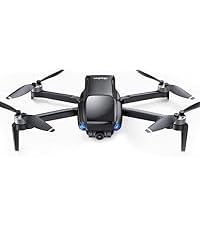
The Ruko F11 Pro Drone combines professional-grade 4K UHD video capture with an impressive 60 minutes of total flight time via dual 2500mAh batteries. Its advanced GPS system extends control range up to 4000 feet, ensuring stable, precise flights and safe automatic returns. Designed for beginners and enthusiasts alike, it features easy-to-use flight modes and durable construction, making it the ultimate drone for capturing stunning aerial footage and mastering the skies.


| ASIN | B07VCD1SRL |
| Age Range Description | Adult |
| Are batteries included? | Yes |
| Battery Capacity | 2500 Milliamp Hours |
| Battery Cell Composition | Lithium Polymer |
| Best Sellers Rank | #130,527 in Toys ( See Top 100 in Toys ) #293 in Remote- & App-Controlled Drones |
| Brand Name | Ruko |
| Color | Black |
| Connectivity Technology | Wi-Fi |
| Control Type | Remote Control |
| Customer Reviews | 4.4 4.4 out of 5 stars (7,422) |
| Effective Still Resolution | 8.3 |
| Includes Rechargeable Battery | Yes |
| Includes Remote? | Yes |
| Item Weight | 18.34 Ounces |
| Manufacturer | Ruko |
| Material | Aluminum |
| Maximum Range | 500 Meters |
| Media Type | SD |
| Model Name | F11 Pro |
| Model Number | F11 Pro |
| Optical Sensor Technology | CCD or CMOS |
| Part Number | Ru44771 |
| Remote Control Technology | Wi-Fi |
| Skill Level | All |
| Special Features | Integrated GPS |
| Supported Image Format | JPEG |
| Unit Count | 2 Count |
| Video Capture Format | MP4 |
| Video Capture Resolution | 4K |
| Video Output Resolution | 4K |
| Wireless Communication Technology | Wi-Fi |
C**R
After receiving the Ruko F11 pro it took a little bit to get everything to work properly. You canโt be inside and get a gps signal so make sure you are in an open area before you try. After I got everything ready it was up very easily. Stable flight, power at the ready and easily controllable. The camera is clear but have yet to use it at a distance. Will add that later. Build quality is great. Drone is a little heavy and larger than I expected but that makes it more stable in the air. Will add video when I get into some larger areas but for the price the Ruko F11 Pro is a great intro drone and would recommend it.
U**C
This is my first drone and jumped in head first. Long story short as I can...pairing with the GPS can be DIFFICULT, but once learned, it's easy. You NEED to register it with the FAA and take a FREE safety test online. Using google search type registering your drone with the FAA and the rest is not that hard to follow. You do need to pay a $5 fee for three years registration. You also MUST dl the air aware app along with the Ruko Pro app. Reason for the air aware app, is that when you are ready to fly your drone, opening the app, will lyk if the area that you're in has been cleared by the FAA in REAL time. I also recommend that you order FREE stickers (no cc or ANY info like that) to put your registration number on your drone (through pilotinstitute), which is REQUIRED by the FAA. I am waiting for mine and used a label maker in the meantime to get this accomplished. After all of this, pairing and setup was the next step. Turn the drone on, then the controller. move the L stick up and then then down and 2 tones, along with a white light on your controller, will lyk it's paired. Immed AFTER this step, is where I got confused and it took me a while to figure this out. You then need to pick up the drone and rotate it litterally in a circle 2 times horizontally (till the back lights become solid, then place it down), then pick it back up again, with the camera facing the ground (vertically) and again rotate it 2x in a cirlce until the front lights turn solid, then place it back on a flat surface again. At that point, you MUST connect it through your phones wifi. Go to your phones wifi list, find ruko in there and connect it. Once you do that, open the app. It will NOT finish the GPS pairing UNTIL you open the app and click on controls towards the upper right corner of the app. You will then see the view from the drone camera itself and you then know that you're gtg!! After that, move BOTH thumb sticks at the SAME time towards one another (the left goes bottom R, 5 o'clock position and the R stick goes bottom L 7 o'clock position) which starts up the props and your FINALLY ready for flight. My personal opinion for the drone itself is FANTASTIC!! First time flyer I thought I could easily use it in my SMALL back yard in my residential neighborhood. Big miscaluation on my part. Learn from my error and go to a empty parking lot or field UNTIL you get the hang of it. I CRASHED my drone 3 times in a matter of 15 min and almost hit numerous trees and power lines!! I thought for sure that my drone was toast!! Especially AFTER I HIT my own lamp post in my back yard. While there are a few nicks and dings (not too bad), to my surprise, it STARTED RIGHT BACK UP EVERY TIME AND CONTINUES TO WORK PERFECTLY!!! I was SHOCKED to say the least!! What a STURDY/WELL MADE piece of equiptment!!! My complimence to Ruko for making such a well built drone with SOLID electronics and pieces. After realising that I should not press my luck any further, I headed out to a baseball field and learned how to operate it properly. It took about and hour or so, but I got so competent with it, that I can NOW fly it in my small back yard with ZERO issues. I even know how to take pics and adjust the camera in flight. It has an auto follow feaure and auto land, which is why going through the difficultuy to pair it with the GPS is SSSOOO important. I crashed in my yard those times because I got frustrated, not being able to figure out the GPS pairing and flew it at that time, bypassibg this important step. Other than that, the camera is excellent, the drone itself is obv solid, and it's feaures are plentiful. This also includes being remote ID compliant with the FAA, by having a built in transmitter that constantly broadcasts your drones ID, speed, heading and so on. It comes wtih TWO batteries that provide 30 mins flight time each and are recharged via USB-C and the remote controller is charged the same way. My advice, is to buy the extra landing gear with the extra caps in the package and buy extra props as well. I also recommend buying an extra RC controller that you can find on Ebay (new) for half the cost, especially since it is sold out from Ruko. I am so impressed by this drone, I am going to buy the same exact one to have as a backup. It's nice to see a company (esp from China) put out a solid product of this QUALITY. Worth EVERY penny!!
J**Y
Old Review The camera is fixed, making it difficult to control the flight. When the homing button is pressed, it always misses the mark or landing area. It ends up landing in an area with rough surfaces or tall grasses. Update (August 11, 2024). I encountered some issues with the first drone I tried. The camera was fixed, which made it challenging to control the flight. Whenever I pressed the homing button, the drone consistently missed the mark or landing area, ending up on rough surfaces or tall grass. However, after trying another drone of the same model, I found that the camera was fully functional. It could easily move, pointing both forward and downward from the remote. I was impressed to see that the drone now has the capability to land within 2 feet from where it takes off. I must commend the company for its exceptional customer service and managerial support. I am now 100% satisfied with my experience and would highly recommend purchasing this drone from this company.
F**T
Wow this drone is capable ...30 kmh wind and its stable.In Canada needs to be registered 5$ and you require a liscence 10$ ...all done online. Flying is easy ...pictures an video are great ...using 128 gb tf card Having random disconnect with controller but support is great and a replacement transmitter is on the way.
D**Q
I bought this Drone to do some overhead video and pictures. I had a few issues at the beginning, but after watching the videos and with some practice, I was able to fly this Drone. I have some shots of my grandson on his motorbike, my granddaughter on her horse, and pictures of our daughters house out west. I had a few issues in the beginning, but the customer service I received from RukoToys was fantastic. They helped through the problems and I feel confident that in the future I will be able to use this Drone as well as I expected it to be in the beginning. Do your homework, watch the videos and practice, practice, practice makes it a perfect drone to own. Thanks Don
Trustpilot
1 month ago
1 month ago