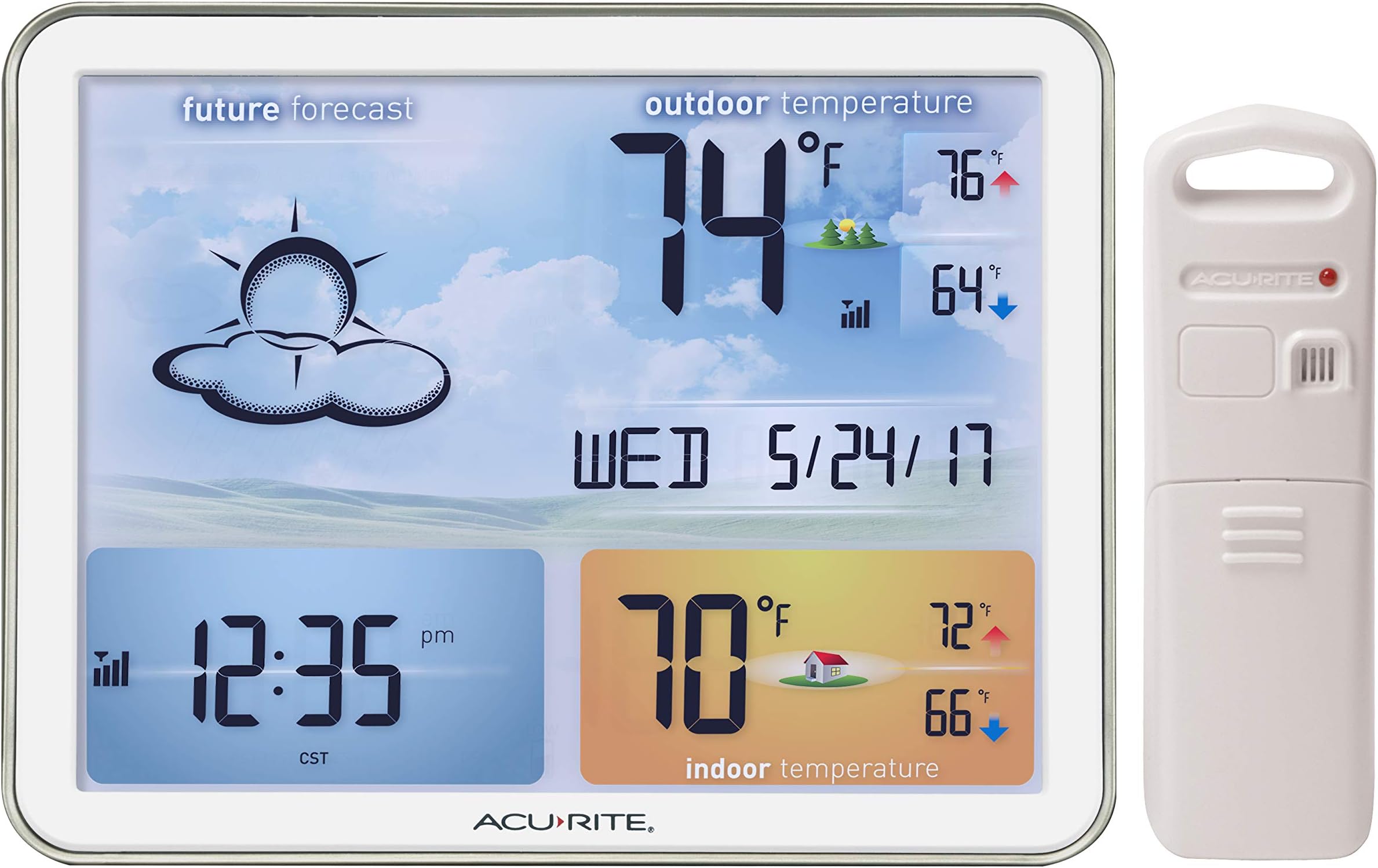
PREFATORY NOTE: I recently noticed some (evidently well-meaning) customers provided their own (evidently casual) VIDEOS and/or PHOTOS that, alas, make this weather station's backlit display appear excessively DARK. I don't know if said customers were simply hastily filming and/or if they hadn't set the weather station display's brightness level (via its own pertinent buttons) to its normal "100%" level. Anyway, prospective purchasers should frankly consider the (evidently Acurite-provided) much brighter photos near the top of Amazon's main product page (together with the evidently Acurite-provided INTRODUCTORY video) to be at least considerably more indicative of the altogether satisfying brightness level that I myself (admittedly no shutterbug) readily achieved with my own installed specimen of this product. * * * I recently bought this colorfully alluring AcuRite 02081M weather station, after having chosen it with some trepidation, considering that some customer reviews had cited not only the limitations of its display when viewed from certain angles and distances but also the general unsuitability of the display for WALL mounting. [More on those matters below, in this review’s final, “Bottom Line” section.] As I began installing the main unit on the rough side of my house's fully underground basement (in the "home gym" at the west end of the house), I inserted three AA alkaline batteries (for “backup” purposes) and then connected the AC power cord, whereupon the main unit received (seemingly instantly and effortlessly) the compatible, correct broadcast signal from my long ago installed AcuRite remote in the garage on the (fairly distant) east-end wall of the house. Moreover, it likewise automatically proceeded to successfully receive the “atomic clock” time-and-calendar signal information (broadcast from Fort Collins, Colorado). [Afterwards, I pressed-and-held the rear “SET” button (to enter manual-setup mode) and merely changed the “time zone” setting to MY location. (Doing so immediately corrected the displayed hourly time to conform to MY time zone.)] Of course, DST (daylight-saving time) biannual resetting (of the hourly time) will henceforth be handled automatically by this main unit, not me. Sweet! [Of course, you always have the option of switching “DST” off (via manual “SETUP” mode).] This main unit's built-in (indoor) thermometer is indeed accurate (matches the temperature readings of several of my highest quality "benchmark" thermometers that I'd temporarily placed adjacently). After several hours, the display's weather-forecast icon is already starting to (more or less) match the analogous icons of several of my other AcuRite weather stations installed throughout the house; so, its built-in barometer does appear normally responsive. [However, the displayed weather forecast likely won’t settle down and become fully decently accurate till somewhat after the completion of the initial “14-day Learning Mode” phase.] Interestingly, although I'd read certain other customers' claims that their specimens came with AC power adapter cords that were approximately FOUR or FIVE feet long, the one that came with MINE is approximately SIX feet long (thank goodness). Also, certain customers' claims regarding the backlight conveyed the notion that it's impossible to simply switch it completely off. But I soon found that this is absolutely untrue. For, after a brief bit of experimentation with not only the “UP” button’s but also the “DOWN” button's respective “brightness-level-toggling” sequences, I discovered it’s possible to use the “UP” button as a “BACKLIGHT ON” switch, and use the “DOWN” button as a “BACKLIGHT OFF” switch. [Just initially set this up by repeatedly pressing-and-releasing the “UP” button till the backlight shines at its normal “100%” level, and then repeatedly pressing-and-releasing the “DOWN” button till the backlight shuts COMPLETELY OFF. Thereafter (henceforth), you’ll always be able to just tap the “UP” button once to switch on the backlight, and likewise just tap the “DOWN” button once to switch off the backlight.] [NOTE: Curiously, the ability to switch the backlight COMPLETELY OFF isn’t even mentioned in AcuRite’s “Instruction Manual” for this model.] Moreover, having set up the backlighting mode (via exactly the steps explained in my prior paragraph), during the ensuing days and nights I noticed that AcuRite’s “AUTO DIM mode” (likewise available on various other of their weather station models) was similarly in effect with THIS model, as follows. During “daytime” hours, the backlight shines at its normal “100%” level; but during “nighttime” hours, the backlight shines at its lowest, “15%” level. [NOTE: Curiously, “AUTO DIM mode” isn’t even mentioned in AcuRite’s “Instruction Manual” for this model.] In my opinion (ranting frankly as an AVID hobbyist/collector of such "basic" weather station products, including MANY other models by not only Acurite but also by La Crosse Technology and Baldr), Acurite's obviously INEXCUSABLE lack of ANY included instructional information regarding not only the unavoidably confusing/frustrating “AUTO DIM mode” feature but also the unavoidably confusing/frustrating "backlight ON/OFF" feature of THIS model evinces a pathetic attitude of casual [corporate?] indifference that should have gotten the responsible employee(s) terminated. [Incidentally, I feel much the same way about the frustrating ABSENCE of not only the "day-of-the-week display" feature but also the "atomic clock" feature on MOST of Acurite's OTHER models of basic weather stations (but, thank goodness, the model discussed in THIS review shines as a noteworthy, happy EXCEPTION in both of THOSE particular respects)!] BOTTOM LINE: FIRST, know that IF you install this weather station’s display even slightly HIGHER than eye level, you will absolutely NOT be able to satisfactorily (if at all) discern the display’s information. Therefore, place the display either AT eye level or LOWER than eye level. SECONDLY – and equally importantly – know that you absolutely won't be able to FULLY sharply discern the display information IF the DISTANCE between you and the display is MORE than about 4 [or, better still, 3] feet. Consequently, you will surely NOT be fully pleased with this particular model unless you're able to view it from not only precisely the right ANGLE but also precisely the right DISTANCE. Regarding WALL INSTALLATION of the display: All of the control buttons – including the “UP” and “DOWN” ones, which are used to control the backlight – are on the BACK of the display. Therefore, I absolutely DON'T deem this model ideally suited for WALL mounting, especially considering its essentially “required” AC-power adapter’s cord would be dangling conspicuously from the display’s lower-right corner. [NOTE: Despite the buttons being on the unit's rear, it's very easy to operate them while facing the front of my below-eye-level, shelf-top-mounted unit. With my right-hand thumb tip placed lightly in front of the bezel, I simply move my right-hand index fingertip onto the easily felt "UP" button and/or the "DOWN" button, etc.] Thus I would argue that (for the vast majority of users) this model 02081M [unlike AcuRite’s related model 75077A3M, which is a strictly battery-powered, “no-backlight” version whose particular MONOCHROME display does, however, require BRIGHT ambient lighting (e.g., from a very nearby lamp)] is best used ONLY when installed upon a sufficiently low DESKTOP, SHELF, COUNTERTOP or TABLE, with its rear STAND pulled outward fully (or perhaps “not quite 100%” fully, such that you could adjust its viewing angle – albeit only very slightly – to somewhat tweak the display’s viewability from your vantage point). Therefore, IF – and I do mean "if" – you can luckily find or fashion an IDEAL installation location whose height AND distance are BOTH within this display's fairly limited range of “vertical vantage point viewability" for your purposes, you'll PROBABLY end up being altogether pleased with AcuRite’s model 02081M. [I say "probably" because, unsurprisingly, you'll also need to factor AMBIENT LIGHTING into the placement equation; for example, I myself wouldn't want to install this display in an unusually bright (e.g., sunny) area.] In fact, I'm now delighted that I bought this model 02081M. Although I did initially need a little time to figure out and fashion precisely the correct installation location for its display to look ideal, I now deem that colorful display’s tastefully subdued art beautiful, and all of its dark alphanumeric characters and weather-forecast icons actually look quite distinctly sharp.