Buy anything from 5,000+ international stores. One checkout price. No surprise fees. Join 2M+ shoppers on Desertcart.
Desertcart purchases this item on your behalf and handles shipping, customs, and support to Vanuatu.
๐ Elevate your workspace with the ultimate curved collaboration powerhouse!
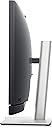
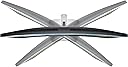
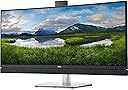
The Dell C3422WE is a 34.1-inch curved WQHD (3440x1440) monitor designed for professionals who demand immersive visuals and seamless collaboration. Featuring a 21:9 aspect ratio, 178ยฐ wide viewing angles, and 300 nits brightness, it enhances productivity and entertainment. Its built-in 5MP pop-up IR camera, dual speakers, noise-cancelling mic, and Windows Hello facial recognition enable secure, high-quality video conferencing. USB-C connectivity delivers up to 90W power, data, and video through a single cable, reducing clutter. Additional features include Auto KVM for multi-PC control, RJ45 Ethernet, and VESA mount compatibility, making it a versatile centerpiece for modern hybrid workspaces.

| ASIN | B08ZJP88D2 |
| Additional Features | 3H Surface Hardness, Anti Glare Screen, Cable Lock Slot, Flicker-Free, LED Indicator, Low Blue Light, Picture by Picture, Picture in Picture, Removable Stand, Security Lock |
| Aspect Ratio | 21:9 |
| Best Sellers Rank | #171,234 in Electronics ( See Top 100 in Electronics ) #3,566 in Computer Monitors |
| Brand | Dell |
| Brightness | 300 cd/mยฒ |
| Built-In Media | LCD Monitor |
| Camera Description | The product features an integrated pop-up IR camera. |
| Color | Platinum Silver |
| Color Gamut | 99 |
| Connectivity Technology | DisplayPort, Ethernet, HDMI, USB |
| Contrast Ratio | 1,000:1 |
| Customer Reviews | 3.8 3.8 out of 5 stars (69) |
| Display Resolution Maximum | 3440 x 1440 Pixels |
| Display Technology | LCD |
| Display Type | LCD |
| Hardware Connectivity | DisplayPort, HDMI, USB, USB Type C |
| Has Color Screen | Yes |
| Is Electric | Yes |
| Item Dimensions D x W x H | 9.1"D x 18"W x 32.1"H |
| Item Type Name | LCD Monitor |
| Item Weight | 25 Pounds |
| Manufacturer | Dell Technologies |
| Model Name | 34 Curved Video Conferencing Monitor,C3422WE |
| Model Number | C3422WE |
| Mounting Type | Wall Mount |
| Native Resolution | 3440x1440 |
| Number of Component Outputs | 2 |
| Pixel Pitch | 9.2 |
| Power Consumption | 5 Watts |
| Refresh Rate | 60 Hz |
| Resolution | QHD Wide 1440p |
| Response Time | 5 Milliseconds |
| Screen Finish | Curved Screen |
| Screen Size | 34.1 Inches |
| Shape | Rectangular |
| Specific Uses For Product | Gaming |
| Total Number of HDMI Ports | 1 |
| Total Usb Ports | 2 |
| UPC | 884116383536 |
| Unit Count | 1.0 Count |
| Viewing Angle | 178 Degrees |
| Warranty Description | 2 year manufacturer |
| Warranty Type | Standard Manufacturer's Warranty |
K**B
Works Great
We use Teams for work and this is easy to use. Camera works well with no issues, and I donโt need to plug in any additional cameras, speakers or microphones. Chargers laptop through the USB-C as well which came with the package. Makes working easy and the desk clear of chords.
J**.
Out of warranty before I even bought it.
Monitor literally blew up. Was using it and then poof all dead. Check power and different outlets and outlets were good. Looked up serial number on Dell website and came to find out that the warranty expired 2 months before I purchased the monitor. How is this allowed. Sell please contact me.
J**C
Llegรณ perfectamente
A**H
My office uses so got 1 for home
My office uses so got 1 for home. excellent monitor.
D**R
Awesome monitor but disappointed with mic/speaker
I was working from home, had two monitors, a laptop, a docking station and a jabra speaker phone. Since I do a lot of video conferencing I thought this would be the perfect solution to get rid of all the extra wires and devices. THE GOOD: Monitor quality is superb. Very bright, very crisp. Just a nice sharp picture. The size is awesome for having multiple windows open. The camera quality is nice and sharp, very happy with it. The build quality of the monitor is nice and sturdy as well. THE BAD: As soon as I started using it I had people saying they had trouble hearing me, as if I was either muffled or too quiet. I changed all sorts of microphone settings and increased the volume...nothing fixed it. Then the speaker that is built into also is rather quiet. If I'm on a call and the diswasher or dryer or even just a fan is going, I can start to have trouble hearing people. Again, I went out to the website and searched and tried all sorts of fixes and yes both the volume on the monitor and the computer were turned all the way up. Tried playing around with the noise suppression settings too. Just not much volume out of this. So overall I'm fairly happy. As a monitor, it is really nice and the camera built in is nice. But one of the key selling features of this monitor is the conferencing portion and I feel like where audio is concerned, they dropped the ball. After playing around and struggling for almost a month, I hooked my Jabra Speak 510 back up and use that for all my conferencing audio. Probably would have been better off to just get a cheaper monitor of the same size and picture quality if I had known audio would be this bad.
B**H
I want to love this Monitor so much, but I cant.
Built in speakers integrated with Teams, built in Webcam and built in microphone. Spent a lot of money to enjoy these luxuries. I now have a $50 soundbar behind the monitor for audio, because the built in speaker has an alarming loud tone when used over a few hours. I just ordered a PC Microphone because the mic would stop working in mid sentance. Webcam part has worked for the most part. But seriously, the things that make this stand out break in under a year. Oof.
M**.
No daisy chain. Not really a USB-C hub
I wanted a monitor that did everything reasonably well without a lot of fuss and with easy connectivity. If this was my only monitor it would be fine. However, I have a second DP monitor. Since (to my surprise) there is no DP port out on this brand new monitor (!?!) and since this monitor only gives full sound/camera/mic functionality if connected by USB-C ... there is no way to use this monitor as my hub without abandoning my DP monitor. I had to keep my old hub and all of the extra cables connections I had hoped to eliminate in order to use my second monitor. I agree with the comment on the camera... not a huge deal for me but for the price point these are two significant misses in my book.
E**C
Poor USB Port Access
Using for general purpose monitor not gaming. Old smaller monitor had convenient USB slots to connect thumb drives. The USB's for thumb drives are on the back on this one and VERY hard to access. Longer thumb drives will not work since the clear space below the USB port is obscured by the slope of the case below the port.
J**M
vraiment satisfaite du produit
Trustpilot
2 weeks ago
2 weeks ago